UPDATE 5/15/17
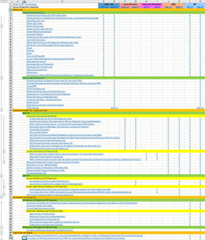
Just posted an update to the spreadsheet, “DRAFT v.09” which includes the newly released Office 365 Threat Intelligence & Office 365 Advanced Data Governance.
—————
UPDATE 2/23/17
Okay, this post documenting Secure Productive Enterprise is fairly out of date yet it gets a lot of hits. The reason this is concerning is that SPE has E3/E5 changed quite a bit since I first wrote this 7 months ago: Numerous features & services have been added since I wrote this.
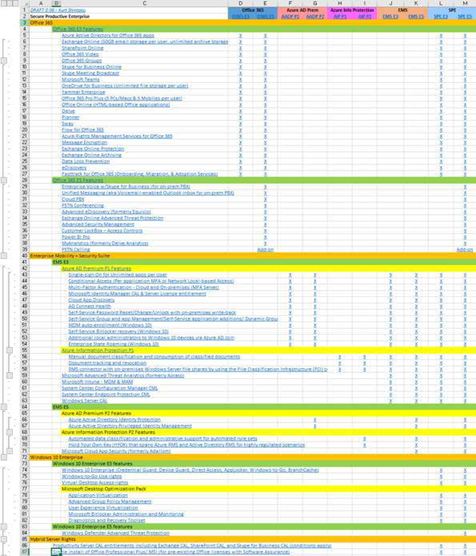
To help my customers understand just what is included in the SPE E3/E5 suite(s), I’ve created a living spreadsheet that I occasionally use with my customers with collapsible rows for each suite component. Hopefully it’ll be useful for you too:
(WARNING: It’s called "living" because I change this spreadsheet monthly and I may not have the most recent stuff posted here – so be forewarned. At the time of this edit, I’m making DRAFT .08 available for download here.)
—————
ORIGINAL POST 7/23/16
Two new licensing SKUs will be offered in August 2016 called the Secure Productive Enterprise (SPE) that replaces the Enterprise Cloud Suite SKU (with the same technologies or more included depending on which SKU is chosen) with one very important additional right:
CLOUD & ON-PREMISES RIGHTS
Users licensed for Secure Productive Enterprise are licensed for the following workloads in BOTH the cloud as well as on-premises. Entitlements to use on-premises servers are granted as well as online services*:
- On-premises productivity server entitlements including Exchange, SharePoint, and Skype for Business for any user licensed with Secure Productive Enterprise
- One on-premises install of Office Professional Plus per user
WHAT’S IN THE “SECURE PRODUCTIVE ENTERPRISE” SUITE LICENSE?
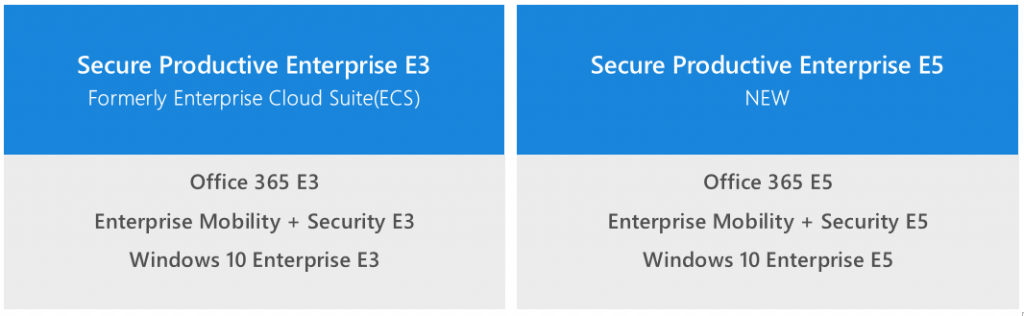
Secure Productive Enterprise is a suite replacing ECS that comes in two configurations – E3 & E5:
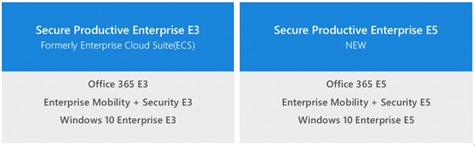
Breaking down the Office 365, Enterprise Mobility + Security, and Windows 10 Enterprise technologies in each SKU:
- Secure Productive Enterprise E3
- Office 365 E3
- Exchange Online
- SharePoint Online
- Skype for Business Online
- OneDrive for Business (Unlimited Storage)
- Yammer Enterprise
- Office 365 Pro Plus + Office Online
- Enterprise Mobility + Security Suite E3 (Same as the previous Enterprise Mobility Suite)
- Windows 10 Enterprise E3 (Available Aug 1st)
- Windows Enterprise w/ SA per-user
Secure Productive Enterprise E5 is the “premium” SKU and adds the following additional capabilities/licenses, indicated by a RED (E5):
- Secure Productive Enterprise E5
- Office 365 E5
- Exchange Online
- SharePoint Online
- Skype for Business Online
- Enterprise Voice w/Skype for Business (for On-prem PBX) (E5)
- Cloud PBX (E5)
- PSTN Conferencing (E5)
- OneDrive for Business (Unlimited Storage)
- Yammer Enterprise
- Office 365 Pro Plus + Office Online
- Advanced Services
- Enterprise Mobility + Security Suite E5
- Azure AD Premium P2
- Azure Information Protection P2
- Microsoft Advanced Threat Analytics (formerly Aorato)
- Microsoft Intune
- Microsoft Cloud App Security (formerly Adallom)
- Windows 10 Enterprise E5 (Avail Aug 1st)
Notes:
- Windows Defender Advanced Threat Protection will be available as an add on to Windows Enterprise SA customers.
https://microsoft.sharepoint.com/sites/infopedia/pages/layouts/kcdoc.aspx?k=G02KC-1-6602
- Enterprise Mobility + Security Suite announcement is public:
https://blogs.technet.microsoft.com/enterprisemobility/2016/07/07/introducing-enterprise-mobility-security/
- Microsoft Intune “Mobile App Management” is the pillar they reference & emphasize for these SKUs.
https://blogs.technet.microsoft.com/enterprisemobility/2015/11/17/enhancing-managed-mobile-productivity/
- Microsoft Advanced Threat Analytics does not change between E3/E5 however is classified in the same security pillar as Cloud App Security
http://www.microsoft.com/ata
* On-premises entitlements subject to program availability and licensing terms. Details to be provided in advance of launch.
Comments Off on INFO: What is the “Secure Productive Enterprise (E3 & E5)” suite
Posted in Uncategorized
 Just announced, the HoloLens Commercial Suite includes the Development Edition, enterprise features for added security and device management, and a warranty. Transform your business with Microsoft HoloLens.




 kurtsh


You must be logged in to post a comment.