image

Outlook wants to make it easy to focus on what matters most to you. Toward this goal, we’ve recently made big improvements to help you stay on top of your travel reservations and package deliveries by showing summary cards in your inbox and automatically adding events to your calendar.

Today, we are introducing Outlook Interesting calendar—special calendar additions that help you track your favorite events. You will be able to add the 2016 Summer Games in Rio—as well as other popular sports—to your calendar.

Read more on Office Blogs.

clip_image001Many enterprise customers have been asking us for the ability to:

  • Require MFA for specific Office 365 workloads
  • Restrict access so users can only access Office 365 or other cloud apps from within their corporate network.

So I’m happy to announce that these Conditional Access policies are now Generally Available to customers.

You can read about it on the EMS blog: https://aka.ms/ucnhae

This is one of the highest value and most differentiated capabilities of Azure AD Premium & because of the closely integrated architecture of Azure Active Directory and Office 365, we can uniquely offer the ability to create different conditional access policies for each backend Office workload load and pilot/rollout those policies separately.

To be clear:  The only way to get this capability for Office 365 is through Azure Active Directory Premium.

More details are available here:

Posted by: kurtsh | July 24, 2016

TRAINING: Skype Operations Framework (SOF)

imageSkype Operations Framework is a comprehensive guide and toolset for implementing and managing a reliable, cost-effective communications service based on Skype for Business. It covers the entire customer lifecycle, including planning, deployment, adoption, and operations. It is a multi-faceted approach to the successful deployment of Skype for Business, incorporating key elements that have customer success firmly at the center.

TRAININGS FROM JULY 18-AUG 9
Trainings start at 8am PST and will last one hour each. All trainings will be recorded and recordings will be shared on Skype Academy.  Trainings include:

  • SOF Overview
  • Cloud PBX & PSTN Conferencing Get Deployed
  • Envisioning: Overview and Ojective Key Results
  • Envisioning: Discovery
  • Envisioning: Business Use Cases
  • Envisioning: High Level Architecture Workshop
  • Skype for Business Adoption Methodology and Success Framework
  • Network Readiness
  • Delivering Network Readiness
  • Cloud PBX, Technical Planning Architecture Session
  • Deployment Guidance
  • Polycom Phone Provisioning with Skype for Business Online
  • Configuring Call Quality Dashboard
  • Testing
  • Scripted user enablement
  • Service health and service usage
  • Managing Call Quality

For a full list of trainings & dates

If your Surface is running really hot, there may be an application or system process that is running at high CPU. Some processes like Windows Update, Office sync, anti-virus scanning, and Edge may run high CPU at times. Over time these processes should subside.

HIGH CPU FROM “SYSTEM AND COMPRESSED MEMORY”
However, I’ve been told that there is also a Windows 10 bug where the "system and compressed memory" task runs at high CPU and causes the system to heat up.

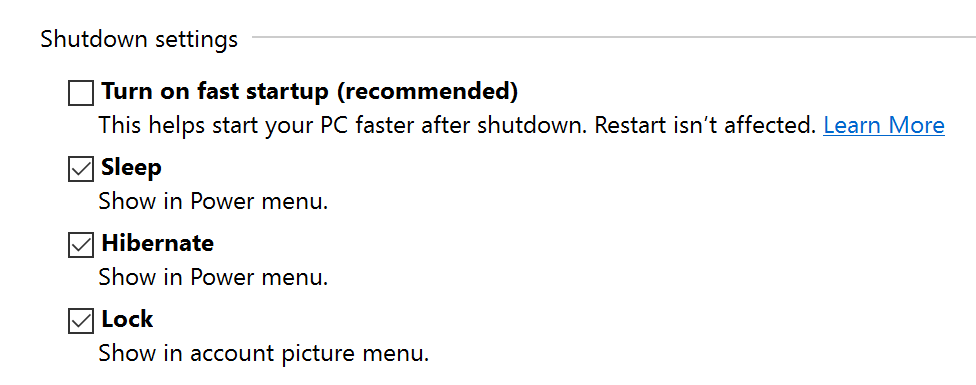
imageThe current workaround is to Disable "Fast Startup" in Control Panel:

  1. Right click the battery icon in SysTray, Choose "Power Options"
  2. In the left pane, Click “Choose what the power buttons do”
  3. Click “Change settings that are currently unavailable”
  4. Scroll to the bottom of the window & uncheck “Turn on Fast Start”
  5. Reboot

image

UPDATE 5/15/17
Just posted an update to the spreadsheet, “DRAFT v.09” which includes the newly released Office 365 Threat Intelligence & Office 365 Advanced Data Governance.

—————
UPDATE 2/23/17

Okay, this post documenting Secure Productive Enterprise is fairly out of date yet it gets a lot of hits.  The reason this is concerning is that SPE has E3/E5 changed quite a bit since I first wrote this 7 months ago: Numerous features & services have been added since I wrote this.

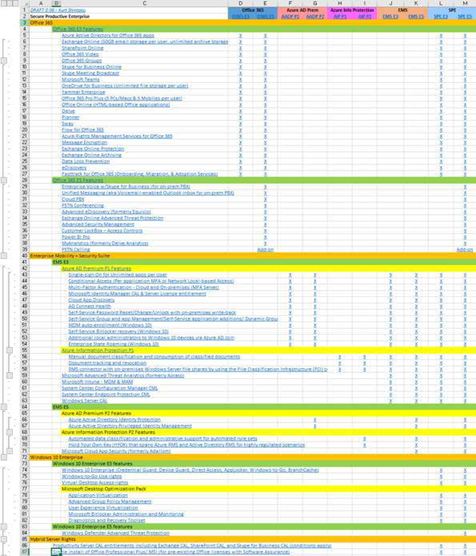
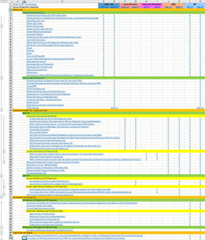
To help my customers understand just what is included in the SPE E3/E5 suite(s), I’ve created a living spreadsheet that I occasionally use with my customers with collapsible rows for each suite component.  Hopefully it’ll be useful for you too:
(WARNING: It’s called "living" because I change this spreadsheet monthly and I may not have the most recent stuff posted here – so be forewarned. At the time of this edit, I’m making DRAFT .08 available for download here.)

—————
ORIGINAL POST 7/23/16

Two new licensing SKUs will be offered in August 2016 called the Secure Productive Enterprise (SPE) that replaces the Enterprise Cloud Suite SKU (with the same technologies or more included depending on which SKU is chosen) with one very important additional right:

CLOUD & ON-PREMISES RIGHTS
Users licensed for Secure Productive Enterprise are licensed for the following workloads in BOTH the cloud as well as on-premises.  Entitlements to use on-premises servers are granted as well as online services*:

  • On-premises productivity server entitlements including Exchange, SharePoint, and Skype for Business for any user licensed with Secure Productive Enterprise
  • One on-premises install of Office Professional Plus per user

WHAT’S IN THE “SECURE PRODUCTIVE ENTERPRISE” SUITE LICENSE?

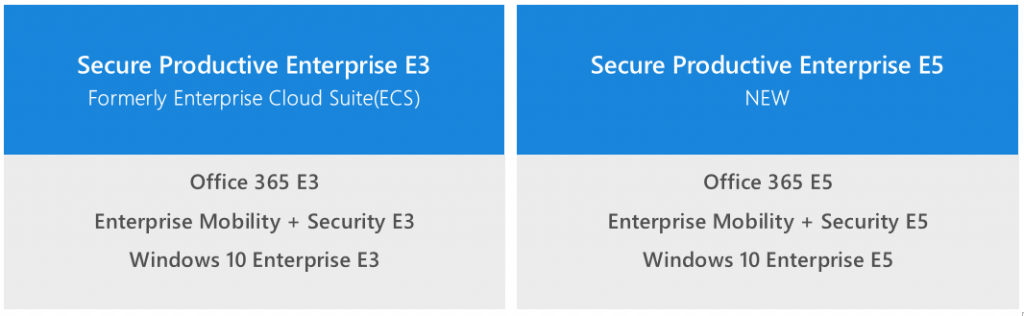
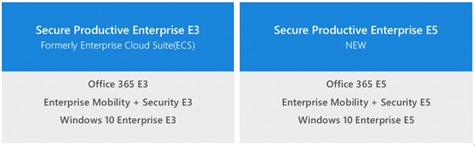
Secure Productive Enterprise is a suite replacing ECS that comes in two configurations – E3 & E5:
image

Breaking down the Office 365, Enterprise Mobility + Security, and Windows 10 Enterprise technologies in each SKU:

  • Secure Productive Enterprise E3
          • Office 365 E3
                • Exchange Online
                • SharePoint Online
                • Skype for Business Online
                • OneDrive for Business (Unlimited Storage)
                • Yammer Enterprise
                • Office 365 Pro Plus + Office Online
          • Enterprise Mobility + Security Suite E3 (Same as the previous Enterprise Mobility Suite)
          • Windows 10 Enterprise E3 (Available Aug 1st)
                    • Windows Enterprise w/ SA per-user

Secure Productive Enterprise E5 is the “premium” SKU and adds the following additional capabilities/licenses, indicated by a RED (E5):

Notes:

  1. Windows Defender Advanced Threat Protection will be available as an add on to Windows Enterprise SA customers.
    https://microsoft.sharepoint.com/sites/infopedia/pages/layouts/kcdoc.aspx?k=G02KC-1-6602
  2. Enterprise Mobility + Security Suite announcement is public:
    https://blogs.technet.microsoft.com/enterprisemobility/2016/07/07/introducing-enterprise-mobility-security/
  3. Microsoft Intune “Mobile App Management” is the pillar they reference & emphasize for these SKUs.
    https://blogs.technet.microsoft.com/enterprisemobility/2015/11/17/enhancing-managed-mobile-productivity/
  4. Microsoft Advanced Threat Analytics does not change between E3/E5 however is classified in the same security pillar as Cloud App Security
    http://www.microsoft.com/ata

* On-premises entitlements subject to program availability and licensing terms. Details to be provided in advance of launch.

image

Technical diagrams for SharePoint 2013
These diagrams provide visual representations of recommended solutions for SharePoint 2013 in the form of models, which are poster-size documents. These resources are available in Visio (.vsd) format (Visio 2010 and Visio 2013) and PDF format.(Last Modified: 2016-05-27)

Technical diagrams for SharePoint 2016 & Online
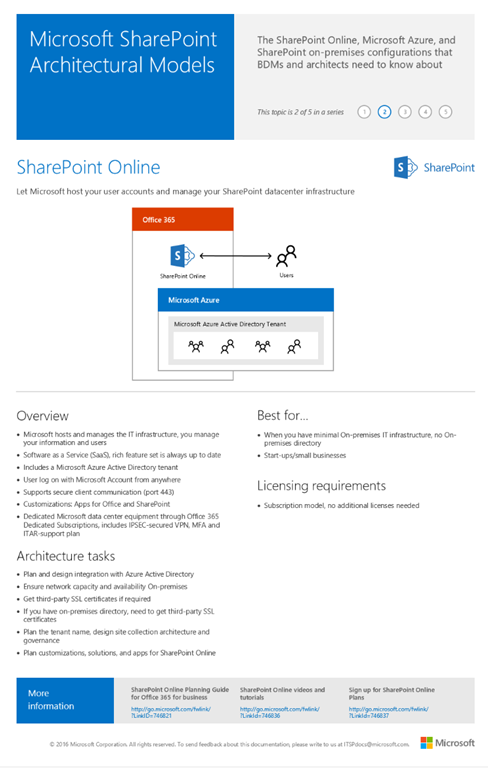
These diagrams provide visual representations of recommended solutions for SharePoint 2016 in the form of models, which are poster-size documents. These resources are available in Visio (.vsd) format (Visio 2010 or Visio 2016) or PDF format, and on Docs.com. This poster describes the imageSharePoint Online, Microsoft Azure, and SharePoint on-premises configurations that business decision makers and solutions architects need to know about.
(Last Modified: 2016-05-20)

(Note: This is part of a set of resources we publish for SharePoint Server 2016 located here: https://technet.microsoft.com/en-us/library/cc303422(v=office.16).aspx)

Posted by: kurtsh | July 22, 2016

BETA: Windows 10 Upgrade Analytics

image

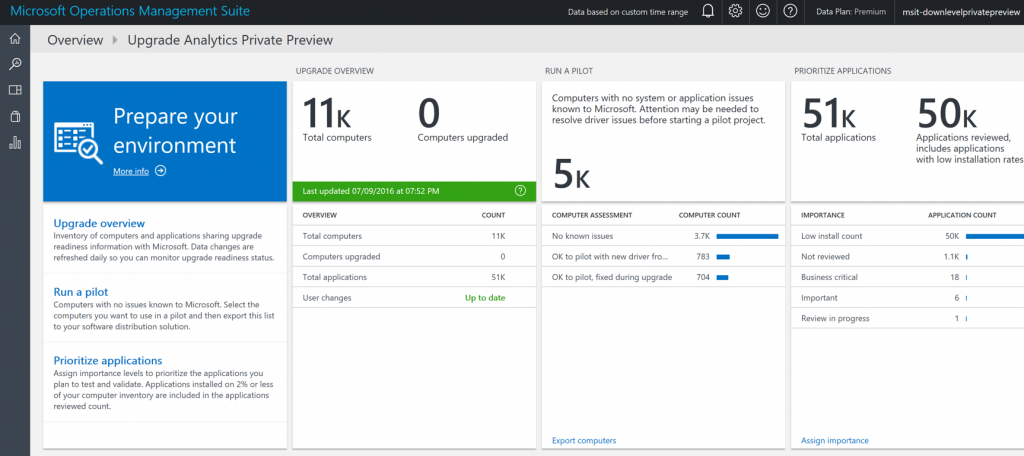
As announced on the new UAblog, Upgrade Analytics is a new service from Microsoft which leverages telemetry in order to provide customers with insights which allow them to quickly evaluate application and driver readiness and mitigate potential problems.

Upgrade Analytics helps you accelerate your move to Windows 10 by providing

  • Up-to date application and driver inventory, including usage data
  • Information about known application and driver issues as well as guidance on how to mitigate them
  • A way to track whether an application or driver is ready Windows 10 in your organization
  • Per-Computer readiness information which you use to target computers for Windows 10 deployments

You can see from the released photo that we leverage Operations Management Suite for reporting & administration of the solution, and endpoint telemetry from Windows 7 or 8.1 is transmitted to the cloud for aggregation & analysis.  A KB package & regkey settings are required on each client to enable telemetry transmission, as per the Upgrade Analytics Deployment Script that’s been published as a download. (See below)

FREE – NO COST
There are no Azure/OMS costs to you for implementing Upgrade Analytics, nor are there any licensing costs for the UA software.

  • New OMS customers can use a completely free OMS tier
  • Existing OMS customers will see no additional charges from the UA data collection & analysis from Upgrade analytics

ENROLLMENT IN THE PREVIEW
Upgrade Analytics Public Preview is available now. Instructions on setting it up are here:
https://blogs.technet.microsoft.com/upgradeanalytics/2016/07/22/upgrade-analytics-public-preview-is-now-available/

DOCUMENTATION
Documentation is available here:
https://technet.microsoft.com/itpro/windows/deploy/upgrade-analytics-get-started

For more information, visit the Upgrade Analytics Blog:

imageIf you plan on deploying Windows 10 Anniversary Update, you’re going to need this update to System Center Configuration Manager.

SCCM Update 1606 delivers new features and enhancements in:

  • Security and data protection
  • Application management
  • Content distribution
  • Deployment and provisioning
  • End user experience
  • Hybrid mode with Microsoft Intune

Read about it at the announcement here:

FORCING THE UPDATE
To force the update on your SCCM central administration site, instead of waiting for the update to get pulled down through “Updates & Servicing”, run the following PowerShell script:

More documentation, support, feedback and forums for the 1606 Update are listed in the public announcement.

imageMicrosoft announced both their quarterly earnings for Q4FY16 & their annual earnings for 2016 yesterday. 

It was a particularly well-received announcement as earnings per share came in at 69 cents relative to analyst’s expectation of 58 cents. 

More importantly, in arguably Microsoft’s most important businesses, Azure revenue grew by 102% (up 108% in constant currency) while Azure compute usage more than doubled from the same period last year.

Here’s some of the market reactions:

Here’s some of the artifacts from the announcement yesterday, including the recording & the PowerPoint presented:

wp_ss_20160719_0001

Subscribing to a podcast feed shouldn’t be a problem using the Podcast app on Windows Phone 8.1 or Windows 10 Mobile.  Generally, all you have to do is search for the podcast name in the Podcast app search bar and – BAM – the podcast shows up for you in the results to click & subscribe to.

But what the podcast doesn’t show up? 
This can happen if the podcast hasn’t been indexed by the search engine yet.  If this is the case, the search field won’t find it and you won’t see it in the results.  And if the podcast is new, it can take up to a week or more to show.

(Note: To speed things up, you can submit the site for indexing by going to http://www.bing.com/toolbox/submit-site-url.)

Can’t you just type in the RSS feed address if you know it? 
Unfortunately (and annoyingly) the answer is no, not from the search bar.  See, the search Podcast app search bar is actually “Bing” and when you search for a podcast through it, the podcast app is very strict about the results that it returns.  Typing in the .RSS URL like http://feed.podcastname.com/rss isn’t accepted.

WORKAROUND: USING THE PODCAST: PREFIX FROM INTERNET EXPLORER OR EDGE
But as a workaround, you can go to Internet Explorer or Edge in Windows 10 Mobile & type:

  • podcast://[podcastURLgoeshere]

For example:

  • podcast://cheeky.tech/feed

Doing this will send the feed URL to the Podcast app which will enable you to subscribe to the podcast without searching for it.

« Newer Posts - Older Posts »

Categories