imageTo enable customers to more easily adopt OneDrive for Business, we’ve launched "Make the Switch" for OneDrive for Business, a combination of OneDrive for Business Quick Start guides and “Make the Switch Guides” to help empower the end user while they switch from Box or Google Drive.

View the documentation here:

image

The above snapshot summarizes what “Azure AD: Tenant Restrictions” does:  It prevents external parties from using your corporate network to access their own Office 365 services (like Exchange Online’s URL outlook.office.com, which is used by everyone) to potentially leak data.

More specifically, tenant restrictions gives customers enhanced control over access to SaaS cloud applications. Admins can now restrict employees using their corporate network to only being able to use Azure AD identities in tenants they have approved.

Taken from the Enterprise Mobility and Security Blog:

Companies that want to move their employees to SaaS apps like Office 365 are sometimes worried about opening their networks to information leaks. If users can access Office 365 with their corporate identity, they can also access these same services with other identities.

Before cloud services, network admins could simply block access to unwanted apps or websites by blocking their URL or IP address. This is no longer an option with SaaS apps, where a single endpoint (like outlook.office.com) is used by all consumers of the SaaS app.

Our solution for this common IT challenge is Tenant Restrictions. This new feature enables organizations to control access based on the Azure AD tenant the applications use for single sign-on. For example, you can use Tenant Restrictions to allow access to your organization’s Office 365 applications, while preventing access to other organizations’ instances of these same applications. 

Visit the Enterprise Mobility & Security blog for more details:

Flow now makes it easier for power users to create Flows that can be used and maintained by others within their organization, amplifying the impact of their automation efforts.

Taken from the announcement post:

Today we are announcing the preview of Team flows. Team flows make it possible for multiple people to own and manage a flow together, and, if someone leaves an organization, the flows they created can continue to run. This is a much-awaited feature that is one of the most voted-on ideas on our ideas forum.

Users can now collectively author and maintain a flow. The following features are supported today for all owners of Team flows:

  • Read, update or delete flow
  • View history and debug flow
  • Add or remove other owners
  • Add or remove connections that the flow has access to

Team flows will show up under the new “Team flows” tab in the Flow portal:

For more on how to manage your own Team Flows now, read the announcement post here:

imageThe Visual Studio 2017 Launch Event is tomorrow!

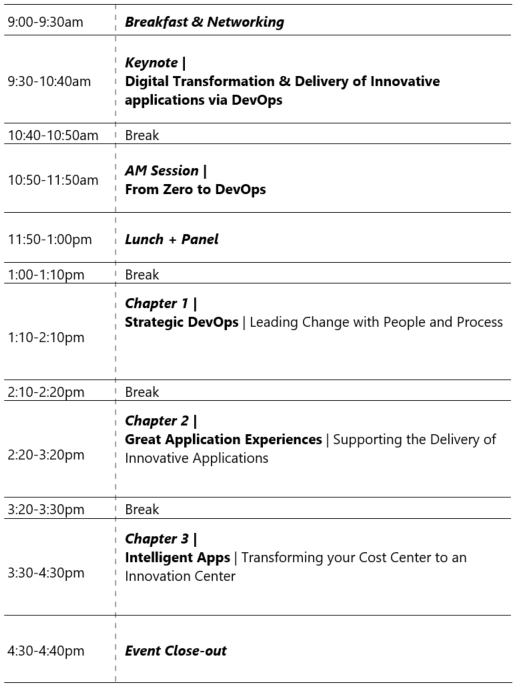
We’re excited to announce that Visual Studio 2017 will be available for download on Tuesday, March 7, 2017! Join us online for a two-day virtual event celebrating 20 years of Visual Studio and our latest release.

  • On March 7, watch our live stream with Julia Larson, Brian Harry, Miguel de Icaza, and Scott Hanselman as they share the newest innovations in Visual Studio, .NET, Xamarin, Azure, and more. After the keynote, Microsoft engineers will lead interactive technical demo sessions to help you get the most out of Visual Studio 2017 and the rest of our tools and platform.
  • On March 8, we’ll help you get productive even faster by hosting a full day of live interactive trainings. Make sure to Save the Date for both days and sign up for the March 8 training now.

Check out the agenda & choose the training that best fits your needs:

To register, visit:

image

Microsoft Coprorate VP, Jeff Teper and Senior Product Manager, Bill Baer, are coming to Los Angeles to keynote “SharePoint Saturday”, a SharePoint centric event produced by the SharePoint community.

Check out the sessions being delivered at the event:
http://www.spsevents.org/city/LosAngeles/LosAngeles2017/sessions

Taken from web site:

SharePoint administrators, end users, architects, developers, and other professionals that work with Microsoft SharePoint Technologies will meet for the SharePoint Saturday Los Angeles event on April 8th, 2017 at the Westside Conference Center Pepperdine University located at 6100 Center Drive , Los Angeles CA.

DATE:
April 8, 2017

LOCATION:
Westside Conference Center Pepperdine University, 6100 Center Drive , Los Angeles CA 90045

REGISTRATION:
http://www.spsevents.org/city/losangeles/losangeles2017

Posted by: kurtsh | March 1, 2017

NEWS: Google & Mozilla like Windows Defender

Apparently both Google & the makers of Firefox have a preference when it comes to antivirus:  Windows Defender

From a Google Chrome Engineer:

From a Firefox’s engineer.

image

UPDATE 10/31/17:
We’ve recently renamed/rebranded the Secure Productive Enterprise suite to “Microsoft 365” (E3/E5) which is now reflected in this post as well as my spreadsheet.

——————–
[This is a follow up from an older, previous post which now has outdated information]

To help my customers understand just what is included in the Microsoft 365 E3/E5 suite(s), I’ve created a living spreadsheet that I occasionally use with my customers with collapsible rows for each suite component.

Every product or service is hyperlinked, so if you don’t know what it is, a simple click will lead you to it’s product page.  Every “X” I have showing what suite the product belongs to (on the right) will direct you to the page showing where the product is listed as licensed through that suite.

I’ve been told it’s very useful as a reference.  Hopefully it’ll be useful for you too.

(WARNING: It’s called “living” because I change this spreadsheet monthly and I may not have the most recent stuff posted here. At the time of this edit, I’m making DRAFT .10 available for download here.)

There’s also a licensing document from Microsoft Volume Licensing that may be useful to you.

imageAccording to a new study from Microsoft’s research organization, which analyzed anonymized data on people’s online activities and sleep behavior, a good night’s sleep really does help us do our best the next day, and a couple of bad nights of sleep could hurt us for days to come.

Here’s an excerpt of the summary:

For example, the web-scale study confirms previous lab-based research that shows individual cognitive performance varies throughout the day, aligning with circadian rhythms and so-called chronotype traits – early birds achieve peak performance earlier in the day than night owls. Whenever people wake up, they are sluggish for the first hour or two of their day, a phenomenon known as sleep inertia.

Across the board, keystroke and click speeds were slowest – by up to 31 percent – at 4 o’clock in the morning, an hour that previous research has shown that “your body thinks it should be sleeping,” said Althoff, who is pursuing a PhD in computer science at Stanford University.

image

“The alignment with lab-based studies on circadian rhythms around sleep and performance is stunning and suggests that we can take sleep research forward and learn new things,” Horvitz said.

The methods can be used to explore patterns of sleep deprivation and recovery, for example.

The study also shows that staying up an extra hour, even if followed by a full night’s sleep, is correlated with slower performance the next day. Going to bed an hour earlier than normal, however, has a negligible effect.

Read the summary here:

Download the complete research study here:

imageInstead of downloading your invoice every month, you can now opt-in to receive your invoice statement attached to your monthly billing email.

In addition, you can configure additional recipients for this email. Save time and send the invoice directly to your accounts payable department.

Read step by step instructions on how to configure this at the announcement post on the Azure blog here:

imageIn November 2015, we opened the Cyber Defense Operations Center (CDOC) to bring together the company’s cybersecurity specialists and data scientists in a 24×7 facility to combat cyber adversaries.

In the year since opening, we have advanced the policies and practices that accelerate the detection, identification and resolution of cybersecurity threats, and have shared our key learnings with the thousands of enterprise customers who have visited the CDOC. Today, we are sharing a Cyber Defense Operations Center strategy brief that details some of our best practices for how we Protect, Detect and Respond to cyberthreats in real time.

Read more about Microsoft’s Best Practices for CyberSecurity here:

Download the Cyber Defense Strategy Brief here:

« Newer Posts - Older Posts »

Categories