imageStill considering using Windows 10 Long Term Servicing Channel (LTSC) for desktop deployment? Think real hard.

The LTSC servicing option is designed for device types and scenarios where the key attribute is for features or functionality to never change.
It is a edition of Windows 10 that is specifically designed for special purpose devices such as embedded systems. To be clear, it is not designed for end user desktops. Examples of the intended target system for LTSC include systems that power manufacturing or medical equipment or embedded systems in kiosks such as ATMs or airport ticketing systems. (LTSC is also the same build as Windows IoT Enterprise, the next generation of Windows Embedded.)

The reason LTSC exists is that specialized systems—such as PCs that control medical equipment, point-of-sale systems, and ATMs—often require a longer servicing option because of their purpose. These devices typically perform a single important task and don’t need feature updates as frequently as other devices in the organization. It’s more important that these devices be kept as stable and secure as possible than up to date with user interface changes. The LTSC servicing model prevents Windows 10 Enterprise LTSC devices from receiving the usual feature updates and provides only quality updates to ensure that device security stays up to date.

To be clear, Long-term Servicing channel is not intended for deployment on most or all the PCs in an organization; it should be used only for special-purpose devices. As a general guideline, a PC with Microsoft Office installed is a general-purpose device, typically used by an information worker, and therefore it is better suited for the Semi-Annual servicing channel.

Here’s a list of considerations regarding the use of LTSC:
(Thank you to former Microsoft Southwest Windows Technology Specialist, Prasad Naik, for providing much of this background!)

  1. No realization of Windows 10’s evolving value.
    Windows 10’s value in the semi-annual channel increases with every evolutionary release. Today’s 1803 release is a very different operating system from 1507 with added functionality that improves the end user experience, provides business value or mitigates risk. For example, RS3/1709 received a variety of invaluable endpoint security advancements including:

    1. Application Guard
    2. Exploit Guard
    3. Improved ransomware protection including Controlled folder access protections & Smart application whitelisting
  2. Lack of support for new/old CPU architectures between releases.
    LTSC is designed specifically to the silicon available at the time of release & is architected for close alignment with that particular hardware. It will not receive new chipset support for hardware architectures (such as Intel’s Coffee Lake, Cannon Lake, and beyond) until subsequent full releases of LTSC. Users of LTSC are locked in to one non-evolving hardware standard, even as newer PC models displace an organization’s current standard. Because hardware vendors generally cease producing PCs with older architectures after a certain time, company’s may need to either warehouse/stock a certain number of your standard PCs to ensure they have them into the future, or negotiate long term purchasing agreements. Organizations using LTSC on desktops will generally also need to maintain multiple versions of LTSC for the hardware platforms they own.
  3. Risk of not getting OS functional fixes for an improving experience.
    LTSC-based PCs are in some ways rolled out in “Extended support” from day 1 of deployment. While LTSC will receive security patches, it will not necessarily receive fixes associated with functionality. Features & functionality will be fixed regularly with the Semi-Annual Channel releases providing dramatically improved performance, security, stability and productivity. LTSC users will not necessarily get those fixes until the next release of LTSC.
  4. Lack of common application support/compatibility such as Office 365 Pro Plus
    LTSC is not the same Windows 10 as semi-annual channel and lacks certain OS components that desktop applications, particularly legacy applications, can rely on. For example, common applications that do not work on Windows 10 LTSC include: Office 365 Pro Plus & Visual Studio
  5. Loss of support for available Windows 10 security features
    The following security features do not exist on the LTSC 2016 release of Windows 10:

    1. Memory protection features
      1. Control Flow Guard (CFG) – a highly-optimized platform security feature that was created to combat memory corruption vulnerabilities
      2. Data Execution Prevention (DEP)
      3. Structured Exception Handling Overwrite Protection (SEHOP)
    2. Address Space Layout Randomization (ASLR)
    3. Hardening against recent zero-day exploits
      1. Win32k elevation of privilege
      2. Open type font elevation of privilege
      1. Windows Hello for Business on-premises
  6. No support for Windows Analytics
    The capabilities of Windows Analytics to collect and present information to IT around Upgrade Readiness, Update Compliance, and Device Health across all enterprise PCs is not available to LTSC machines.

Gartner’s Recommendation
If you’d like to see what analysts say about the matter, here’s a research report that you can view online where Gartner discusses the impact and recommendations for use of LTSC:

References:

Dependent upon the ISV / IHV:

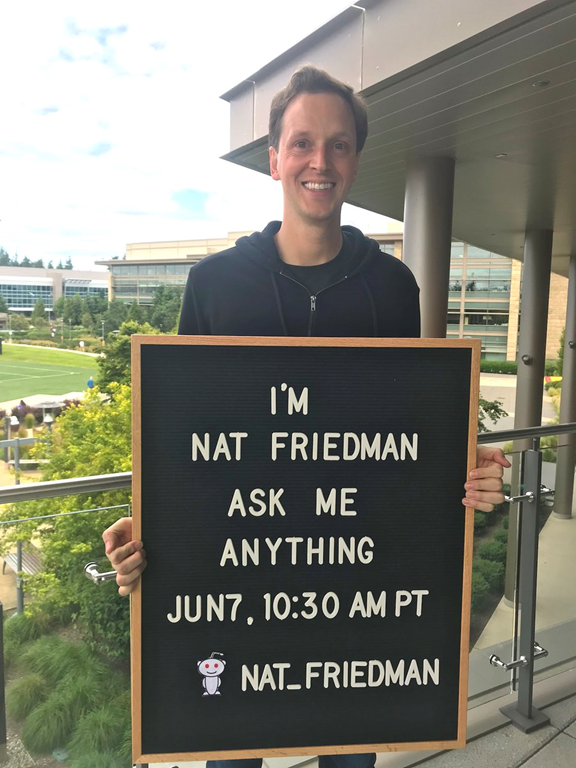
On June 7 at 10:30a PT Nat Friedman did a Reddit “Ask Me Anything” (AMA) about Microsoft’s planned acquisition of GitHub, and our work with developers and open source.

imageHi, I’m Nat Friedman, future CEO of GitHub (when the deal closes at the end of the year). I’m here to answer your questions about the planned acquisition, and Microsoft’s work with developers and open source. Ask me anything.

To review the archives of the AMA, visit the link below:

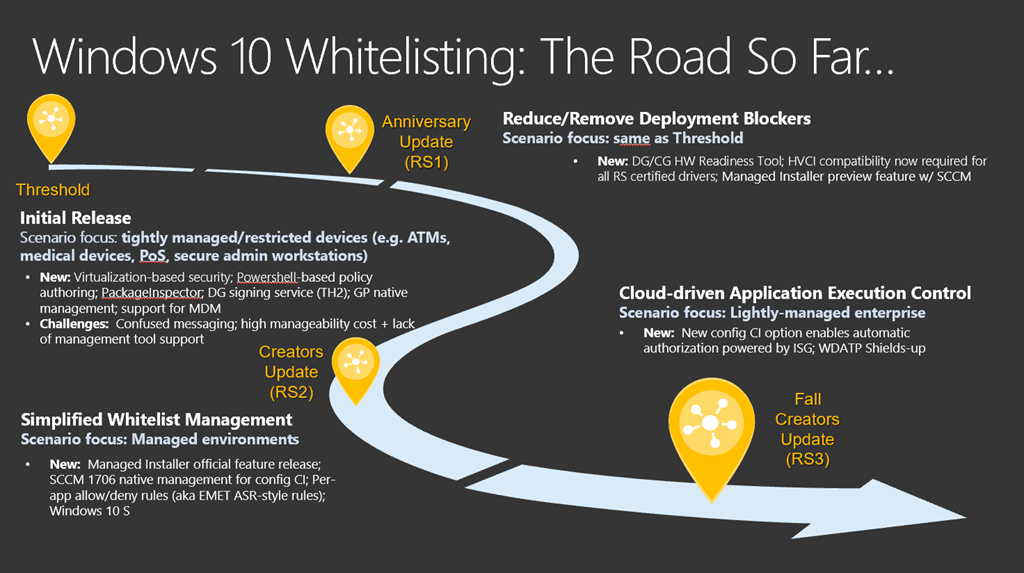
imageWhitelisting in Windows 10 has advanced quite a bit since the initial days of AppLocker.  AppLocker still exists however there is a new capability called Windows Defender Application Control that provides stronger software whitelisting:

  • Windows AppLocker prevents unsigned, unapproved user applications from running on a Windows 10 PC through user/group/role specific policies.
    It does not prevent the usage/execution of unsigned drivers or non-interactive applications (services) on that PC.
  • Windows Defender Application Control provides kernel-level, Enterprise-grade software whitelisting, leveraging Windows code integrity
    It can be applied to drivers, services, and user applications but sets a single, machine policy for the entire enterprise.
    It also has available to it, cloud-based whitelists generated by Microsoft based on the Microsoft Intelligent Security Graph.

The following is a video presentation of this technology and is available at the link below:

imageDistributed systems enable different areas of a business to build specific applications to support their needs and drive insight and innovation. While great for the business, this new normal can result in development inefficiencies when the same systems are reimplemented multiple times. This free e-book provides repeatable, generic patterns, and reusable components to make developing reliable systems easier and more efficient—so you can free your time to focus on core development of your app.

In this 160–page e-book, you’ll find:

  • An introduction to distributed system concepts.
  • Reusable patterns and practices for building distributed systems.
  • Exploration of a platform for integrating applications, data sources, business partners, clients, mobile apps, social networks, and Internet of Things devices.
  • Event-driven architectures for processing and reacting to events in real time.
  • Additional resources for learning more about containers and container orchestration systems.

“There are more distributed systems that need to be built then there are people who know how to build them. The development and sharing of patterns for building distributed systems (especially in container orchestration technology like Kubernetes) enables both novice and veteran system builders to rapidly build and deploy reliable distributed systems.”

—Brendan Burns

Get Current, Stay Current on Windows 10

imageWindows 10 is changing the way IT manages and services enterprise computing. The time is now to take advantage of Windows 10 within your organization.

Attend this workshop to:

  • Learn about the architectural changes to the Windows Deployment and Servicing model
  • Participate in a roundtable discussion of Microsoft’s Operating System Deployment Strategy
  • Gain hands on experience with the tools and resources you need to help deploy and support Windows as a service in your organization

Who should attend this session?

  • IT Managers interested in deploying and managing Windows 10 enterprise-wide
  • Business leaders looking to upgrade from previous versions of Windows

As this is an interactive session, please bring your laptop with you.

image

Join us Wednesday, June 27 for the Emerging Tech Virtual Summit: AI Unlocked, streaming live.

A revolution is coming, one that will overcome challenges we can only imagine, powered by technology we won’t even see. The next generation of life-changing technologies goes far beyond keyboards, screens, smartphones, cameras, watches, and hard drives.

If you want to be part of the next-gen digital revolution, this is the event to attend! Join us live online to hear from industry thought leaders as they explore what’s possible.

imageSTATE OF THE UNION ADDRESS: ARTIFICIAL INTELLIGENCE
Norm Judah
Chief Technology Officer, Microsoft Digital, Services and Success

Join Norm, our keynote speaker, for a "state of the union" on the AI landscape: where the technology is at today, where it’s headed in the future, and how it’s proving its value in the workplace.

imageFUNDAMENTALS OF AI
Robbee Minicola
Global Lead, Wunderman AI

Hear from Robbee, an expert in the convergence of media and technology, as she explains the fundamentals of AI. Get grounded on the concepts of BI, Machine Learning and Artificial Intelligence, and explore the possibilities of how these technologies could revolutionize the way you do business.

We’ll also take you on a journey of exploration across several aspects of AI, including:

  • The exploding world of AI: Insights and trends
  • How companies are leveraging AI to transform their businesses
  • How to responsibly build AI systems with an ethical foundation

The future is waiting—and you can help create it. Save the date for the Emerging Tech Virtual Summit: AI Unlocked, a can’t-miss streaming event, and follow #MSFTEmergingTech on Twitter to join the conversation before, during, and after this insightful event.

Details below:

imageThe digital imperative is here, and the financial services industry is responding in unprecedented ways. Game-changing technologies, coupled with the call for even more efficient yet personalized client experiences, are pushing financial services to transform rapidly. Facing disruption from non-traditional industry entrants at every turn, as well as increased regulatory oversight and global emphasis on cybersecurity and digital trust, today’s banking, capital markets and insurance decision-makers have a lot to contend with.

At the Microsoft Financial Services Summit, in partnership with EY, you will learn how Financial Services businesses can work with their partners to achieve digital transformation. We invite you to join industry peers for a day of thought leadership, engaging discussion, and networking. Hear from institutions who have reimagined the client experience and transformed products and business cultures, with open and connected systems and real-time, predictive digital processes. Please join us Thursday, June 14 at Tribeca 360 in New York City.

Agenda:

  • 8:30 – 9:00AM Registration & Continental Breakfast
  • 9:00 – 9:15AM Welcome & Opening Remarks
  • 9:15 – 10:00AM Microsoft Executive Keynote
  • 10:00 – 10:45AM Customer Journey: The Struggle is Real
  • 10:45 – 11:00AM Break
  • 11:00 – 11:30AM Believe the Hype: Real World AI Powering Financial Services
  • 11:30 – 12:30PM Lunch & Networking
  • 12:30 – 1:15PM Disruptive Leadership: Seek Truth, Guide Change and Thrive
  • 1:15 – 2:00PM Notes from the Field: Innovation Partnerships & Ecosystems
  • 2:00 – 2:30PM The Secret to Success: Third-Party Governance that Works
  • 2:30 – 2:45PM Break
  • 2:45 – 3:15PM Transform Your Business: Security in Today’s Complex Digital Environment
  • 3:15 – 4:00PM Expert Panel: Fighting Financial Crime with Innovative Technology
  • 4:00 – 4:30PM How we did it: Creating a Modern Workplace
  • 4:30 – 5:00PM New Insights: Blockchain in Financial Services
  • 5:00 – 5:15PM Closing Remarks

Event details below:

imageWhen Microsoft rolled out Intune to all its employee’s personal devices, (all devices accessing any corporate data at Microsoft must be enrolled in Intune) folks were naturally interested in knowing what information might be collected by Microsoft IT.

Microsoft is as vigilant about it’s employee’s privacy as it is with our customer’s.  The first thing users were presented with when enrolling their personal devices was information about what information the company would see and would not see:

  • Microsoft can never see:
    • Call & web history
    • Location
    • Email and text messages
    • Contacts
    • Password
    • Calendar
    • Camera roll
  • Microsoft may see:
    • Model
    • Serial number
    • Operating system
    • App names
    • Owner
    • Device name
    • Manufacturer
    • Phone number (for corporate devices only)

This is available in greater detail online for individuals with questions about the data collected via Intune when enrolled.  You can read this info through the link below.

imageIf you’re wondering why Microsoft needed GitHub & why GitHub needed Microsoft, there’s several reasons, but at the core of it is the fact that putting GitHub together with the power of Microsoft Azure is a 1+1=3.

Every GitHub developer has to download, compile, test, edit & post their code to the service. Doing all of this locally on one’s own development system is a waste of productivity when you can:

  • keep code in GitHub
  • compile code in the cloud
  • orchestrate the creation of test environments (VMs & cloud services) – entirely in the cloud
  • access rentable devices like iPhones, Samsung Galaxy, etc. with different OS revisions for test use in the cloud (Xamarin Test Cloud)
  • test one’s code in the cloud
  • edit code in the cloud
  • lather rinse repeat – all online
  • save revisions in GitHub

GitHub gets direct access to the world’s largest, most powerful cloud & Microsoft gets more potential users of Microsoft Azure. 

…GitHub+Microsoft means more productive developers.

For more resources around this acquisition, check out the following link:

Here are some great articles explaining why this acquisition is important:

imageJoin us on Tuesday, June 26, 2018 for a virtual experience to learn tips and tricks for modernizing your infrastructure and applications—regardless of whether you’re running it on-premises or in the cloud.

Windows Server 2019 Virtual Summit
(Agenda)

  • Keynote
  • Tracks
      • Hybrid
      • Security
      • Hyper-converged infrastructure (HCI)
      • Application Platform

Details below:

« Newer Posts - Older Posts »

Categories