UPDATE 10/31/19:
Major update to the this self-service purchase announcement – as documented in the Self-Service FAQ:

Over the past week, we’ve been listening to customer feedback regarding the rollout of our self-service purchase capabilities for Power Platform products. Based on the feedback, we’re making the following changes to our plan:

  • On November 19th, we will provide IT admins a way to turn off self-service purchasing on a per product basis via PowerShell. More details will be forthcoming.
  • To provide more time to prepare for this change, we are updating the launch for self-service purchase capabilities for Power Platform products to start with Power BI on January 14th for all commercial cloud customers.

Beginning January 14, 2020, self-service purchase, subscription, and license management capabilities for Power Platform products (Power BI, PowerApps, and Flow) will be available for commercial cloud customers in the United States. Self-service purchase gives users a chance to try out new technologies and enables them to develop solutions that will ultimately benefit their larger organizations. This capability will not be available to tenants in the US that are government, nonprofit, or education, at this time. Central procurement and IT teams will have visibility to all users buying and deploying self-service purchase solutions through the Microsoft 365 admin center and will be able to turn off self-service purchasing on a per product basis via PowerShell.

The FAQ update is located at:

ORIGINAL POST:
imageAccording to a recent notification from the Office Message Center, Microsoft will soon be enabling self-service purchase and license management capabilities, which will allow users within your organization to purchase products directly, starting with the Power Platform family of products: Power BI, PowerApps, and Flow. 

Power BI will be available in the US starting November 19, followed by PowerApps and Flow and additional geographies beginning December 4.

Further details about announcement are available here:

USERVOICE FEEDBACK
If you’d like to provide Uservoice feedback on this upcoming change, you may do so here: https://office365.uservoice.com/forums/273493-office-365-admin/suggestions/38878723-ability-to-block-self-service-purchase-capabilitie 

PROVIDING WRITTEN FEEDBACK
If you’d like to provide written feedback on this matter, follow these steps:

  1. Go to the notification in Message Center (MC193609)
  2. Hit ‘Dislike’/Thumbs Down.
  3. Provide written feedback.
    (You can specify whether you want to be contacted directly to further discuss this.)

MICROSOFT IGNITE 2019 SESSION
A customer of mine pointed out that if you’re going to Microsoft Ignite next week, you might want to check out the following session:

    imageI recently discovered a really awesome Office 365 podcast called “O365eh!”  Yes, it’s basically a 15min episode podcast that discusses new information re: Office 365 & Microsoft Teams/Skype for Business Online.

    But with a Canadian twist. Smile

    Here’s the cast.  It’s a veritable who’s who of the Office 365/Microsoft Teams world, and all of them are Office Apps & Services MVPs/Most Valuable Professionals.

    Self-description:

    O365Eh! is a regular short podcast on the latest and greatest developments in the Microsoft Cloud from four MVP’s north of the 49th parallel.

    They have both video playback from YouTube & audio subscription availability for podcast listeners – like me.

    (I can’t tell you how much I’ve enjoyed listening to this thing… it’s surprisingly good.  Most Office 365 podcasts aren’t very good, but this crew’s not just very deep technically – again, they’re all Microsoft MVPs – but they’re also kinda fun. Highly recommend subscribing.)

    Per DefenseOne:

    Microsoft Wins Massive JEDI Cloud Contract
    After months of speculation, intrigue, lawsuits, and presidential leaning-in, Microsoft has won the Pentagon’s $10 billion JEDI cloud storage contract, upsetting the presumed frontrunner Amazon. 

    The outcome comes as a surprise to many observers who described Amazon as the almost-certain winner of the Joint Enterprise Defense Infrastructure, or JEDI, program. Amazon was considered by many to be the only qualified bidder because it had the largest enterprise cloud infrastructure and already had reached the necessary highest security level, known as Impact Level 6.

    Read more here:

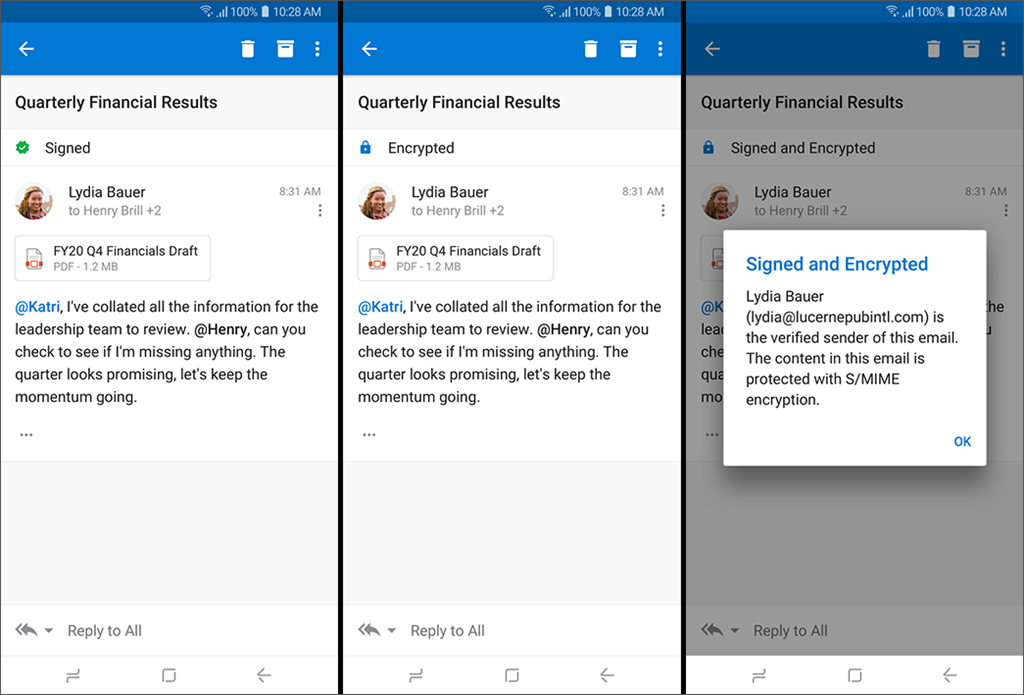
    imageNeed to classify messages while on the go? Do we have a solution for you! Sensitivity labeling is rolling out to both Outlook for iOS and Android! (Requires an @Office365 mailbox)

    Summary: How to classify and/or protect messages when using Outlook for iOS and Android.

    Protecting company or organizational data is extremely important. Outlook for iOS and Android supports two scenarios for classifying and/or protecting content:

    1. Sensitivity labeling

    2. Secure/Multipurpose Internet Mail Extension (S/MIME)

    Sensitivity labeling and S/MIME in Outlook for iOS and Android are supported with Office 365 accounts using the native Microsoft sync technology.

    For more information see:

    imageHopefully you’ve seen that we’re announced a preview of our new Office 365 ProPlus Delivery Optimization feature – which help to reduce network bandwidth usage when Office 365 ProPlus is updated… all without pre-staging the content in a local file share.

    The question is:  How do you enable this feature Enterprise-wide?

    Use Intune to enable Delivery Optimization for Office 365 installs
    If you’ve got Intune, you’re in luck.  Michael Niehaus, Microsoft Deployment PM has written up a great post on how to use Intune to push a policy to the device that enables Delivery Optimization for your Office 365 ProPlus deployed clients.

    He lays it out step by step. Smile

    Read the post here:

    EPILOGUE:
    Oliver Kieselbach on Twitter, however, made the comment however that you might have issues with the ADMX definition and if so, to download the ZIP file below:

    If someone has issues with the ADMX definition… here a zip download to the ADMX file with correct formatting (the character set from the blog was wrong)
    https://oliverkieselbach.files.wordpress.com/2019/10/customofficedosettings.zip

    Posted by: kurtsh | October 24, 2019

    PREVIEW: Delivery Optimization and Office 365 ProPlus

    imageDelivery Optimization for Office 365 ProPlus updates saves valuable corporate internet bandwidth, and avoids having to pre-stage a file share.

    Reg add:

    HKLM\SOFTWARE\Policies\Microsoft\office\16.0\common\officeupdate /v SetDOAsPrimary /t REG_DWORD /d 1

    What is Delivery Optimization?

    Delivery Optimization is a peer-to-peer distribution technology available in Windows 10 that allows devices to share content, such as updates, that the devices have downloaded from Microsoft over the internet. This can help reduce network bandwidth because a device can get portions of the update from another device on its local network instead of having to download the update completely from Microsoft.

    Office 365 ProPlus on devices running Windows 10 can take advantage of Delivery Optimization during installation and when receiving updates, if certain requirements are met.

    Read more here:

    imageThe Office 365 team wrote up the following blog post, highlighting some EPIC sessions being delivered at Microsoft Ignite 2019. 

    If you’re not going to Ignite 2019… y’kinda missing out because this year is gonna be waaaaaaaaay better than past years.  There’s a massive number of product groups that have double downed on this Ignite and will be there to establish contacts with, ask questions of, and get involved with through new programs, etc.

    That being said, here’s some of the sessions they are highlighting:

    Read the entire post here:

    imageIf you’re getting started with the Microsoft PowerPlatform – including PowerApps & Microsoft Flow, you’ll want to check out these resources.

    New features now available for Forms!

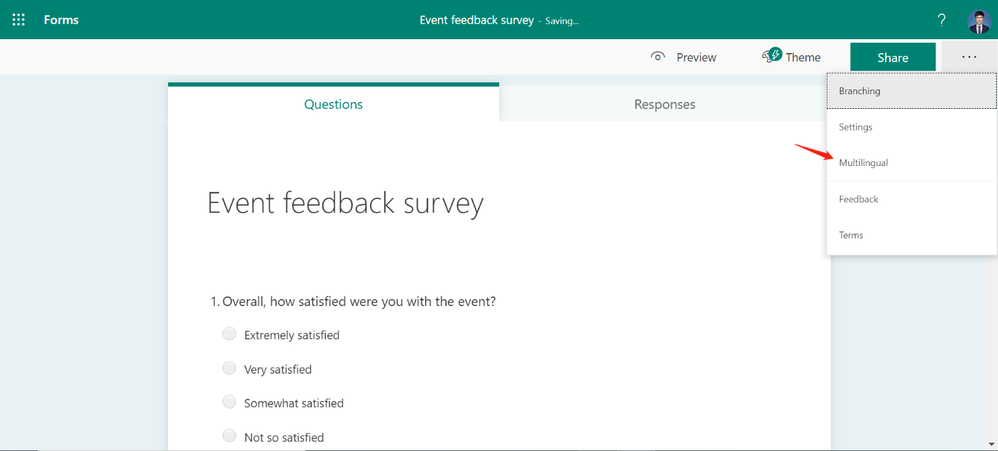
    imageWith Forms, Microsoft strives to deliver the best user experience for form designers, respondents, and collaborators. We believe that a key element in creating the best user experience is starting with an intuitive design. We are excited to share two recent advancements in Forms’ design: Multilingual Support, and Office Suite Header.

    Read more here:

    imageFrom Microsoft’s Global Digital Safety Advocate:

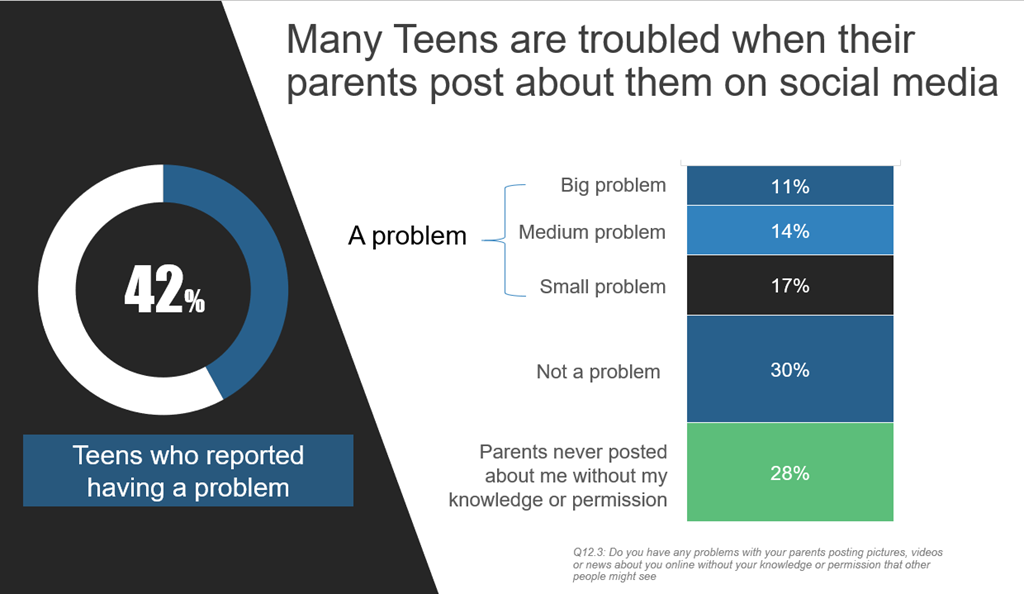
    Teens around the world say parents share (or “sharent”) too much about them on social media – so much so that it’s become a concern for more than four in 10.

    Forty-two percent of teenagers in 25 countries[1] say they have a problem with their parents posting about them on social media. Of that sum, 11% say it’s a big problem; 14% say it’s of medium concern, and 17% consider it a small issue – all according to preliminary results of a new Microsoft study about the state of digital civility today. In addition, two-thirds (66%) of teens say they’ve fallen victim to at least one online risk at some point, with the same percentage worried that a similar negative online experience will happen to them again.

    ..

    Read the study’s details at the link below:

    « Newer Posts - Older Posts »

    Categories