imageWith the Modern Workplace needing to support working anywhere, anytime and on any device, the organization may face new challenges. Common issues can be summarized and grouped into three core areas.

First, Security and Access Control, second, Device and Data Management and third, Compliance. Each area has its challenges and issues, which means that for an organization to support a digital workplace, needs to be mitigated and understood.

Learn how to transform your business and remain secure and compliant in a rapidly evolving world…

Download the whitepaper at:

(Found at https://resources.techcommunity.microsoft.com/security-compliance-and-administration/)

Posted by: kurtsh | October 13, 2019

DOWNLOAD: Office Remote for Windows 10 & Android

image[I’m writing this because Office Remote mysteriously & silently disappeared from the Google Play Store back in 2018.  I’m currently pinging Darren Edge internally who’s the Director responsible for Office Remote in the early part of the decade to find out what happened. 

I suspect that the effort to keep it maintained per Microsoft engineering & development guidelines didn’t warrant keeping it listed… so yes, that’s a bummer.  But 1.2.0.0 of the Android “Office Remote” client remains available as a downloadable .APK from 3rd parties but it does mean you have to sideload it so caveat installer.]

Office Remote turns your phone into a smart remote that interacts with Microsoft Office on your PC. The app lets you control Word, Excel, and PowerPoint from across the room, so you can walk around freely during presentations. It also shows you your speaker notes and the presentation timer to help you present more effectively.

New PowerPoint Features in v1.1.3.0:

We added a large thumbnail of the slide that is currently presented, as well as a smaller preview of your next slide. We managed to do this without impacting your notes.

You now get an instant laser pointer by simply touching this new thumbnail with your finger.

Play and pause your embedded videos from Office Remote.

With Office Remote, you can start your PowerPoint presentation, advance the slides, see your speaker notes, and control an on-screen laser pointer with a touch of your finger —all from your phone. You can also navigate between Excel worksheets and graphs, and control data slicers from the palm of your hand. And you can scroll through a Word document or quickly jump to specific sections or comments.

Office Remote has the following features:

PowerPoint:

  • Jump to the next, previous, and last slide
  • View slide thumbnails and jump to a slide
  • View speaker notes on phone
  • View presentation timer and slide numbers
  • Laser pointer using touch on your phone

Excel:

  • Change worksheets by swiping
  • Use Slicers, PivotTable, and Filters
  • Jump to any named object in your workbook
  • Move up or down the worksheet
  • Change the zoom level

Word:

  • Jump to headings
  • Jump to comments
  • Screen up/down
  • Line up/down
  • Change the zoom level

App requirements:

  • Microsoft Office 2013. This app does not work with Office 2013 RT or earlier versions of Office.
  • Bluetooth on your PC – The desktop add-in for Office Remote must be installed on your PC 

Installation:
There are two components:

—————

A word on downloading .APK files from external sources
Downloading APKs outside of a trusted store like this is inherently risky.  There are ways that you can scan .APKs for threats and viruses, but you can never really be sure. 

If you want to pursue downloading the APK from a 3rd party source, read the following to understand how to scan APKs for threats:
https://www.maketecheasier.com/scan-apk-files-for-virus/

I’ve personally scanned the APKMirror.com file using Metadefender & VirusTotal but you should probably do the same for any APK you plan to sideload.

imageAccording to Forrester, IT experts experienced 40% fewer security breaches* by shifting to Windows 10 and Office 365 ProPlus. Now is the time to shift your organization. Learn how:

    Review the following checklist to ensure you’ve got everything covered in your deployment of Windows 10 & Office 365 ProPlus: 

* Source: Forrester Report – “Total Economic Impact of the Modern Desktop with Microsoft 365” – July 2018    
https://anytimeoffice.com.au/wp-content/uploads/2018/12/The_Total_Economic-Impact-Of-The-Modern-Desktop-With-Microsoft-365-And-AnytimeOffice.pdf     

    imageWe’ve released some highly anticipated solutions that make Office running in a virtual environment better… and faster!

    Microsoft 365 is designed to help organizations digitally transform workplace collaboration. Many customers that I work with use virtualization, and they’re always looking for ways to cut costs and improve the user experience. To help, we acquired FSLogix last November, and today I’m pleased to announce four new capabilities to further improve the user experience in virtualized environments:

    • FSLogix technology, which improves the performance of Office 365 ProPlus in multi-user virtual environments, is now available at no additional cost for Microsoft 365 customers.
    • Windows Server 2019 will add support for OneDrive Files On-Demand in the coming months.
    • Office 365 ProPlus, our flagship Office experience, will be supported on Windows Server 2019.
    • And we’ve added new capabilities to Outlook, OneDrive, and Microsoft Teams in Office 365 ProPlus to improve the user experience in a virtualized environment.
    Get the same reliable experience with Office apps in any environment with FSLogix

    The FSLogix container technology is now fully integrated with Office apps in virtual environments. This technology improves the speed and reliability of virtualized Office apps to feel like the experience of using Office apps on a dedicated machine. The FSLogix containers work in virtualized environments, including those provided by Microsoft, Citrix, and VMWare. This technology is now included at no extra charge if you are licensed for any of the following Microsoft solutions:

    • Microsoft 365 E3/E5/A3/A5/Student Use Benefits/F1/Business
    • Windows 10 Enterprise E3/E5
    • Windows 10 Education A3/A5
    • Windows 10 VDA per user
    • Remote Desktop Services (RDS) Client Access License (CAL) and Subscriber Access License (SAL)

    Learn more about FSLogix.

    Read the entire announcement here:

    imageCloud-based advanced services, like machine learning, artificial intelligence, and data analytics, open new opportunities for technical teams to drive business value. Find inspiration and guidance about what kind of transformational changes are possible and how you can achieve them. Download this free e-book, Designed to Disrupt: Reimagine Your Apps and Transform Your Industry, to help you:

    • Use cloud technology to give your company a competitive edge by accessing new markets, enhancing your customers’ experience, and increasing operational efficiency.
    • Learn from companies who have successfully used innovative technologies—such as cognitive services, Internet of Things (IoT) and bots—to grow their businesses. 
    • Create a digital journey roadmap, with envisioning sessions to reimagine your company’s goals and practical tools to bring your visions to life.

    https://azure.microsoft.com/en-us/resources/designed-to-disrupt-reimagine-your-apps-and-transform-your-industry/

    imageRecently there’s been some significant changes to the way the PowerPlatform is licensed.

    For more details, read the following sites:

    Posted by: kurtsh | October 11, 2019

    PREVIEW: Azure Cognitive Services “Personalizer”

    imageAzure Personalizer is a cloud-based API service that allows you to choose the best experience to show to your users, learning from their real-time behavior.

    • Provide information about your users and content and receive the top action to show your users.
    • No need to clean and label data before using Personalizer.
    • Provide feedback to Personalizer when it is convenient to you.
    • View real-time analytics.
    • Use Personalizer as part of a larger data science effort to validate existing experiments.

    How does Personalizer work?

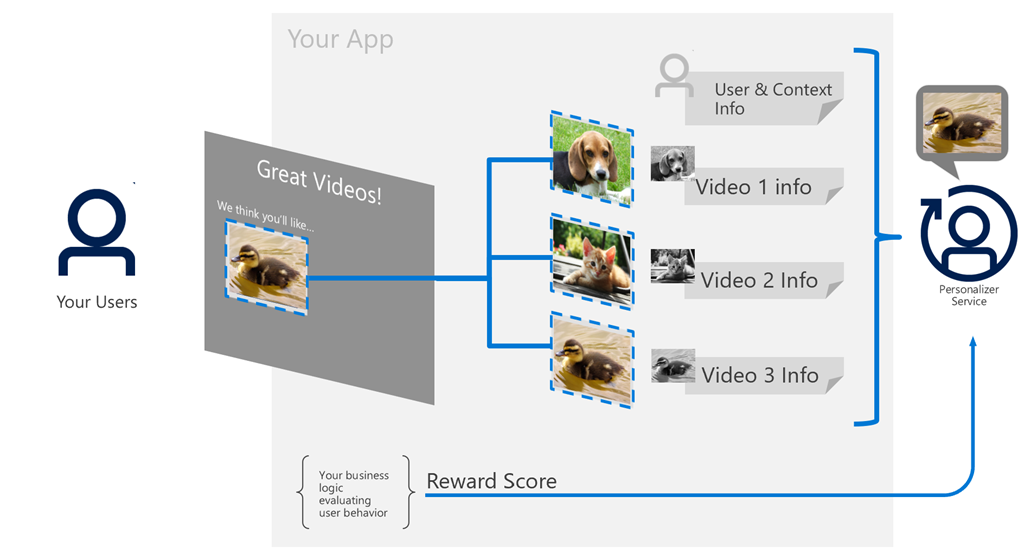
    Personalizer uses machine learning models to discover what action to rank highest in a context. Your client application provides a list of possible actions, with information about them; and information about the context, which may include information about the user, device, etc. Personalizer determines the action to take. Once your client application uses the chosen action, it provides feedback to Personalizer in the form of a reward score. After the feedback is received, Personalizer automatically updates its own model used for future ranks. Over time, Personalizer will train one model that can suggest the best action to choose in each context based on their features.

    Read more about Azure Personalizer here:

    imageToday, we are proud to announce that Microsoft is positioned as a leader in The Forrester Wave™: Endpoint Security Suites, Q3 2019, receiving among the second highest scores in both the strategy and market presence categories.

    According to Forrester, “Microsoft has a compelling vision for the future where endpoint threat prevention and detection are completely integrated and inseparable.”

    Read the entire announcement and download the Forrester Report here:

    image

    Join us for an exclusive ‘behind the scenes’ experience where you’ll have the opportunity to:

    • Get hands on with the Microsoft Surface family of devices and experience real life examples of digital transformation in action.
    • Hear and learn from other customers about their digital transformation initiatives.
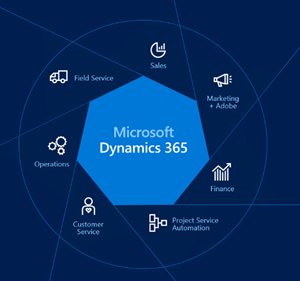
    • Learn about the latest trends driving workplace transformation – from enabling teamwork with the new Surface Hub 2S and Microsoft Teams, to increasing the efficiency of your field workforce with predictive analytics from Dynamics 365 and Surface Go.
    • Access programs, resources and solution experts from Microsoft and our partners to help develop and activate your workplace transformation strategy.
    • Network with peers while enjoying nibbles and drinks.

    Event Agenda

    • 4:00pm – 4:15pm
      Arrival and networking
    • 4:15pm – 4:35pm
      Welcome remarks
    • 4:35pm – 7:00pm
      Tour the Surface experience while enjoying refreshments

    Surface Fall Roadshow – Los Angeles

    (Event also stopping at Chicago, Atlanta, Minneapolis, Houston, Dallas, and Portland)

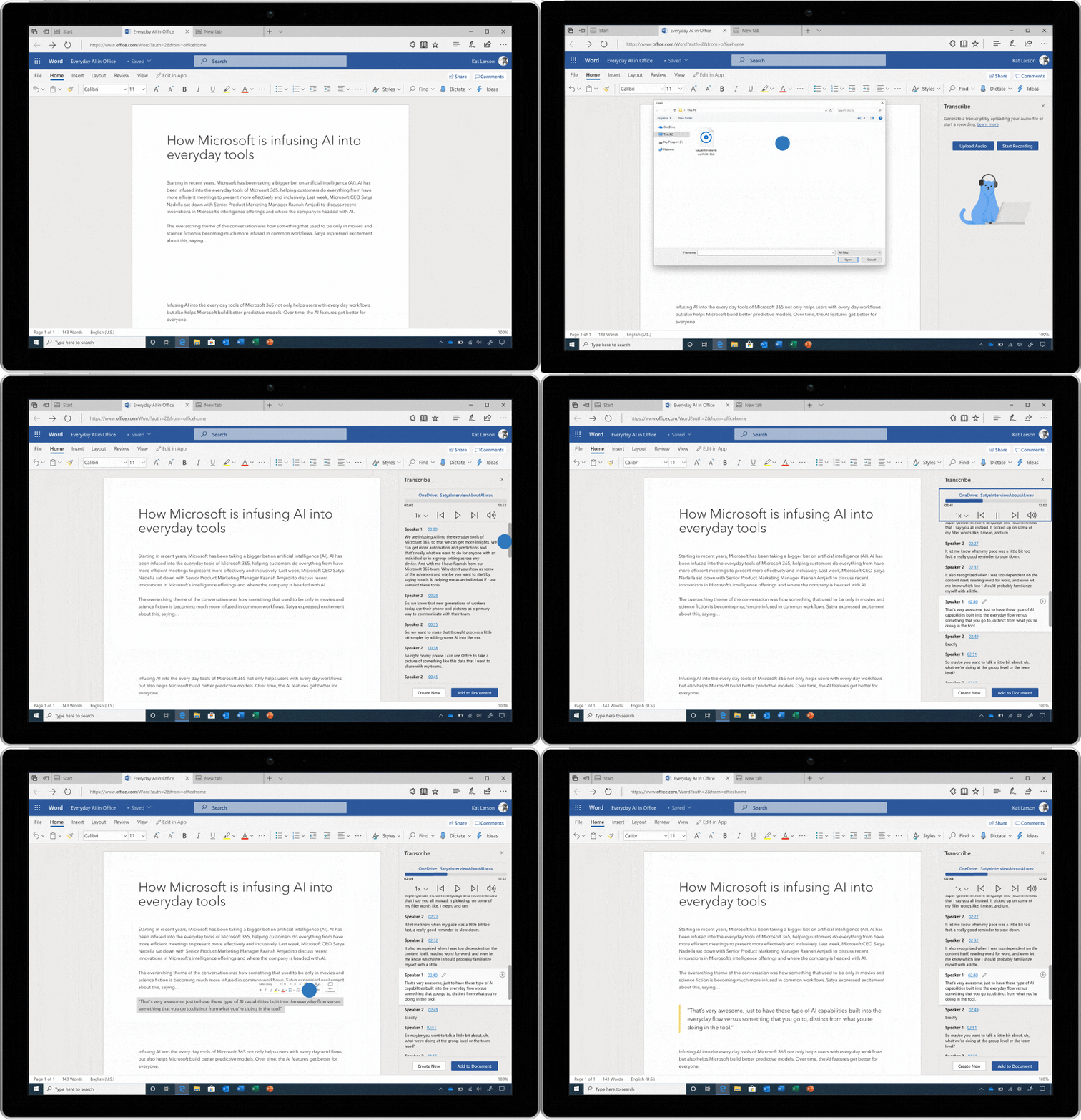
    NEW! Transcribe audio files or record your own while staying in the flow in Microsoft Word – coming in early 2020.

    Image of an audio file being transcribed in Microsoft Word.

    We spoke with researchers, reporters, lawyers, and teachers, and learned that people spend a ton of time recording audio interviews on their phone, and then spend even more time transcribing those conversations into Word.

    Today, we’re announcing a solution that helps busy professionals upload their own audio files or record new ones on the fly, all within Word. Once your audio has been uploaded or recorded, Word—leveraging your OneDrive account to securely store the audio files and Azure Speech Services under the hood—displays a written audio transcription in the side panel and allows you to quickly and easily bring relevant snippets or the entire transcript into your document to edit. The transcript itself is automatically separated by speaker and into relevant chunks of content, and the interactive panel allows you to easily jump around the recording to find and verify the perfect quote.

    Audio transcription in Word will be available in early 2020 in Word for the web, with integration into the Word desktop and mobile apps following in the spring. Exact plans and pricing will be announced closer to general availability.

    Read about this and more on the Microsoft 365 blog:

    « Newer Posts - Older Posts »

    Categories