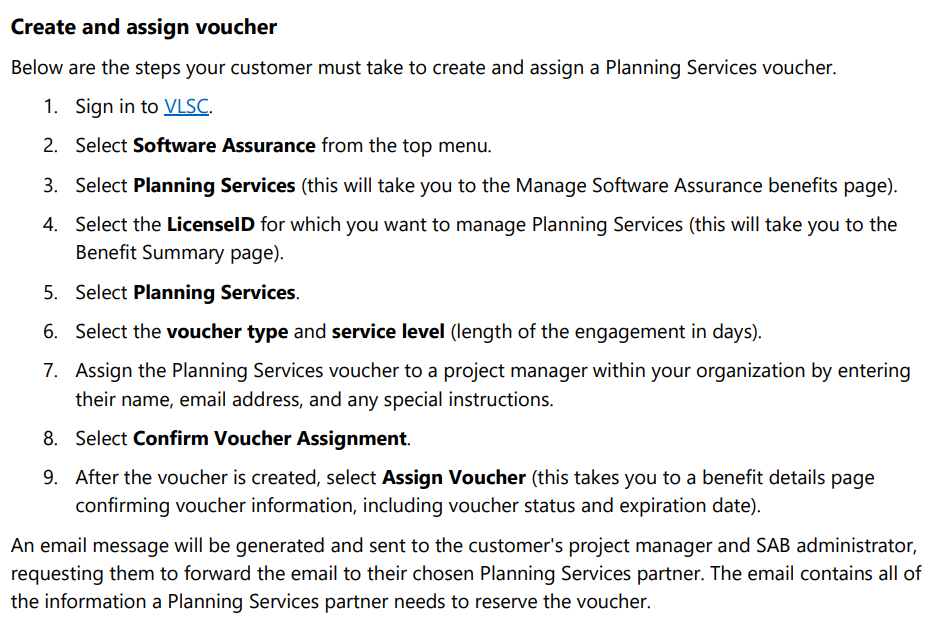
imageNow is the time to go passwordless. Microsoft CVP Joy Chik walks through the end-to-end config to set up Multifactor Authentication with FIDO2 keys or Authenticator and even the new Temporary Access Pass, so your people don’t even need to start with a password.

Stop using passwords. Click the link and sign up for the public preview for “Temporary Access Pass”.

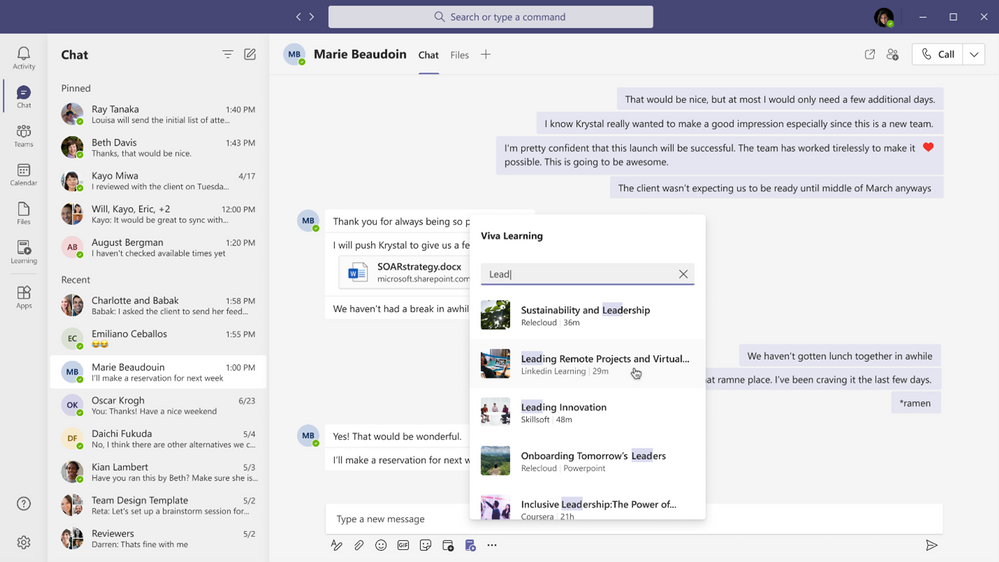
imageToday, we are announcing that Viva Connections will be available to all customers as part of their existing Microsoft 365 and SharePoint license. Any employee in the organization that is licensed for SharePoint will be able to use Viva Connections at no additional costs. New customers can learn more about Microsoft 365 and SharePoint licensing options here.

Also, today we are announcing that the Teams desktop experience for Viva Connections is starting to rollout and will be generally available to all customers by the end of March. Keep any eye on the Microsoft 365 message center for details on how you can deploy Viva Connections when ready.

As hybrid work models become widely embraced, reimagining how we nurture employee development and training and how we keep employees connected to each other and to benefits and wellbeing opportunities becomes critical to success. Last month, we launched Microsoft Viva, our new employee experience platform built to empower people and teams to be their best from anywhere.

Powered by the full breadth and depth of Microsoft 365, Microsoft Viva is experienced through Microsoft Teams and other core Microsoft 365 apps to bring together communications, knowledge, learning, and insights into an integrated employee experience.

Microsoft Viva Connections, one of the four Viva modules, is your gateway to a modern employee experience. It is personalized and appears in the apps and devices your employees already use every day, such as Microsoft Teams. Viva Connections provides a curated, company-branded experience that brings together relevant news, conversations, and other resources. You can learn more about Viva Connections in the announcement blog or in the Microsoft Ignite session Introducing Microsoft Viva Connections.

Read more:

Posted by: kurtsh | March 19, 2021

INFO: “Windows as a Service” cheat sheet

imageFormer Microsoft Deployment oracle, Michael Niehaus, has written a beautiful cheat sheet on what your deal is for whatever release of Windows 10 you have in your organization.

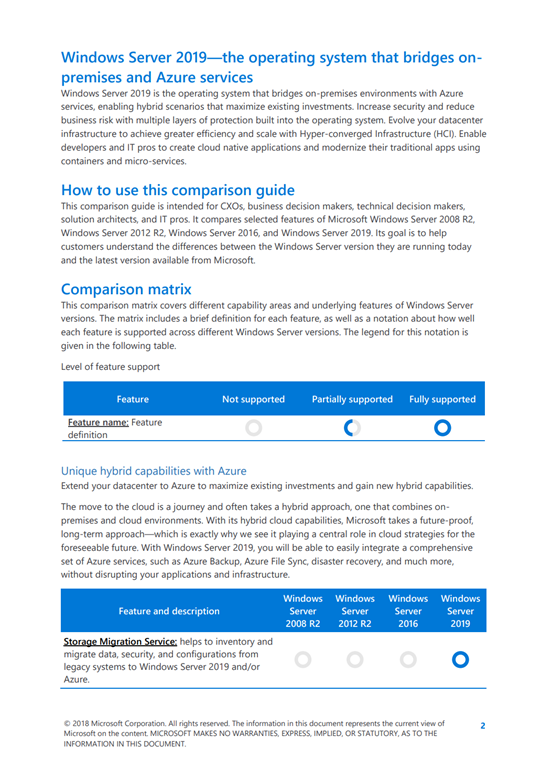
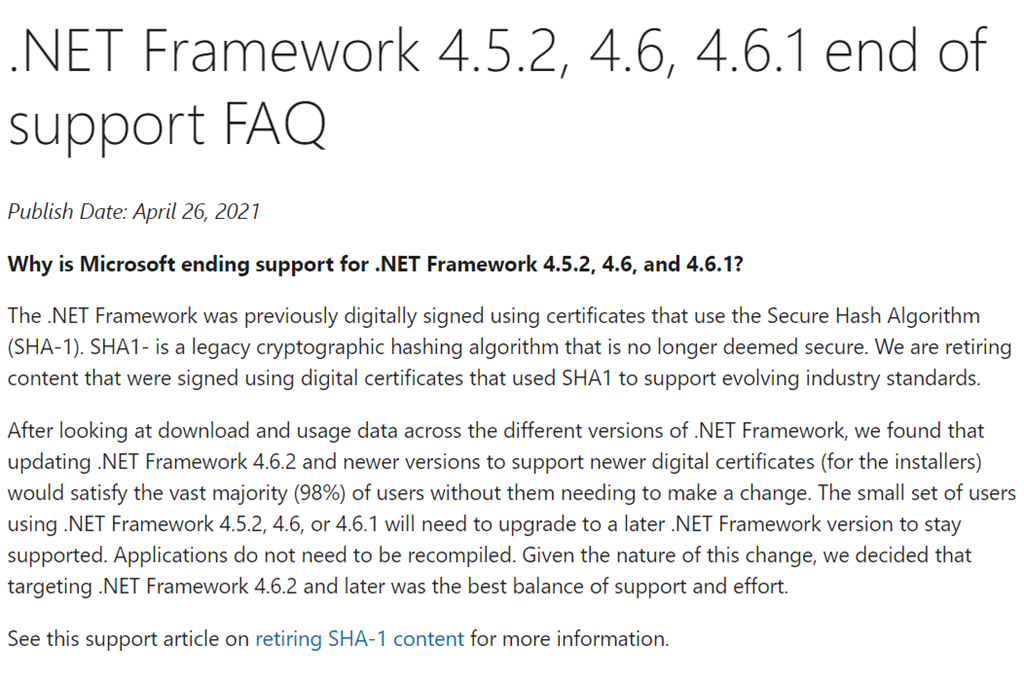
I’ve seen some questions recently about how the latest announcements about the 21H1 release of Windows should be considered. But really you should be looking more broadly, depending on what release you are currently running and how much time is left on that release. The Windows 10 release information page remains the authoritative source that everyone should be following, but here’s a quick take projecting that forward with (a) the new 21H1 release details, and (b) the expected 21H2 full release:

If you are running an Enterprise SKU of…
You should …

  • Something earlier than Windows 10 1803
    Seek help. You’re already unsupported.
  • Windows 10 1803 or 1809
    Hurry up and deploy at least Windows 10 2004. You only have until May 11, 2021.
  • Windows 10 1903
    This is already unsupported. Install the Windows 10 1909 enablement package right now, so that you are again supported.

For more on 1909, 2004, 20H2, LTSC, etc. read the full post:

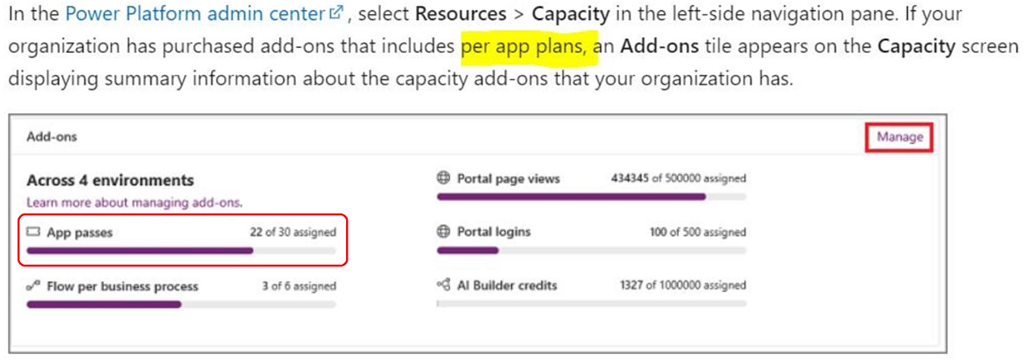
Easily automate anything from your desktop. Reduce bottleneck and create flows faster with hundreds of prebuilt actions. PowerAutomate Desktop is now available to Windows 10 users at no additional cost.

Now available for Windows 10 users at no additional cost

  • Record desktop and web actions in a single flow
    Use the desktop and web recorders to build flows while editing the recorded actions in real time across the web or desktop.
  • Automate easily with the drag-and-drop designer
    Organize your flows logically with the visual designer, while using desktop and web recorders to capture the core logic of your automation.
  • Start with hundreds of prebuilt actions
    Create flows faster using a diverse set of prebuilt actions that connect to many different systems including SAP, websites, and even legacy terminals and mainframes.
  • Create flows that validate themselves
    Take advantage of exception handling to enable complex workflows that require validation through actions and scripts—proactively managing settings so automations don’t require human intervention.
  • Monitor flows easily with centralized logs
    Review automatically saved centralized logs that include detailed information for every execution run, plus screenshots of errors for any troubleshooting.

Build personal desktop flows with easy drag-and-drop capabilities in Power Automate Desktop.

For more detail, read the following:

imageWhile cloud storage offers many advantages over on-premises storage, it is also different in comparison and can be difficult to navigate. It is critical to think about storage early on in your cloud migration as storage decisions can impact application performance and business growth.

Learn how to make smart block storage decisions in the cloud to minimize cost and maximize business growth.

Read this e-book to get guidance on how to:

  • Think about cloud storage and the differences between core storage services in Azure. 
  • Combine disk storage attributes – like throughput, capacity, latency, and availability – for your applications. 
  • Optimize disk storage attributes to meet your application’s needs. Understand Azure Storage pricing. 
  • Build on your foundational knowledge with additional learning resources.

Download the eBook here:

imageFor 14 consecutive years, Gartner has recognized Microsoft as a Magic Quadrant Leader in analytics and business intelligence platforms.

Learn more in this report about the Power BI features that we believe helped again position Microsoft as a Magic Quadrant Leader in analytics and BI:

  • The Power BI cloud service is extremely rich in its capabilities, including an increased set of augmented analytics and automated ML capabilities.
  • AI-powered services, such as text, sentiment, and image analytics are available within Power BI Premium and draw on Azure capabilities.
  • imageThe increasing integration of Power BI into Microsoft Teams, with its tens of millions of daily active users, will inevitably further increase Power BI’s reach in the world of remote working.

Download the report here:

imageIn the third edition of the Enterprise Cloud Strategy e-book, we’ve taken the essential information for how to establish a strategy for migrating and managing your enterprise’s infrastructure on Azure, so you can quickly understand:

  • How infrastructure as a service (IaaS) unburdens you from managing on-premises processes, saving you money and time so that you can focus on innovation.
  • How to plan and implement a consistent hybrid cloud computing infrastructure.
  • How to secure and manage your company’s data in the cloud with built-in Azure security and compliance tools.
  • How implementing dev/test environments makes software development faster and more efficient.

This valuable asset for IT and business leaders provides a comprehensive look at creating, managing, and maintaining IaaS ecosystems, as well as specific guidance on topics like monitoring, governance, and compliance.

Get the eBook here:

imageEndpoint Management Acceleration day is done but if you want to look at the slides or go back to Teams Live Events to watch the recording of any of the 6 sessions, go here: http://aka.ms/EMAD/decks 

  • How to Operate Microsoft Intune in the Real World
  • Deploying shared and FLW devices with MEM
  • Automate Common Microsoft Endpoint Manager Tasks
  • How to Secure your Endpoints with MDE MTD

We’ll keep the Teams Live Events live until we can post them, and the Q&A, in the VideoHub.

Discussion here:

imageBuild skills and resilience to navigate your cloud journey with confidence in this free, technical deep dive with Microsoft Azure experts and your IT community peers. Learn how to migrate and modernize your apps, databases, and infrastructure in the cloud quickly and efficiently with Azure.

Register for this digital event to:

  • Join workshops with step-by-step guidance on your specific workloads and migration scenarios.
  • Get expert guidance on topics such as choosing a cloud provider, assessing your migration readiness, and architecting your environment for scale.
  • Learn key considerations for successful migration decision-making and how to analyze workloads to decide which to move first.
  • Hear best practices and real-life migration success stories from customers.
  • Find out how to scale your apps to meet growing demand and build resilience to grow beyond the capacity of your current datacenter.
  • Test your knowledge and win swag when you visit virtual booths at the event.

We’ve got a brain trust of Azure engineering speakers that will be online, led by Jeremy Winter, CVP of Program Management for Azure.

imageThe majority of organizations still use Active Directory as a major part of their identity infrastructure. As well as helping to protect against advanced attacks targeting your organizations’ on-premises identities, Microsoft Defender for Identity provides a host of assessments used to highlight legacy misconfigurations and any instances where the best practice may not be in place.

We delve into some of these assessments in this session and why they’re essential, mainly based on recent global security events.

« Newer Posts - Older Posts »

Categories