Posted by: kurtsh | May 28, 2021

RELEASE: Windows Package Manager 1.0

Have you ever wanted to install apps & tools on your Windows computer with a simple command like:

winget install PowerToys

Y’can now with the Windows Package Manager 1.0.

imageWe started a journey to build a native package manager for Windows 10 when we announced the Windows Package Manager preview at Microsoft Build 2020. We released the project on GitHub as an open-source collaborative effort and the community engagement has been wonderful to experience! Here we are today at Microsoft Build 2021…

We are excited to announce the release of Windows Package Manager 1.0!

WINDOWS PACKAGE MANAGER 1.0

imageCLIENT
The
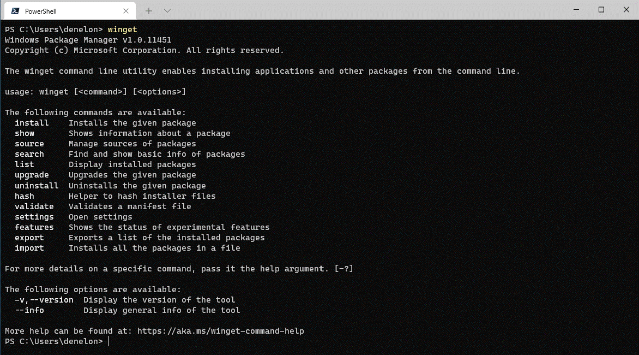
winget client is the main tool you will use to manage packages on your machine. The image below displays winget executed in Windows Terminal via PowerShell. You can see the list of available commands used to manage packages and work with manifests. You can search for a package (search looks at the name, moniker, and tags) using winget search vscode. Installing something on your machine is as easy as winget install PowerToys. You can check for upgrades to packages with winget upgrade or you can just upgrade everything with winget upgrade --all. Are you setting up a new machine? Be sure to winget export packages.json on your current machine (and copy the file to your new machine) so you can winget import packages.json on the new machine. With winget list you can see everything installed in Add / Remove Programs, and you can winget uninstall <SomePackage> to remove it from your system. You can learn more about the commands and syntax from our documentation.

More information – including how to get it – is available in the announcement post below.

image

Live Security and Compliance Ask Me Anything (AMA) with Microsoft Product Experts

Register Now: Tuesday, June 1, 2021, 11:00 AM – 11:45 AM CDT

Microsoft Security and Compliance thought leaders Matthew Littleton / @Matthew Littleton (CYBERSECURITY)  (Microsoft Global Advanced Compliance Specialist, and Retired Navy Captain) and Matt Soseman / @Matt Soseman  (Microsoft Senior Security Architect) will offer unique insights and a depth of knowledge around the Microsoft Security product suite during this 45 minute open forum Q&A.

These leaders will bring nearly 25 years at Microsoft to bear while answering questions pertaining to product capabilities and updates, feature availability, and applications for federal cybersecurity mandates such as the Cybersecurity Maturity Model Certification (CMMC) and DFARS 7012. Questions may cover the following and much more:

  • Data Loss Prevention
  • Microsoft Intune
  • Azure Active Directory and Conditional Access
  • Microsoft Cloud App Security
  • Microsoft 365 GCC & GCC High

In this Ask Me Anything (AMA) style session, Matt and Matt will address audience members and their respective scenarios deploying in the Microsoft Government Cloud to better prepare teams looking to protect corporate and US Government Data. 

The goal of this session is to address contractors questions in light of the recent Cloud Security and Compliance Series event where both Matt and Matt have addressed topics such as “CMMC Compliance in the Microsoft Sovereign Cloud” and “Meeting CMMC Level 3 with Microsoft Intune / Meeting CMMC with Microsoft Information Protection (MIP)”.

Registration here:

imageThe Security Methodology for the Microsoft Cloud Adoption Framework is the CISO/CIO’s view for effectively integrating with the business + organizing/focusing security disciplines in your program.

Recently released, the Secure methodology provides a vision of the complete end state to guide the improvement of your security program over time. The following infographic provides a visual mapping of the key ways that security integrates with the larger organization and the disciplines within security.

To access this guidance, visit:

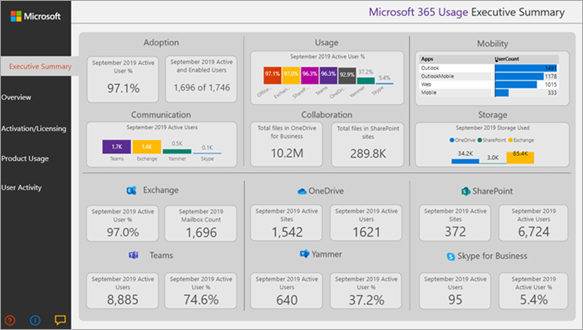
imageUse Microsoft 365 usage analytics within Power BI to gain insights on how your organization is adopting the various services within Microsoft 365. You can visualize and analyze Microsoft 365 usage data, create custom reports and share the insights within your organization. You can also gain insights into how specific regions or departments are using Microsoft 365.

Microsoft 365 usage analytics gives you access to a pre-built dashboard that provides a cross-product view of the last 12 months and contains a number of pre-built reports. Each report provides you with specific usage insights. User-specific information is available for the last full calendar month.

The data model that powers the template app includes user attributes from Active Directory, enabling the ability to pivot in certain reports. The following Active Directory attributes are included: location, department, and organization.

See Enable Microsoft 365 usage analytics to start collecting data.

Microsoft 365 usage analytics contains a number of reports detailed in the following sections.

You can access detailed reports for each area by selecting the data tables. You can view all pre-built reports by selecting the tabs at the bottom of the site. For more detailed instructions, read Navigating and utilizing the reports and Customizing the reports.

You install it as a Global Administrator into Power BI by following the instructions below: (You need to have a Power BI Pro license to use the Template)

Docs on how to use Microsoft 365 Usage Analytics, how to modify the reports/dashboards, etc. is here:

If you have to download the Power BI Template used for Usage Analytics, download it here:
(We recommend you depend on the “Get Apps” entry for Power BI apps because the template is updated regularly and downloading the .PBIT will leave you stuck at one release.)

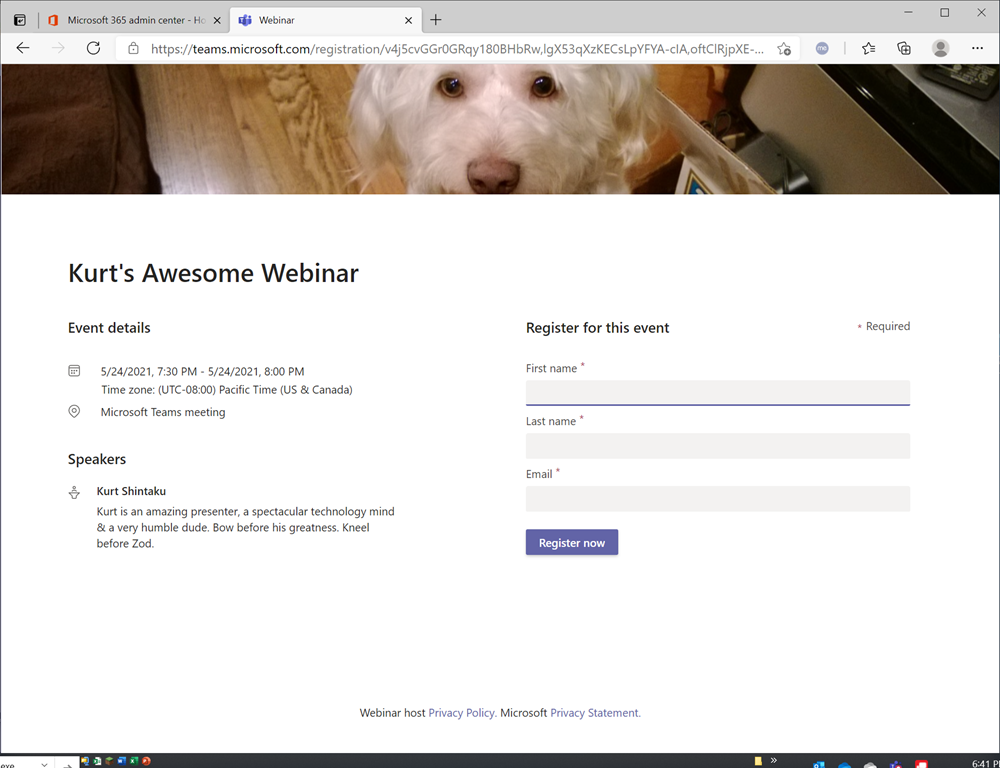
imageGot Office 365 E3/E5/G3/G5 and using Microsoft Teams? Wanna make your own webinars… for no extra cost?

INTRODUCING MICROSOFT TEAMS WEBINARS
Any user of Microsoft Teams with an E3/E5 or G3/G5 license can now make & schedule their own webinars at no additional cost through the very Teams client that they use every day. (Pending rollout to their Office 365 tenant) 

This means that licensed Teams users can now:

  • Schedule a Teams Webinar on their own
  • Have attendees “register” for your meeting/webinar through a auto-generated (customizable) registration web page
  • Send out Calendar (.ICS) appointments to registrants
  • Automatically send updated appointments if the date/time details change as needed
  • Run webinars for up to 1000 interactive users (voice-enabled) & identify participation levels based on registered users
    (Attendees above 1000 transition to “spectators” that can not use voice but can participate in written Q&A)
  • Transfer participants lists directly into Dynamics 365 Marketing to run campaigns
  • Export participants lists for other CRM solutions

For more details about Teams Webinars, please see the following resources:

Attribute Based Access Control (ABAC) is now in public preview!  Learn how to make it easier for your organization to manage access to Azure resources at scale:

The public preview of Attribute Based Access Control (ABAC) in Azure builds on Azure Role-Based Access Control (RBAC) to make it easier for organizations to manage access to Azure resources at scale. This first release of ABAC supports Azure Storage with resource attributes. Many of you are familiar with Azure RBAC role assignments, which enable you to grant access to one Azure resource or all resources in a hierarchy.

We’ve received the following feedback for Azure RBAC.

  • In some scenarios, you need more fine-grained access control than what RBAC offers. For example, you need to grant access to some, not all, resources in a hierarchy.
  • You need to make access control decisions based on business information, such as a resource’s deployment stage or a user’s project. Such information is commonly referred to as attributes or tags and using attributes in access control decisions is commonly referred to as ABAC.
  • As your Azure usage grows, you need to manage access with relatively fewer role assignments.

With this preview, you can now write ABAC conditions in Azure role assignments. An ABAC condition consists of one or more target actions and a corresponding logical expression using attributes. When a user tries to perform the targeted action in an ABAC condition, the logical expression must evaluate to true to grant access. By using attributes as additional inputs into access control decisions, you can achieve even more fine-grained access control than what RBAC offers with relatively fewer role assignments.

Read the full announcement here:

Posted by: kurtsh | May 24, 2021

TRAINING: Azure in a Month of Lunches Audiobook

imageSome people learn best with audio. Presenting “Learn Azure in a Month of Lunches”, the audiobook:

Listen to the audio book below:

Get the free eBook at:

imageMicrosoft provides open access to no-cost, instructor-led complimentary training for a variety of topics.

  • Azure
  • Microsoft 365
  • Power Platform
  • Security
  • Dynamics 365

US-ONLY
Here is a US-centric view of the upcoming virtual training we have for:

WORLDWIDE
And here is the super-secret master index of all the training we deliver online worldwide.  (The URLs are crafted for Pacific Timezone & English language delivery.)

Enjoy.

imageWe announced a new set of capabilities for Microsoft Defender for Endpoint that empower organizations to discover and secure network devices and unmanaged endpoints.

This is especially critical in the new global hybrid working environment, which exposes the most challenging cybersecurity landscape we’ve ever encountered.

For more details, visit:

Psst. If you’re interested in some one-on-one time with the product groups responsible for BC/DR here at Microsoft, here’s 2 opportunities to hear about what’s coming and provide feedback at Build 2021 this week.

—————–

Join Business Continuity Disaster Recovery Product roundtables at Microsoft Build 2021 on Wednesday, May 26!

Note:

  • Must be registered for Microsoft Build 2021 – if you still need to register, visit https://build.microsoft.com
  • You will need to fill out a questionnaire to determine eligibility to participate.

Roundtables:

Wednesday, May 26 2:30 AM – 3:30 AM
CON-PRT125 Business continuity-challenges in planning & execution (Intermediate 200)
Do you have a need for business continuity on Azure? Do you need help in choosing the right business continuity solution – Azure Backup or Azure Site Recovery or High Availability or a combination of the above? Do you face challenges while ensuring business continuity of your applications? Join the discussion with Azure Business Continuity product team to share your journey and let us fix these challenges for you!
http://aka.ms/BusinessContinuity_MicrosoftBuild2021

Wednesday, May 26 6:30 AM – 7:30 AM
CON-PRT109 Azure Backup: automation & security for databases & storage (Intermediate 200)
What are the key automation clients you use for backup management in Azure? Help us build end-to-end backup automation tools to protect and monitor your data assets at scale in Azure. Are you looking to build generic DIY backup solutions using database clients? How do you manage and access secrets for databases in Azure? Our Azure Backup engineering teams would love to collaborate on a number of roadmap features that span IaaS and PaaS across Windows and Linux.
http://aka.ms/AzBackup_MSBuild21

« Newer Posts - Older Posts »

Categories