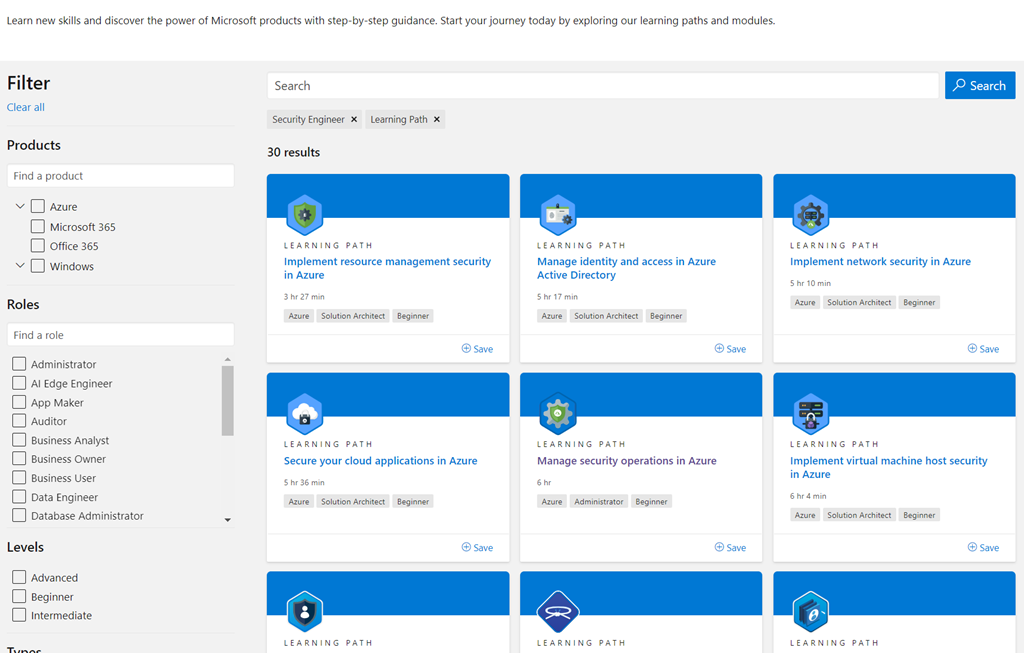
imageMicrosoft has recently released 30 multi-module “learning paths” for Security Engineers spanning Azure, Azure Active Directory, Microsoft 365 as well as a few on-premises technologies such as Active Directory, Windows Server, & Windows 10.

These are available at no cost to the student.  Each path requires roughly 5 hours of training.  Here’s a sample of what’s available as of 6/19/21:

Azure:

Microsoft 365:

Review the entire security training catalog here:

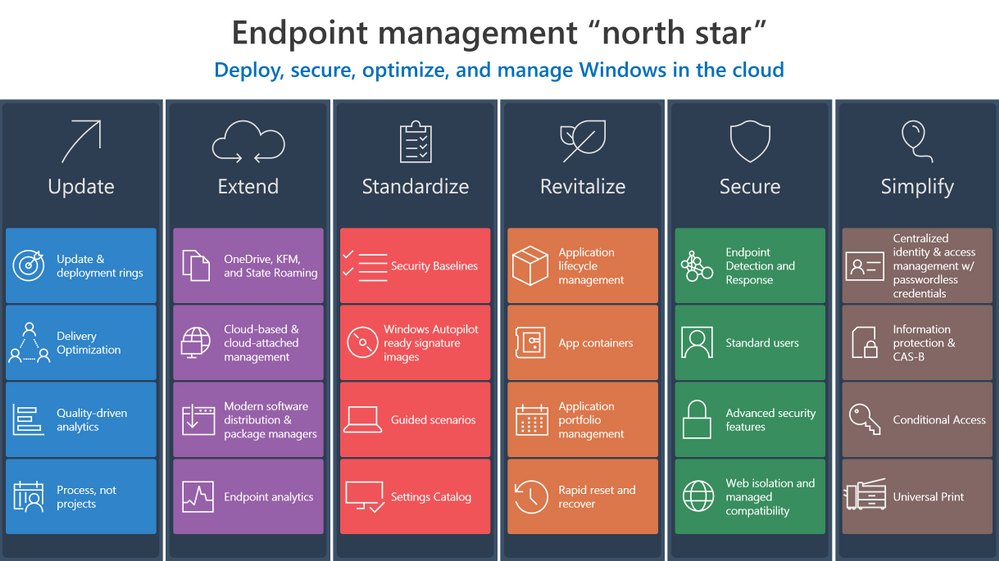
imageLooking for a framework to help you transform Windows endpoint management and simply by moving to a cloud-first model?

We just published exactly that… a framework for Endpoint Managers & Client Administrators to make that transformation.

Investments in Azure and Microsoft 365 can streamline your transition to the cloud and make it easier to manage endpoints across your organization. Now let’s explore ways to develop and implement effective strategy to make that transition and help you create the “how” and “why” to leverage these solutions in your own environment.

  • Update
  • Extend
  • Standardize
  • Revitalize
  • Secure
  • Simplify

Review the framework in it’s entirety here:

imageIf you are an existing Microsoft Defender for Endpoint customer but have Exchange servers that are not onboarded, see instructions at this documentation site for onboarding Windows Server to Microsoft Defender for Endpoint.

Posted by: kurtsh | June 21, 2021

RELEASE: Microsoft Teams Panels

imageMicrosoft Teams Panels are now generally available. 

Teams Panels are discreet touch-friendly “signage” posted outside of a conference room that displays current & upcoming meetings. First & foremost they indicate with a RED or GREEN glow if the conference room is occupied but they also allow people to:

  • Reserve the room on the spot through the touch interface
  • Visually display maps to identify available rooms nearby
  • Notify current occupants that the next meeting is waiting outside to begin
  • Automatically connect to the Teams Meetings within the conference room’s audio/video facilities

With Teams Panels, employees can book an available room on the spot or find another time slot and reserve it right from the panel. With vibrant, color-coded LED indicators, it’s easy to determine space availability from a distance. And, the intuitive and easy-to-read UI presents space and meeting information, so you can confirm you’re in the right place at the right time.

A popular feature available now is the ad hoc meeting scheduler. Let’s say you and a colleague need to jump on a quick client call. Simply go to the Teams Panel outside a meeting space. If the time slot is not booked, it will appear green. Just tap the screen to instantly book it and the room is yours for the time selected. Teams Panels use the Exchange calendar for the booking of the room, so users can have insight in the meeting space free or busy status at any time.

For more details on Microsoft Teams Panels or to contact a manufacturer of a Teams Panel like Crestron or Yealink, visit:

For other examples of Microsoft Teams-enabled hardware, visit:

Posted by: kurtsh | June 21, 2021

VIDEO: Yammer Governance (in a Microsoft 365 World)

Learn about administering your Yammer network in Microsoft 365 and managing compliance, including a double-click into Yammer data governance features like:

  • eDiscovery
  • Data Retention
  • Native Mode

imageYour one-stop session for administering your Yammer network in Microsoft 365 and managing compliance, including a double-click into the latest Yammer data governance features like eDiscovery, Data Retention, and Native Mode.

View the content here:

Posted by: kurtsh | June 19, 2021

RELEASE: The “new” Microsoft Whiteboard

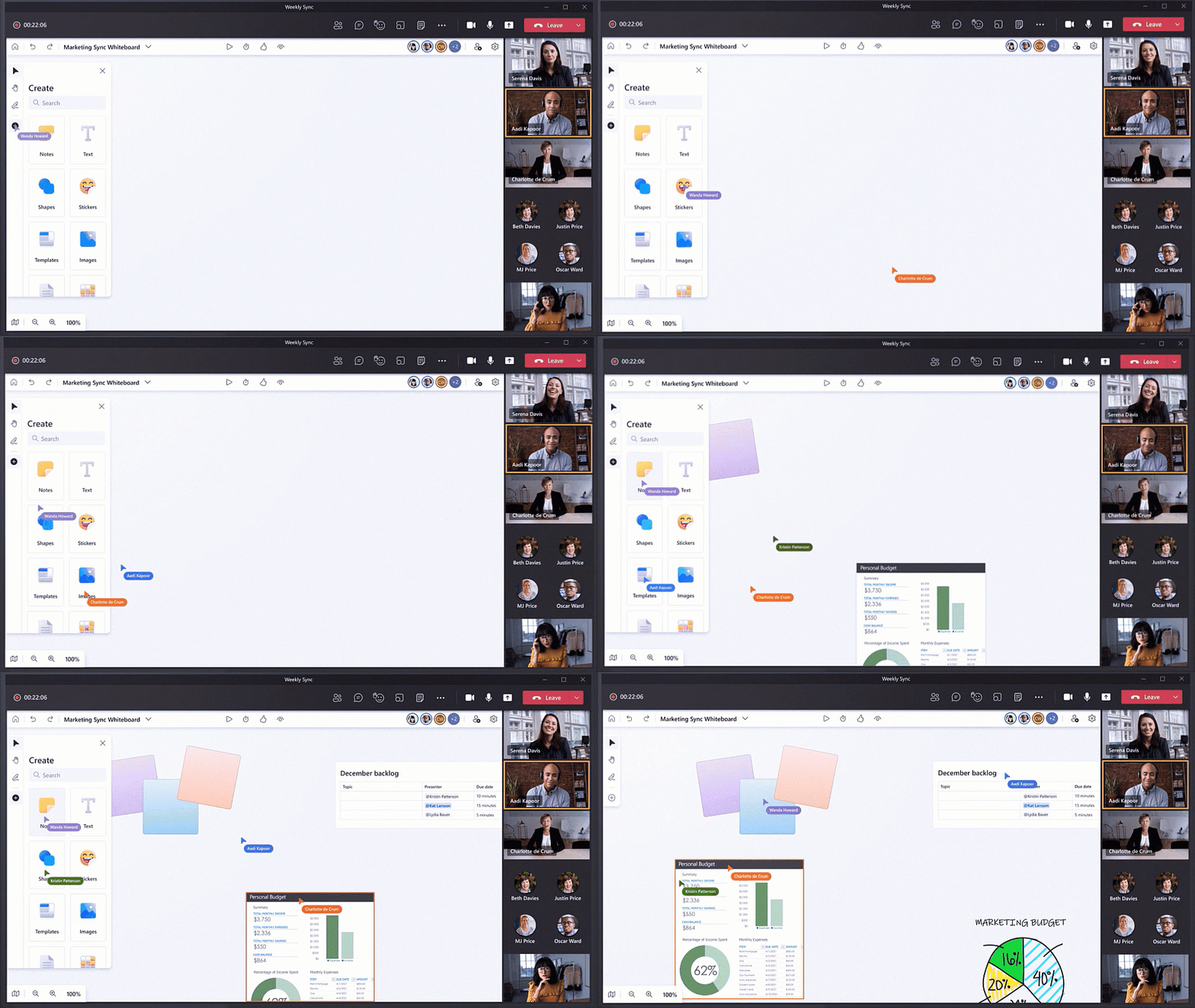
imageIntroducing a completely new Microsoft Whiteboard, the visual collaboration workspace in Microsoft 365, designed for hybrid work.

We introduced Microsoft Whiteboard with the goal of bringing people together for visual collaboration, working across a range of devices and ecosystems including Microsoft Teams.

Over the past 18 months, as many people were working remotely, we learned customers needed virtual-first tools to creatively problem-solve with others. To help people thrive in a more flexible work environment, we have reimagined the Whiteboard experience to help our customers collaborate, wherever, and whenever.

Try the new Microsoft Whiteboard now at: https://whiteboard.microsoft.com/

Learn more: https://aka.ms/new-whiteboard

For those still using ADFS, we’ve got a treat:

AD FS sign-ins can now be added to Azure AD activity reporting, giving organizations a unified view of their hybrid identity infrastructure. This sign-in activity appears in the “Federated” column of Azure AD sign-in reports for customers using the latest version of Azure AD Connect Health. Customers can stream this activity and analyze in their own SIEM tools like Azure Sentinel, or they can use the Azure AD integration with Azure Monitor and Log Analytics to unlock insights and build dashboarding within the Azure portal. Log Analytics now has a stream called “ADFS SignIns”, which contains the same schema as the sign-in data in the logs, and Azure Monitor has a new pre-built “Sign-In Report” workbook.

AD FS sign-ins can now be integrated into the Azure Active Directory sign-ins report by using Connect Health. The Azure AD sign-ins Report report includes information about when users, applications, and managed resources sign in to Azure AD and access resources.

The Connect Health for AD FS agent correlates multiple Event IDs from AD FS, dependent on the server version, to provide information about the request and error details if the request fails. This information is correlated to the Azure AD sign-ins report schema and displayed in the Azure AD Sign-In Report UX. Alongside the report, a new Log Analytics stream is available with the AD FS data and a new Azure Monitor Workbook template. The template can be used and modified for an in-depth analysis for scenarios such as AD FS account lockouts, bad password attempts, and spikes of unexpected sign-in attempts.

Read the documentation on this new feature here:

imageThreat analytics is Microsoft 365 Defender’s in-product threat intelligence (TI) solution designed to help defenders like you to efficiently understand, prevent, identify, and stop emerging threats. It provides a unique combination of in-depth TI analysis and reports from expert Microsoft security researchers, and consolidated data showing your organization’s security posture relative to the threats. Threat analytics helps you respond to and minimize the impact of active attacks.

As part of a unified extended detection and response (XDR) experience in Microsoft 365 Defender, threat analytics is now available for public preview. It includes better data coverage, incident management across security pillars, automatic investigation and remediation, and cross-domain hunting capabilities.  Microsoft 365 Defender threat analytics is available for Microsoft Defender for Office 365 and Microsoft Defender for Endpoint users.

If you’re familiar with threat analytics in Microsoft Defender for Endpoint, you’ll be excited to know that the integrated experience you’ll see in Microsoft 365 Defender threat analytics takes your report consumption to another level.

Read more about Threat Analytics for Microsoft 365 Defender here:

imageWith the dawn of the COVID-19 pandemic, state and federal agencies around the globe were looking at ways to modernize data intake for social services recipients. The government of a country of about 40 million citizens reached out to Microsoft and asked us to assist in this endeavor. Going paperless eliminates waiting in line at an agency office, and lowers the chance of COVID-19 transmission. The ability to make requests or apply for federal or local assistance online makes the process safer and more efficient, as once data is collected citizens should start receiving funds more accurately and quickly.

Security is a major concern of not only major governments but of other entities using Microsoft Power App intake forms. Organizations and agencies needed to be certain that Microsoft Power App intake forms could not be used to collect data from large, sensitive databases containing personal information like names, addresses, Social Security or national security identification numbers, telephone numbers, or bank account information for direct deposit. If internet-facing forms collect personal information, and are not securely implemented, bad actors can use those forms to cleverly gain access to millions—if not billions—of personal records.

We authored this white paper specifically for those agencies and organizations who are transforming data intake to partially or 100-percent paperless. Microsoft wants to ensure that customers are implementing our technologies with the most secure approach possible, and adhering to compliance with all data privacy laws. Microsoft is also making recommendations in the white paper regarding the best way to implement the NIST Cybersecurity Framework in order to identify, protect, detect, respond, and recover from cybersecurity attacks.

Posted by: kurtsh | June 18, 2021

RELEASE: Outlook Roaming Email Signatures

Ever notice your email “auto” signature doesn’t follow you from device to device?  It’s because it was originally stored in Outlook locally per device.

imageComing soon (July 2021) to Exchange Online & Outlook.com users, if you’ve got email signatures, they’ll now be stored in your Email Account in the cloud and “follow you” from device to device.

(No word on availability for GCC/GCC High/DoD.)

Read the details on how this will work in the article below.

« Newer Posts - Older Posts »

Categories