For those still using ADFS, we’ve got a treat:

AD FS sign-ins can now be added to Azure AD activity reporting, giving organizations a unified view of their hybrid identity infrastructure. This sign-in activity appears in the “Federated” column of Azure AD sign-in reports for customers using the latest version of Azure AD Connect Health. Customers can stream this activity and analyze in their own SIEM tools like Azure Sentinel, or they can use the Azure AD integration with Azure Monitor and Log Analytics to unlock insights and build dashboarding within the Azure portal. Log Analytics now has a stream called “ADFS SignIns”, which contains the same schema as the sign-in data in the logs, and Azure Monitor has a new pre-built “Sign-In Report” workbook.

AD FS sign-ins can now be integrated into the Azure Active Directory sign-ins report by using Connect Health. The Azure AD sign-ins Report report includes information about when users, applications, and managed resources sign in to Azure AD and access resources.

The Connect Health for AD FS agent correlates multiple Event IDs from AD FS, dependent on the server version, to provide information about the request and error details if the request fails. This information is correlated to the Azure AD sign-ins report schema and displayed in the Azure AD Sign-In Report UX. Alongside the report, a new Log Analytics stream is available with the AD FS data and a new Azure Monitor Workbook template. The template can be used and modified for an in-depth analysis for scenarios such as AD FS account lockouts, bad password attempts, and spikes of unexpected sign-in attempts.

Read the documentation on this new feature here:

imageThreat analytics is Microsoft 365 Defender’s in-product threat intelligence (TI) solution designed to help defenders like you to efficiently understand, prevent, identify, and stop emerging threats. It provides a unique combination of in-depth TI analysis and reports from expert Microsoft security researchers, and consolidated data showing your organization’s security posture relative to the threats. Threat analytics helps you respond to and minimize the impact of active attacks.

As part of a unified extended detection and response (XDR) experience in Microsoft 365 Defender, threat analytics is now available for public preview. It includes better data coverage, incident management across security pillars, automatic investigation and remediation, and cross-domain hunting capabilities.  Microsoft 365 Defender threat analytics is available for Microsoft Defender for Office 365 and Microsoft Defender for Endpoint users.

If you’re familiar with threat analytics in Microsoft Defender for Endpoint, you’ll be excited to know that the integrated experience you’ll see in Microsoft 365 Defender threat analytics takes your report consumption to another level.

Read more about Threat Analytics for Microsoft 365 Defender here:

imageWith the dawn of the COVID-19 pandemic, state and federal agencies around the globe were looking at ways to modernize data intake for social services recipients. The government of a country of about 40 million citizens reached out to Microsoft and asked us to assist in this endeavor. Going paperless eliminates waiting in line at an agency office, and lowers the chance of COVID-19 transmission. The ability to make requests or apply for federal or local assistance online makes the process safer and more efficient, as once data is collected citizens should start receiving funds more accurately and quickly.

Security is a major concern of not only major governments but of other entities using Microsoft Power App intake forms. Organizations and agencies needed to be certain that Microsoft Power App intake forms could not be used to collect data from large, sensitive databases containing personal information like names, addresses, Social Security or national security identification numbers, telephone numbers, or bank account information for direct deposit. If internet-facing forms collect personal information, and are not securely implemented, bad actors can use those forms to cleverly gain access to millions—if not billions—of personal records.

We authored this white paper specifically for those agencies and organizations who are transforming data intake to partially or 100-percent paperless. Microsoft wants to ensure that customers are implementing our technologies with the most secure approach possible, and adhering to compliance with all data privacy laws. Microsoft is also making recommendations in the white paper regarding the best way to implement the NIST Cybersecurity Framework in order to identify, protect, detect, respond, and recover from cybersecurity attacks.

Posted by: kurtsh | June 18, 2021

RELEASE: Outlook Roaming Email Signatures

Ever notice your email “auto” signature doesn’t follow you from device to device?  It’s because it was originally stored in Outlook locally per device.

imageComing soon (July 2021) to Exchange Online & Outlook.com users, if you’ve got email signatures, they’ll now be stored in your Email Account in the cloud and “follow you” from device to device.

(No word on availability for GCC/GCC High/DoD.)

Read the details on how this will work in the article below.

A new superpower for communicators has been introduced with Yammer for broadcasting critical messages: 

“Essential Announcements” ensure that critical announcements reach your audience across Yammer and their Outlook inbox – and even Teams.  Reach your audience (community) and measure reach & impact with Conversation Insights.

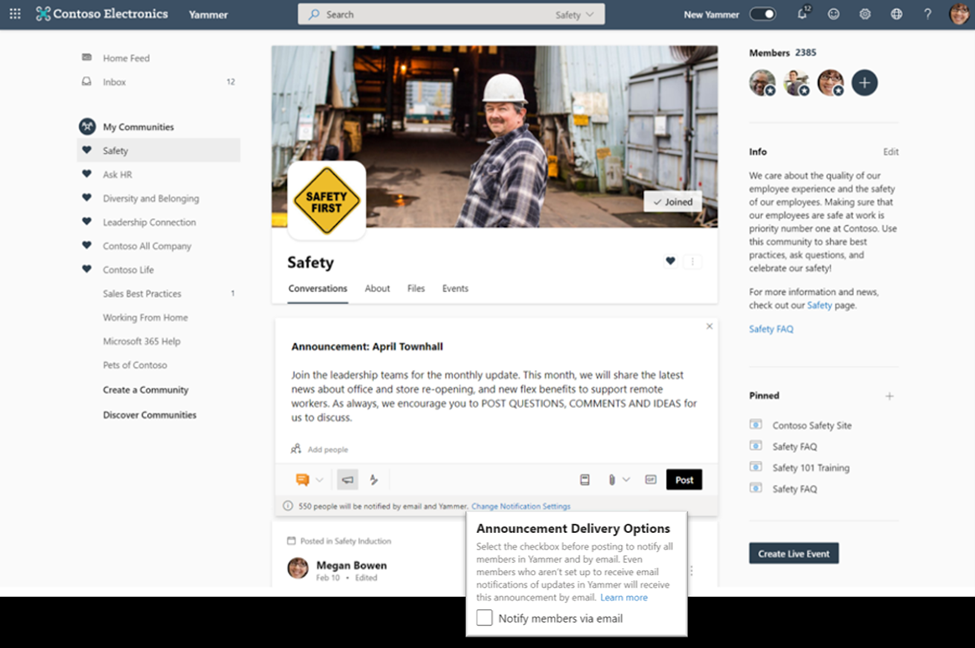
imageSome announcements are crucial to keeping employees up to date – whether it’s regarding safety, protocols, policies, or other priority news. In these instances, corporate communicators and leaders need ways to guarantee that messages are delivered to every employee. This feature allows Yammer community admins to set an announcement as ‘essential’ to ensure that it’s delivered via email to every member of that community, even if it is outside of their preferred notification settings.

How it works

Community admins and network admins can now choose to set a post as an ‘essential announcement’ by changing the announcement delivery options before they post, which will notify all community members by email including those members who are not setup to receive email notifications of updates in Yammer. The total number of members will also be listed at the bottom of the editing card. Admins must be using the new Yammer experience to use this feature, but members using both the classic and new Yammer will receive the notifications. Learn more about how to send announcements in Yammer here. When members receive email notifications for essential announcements, they will be able to reply directly to the announcer by email. The email would also contain a note explaining to the member that they received this email as the community admin chose to make an essential announcement.

For those that have the Yammer Communities app for Teams installed, announcements and @mentions made in Yammer will also appear in your Microsoft Teams activity feed.

Read more here:

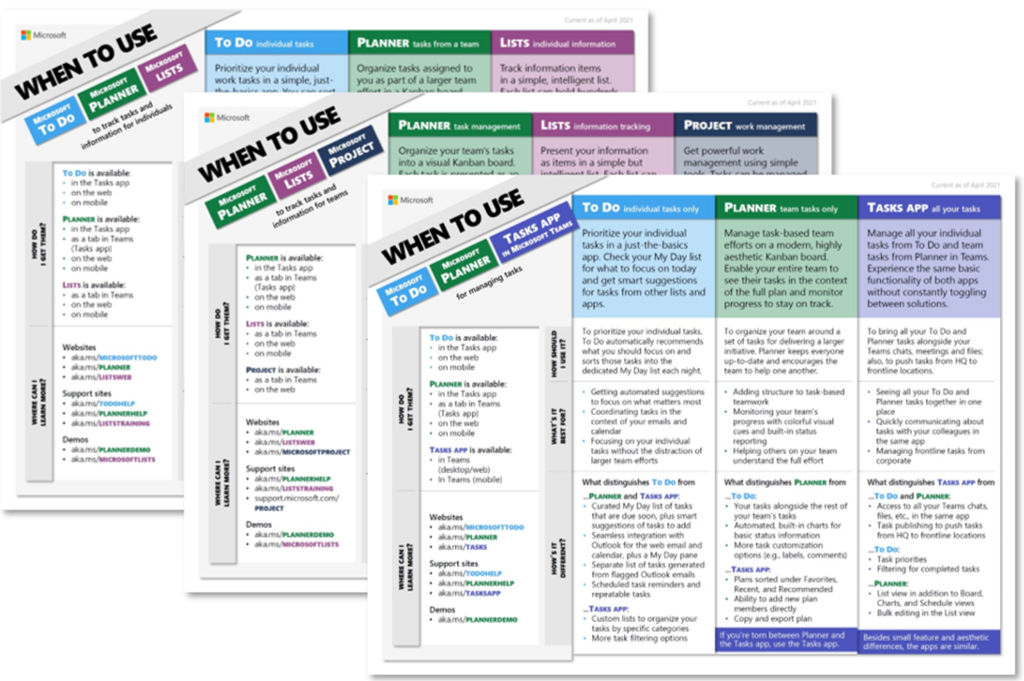
imageThe launch of Microsoft Lists and Tasks in Microsoft Teams last year added new options to an already robust catalog of Microsoft work management tools. They seemed to overlap with Microsoft To Do, Microsoft Planner, and Microsoft Project for the web, causing a lot of (understandable) confusion and questions, all of which boiled down to, “Which tool should I use?”

Today, we’re answering that question with three aptly named when-to-use guides. These one-page documents, which are linked below, focus on different work management scenarios and the Microsoft tools that enable them:

Read the rest of the article and download the guides here:

imageMicrosoft Viva is an employee experience platform that brings together communications, knowledge, learning, resources, and insights. Powered by Microsoft 365 and experienced primarily through Microsoft Teams, Viva fosters a culture where people and teams are empowered be their best from anywhere.

Join us Thursday, June 17th at 12 noon eastern, to learn how Microsoft Viva can take your organizational employee experience to the next level as we cover: Download the meeting invite here.

View original invite here:

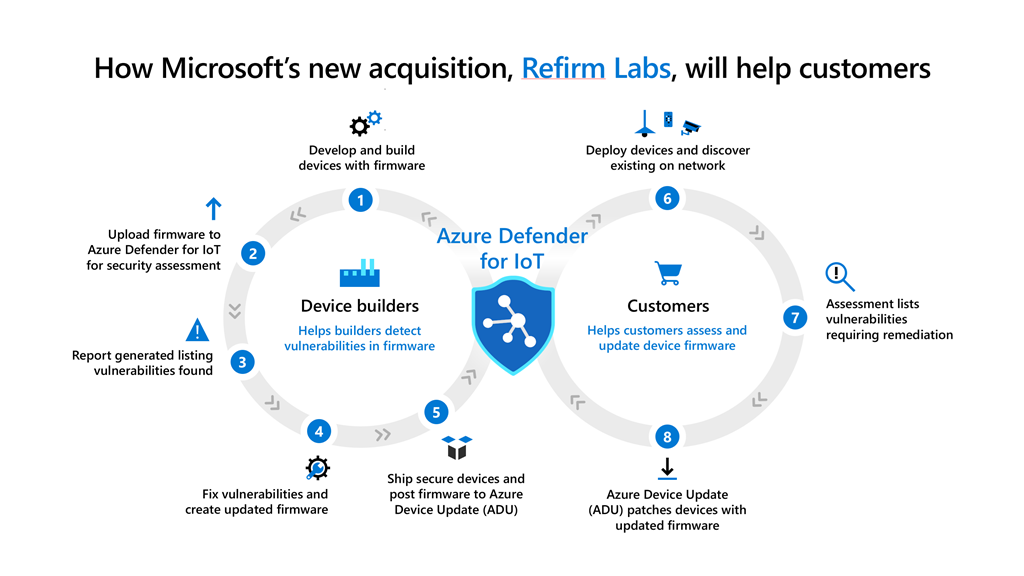
imageOn June 2nd, we announced the acquisition of ReFirm Labs to enrich our device firmware analysis and security capabilities across devices that form the intelligent edge from servers to IoT. The addition of ReFirm Labs to Microsoft will bring both world-class expertise in firmware security and the Centrifuge platform to enhance Microsoft’s ability to analyze and help protect firmware backed by the power and speed of our cloud.

Read more here:

imageFor anyone looking for the datasheets for any of the Microsoft Surface device and accessory announcements made back in April, here’s links to the materials for each announced item:

Azure MFA admins – ever wish there was a way to migrate your users from SMS/Phone to something more secure like Push?

Microsoft has a new Preview feature called "Nudge" that can help!

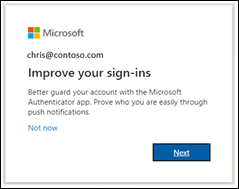
imageYou can nudge users to set up Microsoft Authenticator during sign-in. Users will go through their regular sign-in, perform multifactor authentication as usual, and then be prompted to set up Microsoft Authenticator. You can include or exclude users or groups to control who gets nudged to set up the app. This allows targeted campaigns to move users from less secure authentication methods to Microsoft Authenticator.

In addition to choosing who can be nudged, you can define how many days a user can postpone, or "snooze", the nudge. If a user taps Not now to snooze the app setup, they will be nudged again on the next MFA attempt after the snooze duration has elapsed.

Read more about this new, free features here:

« Newer Posts - Older Posts »

Categories