Posted by: kurtsh | April 10, 2022

INFO: Conditional Access for Zero Trust

How cool is this! A framework for implementing Zero Trust principles by using Conditional Access to control access to cloud services.

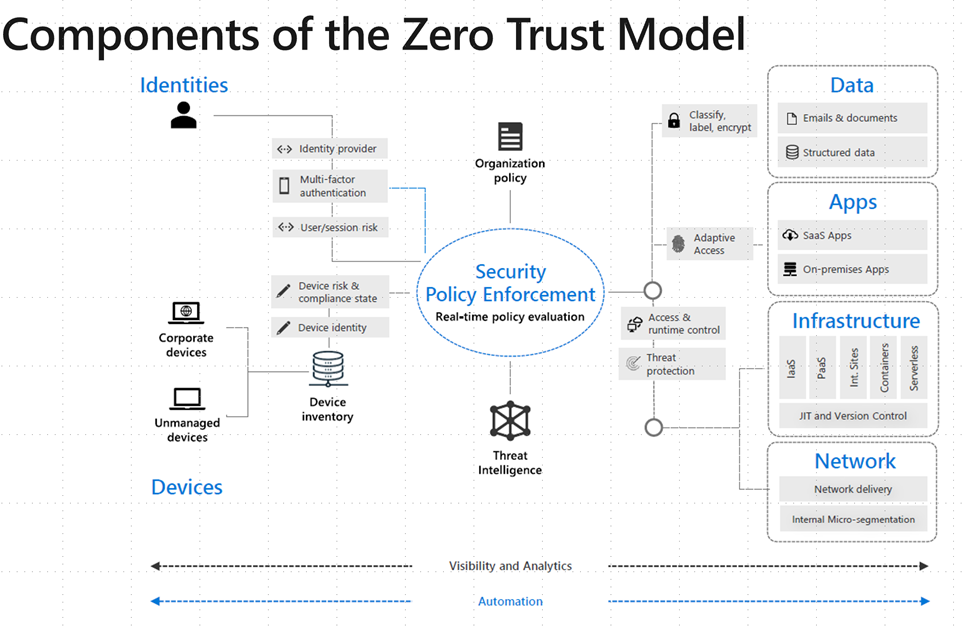
imageThe articles in this section provide a design and framework for implementing Zero Trust principles by using Conditional Access to control access to cloud services. The guidance is based on years of experience with helping customers control access to their resources.

The framework presented here represents a structured approach that you can use to get a good balance between security and usability while ensuring that user access is controlled.

The guidance suggests a structured approach for helping to secure access that’s based on personas. It also includes a breakdown of suggested personas and defines the Conditional Access policies for each persona.
Read the article here:

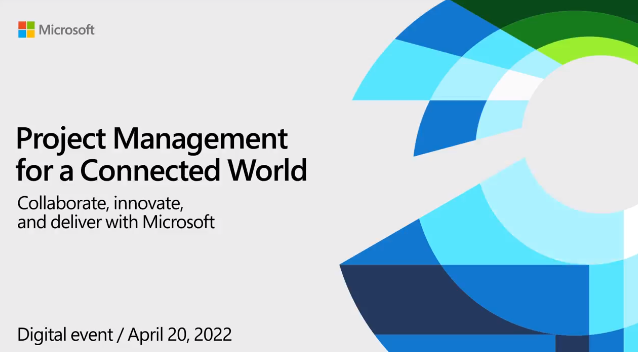
imageLearn how Microsoft’s project management tools help you run projects more efficiently for successful delivery. Choose your own experience by attending breakout sessions that meet your needs from among twelve options.

Join us for this digital event to:

  • Learn how to stay organized and deliver results across projects of varying complexity with Microsoft’s connected project experiences.
  • Hear about the latest product features and roadmap.
  • Explore when to use Microsoft Planner, Microsoft Project, or Dynamics 365 Project Operations to meet your goals.
  • Get your questions answered by product experts throughout all the sessions.

Register here:

Microsoft has several great resources for Public Sector customers including those in State & Local Government.

Posted by: kurtsh | March 23, 2022

DOWNLOAD: Power BI End-To-End Diagram (3rd party)

Melissa Coates, a Power BI professional & trainer, created the diagram to the right.  It’s a nice illustration of the different ways Power BI can be used – outside of simple reporting.

imageThis is the fourth major revision over the last few years. Why do I produce this diagram?

Mostly I produce this diagram to help with awareness that Power BI can be used a lot of ways. Although the diagram doesn’t include every single possible item, I try to include the most important items — when you’re focused on a cloud-based deployment.

You might use the diagram to:

  • Notice some aspects that you may not be aware of, and inspire you to learn more about them.

  • Talk with coworkers about what’s involved with the Power BI ecosystem.

  • Dispel the notion that Power BI is “just” a reporting tool.

  • Consider if you’re planning and managing the Power BI ecosystem sufficiently.

Download the .PDF here:

PowerAppsLogoDeliver business applications fast and pay for only what you use with the Microsoft Power Apps pay-as-you-go plan.

By configuring your Azure subscription to automatically provision Power Apps per app licenses for active users of your apps, you can now explore the value of low code with Power Apps more easily. Whether you’re looking to better understand your usage of the platform or build solutions to be used at scale throughout your organization, the pay-as-you-go plan makes it easier and low risk to scale investments over time based on your usage patterns.

Join us for this webinar to learn how you can use an Azure subscription to cover your Power Apps using the new pay-as-you-go licensing for Microsoft Power Apps.

You can also check out our full library of upcoming live events, or watch the recorded sessions on-demand, just follow this link.

Register & view here:

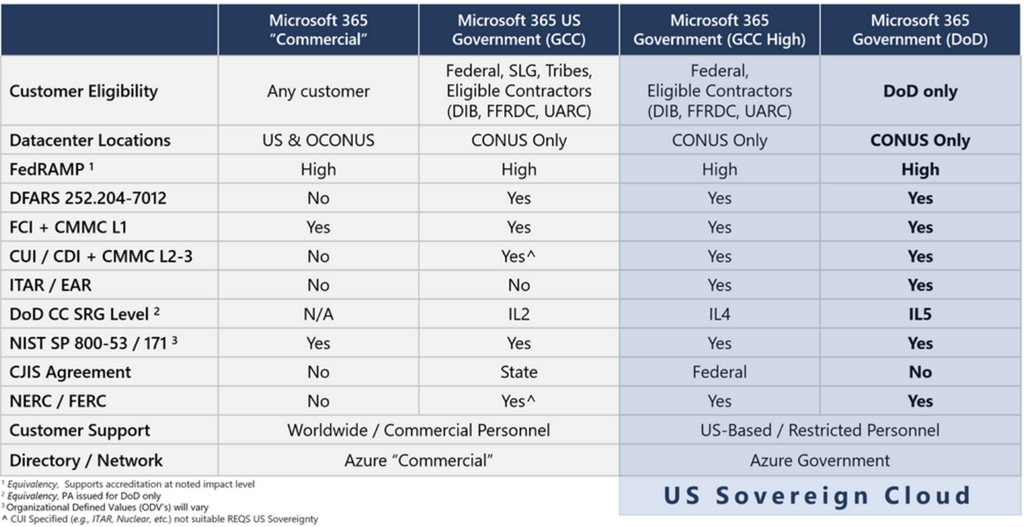
imageAre you using the government cloud? 
Are you interested in the government cloud? 
Do you know what a “government cloud” is?

You’re in for a treat.  Microsoft Government Cloud expert Richard Wakeman just published his latest review of Microsoft’s government cloud and our point of view on regulatory compliance.

Anyone in State & Local Government or Federal Government should read this as a primer on why “government clouds” exist & how Microsoft addresses their need in Microsoft 365 & Azure.

This is a genuinely educational, current & LONOG blog post that I consider required reading for anyone dealing with the cloud in State & Local Government.

imageFind out how choosing the right devices can transform your organization

A Gartner survey shows that “institutional agility is the way public-sector leaders and Chief Information Officers can balance stability with speed”1 to respond faster and better to disruptions. How can you achieve agility while transitioning to a hybrid workplace? Start from the inside: provide employees with the devices they need to do their best collaboratively, safely, and from virtually anywhere.

A streamlined device strategy for state and local government must give teams modern tools to work effectively and foster security. The benefits of a hybrid approach range from boosted workforce collaboration and productivity to proactive protection, improved IT efficiency, cost reduction, and easier deployment. Take advantage of all these benefits by bringing cloud-ready Surface devices into your strategy.

Join us in this webinar to discover with real-life scenarios:

  • How the Surface PCs and devices can help meet the needs of your workforce—for example, combining Surface, Microsoft 365, and Microsoft Teams to better remote working.
  • How to address the IT challenges of hybrid work and its device deployment, management, and security needs.
  • How to transition to an automated approach using an integrated cloud and modern device strategy.
  • How to use chip-to-cloud protection to apply a zero-trust security strategy to devices.

Lead the digital transformation in government with Microsoft.

Posted by: kurtsh | March 22, 2022

HOWTO: Get support for Power Automate

PowerAutomateFor customers without Microsoft Unified Support agreements, they must turn to public forms of support for issues with Power Automate.  These forms are listed here:
https://powerautomate.microsoft.com/en-us/support/

Note: If your user account is Power Apps licensed, you are entitled for Power Automate rights and that should get you the ability to file for support through the first option in the above link called “Paid Subscription Support”.

POWER AUTOMATE COMMUNITY
Alternatively, you may choose to submit your questions to the Power Apps Community here:  https://powerusers.microsoft.com/t5/Power-Apps-Community/ct-p/PowerApps1

image_9fa7ce64-9ffc-4b35-a55c-1703354ea9be20220311_093948Got questions for the Power Automate engineering team?

"Ask Microsoft Anything" for Power Automate coming up next week!

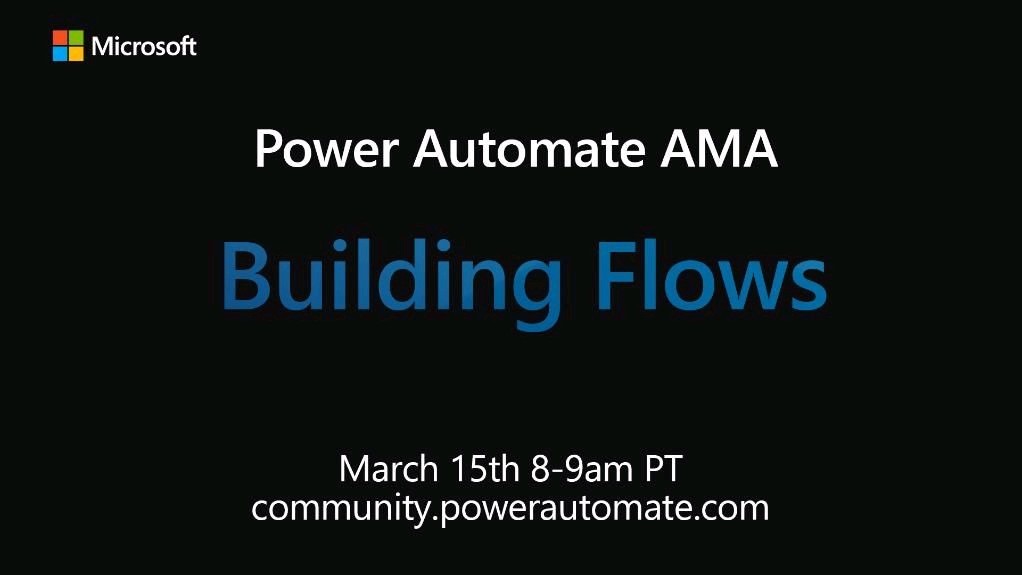
Announcing the March 8th “Building Flows” AMA! Excited to announce our first AMA in the Power Automate community! On March 8th we will be hosting an AMA on “Building Flows”. Come prepared with your questions and we will be answering questions from 8:00AM until 9:00AM Pacific Time. What is an AMA? AMA stands for “Ask Microsoft Anything” – where we gather our Microsoft experts to answer all your experts on the chosen theme. Who will be at the AMA? We’re excited to have Chris Garty, Kishor Subedi, Matt Townsend as our experts from Microsoft to answer community questions.

Check it out here:

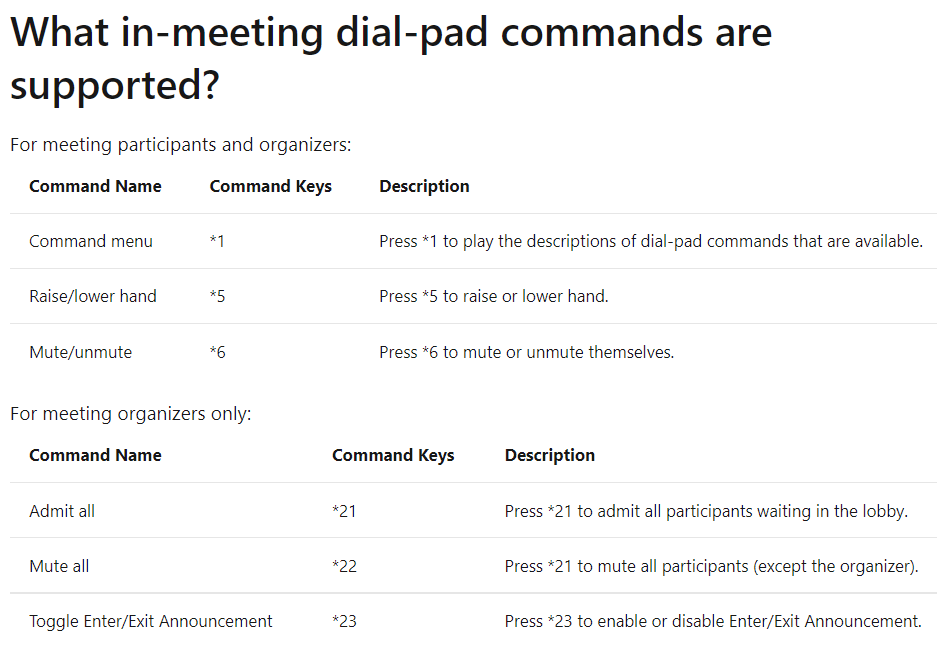
imageHere’s a quick reference for dial pad commands within Teams Audio Conference calls:

Meeting Participants:

  • Command Menu *1
    Press *1 to play the descriptions of dial-pad commands that are available.

  • Raise/lower hand *5
    Press *5 to raise or lower hand.

  • Mute/unmute *6
    Press *6 to mute or unmute themselves.

Meeting Organizers:

  • Admit all *21
    Press *21 to admit all participants waiting in the lobby.

  • Mute all *22
    Press *21 to mute all participants (except the organizer).

  • Toggle Enter/Exit Announcement *23
    Press *23 to enable or disable Enter/Exit Announcement.

This is documented here:

« Newer Posts - Older Posts »

Categories