imageDeep dive into Windows Embedded CE Tools and Standard Tools with Randy Rockinson, Douglas Boling, and others

TechEd 2009 Pre-conference Seminars
Sunday, May 10, 2009
Los Angeles Convention Center

Attend a full-day seminar of 300- and 400-level technical training on Windows Embedded CE 6.0 or Windows Embedded Standard 2009 and take home an ICOP board and SPARK Kit (value of $1300)—on us. The seminars are open to all—you do not need to be a TechEd attendee to register for the pre-conference days.

  • Who should attend: Experienced embedded developers; ideally with hands-on experience with CE 6.0/Standard 2009, or previous versions of these Windows Embedded products.

  • About the content: Choose from a full-day seminar about CE 6.0 or Standard 2009; each will have six modules led by Randy Rockinson, Douglas Boling and other Windows Embedded technical experts for the Windows Embedded technical team. During the day we’ll answer practical question and work through advanced scenarios. There are no labs as part of the pre-cons. Visit the TechEd site to read the abstracts.

  • Cost and Registration: US$400 for registered TechEd attendees; US$500 for non-TechEd attendees. Register via the TechEd site.

LINK: http://www.msteched.com/teched/seminars.aspx

———————–

image “SPARK YOUR IMAGINATION” OFFER:
If you are an Embedded Systems hobbyist or you’d like to become one, sign up for the Windows Embedded “Spark Your Imagination” offer!  SPARK is a Windows Embedded offering for hobbyists:

  • We provide a full version of Windows Embedded CE 6.0 R2.
  • A full version of Visual Studio Pro 2005.
  • You buy a SPARK-selected board from any of our 5 hardware partners.
  • You get the software and the hardware for the price of the board.

There’s no catch.  Just get your gear and go. No markup on the board. Be free. The only requirement is that any work you produce be strictly non-commercial. It wouldn’t be much of a hobbyist program otherwise.

LINK: http://www.microsoft.com/windowsembedded/en-us/products/spark/default.mspx

Digg This

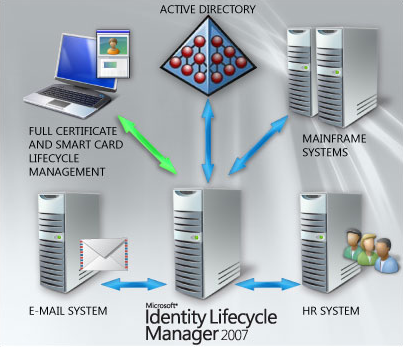
image Gemalto and Oxford Computer Group invite you to a free 2-day training seminar and hands-on-lab on Microsoft’s Identity Lifecycle Manager (ILM) “2”.

Come and learn how ILM “2” can help you by delivering simplicity, agility and efficiency while increasing security and compliance within your enterprise identity infrastructure.

The curriculum for this training is modular, which will allow users with different technical levels to attend. 

Day 1 Agenda:

  • ILM “2” Overview Presentation and Demo
  • ILM “2” Managing Users and Groups Hands-on Lab
  • ILM “2” and ILM 2007 Comparison
  • Certificate Basics Presentation
  • Certificate Demo and Basic Use Cases
  • CLM Hands-on Lab

clip_image002

clip_image003

Day 2 Agenda:

  • ILM “2” Codeless Synchronization Presentation and Demo
  • ILM “2” Hands-on Lab
  • ILM “2” Policy Management Presentation and Demo
  • ILM “2” Hands-on Lab
  • Making It All Work Together – Demo: ILM, CLM, ADFS, MOSS, RMS, and IAG

LOCATION/DATE:
Irvine, CA – April 2 – 3

REGISTRATION:
If you’re one of my customers, please contact me and I will provide you with registration information.  No unregistered attendees will be permitted in the event.

Digg This

image Published on February 2nd, 2009, Ben Gray for Forrester Research shows that Enterprise deployment of Windows Vista is steadily moving forward throughout North America & Europe.  More interestingly, the report also clearly demonstrates that neither MacOS or Linux is making bigger in-roads with shares of 3% & 2% each in the Enterprise. 

A few bulleted highlights from the report:

  • Windows Vista is “finally starting its much anticipated ramp-up in the enterprise”
    • 31% of ITDMs have already begun migration to Windows Vista
    • Nearly 10% of all PCs in enterprises run Windows Vista
    • There is considerable interest in Windows 7
  • Window XP still powers 71% of enterprise PCs but will likely be replaced by Windows Vista during natural PC refresh cycle
  • Windows 2000 is “fading fast” from enterprise landscape
  • Mac OS X maintains its niche business status but there is more interest
    • 3% Mac OS X foothold in enterprise environments
    • Forrester anticipates that IT department interest in allowing employees to bring Mac-products  into the office (mainly iPhones) will “increasingly evolve to actual pilots later this year and beyond.”
  • Linux adoption is flat at 2%, largely driven by Red Hat and Novell.

Some press coverages of the report:

Digg This

clip_image002

Convergence is the premier Microsoft Dynamics event, bringing customers, partners, team members and industry experts together in an environment created for you to discuss solutions, address business needs and establish a true community that can be leveraged throughout the year.

In 2009, Convergence will take place in New Orleans, Louisiana March 10 – 13. This is your opportunity to participate in an exceptional program including a variety of speakers, detailed product demonstrations and hands-on learning sessions. You will learn how to enhance your Microsoft investment now and in the future, and gain a stronger sense of community through interacting with industry leaders, Microsoft team members, partners and other customers.

Convergence 2009 will help you:

  • Build skills across all Microsoft platforms and equip yourself with the tools and knowledge you need to optimize your business solution.
  • Interact with peers, partners, Microsoft team members and top industry experts in both structured and informal settings.
  • Hear the vision and strategy of key Microsoft executive leaders and gain insight on the future of the company, product direction and investments so you can align your business and take advantage of the benefits.

Why Management Should Let You Attend

In today’s difficult economic environment, there has never been more value in attending Convergence. This year is geared toward helping attendees leverage their Microsoft Dynamics solutions to increase visibility into operations and maximize efficiencies.

Convergence attendees will get exposure to new technologies, will better understand their current business management software, and will have the insights they need to unleash their solution’s full capabilities.

Here are the six reasons for you to attend:

  1. Learn how to more effectively use Microsoft Dynamics solutions to easily analyze financial data and respond to changing business conditions.
  2. Gain clearer understanding of reporting and process automation capabilities to more effectively forecast and manage cash flow and compliance.
  3. Learn how Microsoft Dynamics solutions can give their advisors and representatives access to comprehensive client information and insight.
  4. Discover new ways Microsoft Dynamics can help improve fiscal responsibility and the delivery of public services.
  5. Use accurate financial tracking and reporting to boost efficiencies and improve accountability.
  6. Take advantage of the Convergence Attendee Sales Offer! Microsoft Dynamics AX, GP, NAV and SL customers who attend Convergence 2009 are eligible to receive up to a 20% discount. Terms & Conditions available here.
    View the Microsoft Dynamics CRM Online sales offer for Convergence attendees here.

Register now by visiting the Convergence 2009 New Orleans registration site at:
http://www.microsoft.com/dynamics/convergence/neworleans09

Digg This

Posted by: kurtsh | February 13, 2009

VIDEO: “The History of Microsoft”… a videography

image Tina from Channel 10 is publishing a video series of the History of Microsoft.

Welcome to The History of Microsoft.  A video series that gives you a rare glimpse into the story behind the software giant.  Using rare footage and never-before-seen photos we break down Microsoft’s history by year. Every Thursday we will air a brand new episode beginning with 1975 where The History of Microsoft begins when the ALTAIR 8800 appeared on the cover of Popular Electronics inspiring two young men Bill Gates and Paul Allen to develop BASIC language software for it.  Tune in.

So far, years 1975 & 1976 are published with more anticipated:

Digg This

image The Hyper-V Security Guide can help you elevate the security of virtualized Windows Server environments to meet your business-critical needs.

This accelerator provides IT professionals like you with recommendations to address your key security concerns around server virtualization. The guide provides authoritative guidance that relates to the following strategies for securing virtualized environments:

  • Hardening Hyper-V. The guide provides prescriptive guidance for hardening the Hyper-V server role, including several best practices for installing and configuring Hyper-V with a focus on security. These best practices include measures for reducing the attack surface of Hyper-V as well as recommendations for properly configuring secure virtual networks and storage devices on a Hyper-V host server.
  • Virtual machine management and delegation. The ability to safely and securely delegate administrative access to virtual machine resources within an organization is essential. The guide highlights several available methods to administer different aspects of a virtual machine infrastructure and ways to control administrative access to different servers and at different levels.
  • Protecting virtual machines. The guide also provides prescriptive guidance for securing virtual machine resources, including best practices and detailed steps for protecting virtual machines by using a combination of file system permissions, encryption, and auditing.

Join the beta program [Live ID required].  Then bookmark this link to the program site to get the latest information about upcoming events.

LINK:
https://connect.microsoft.com/InvitationUse.aspx?ProgramID=2699&InvitationID=TET-THVC-6CWK&SiteID=715

Digg This

Posted by: kurtsh | February 12, 2009

DOWNLOAD: GImageX Beta for Windows 7 Beta (3rd party)

image

[as taken from The Deployment Guys]

The Windows Automated Installation Kit (Windows AIK) is a set of tools and documentation that support the configuration and deployment of Microsoft® Windows® operating systems.. By using Windows AIK, you can automate Windows installations, capture Windows images with ImageX, configure and modify images using Deployment Imaging Servicing and Management (DISM), create Windows PE images, and migrate user profiles and data with the User State Migration Tool (USMT).

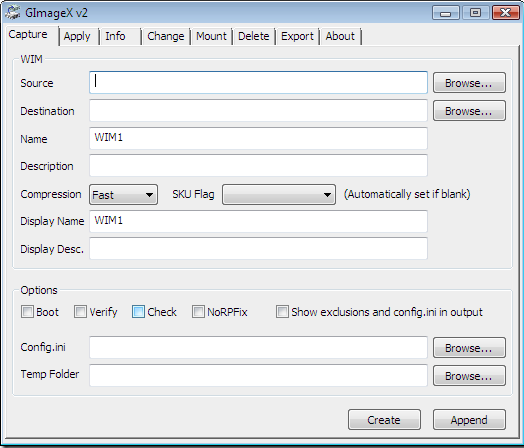
GImageX is a third-party graphical version of the ImageX command-line tool from the Windows AIK.

With the release of the Windows 7 beta and also the beta of the Windows Automated Installation Kit I’ve updated GImageX to work with these new beta versions. I’ve also tidied up parts of the documentation around installation and tweaked the “mount” functionality to provide better feedback during the operation.

Please note that GImageX is a third-party tool so please remember that you won’t be able to ring up Microsoft PSS to get support with it! However, it uses the official Microsoft published WIMGAPI SDK which is a supported way of working with WIM files.

Digg This

Posted by: kurtsh | February 12, 2009

DOWNLOAD: NetFlix Mobile Manager for Windows Mobile

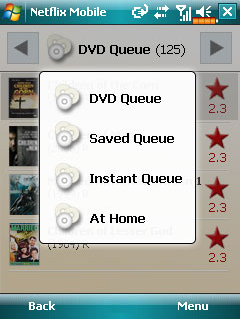
image If you like the movies, it’s time to celebrate!

Windows Mobile now offers a mobile application for Netflix. The new Netflix application for Windows Mobile phones makes it simple to manage your Netflix experience from a mobile device. You can search the entire Netflix library for your next film, get complete movie details, and even manage your DVD queue. Easily update your queue by moving films up, moving films down, or removing films from your queue.

A feature exclusive to Windows Mobile is the ability to play previews right on your Windows Mobile device. After watching a preview, you can then add the movie to your Instant Queue so you can instantly watch the movie on your Xbox 360.

Managing a Netflix account while mobile has never been easier, thanks to Mobile Manager for Netflix and a Windows Mobile phone.


image DOWNLOAD:
(from desktop) http://www.microsoft.com/windowsmobile/en-us/totalaccess/software/software/netflix.mspx
(from mobile) http://www.microsoft.com/windowsmobile/mobile/en-us/totalaccess/software/software/default.mspx

MSDN WINDOWS MOBILE ARTICLE:
http://blogs.msdn.com/windowsmobile/archive/2009/02/04/mobile-manager-for-netflix.aspx

Digg This

Posted by: kurtsh | February 12, 2009

VIDEO: Kylie uses Windows Live Photo Gallery

image Richard and Greg talk to Richard Hicks about ISA Server, including 2000, 2004, 2006 and the upcoming Threat Management Gateway product. The discussion also explores dedicated ISA hardware.

Richard HicksRichard Hicks is a Senior Sales Engineer and Product Specialist for edge security solutions at Celestix Networks, Inc. Richard has been working with Microsoft ISA Server 2006 and its predecessors for over 12 years. Richard has designed and deployed network security solutions using ISA for SMB’s, military and defense organizations, and Fortune 100 companies around the world. Richard is an MCSE and MCITP, and is Microsoft Certified in Proxy 2.0, ISA Server 2000, ISA Server 2004, and ISA Server 2006. Richard currently lives and works in beautiful, sunny Southern California.

DOWNLOAD:
http://www.runasradio.com/default.aspx?showNum=96

Digg This

« Newer Posts - Older Posts »

Categories