image <taken from the Sharepoint Team blog>
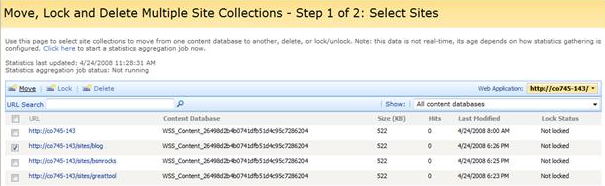
The current version of SharePoint gives an administrator the ability to look into what is actually happening on a farm, how many users are active, how heavy are they using the system, what type of requests are coming in, what kind of clients, etc.  Much of this information is captured in the IIS logs.

Mike Wise who works on the Customer Advisory Team specializes in SharePoint capacity planning and architecture and his goal is to make SharePoint capacity planning more of a science and less of an art.  His whitepaper is the first step, concentrating on the descriptive side of the task and showing one powerful technique that can be used today to make SharePoint performance and capacity measurable.  You can count on seeing more papers, reports, and calculation methods building off his technique in the coming months.

Topics covered in the whitepaper:

  • Preparing the Analysis Machine
  • Preparing the Server Logs
  • Initial Queries
  • Counting Users
  • Load Balancing
  • User Types
  • Request (RPS) Distribution over Time
  • Distinct Users over Time
  • User Agent Distribution
  • Browser Usage Patterns
  • Office Client Web Service Usage
  • Slow Home Page Percentages
  • Import IIS Logs into SQL

You can download the whitepaper here: 
http://www.microsoft.com/downloads/details.aspx?familyid=f159af68-c3a3-413c-a3f7-2e0be6d5532e&displaylang=en&tm

Digg This

Posted by: kurtsh | February 19, 2009

BETA: Forefront Threat Management Gateway Beta 2 released

image <taken from the ISA blog>
I wanted to publish a follow-on to Jim’s enthusiastic post about our public beta.  We have reached an important and critical milestone in the release of Forefront Threat Management Gateway (TMG), our comprehensive network protection solution. For those of you catching up on the TMG line, Forefront TMG is the future version of the Microsoft Internet Security & Acceleration Server (ISA Server) and will extend the capabilities of ISA Server with new features and security technologies. Forefront TMG will be available as both a standalone solution but also part of new integrated suites to be released in the future such as the upcoming Forefront “Stirling” security suite

Today, I am announcing that Beta 2 is available for public download and evaluation. This is a significant change from Beta 1 – the content and feature set is almost too rich too blog in a single posting to be honest. But I will try…

We really have 6 unique value propositions with this release that really emphasize our comprehensive approach to network protection:

  • Control network policy access at the edge (Firewall)
  • Protect users from web browsing threats (Web Client Protection)
  • Protect users from E-mail threats (Email Protection)
  • Protect desktops and servers from intrusion attempts (NIS)
  • Enable users to remotely access corporate resources (VPN, Secure Web Publishing)
  • Simplified management (Deployment)

From a “what’s new” perspective in Beta 2 from the Beta 1 release, we have really polished and completed a lot of features. On the firewall side, we have added key components such as VoIP traversal (SIP), enhanced NAT and ISP Link Redundancy. Combined with our NAP (Network Access Protection) integration with the VPN functionality, the firewall and remote access capabilities are richer than ever. On the web client protection area, we now have fully functional HTTP Anti-virus/spyware scanning and detection as well as HTTPS forward inspection. This provides an extremely rich secure web gateway for the clients that protects all web clients regardless of platform when going through the TMG proxy.

Some of the new areas we have added include a secure email relay deployment option providing email protection at the edge through Exchange Server and Forefront Security for Exchange integration to provide a hardened edge based anti-virus and anti-spam solution. Also we are excited to preview is our new Forefront Network Inspection System (NIS). Forefront NIS is a unique intrusion detection and response solution that integrates with the Forefront codename Stirling security suite to provide security assessment and responses.

Last, but not least, our deployment and management capabilities have received a complete upgrade. Everything from a UI and configuration wizards facelift for easier installation and maintenance, but a completely new array management infrastructure to ensure distributed enterprise deployments of multiple TMG installations.

In the end, I will let the beta speak for itself – we would love to hear your feedback on the feature set and quality in your environments and scenarios. The download is available now and public for everyone to install today – I welcome you to give it a test run!

Download center link:
http://www.microsoft.com/downloads/details.aspx?FamilyID=e05aecbc-d0eb-4e0f-a5db-8f236995bccd&DisplayLang=en

Digg This

Posted by: kurtsh | February 19, 2009

RELEASE: Grand Theft Auto IV: “The Lost and Damned”

imageNow available – EXCLUSIVELY ON XBOX 360 & XBOX LIVE!

Grand Theft Auto IV:  The Lose and Damned features a new main character, Johnny Klebitz, and a plot that intersects with the storyline of Grand Theft Auto IV.  New missions offer an entirely fresh way to explore Liberty City with new multiplayer modes, weapons, vehicles, and additional music.

http://www.xbox.com/en-US/games/g/grandtheftautoiv/lostanddamned/

—————

Johnny is a veteran member of The Lost, a notorious biker gang. Johnny has been creating business opportunities for The Lost in Liberty City, but his first loyalty must be to the patch he wears on his back and to Billy Grey, the club’s President. However, when Billy returns from rehab hell-bent on bloodshed and debauchery, Johnny finds himself in the middle of a vicious turf war with rival gangs for control of a city torn apart by violence and corruption. Can the brotherhood survive?

Developed by series creator Rockstar North and set in Liberty City, Grand Theft Auto IV™ The Lost and Damned™ features a new main character, Johnny Klebitz, and plot that intersects with the storyline of Grand Theft Auto IV; new missions that offer an entirely fresh way to explore Liberty City with new multiplayer modes, weapons and vehicles; and a diverse soundtrack with additional music—all with the incredible production values that are the trademarks of Grand Theft Auto.

The Lost and Damned is available now for download, exclusively from Xbox LIVE Marketplace. You can check out the screenshots from the new expansion above.

DOWNLOAD: 
http://marketplace.xbox.com/games/offers/0ccf0001-0000-4000-8000-0000545407f2

Digg This

image I’ve noticed that many customers and even some people at Microsoft don’t realize you can program your Microsoft Wireless Mouse to remotely change the slides within the LiveMeeting client just as you might with Powerpoint… just like a wireless Powerpoint clicker.

  1. Install Intellimouse software from: 
    http://www.microsoft.com/hardware/download/
    download.aspx?category=MK
  2. Run Programs –> Microsoft Mouse –> Microsoft Mouse.  This will open the "Mouse Properties" dialog.
  3. Click the "Buttons" tab furthest left.
  4. Enable the Checkbox labeled, "Enable program-specific settings"
  5. Click "Settings…" button.  This will open a dialog box called "Program – Specific Settings".
  6. Press "Add…" button. 
    Depending on what version of the Mouse software you have, this will either:
    a) open a dialog box labeled "Add Program…" 
        If this is the case, proceed to the next step.
    b) open a dialog box labeled "Add Program or Game"
        If this is the case, click the link labelled, "Mannual add a program…".  
        A dialog box labeled "Add Program…" will appear.
  7. Enter the name of the LiveMeeting executable in the "File name" field.  This will depend on what Edition of Windows you are running – 32-bit of 64-bit.
    1. If you are running 32-bit Windows (most likely), in the "File name" field, type:
          C:Program FilesMicrosoft OfficeLive Meeting 8ConsolePWConsole.exe
      …then press the "Open" button.  This will return you to the "Program – Specific Settings" window.
    2. If you are running 64-bit Windows (x64), in the "File name" field type, type:
          C:Program Files (x86)Microsoft OfficeLive Meeting 8ConsolePWConsole.exe
      …then press the "Open" button.  This will return you to the "Program – Specific Settings" window. 
  8. Click & highlight the new Program called, "Microsoft Office Live Meeting".
  9. Click the drop down list for "Left side button" and select, "Keystroke…".  The "Keystroke Assignment" dialog will appear.
  10. Click into the Key Combination text field, and press the following keys on your keyboard at the same time:
       CTRL DOWNARROW
    The words "Ctrl + Down" will appear in the "Key Combination" field.
  11. Click "Ok" button to leave the "Keystroke Assignment" dialog.
  12. Click "Ok" button to return to the “Program – Specific Settings” dialog.
  13. Click the drop down list for "Right side button" and select, "Keystroke…"
  14. Click into the Key Combination text field, and press the following keys on your keyboard at the same time:
    CTRL UPARROW
    The words "Ctrl + Up" will appear in the "Key Combination" field.
  15. Click "Ok" button to leave the "Keystroke Assignment" dialog.
  16. Click "Ok" button to leave the "Program – Specific Settings" dialog.
  17. Click "Ok" button to leave the "Mouse Properties" dialog.

The next time you run LiveMeeting as a Presenter, you’ll be able to use the secondary left & right side buttons to change slides forward and back.

(NOTE:  This was written specifically for the Microsoft Wireless Notebook Laser Mouse 8000 however it could be applied to virtually any Microsoft Mouse, by remapping ‘other’ buttons on the mouse – including the traditional LEFT and RIGHT mouse buttons – using the Intellimouse software.)

Digg This

Posted by: kurtsh | February 17, 2009

UPDATE: Windows Live Writer 2009 (Build 14.0.8064.206)

image

Well, along with a new version of Windows Live Messenger, apparently, we’ve released a new version of Windows Live Writer 2009 as well.

Only difference is that I haven’t the slightest idea what’s new about this version.  I believe the previous release was build 14.0.8050.1202.

For questions & comments, visit the forums for Windows Live Writer at:

Digg This

Posted by: kurtsh | February 17, 2009

RELEASE: Windows Live Messenger 2009

image With relatively little fanfare we announced the official release of Windows Live Messenger 2009(14.0.8064.0206)  This has been in beta form for a very long time and appears to be finally released.  The previous version was Windows Live Messenger 8.5.

  • Support for handwriting from Tablet PCs or those with digitizers
  • Personalization of the interface, including changing the background & color of the chat window, modifying the fonts used and transmitted to other parties
  • PC-to-PC video & audio calls
  • PC-to-phone/traditional telephone lines
  • Photo sharing
  • Web-based Messenger
  • Facebook Integration http://apps.facebook.com/
    windowslivemessenger
  • Minimal advertising

DOWNLOAD:
http://download.live.com/messenger/

ANNOUNCEMENT:
http://messengersays.spaces.live.com/blog/cns!5B410F7FD930829E!60258.entry

Digg This

imageDeep dive into Windows Embedded CE Tools and Standard Tools with Randy Rockinson, Douglas Boling, and others

TechEd 2009 Pre-conference Seminars
Sunday, May 10, 2009
Los Angeles Convention Center

Attend a full-day seminar of 300- and 400-level technical training on Windows Embedded CE 6.0 or Windows Embedded Standard 2009 and take home an ICOP board and SPARK Kit (value of $1300)—on us. The seminars are open to all—you do not need to be a TechEd attendee to register for the pre-conference days.

  • Who should attend: Experienced embedded developers; ideally with hands-on experience with CE 6.0/Standard 2009, or previous versions of these Windows Embedded products.

  • About the content: Choose from a full-day seminar about CE 6.0 or Standard 2009; each will have six modules led by Randy Rockinson, Douglas Boling and other Windows Embedded technical experts for the Windows Embedded technical team. During the day we’ll answer practical question and work through advanced scenarios. There are no labs as part of the pre-cons. Visit the TechEd site to read the abstracts.

  • Cost and Registration: US$400 for registered TechEd attendees; US$500 for non-TechEd attendees. Register via the TechEd site.

LINK: http://www.msteched.com/teched/seminars.aspx

———————–

image “SPARK YOUR IMAGINATION” OFFER:
If you are an Embedded Systems hobbyist or you’d like to become one, sign up for the Windows Embedded “Spark Your Imagination” offer!  SPARK is a Windows Embedded offering for hobbyists:

  • We provide a full version of Windows Embedded CE 6.0 R2.
  • A full version of Visual Studio Pro 2005.
  • You buy a SPARK-selected board from any of our 5 hardware partners.
  • You get the software and the hardware for the price of the board.

There’s no catch.  Just get your gear and go. No markup on the board. Be free. The only requirement is that any work you produce be strictly non-commercial. It wouldn’t be much of a hobbyist program otherwise.

LINK: http://www.microsoft.com/windowsembedded/en-us/products/spark/default.mspx

Digg This

image Gemalto and Oxford Computer Group invite you to a free 2-day training seminar and hands-on-lab on Microsoft’s Identity Lifecycle Manager (ILM) “2”.

Come and learn how ILM “2” can help you by delivering simplicity, agility and efficiency while increasing security and compliance within your enterprise identity infrastructure.

The curriculum for this training is modular, which will allow users with different technical levels to attend. 

Day 1 Agenda:

  • ILM “2” Overview Presentation and Demo
  • ILM “2” Managing Users and Groups Hands-on Lab
  • ILM “2” and ILM 2007 Comparison
  • Certificate Basics Presentation
  • Certificate Demo and Basic Use Cases
  • CLM Hands-on Lab

clip_image002

clip_image003

Day 2 Agenda:

  • ILM “2” Codeless Synchronization Presentation and Demo
  • ILM “2” Hands-on Lab
  • ILM “2” Policy Management Presentation and Demo
  • ILM “2” Hands-on Lab
  • Making It All Work Together – Demo: ILM, CLM, ADFS, MOSS, RMS, and IAG

LOCATION/DATE:
Irvine, CA – April 2 – 3

REGISTRATION:
If you’re one of my customers, please contact me and I will provide you with registration information.  No unregistered attendees will be permitted in the event.

Digg This

image Published on February 2nd, 2009, Ben Gray for Forrester Research shows that Enterprise deployment of Windows Vista is steadily moving forward throughout North America & Europe.  More interestingly, the report also clearly demonstrates that neither MacOS or Linux is making bigger in-roads with shares of 3% & 2% each in the Enterprise. 

A few bulleted highlights from the report:

  • Windows Vista is “finally starting its much anticipated ramp-up in the enterprise”
    • 31% of ITDMs have already begun migration to Windows Vista
    • Nearly 10% of all PCs in enterprises run Windows Vista
    • There is considerable interest in Windows 7
  • Window XP still powers 71% of enterprise PCs but will likely be replaced by Windows Vista during natural PC refresh cycle
  • Windows 2000 is “fading fast” from enterprise landscape
  • Mac OS X maintains its niche business status but there is more interest
    • 3% Mac OS X foothold in enterprise environments
    • Forrester anticipates that IT department interest in allowing employees to bring Mac-products  into the office (mainly iPhones) will “increasingly evolve to actual pilots later this year and beyond.”
  • Linux adoption is flat at 2%, largely driven by Red Hat and Novell.

Some press coverages of the report:

Digg This

« Newer Posts - Older Posts »

Categories