image OFFER: Windows Azure Platform Cloud Development & Test… at no additional cost for MSDN developers!
Did you know that MSDN Premium subscribers get access to Windows Azure at no additional cost? This promotional offer provides monthly compute hours, storage, data transfers, SQL Azure databases, Access Control transactions and Service Bus connections.

How do I try this?
To get started, you’ll want to get the following:

  • Windows Azure Platform Training Kit
  • Windows Azure Tools & SDK for Visual Studio
  • Windows Azure Sample App & code

Download all of these from the following link:
http://www.microsoft.com/windowsazure/getstarted/

Training?
There is also a free training going on entitled, “MSDN Events presents: Take Your Applications Sky High with Cloud Computing and the Windows Azure Platform” on February 25th in Burbank, in case you’re interested.
http://msevents.microsoft.com/CUI/EventDetail.aspx?EventID=1032438180&Culture=en-US

clip_image002CSO Magazine’s Seminar on Business-Aligned Identity Management – Irvine
As a key security executive, you are invited to join us as our guest on March 18th in Irvine California for CSO magazine’s exclusive Seminar on Business-Aligned Identity Management.

Identity management is no longer simply a stand-alone solution. Properly and securely managing identity and access control has to be an integrated component of a carefully considered and diligently deployed security infrastructure. Attend this CSO Seminar and you’ll hear about the entire process of properly aligning business initiatives with security initiatives.

A Special CSO Magazine Event for Key Executive Decision Makers
Session Highlights Include:

  • Networking Breakfast
  • Opening Address: The CSO Perspective and the State of the Market
  • Business-Aligned Identity Management
  • Business Enablement
  • clip_image002Process Improvement
  • Effective Compliance
  • Enhanced Security
  • Extending to the Cloud
  • Lunch with Keynote Address
  • Bringing it All Together – A Strategic Approach to Business-Aligned Identity Management

This special seminar, featuring speakers from CSO magazine, Microsoft, Gemalto, Edgile, Omada, and ChosenSecurity will focus on solving business challenges with strategic capabilities and driving business value. After all, you’re responsible for every dollar spent on securing your infrastructure and ensuring hat no one is accessing your applications without the proper credentials.

A comprehensive approach to business-aligned identity management will take you in the right direction. At this special seminar, you’ll hear an overview of the market, how to align IDM with business objectives, how doing so can increase security, address issues with cloud computing, bolster the bottom line and generate business growth.

Space is limited – register today to secure your complimentary seat.

*Our audience consistently rates peer-to-peer networking opportunities as one of the top reasons they attend a CSO conference. That end, you must be a senior IT/security executive or a senior IT/security manager involved in the purchase of IT/security product and services to qualify for attendance. Additional criteria for qualification are available upon request. As such, analysts, venture capitalists, sales, marketing and consulting positions from non-sponsoring vendor companies do not qualify for attendance. CXOMedia Inc. reserves the right to deny enrollment to anyone who does not meet the qualifying criteria. Thank you for understanding.

REGISTRATION:
This is an invite only event.  If you are a customer of mine interested in participating, please contact me for registration information.

Live%20Meeting Microsoft also offers free instructor-led sessions on Office Live Meeting. Visit a class and explore key Live Meeting usage scenarios through live demonstrations and hands-on activities. Classes are held in a virtual classroom and allow hands-on experience to build knowledge, skills, and confidence to use Office Live Meeting more effectively. Students are able to ask questions of the instructor in these highly interactive trainings. On demand courses are also available.

Courses include:

    • Introducing Office Live Meeting: This course introduces the features and functionality available within Live Meeting through live demonstrations and hands-on activities.
    • Office Live Meeting Quick Start: A first step for all Office Live Meeting users, this 30-minute introduction covers the fundamentals of scheduling and presenting.

Come learn more about how you can get more out of your Live Meeting experience! Visit for a complete course catalog.

LINK: http://office.microsoft.com/en-us/livemeeting/HA102429721033.aspx

image

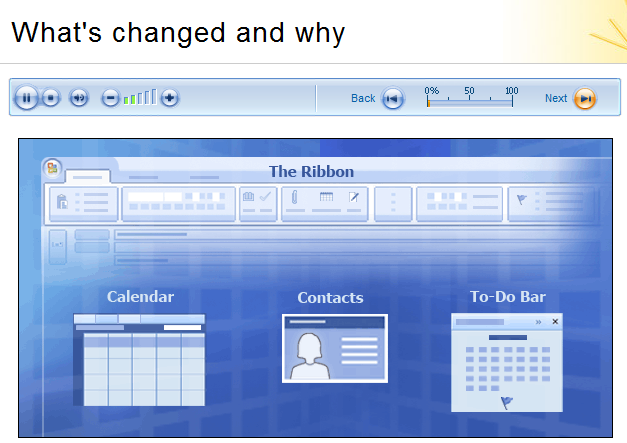
Use these links to connect to online training, documentation, and other information to help you make the most of Office Outlook 2007.

Microsoft Office Outlook Web Access (OWA)
Short “how-to” videos to help you become acquainted with the basic features of OWA. These videos are available in English and Japanese languages only:

Microsoft Office Outlook 2007 Online Training
Free step-by-step training on key Office Outlook features, as well as a printable quick reference at the end of each course:

[taken from http://technet.microsoft.com/en-us/library/cc742588.aspx]

The Windows Home Server team is giving away a bunch of free swag to the first 2500 applicants.  See below for a copy & paste of the offer made last night… and get your SASE in the mail quickly… these things are usually gone in 24 hours!

What better way to prepare for Valentine’s Day with our extended Windows Home Server community than to help us help you show the love for WHS! We’ve got a fun Valentine’s Day promo to announce to kick off the celebrating – thru everyone’s favorite…some Windows Home Server Stickers!

P1030515

2009 has been a great year and we’re sure 2010 will be even better with the incredible combination of Windows Home Server and Windows 7 protecting, connecting and organizing everything in your digital life. Show off your love for Windows Home Server by letting us send you some of our favorite Home Server stickers including the tattoo, “Mommy book” cover, the blue house and the status houses.

So how do you get your stickers? Usually were all about technology and  e-mail, but this time we’re going OLD SCHOOL with snail mail to avoid keeping any information about you. Just send a self-addressed stamped envelope (SASE) to the address below. We’ll send you all four stickers pictured above and shred your original envelope.

Send me the WHS stickers!

15580 NE 31st St
Redmond, WA 98052

Make sure to include enough postage to return a sticker pack via U.S. mail. It’s less than one ounce, so a standard First Class stamp will do if you’re in the United States; enclose an envelope with International Reply Coupons (IRC) if you’re outside of the U.S. And be sure to send your envelope in soon — one per person please.
Microsoft will use your self-addressed stamped envelope to send you the offer materials.  We will not keep or maintain your contact information.

* We sadly don’t have an unlimited supply of these, so this offer is good only for the first 2,500 to respond. Limit one set of stickers per person. This offer is non-transferable and cannot be combined with any other offer.  This offer ends on Feb 28th or while supplies last, and is not redeemable for cash.  Taxes, if any, are the sole responsibility of the recipient.  Any gift returned as non-deliverable will not be re-sent. Please allow 6 – 8 weeks for shipment of your stickers. Due to government gift and ethics laws, government employees (including military and employees of public education institutions) are not eligible to participate.

[taken from the Windows Team Blog]

Posted by: kurtsh | February 9, 2010

RELEASE: Windows Experience Pack for Windows 7

image I want to take a moment and let folks know about the Windows Experience Pack we are making available starting today for people with PCs running Windows 7 and/or Windows Live Essentials. While we can’t send all of you on vacation, we can give you something special to help you daydream and customize your PC and online experience.

With the Windows Experience Pack, you are able create an alter-ego of yourself in a specific destination – a beach, mountain, safari, or city. When you create your alter-ego, you create a fully customized avatar for that destination that becomes a part of a Windows Live Messenger and Windows 7 theme for your PC. You’ll also be able to download a .jpg image of your avatar to share, print, or use as your icon on social networks.

For a specific destination you pick, the following Windows Live Messenger elements are created for you to use in Messenger for your alter-ego:

  • 1 static Display Picture
  • Up to 4 Dynamic Display Pictures
  • A Wink
  • 7 new Emoticons
  • A new Messenger Scene

For Windows 7, you are given the choice between 3 desktop backgrounds for your destination and a screensaver featuring multiple photos from your destination.

The Windows Experience Pack was created and optimized for Windows 7, but it can be downloaded and used on PCs running Windows XP or Windows Vista too (although performance and features may vary).

[taken from the Windows Blog]

Posted by: kurtsh | February 9, 2010

WHITEPAPER: “Cloud Computing Security Considerations”

image This is an 8-page high-level discussion of the fundamental challenges and benefits of cloud computing security, plus some of the questions that cloud service providers and organisations using cloud services need to consider when evaluating a new move, or expansion of existing services, to the cloud. This document presumes that the reader is familiar with the core concepts of cloud computing and basic principles of cloud security. It is not the goal of this paper to provide all the answers to the questions of security in the cloud or to provide an exhaustive framework for cloud security.

————

As with any other technological shift or change, security benefits and risks need to be addressed before the full benefits of cloud computing can be realised. Considerations such as compliance and risk management; identity and access management; service integrity; endpoint integrity; and information protection should all be explored when evaluating, implementing, managing, and maintaining cloud computing solutions.

  • Compliance and Risk Management: Organisations shifting part of their business to the cloud are still responsible for compliance, risk, and security management.
  • Identity and Access Management: Identities may come from different providers, and providers must be able to federate from on-premise to the cloud, as well as to enable collaboration across organisation and country borders.
  • Service Integrity: Cloud-based services should be engineered and operated with security in mind, and the operational processes should be integrated into the organisation’s security management.
  • Endpoint Integrity: As cloud-based services originate–and are then consumed–on-premise, the security, compliance, and integrity of the endpoint have to be part of any security consideration.
  • Information Protection: Cloud services require reliable processes for protecting information before, during, and after the transaction.

While they bring many potential benefits, services provided through cloud computing may also create new concerns, some of which are not yet fully understood. Adopting a cloud service may also require IT organisations to adapt to data management no longer under their direct control. This is especially true in a “hybrid model” in which some processes remain on-premise and some are in the cloud, requiring new and extended security processes that encompass multiple providers to achieve comprehensive protection of information. Risk management and security management remain the responsibility of any organisation, but should be extended to include the cloud provider(s).

Clear strategies related to these five considerations[1], as well as a strong service-level framework, will help to ensure that implemented services deliver cloud computing functionality that meets security requirements and business expectations.


[1] These are just some of the question areas which must be considered. Further details and advice on cloud computing in general can be found in the papers from The Cloud Security Alliance and ENISA.

WHITEPAPER:  “Cloud Computing Security Considerations”
http://bit.ly/beL73O

imageToday I’m pleased to announce we have shipped the RC for Visual Studio 2010 / .NET Framework 4!  MSDN subscribers can download the bits immediately from this location.  The RC will be made available to the public on Wednesday February 10.

We got a lot of invaluable feedback on Beta 2 through Connect as well as your survey responses.  In particular many of you pointed out areas of performance where we were not at parity with VS2008 and it was impacting your ability to adopt the product.  Some of those areas of feedback included general UI responsiveness (including painting, menus, remote desktop and VMs), editing (typing, scrolling, and Intelisense), designers (Silverlight and WPF in particular), improved memory usage, debugging (stepping, managed / native interop), build times, and solution/project load.

Since then Brian and I have been doing daily stand up meetings with the team working through the feedback.  We’ve conducted several private CTP’s with people who reported issues in order to validate the direction of the work.  In December we made the hard call to extend the Beta 2 period to continue to drive improvements into the product.  I had a chance to discuss the things we found and the work we did with the Channel 9 guys:

imageJason Zander- Visual Studio 2010 Release Candidate Released- 23 minutes, 7 seconds
http://ecn.channel9.msdn.com/o9/ch9/1/3/9/5/2/5/JasonZanderVS2010RC_ch9.wmv

DOWNLOAD:  Visual Studio 2010 and .NET Framework 4 Release Candidate
http://msdn.microsoft.com/en-us/vstudio/dd582936.aspx

[taken from Jason Zander’s blog]

Posted by: kurtsh | February 8, 2010

NEWS: Microsoft advances Search Privacy with Bing

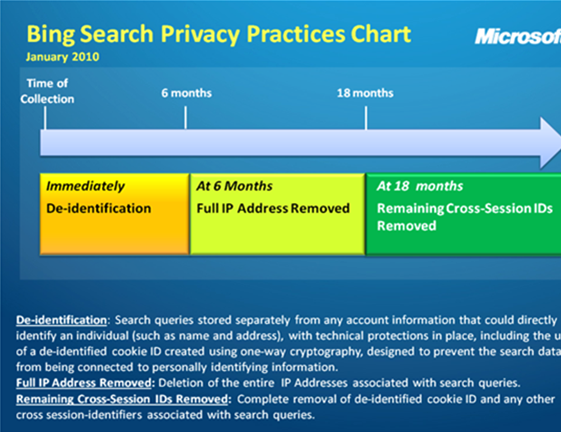
image Today, as part of our ongoing evaluation of Microsoft’s Internet search privacy practices, we are pleased to announce an important change in our data retention policy.  We will delete the entire Internet Protocol address associated with search queries at six months rather than at 18 months. This new and significant step will be incorporated into our existing privacy practices, which already provide strong protections for Bing users.

This change is the result of a number of factors including a continuing evaluation of our business needs, the current competitive landscape and our ongoing dialogue with privacy advocates, consumer groups, and regulators – including the Article 29 Working Party, the group of 27 European national data protection regulators charged with providing advice to the European Commission and other EU institutions on data protection.

Under our current policy, as soon as Microsoft receives a Bing search query we take steps to de-identify the data by separating it from account information that could identify the person who performed the search.  Then, at 18 months, we take the additional step of deleting the IP address, the de-identified cookie ID and any other cross-session IDs associated with the query. The core components of this policy will not change. Our new policy will change the date at which we delete the IP address associated with search queries to six months.   We will implement the new policy over the next 12 to 18 months.

Read more here:

NEWS: Microsoft Advances Search Privacy with Bing
http://bit.ly/98UZyb

DOCUMENT:  Privacy Protections in Microsoft’s Ad Serving System and the Process of “De-identification”
http://bit.ly/anukrF

Put simply, here’s a list of my Top 2009 Windows Phone apps:

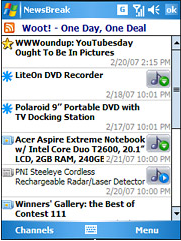
  1. image Ilium Software’s Newsbreak – The best RSS Feed reader, with the ability to download podcasts as well!
    http://www.iliumsoft.com/site/nw/newsbreak.php
  2. Microsoft’s Office Communicator Mobile 2007 R2  – The best instant messaging client available, with the ability to auto-connect you to OCS Conference calls.
    http://office.microsoft.com/en-us/communicator/HA102027021033.aspx
  3. Trinket Software’s Twikini – The best Twitter client for Windows Phone.
    http://trinketsoftware.com/Twikini/
  4. HTCAddict’s cleanRAM – A fantastic ram cleaning tool that ensures that your device continues to run at peak performance.
    http://www.htcaddicts.com/?id=110
  5. Microsoft Bing Mobile – The greatest mapping/directory/search tool available for Windows Phone.
    http://discoverbing.com/mobile/
  6. AE Button Plus – The ultimate hardware button remapping tool for Windows Phone.  Very little that it can’t remap.
    http://ae.inc.ru/aebplus.php
  7. Dymo’s Cardscan – Use the camera on your phone as a card scanner.  Immediated import business cards into your Outlook contacts by just taking a photo of it.
    http://marketplace.windowsphone.com/Overview.aspx (Find it on the Windows Mobile Marketplace – the only place to download it)
  8. Sling’s SlingPlayer Mobile – Watch your home TV from your Windows Phone.
    http://slingmedia.com/go/slingplayer-mobile
  9. WindowsGames’s Pocket Slay – One of the greatest, simplest strategic games ever.  Extremely addictive.  Anyone can learn.
    http://windowsgames.co.uk/
  10. Microsoft LiveMesh – Desktop to Windows Phone file sync product
    https://m.mesh.com/install/wm6/livemesh.cab (Visit using Pocket Internet Explorer)
  11. LogMeIn – Desktop remote control software… remote into your desktop from your Windows Phone!
    http://www.logmein.com (Visit using Pocket Internet Explorer)

Here’s Mike Gannotti’s list of his Top 2009 Windows Phone Apps.  Some are different… some are the same: 
http://bit.ly/9Oaw0j

« Newer Posts - Older Posts »

Categories