Posted by: kurtsh | May 20, 2010

BETA: Microsoft Deployment Toolkit 2010 Update 1

image We are very pleased to announce the release of the Beta for MDT Update 1.  This is a significant update to a well known addition to System Center Configuration Manager primarily for OS deployment, but MDT is much more than just a small add on.

As organizations make the move to Windows 7, and Office 2010 the need for tools to help deploy Windows and Office quickly—and do it right the first time is a major priority.  Organizations have also been asking for features that will let them respond to user requests to ‘have a say’ in what gets installed on their machines. 
To respond to our Customers’ needs, the Solution Accelerators Team has built powerful new features into Microsoft Deployment Toolkit 2010. 

MDT 2010 Update 1 includes:

  • Office 2010 support
  • the ability for users to initiate and customize their own deployments using Configuration Manager
  • key enhancements in Windows 7 driver support
  • and much more.

MDT 2010 Update 1 is now in Beta release.  You can access this update here.

[taken from http://blogs.technet.com/systemcenter/archive/2010/05/11/microsoft-deployment-toolkit-2010-update-1-now-in-beta-release.aspx]

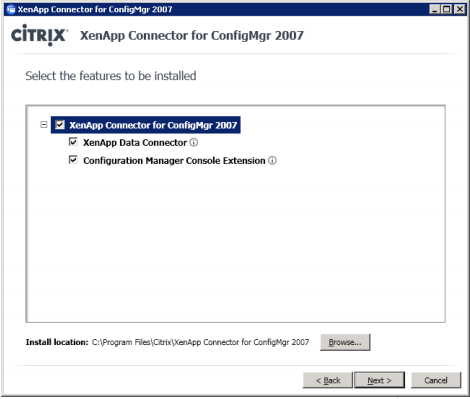
image As we demonstrated a few weeks ago at MMS, the System Center team is working in partnership with Citrix to integrate the management of XenApp with Configuration Manager. We’ve put together a white paper that outlines how the new capabilities can be used to improve enterprise application management. The Citrix Connector for Configuration Manager will enable unified management of applications across the desktop and XenApp Server farm environment. The connector enhances Configuration Manager, enabling administrators to orchestrate the tasks required to deliver applications to XenApp Servers and publish XenApp hosted applications seamlessly and with minimal impact to the user.

The Citrix Connector for Configuration Manager infrastructure will enable application deployment to target devices (non-managed, non-Windows, smartphone, and thin client) that couldn’t be managed before with Configuration Manager alone. Typical Configuration Manager packages and programs are reused and delivered to XenApp servers. The Citrix Connector for Configuration Manager populates collections with XenApp Farms, Folders and Worker Groups for targeting application deployment. In the end, application deployment is accomplished by a coordination of Configuration Manager task sequence advertisements and Citrix Power and Capacity Management, created with the familiar Configuration Manager console that orchestrates the application installation on XenApp servers.

I thought you might be interested in listening as Brad Anderson will be speaking during the keynote, streaming live, at Citrix’s Synergy conference on Thursday, (May 13, 8:30 a.m. – 10:30 a.m. PDT).

[taken from http://blogs.technet.com/systemcenter/archive/2010/05/12/the-citrix-connector-for-system-center-configuration-manager.aspx]

image

By now you’ve heard about desktop virtualization
The problem is that you’re hearing conflicting things.
It can…it can’t…it is…it isn’t…it will…it won’t…

Join us at the Virtualization Roadshow to get the real facts about desktop virtualization from the experts. Citrix and Microsoft are coming to a city near you to give you all the answers you need on desktop virtualization.

In this half-day seminar you will learn how to:

  • Simplify your Windows 7 migration
  • Save time and cost in desktop refresh
  • Streamline desktop support
  • Improve data security

Don’t miss this exclusive desktop virtualization seminar.

AGENDA:

  • 8:00 AM – 9:00 AM  Breakfast
  • 9:00 AM – 9:45 AM  Desktop Revolution –Citrix High Level speaker
  • 9:45 AM – 10:45 AM  Product stack (MSFT/Citrix) and demos – Citrix and MS speakers
  • 10:45 AM – 11:00 AM  Break
  • 11:00 AM – 11:45 AM  Thinking about (or stuck with) VMware VDI? Microsoft and Citrix can help – Citrix speaker
  • 12:00 PM – 1:30 PM  Optional Technical Workshop – Citrix speaker

REGISTRATION:
If you’re interested in participating, please contact me for registration info in Los Angeles.

Paul Thurrott made a comment in a recent post on his blog about how the media’s stance around Office & productivity tools has always been one in which Google was referred to as the dominant player or the “company to beat” whereas Microsoft has somehow been playing “catch up” to what Google purportedly offers in the productivity space. 

Anyone that hasn’t been usurped by technology religion knows that this couldn’t be farther from the truth.  And now, there’s documented evidence that Google’s presence in the media is predominantly hype.  For those of you who haven’t seen this yet, there was a recently published Forrester report which states:

  • 81% of enterprises use Office 2007
  • 4% use Google Docs

clip_image001Here are some of the top conclusions:

  • 1/3 of survey respondents are planning to upgrade to Office 2010
  • Enterprises that had Office “alternatives” installed were for the purpose of specific workforce needs and were complementary to Office not a replacement
  • Forrester’s Conclusion: “The alternatives to Microsoft Office today do not meet the needs of the enterprises Forrester surveyed. Common end user barriers to adoption of alternatives include lack of required functionality, third-party integration requirements, user acceptance, lack of seamless interoperability with Office, and legacy content support needs. These gaps will be bridged in the coming years as Google, OpenOffice.org, and others mature.”

Why are businesses anxious to move to Office 2010? Here is a chart from Forrester that outlines the reasons:

  1. The upgrade is included in our license program (52 percent)
  2. There are compelling benefits to be gained by upgrading (39 percent)
  3. We would like to be compatible with external partners or clients (35 percent)
  4. Business needs demand new or different tool supprt (26%)
  5. Current tools are no longer supported (20%)
  6. We are combining the upgrade with a new hardware rollout (19%)
  7. Our culture demands having the latest tools (15%)

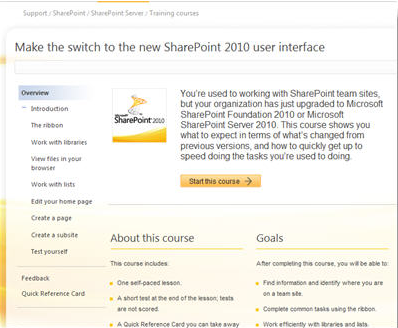
image We’re pleased to announce the availability of a set of introductory end-user training courses for SharePoint Server 2010.

The online SharePoint Server 2010 training courses are video-based. Each course includes video lessons, a brief quiz (not scored), and a printable Quick Reference Card. You can take these training courses at your desk and your own pace by viewing them in a Web browser.

We are continuously updating and adding to our catalog of SharePoint Server 2010 training. If you are interested in taking additional training courses about SharePoint Server 2010, visit or bookmark our Training courses on Office.com.

You can also stay updated on training and other content for end-users, site managers, and site designers by following @StartSharePoint on Twitter. We’re also interested in hearing from you, so feel free to comment on this or any post, or send us a Tweet.

If you’ve been following @SharePointWrTSF Twitter account (that’s me), I thank you for the follow, but we’ll be shifting our official content updates to @StartSharePoint. This Twitter name is easier to remember, and now my teammates will be joining in. I’ll still Tweet as @SharePointWrTSF, with a mix of SharePoint and my own activities. I’ll be honored if you stick around, but I understand if you need to streamline and follow just one account.

Interested in more resources to help you get started quickly? Here are more links:

[taken from http://blogs.msdn.com/microsoft_press/archive/2010/05/13/free-ebook-moving-to-microsoft-visual-studio-2010-draft-preview-ii.aspx]

image On March 26 we released the first draft installment of Moving to Microsoft Visual Studio 2010, which we’ll release as a free (and complete) ebook this summer. That installment contained the three chapters that make up Part II, “Moving from Microsoft Visual Studio 2005 to Visual Studio 2010.”

Today we’re happy to release a second draft installment: the three chapters that make up Part III, “Moving from Microsoft Visual Studio 2008 to Visual Studio 2010.”

You can download one or both free draft ebooks (in XPS or PDF format) here.

Here’s some of the Introduction, which explains the book’s approach:

Introduction

Every time we get close to a new release of Microsoft Visual Studio we can feel the excitement in the developer community. This release of Visual Studio is certainly no different, but at the same time we can feel a different vibe. In November 2009, at Microsoft Professional Developer Conference in Los Angeles, participants had the chance to get their hands on the latest beta of this Visual Studio incarnation. The developer community started to see how different this release is compared to any of its predecessors. This might sound familiar, but Visual Studio 2010 constitutes, in our opinion, a big leap and is a true game changer in that it has been designed and developed from the core up.

Looking at posts in the MSDN forums and many other popular developer communities also reveals that many of you—professional developers—are still working in previous versions of Visual Studio. This book will show you how to move to Visual Studio 2010 and will try to explain why it’s a great time to make this move.

Who Is This Book for?

This book is for professional developers who are working with previous versions of Visual Studio and are looking to make the move to Visual Studio 2010 Professional.

What Is the Book About?

The book is not a language primer, a language reference, or a single technology book. It’s a book that will help professional developers move from previous versions of Visual Studio (starting with 2003 and on up). It will cover the features of Visual Studio 2010 through an application. It will go through a lot of the exciting new language features and new versions of the most popular technologies without putting the emphasis on the technologies themselves. It will instead put the emphasis on how you would get to those new tools and features from Visual Studio 2010. If you are expecting this book to thoroughly cover the new Entity Framework or ASP.NET MVC 2, this is not the book for you. If you want to read a book where the focus is on Visual Studio 2010 and on the reasons for moving to Visual Studio 2010, this is the book for you.

How Will This Book Help Me Move to Visual Studio 2010?

This book will try to answer this question by using a practical approach and by going through the new features and characteristics of Visual Studio 2010 from your point of view—that is, from the view of someone using Visual Studio 2005, for example. To be consistent for all points of view and to cover the same topics from all points of view, we decided to build and use a real application that covers many areas of the product rather than show you many disjointed little samples. This application is named Plan My Night, and we’ll describe it in detail in this Introduction.

To help as many developers as we can, we decided to divide this book into three parts:

  • Part I will be for developers moving from Visual Studio 2003
  • Part II will be for developers moving from Visual Studio 2005
  • Part III will be for developers moving from Visual Studio 2008

Each part will help developers understand how to use Visual Studio 2010 to create many different types of applications and unlock their creativity independently of the version they are using today. This book will be focusing on Visual Studio, but we’ll also cover many language features that make the move even more interesting.

Each part will follow a similar approach and will include these chapters:

  • “Business Logic and Data”
  • “Designing the Look and Feel”
  • “Debugging the Application”

For example, Part I, “Moving from Microsoft Visual Studio 2003 to Visual Studio 2010,” includes a chapter called “From 2003 to 2010: Debugging the Application.” Likewise, Part II, “Moving from Microsoft Visual Studio 2005 to Visual Studio 2010,” includes a chapter called “From 2005 to 2010: Debugging the Application.”

Designing the Look and Feel

These chapters will focus on comparing how the creation of the user interface has evolved through the versions of Visual Studio. They pay attention to the design surface, the code editor, the tools, and the different controls, as well as compare UI validation methods. These chapters also tackle the topic of application extensibility.

Business Logic and Data

These chapters tackle how the application is structured and demonstrate the evolution of the tools and language features available to manage data. They describe the different application layers. They also show how the middle-tier is created across versions and how the application will manage caching the data as well as how to manage getting data in and from the database.

Debugging the Application

These chapters showcase the evolution of all developer aids and debugger tools as well as compare the different ways to improve the performance of an application. They also discuss the important task of unit-testing your code.

Deploying Plan My Night

Part I, for developers using Visual Studio 2003, also includes one extra chapter, “From 2003 to 2010: Deploying Plan My Night.” This chapter goes through the different ways to package, deploy, and deliver your application to your end users. The topic of updating and sending new bits to your customers is also discussed. We feel that Parts II and III, for developers using Visual Studio 2005 and Visual Studio 2008, didn’t require a chapter on deployment.
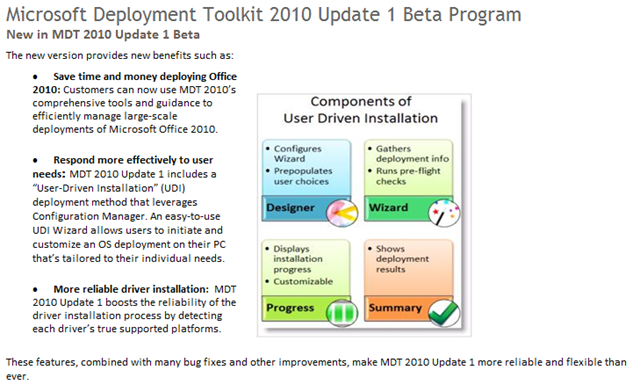
image We released a few free software updates on the Zune Marketplace so if you have a Zune, fire up the client.

The free Zune Twitter app now has a landscape keyboard in v1.2, however in order to get it, you have to set "keyboard tilt" under the settings in Twitter.  (it’s off by default)  Zune Facebook is now v1.1 with some minor fixes.

We’ve also added free downloads for some beautifully rendered versions of “Hearts” and “Spades”.

image This has nothing to do with Microsoft other than it’s gaming available for the Windows platform but it’s so cool, it’s worth mentioning here:  PORTAL is free.

PORTAL is a game by Valve, a game studio and publisher famous for their production of some famous games including:

  • Half Life (Original, Episode 1, Episode 2)
  • Left4Dead 1 & 2
  • Counterstrike: Source
  • Team Fortress

(If you’re not a Windows gamer or an XBox 360 gamer, trust me – these games are LEGENDARY.)

One game, a rather simple one, is called PORTAL and it’s phenomenal because it’s a thinking man’s game.  Everyone’s played it and if you haven’t yet done so, this is your chance to get the game and play it for free on your Windows PC… but only until May 24th.  All you need to do to get it is simply sign up and say you want it.  It’ll be added to your account and you can download the game and the Steam-game dellivery engine later.  Just as long as you have an account and add PORTAL to your account you’ll have it available for free forever. 

So get to it!

DOWNLOAD:  Steam & PORTAL the game… FREE until May 24th!
http://store.steampowered.com/freeportal/

I’ve had this video sent to me over a dozen times now.  (Please – I’ve seen it.  No need to forward it again.)  It’s a video from CBS News depicting photocopy machines as security concern for companies because of the data it potentially retains on it’s hard drive of copies it’s made over it’s life span when it’s decommissioned. 

The accompanying question has been:  “What does Microsoft do to mitigate this potential risk?  Do you have a process?”

The answer is, YES, Microsoft has had a formal process to address this concern.  According to Microsoft Client Hardware Management:

Our campus has a drive destruction process as part of our program’s standards.  All of our U.S. public print hard drives are encrypted to protect the data while in use, and the drives are pulled and shredded when the printers are retired.

Here’s the video that this discussion originated from in case you haven’t seen it.

Today the team is releasing an update to the Bing app for Windows phone. It contains a couple of great improvements:

New home page design. In response to customer requests and to get better visual alignment with Bing apps on other platforms, we’ve added the “launcher” design to the Windows app. Now the home page shows shortcuts to Movies, Local listings, Maps, Directions, Traffic, and Favorites.

Navigation! The Bing app on your Windows 6.x phone now includes free voice guided turn-by-turn navigation. Here’s how it works: when you request directions within the app, you’ll see a new “Navigate” button. Select it, and Bing will calculate your route, and then guide you as you drive. You can select fastest or shortest route, choose to avoid traffic and/or tolls, see a map or a list of directions, and see nice big arrows that you can glance at to see which way to turn next.  Since the whole thing can be hands-free, this voice guided navigation will make your next trip in the car that much safer.

Navigation is available on Sprint, T-Mobile, and AT&T phones. We will update the app for Verizon phones next week to show a link to the VZ Nav service on the directions screen.

image  image image

If you already have the Bing app on your Windows phone, launch it on Tuesday to get the update. If not, you can download it starting Tuesday afternoon at m.bing.com.

The navigation feature is compatible with the phones below. Give it a try.

Windows Phone

  • HTC Fuze
  • HTC Pure
  • HTC HD2
  • HTC Tilt 2
  • HTC Touch Diamond 2
  • HTC Touch HD
  • HTC Touch Pro
  • HTC Touch Pro 2
  • Motorola Q9c
  • Samsung Jack
  • Samsung Omnia II
  • Samsung Propel
  • T-Mobile Dash 3G

« Newer Posts - Older Posts »

Categories