Posted by: kurtsh | October 10, 2010

RELEASE: Windows Phone 7’s portal is live!

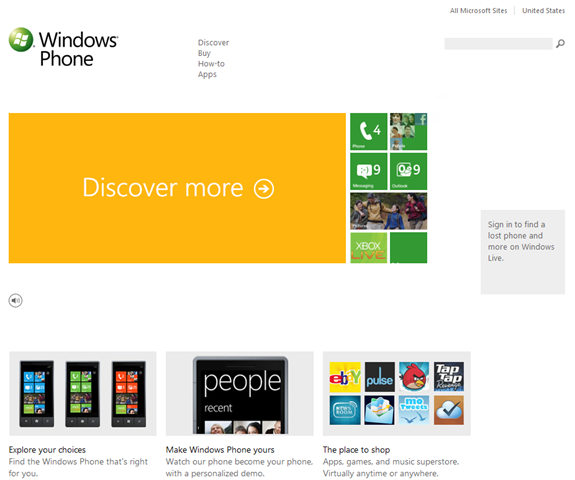
imageYup.  It’s a little early but the portal on Microsoft.com for Windows Phone 7 is up and running.

Why do you care?  Well, because if you are at all interested in Windows Phone 7, not only do they go over what’s great about the phone on this site, you can also BUY software for your device, learn how to use the device, and even FIND YOUR LOST PHONE from the portal by signing in with the Windows Live ID tied to the device you lost.

Cool.

Instead of covering all it’s aspects, I’m just gonna post the link as well as Neowin.net’s coverage of the portal since they did a pretty darned good job.

Posted by: kurtsh | October 10, 2010

RELEASE: Windows Phone Radio Podcast is live!

imageNew podcast folks as announced by the folks at the Windows Phone Blog!

Windows Phone Radio… the podcast, just broke ground a couple days ago.  There are two episodes posted so far, available for subscription via Zune Marketplace or RSS.  The description of the series is as follows:

“Windows Phone Radio is the place for the latest news and information from the Windows Phone team at Microsoft. Your hosts Brian Seitz (@brianseitz) and Matt Akers (@skipdeez) will track the people behind the news and broadcast on location from around Microsoft campus and industry events.”

Subscribe to it now via Zune or RSS… and follow along on the Windows Phone blog!

Posted by: kurtsh | October 7, 2010

RELEASE: SQL Server 2008 Service Pack 2

imageMicrosoft is pleased to announce the availability of SQL Server 2008 Service Pack 2. Both the Service Pack and Feature Pack updates are now ready for download on the Microsoft Download Center.  Service Pack 2 for SQL Server 2008 includes new compatibility features with SQL Server 2008 R2, product improvements based on requests from the SQL Server community, and hotfix solutions provided in SQL Server 2008 SP1 Cumulative Update 1 to 8.

Key enhancement in Microsoft SQL Server 2008 Service Pack 2 are:

  • Reporting Services in SharePoint Integrated Mode. SQL Server 2008 SP2 provides updates for Reporting Services integration with SharePoint products.   SQL Server 2008 SP2 report servers can integrate with SharePoint 2010 products. SQL Server 2008 SP2 also provides a new add-in to support the integration of SQL Server 2008 R2 report servers with SharePoint 2007 products. This now enables SharePoint Server 2007 to be used with SQL Server 2008 R2 Report Server. For more information see the “What’s New in SharePoint Integration and SQL Server 2008 Service Pack 2 (SP2)” section in What’s New (Reporting Services).
  • SQL Server 2008 R2 Application and Multi-Server Management Compatibility with SQL Server 2008.
    • SQL Server 2008 Instance Management With SP2 applied, an instance of the SQL Server 2008 Database Engine can be enrolled with a SQL Server 2008 R2 Utility Control Point as a managed instance of SQL Server. SQL Server 2008 SP2 enables organizations to extend the value of the Utility Control Point to instances of SQL Server 2008 SP2 without having to upgrade those servers to SQL Server 2008 R2. For more information, see Overview of SQL Server Utility in SQL Server 2008 R2 Books Online.
    • Data-tier Application (DAC) Support. Instances of the SQL Server 2008 Database Engine support all DAC operations delivered in SQL Server 2008 R2 after SP2 has been applied. You can deploy, upgrade, register, extract, and delete DACs. SP2 does not upgrade the SQL Server 2008 client tools to support DACs. You must use the SQL Server 2008 R2 client tools, such as SQL Server Management Studio, to perform DAC operations. A data-tier application is an entity that contains all of the database objects and instance objects used by an application. A DAC provides a single unit for authoring, deploying, and managing the data-tier objects. For more information, see Designing and Implementing Data-tier Applications.

To download the SQL Server 2008 SP2 release please select from the links below:

clip_image001

Registration for MMS 2011 is now open!
Microsoft Management Summit 2011
March 21 – 25, Las Vegas, Nevada

It’s time to start planning for the Microsoft Management Summit 2011 (MMS 2011) – the place to learn about the latest IT Management products, technologies and solutions from Microsoft and partners. Covering all of the latest management product releases, including five new management product versions planned to release in the coming year and demonstrating a variety of new Beta products, attending MMS 2011 is a valuable learning opportunity you won’t want to miss!

Registration is now open, and if you register before February 15, 2011 you can save $275 off the regular registration fee. Event details, including an overview of the event, overall event agenda, and registration and hotel information, can be accessed from the event web site at www.mms-2011.com. 

Event Overview

The sessions and hands-on labs at MMS 2011 will offer a unique opportunity to dive deep into the wide range of new products and solutions being released in the coming year, allowing you to evaluate the latest technologies against the needs of your organization.  The event will also offer sessions on best practices – real-world tips and tricks developed in live deployments around the world – presented by attendees, IT Management Consultants and Microsoft field staff. 

Management Product Content

During MMS 2011, in addition to sessions covering existing products and solutions, there will be significant coverage of recent and upcoming management product releases including:

  • System Center Configuration Manager 2007 R3
  • System Center Configuration Manager v.Next
  • System Center Data Protection Manager
  • System Center Operations Manager v.Next
  • System Center Service Manager R2
  • System Center Virtual Machine Manager v.Next

There will also be significant coverage of Opalis Integration, and more topics on Forefront Security products as well as Windows Embedded, Windows Server and Windows Client management technologies and solutions.  In addition, a number of exciting new announcements are planned around Cloud management solutions for both desktop and datacenter management scenarios. Sessions will provide insight into both hosting and utilization of Cloud infrastructures, with new products and solutions from Microsoft and key partners.

Event Agenda

MMS 2011 will offer deep technical Breakout Sessions covering a range of IT Management topics and technologies. Daily “Speaker Q&A” sessions allow attendees to meet the presenters at the end of each day to discuss specific session content informally in a casual format. In addition, the event will provide over 8,000 Instructor-led Hands-On Lab places during the week and a “walk-in” Self-paced Lab area.  Microsoft’s Management solutions, together with those provided by Partners, will be on show at the MMS 2011 Expo where you’ll have the opportunity to review the solutions on offer and discuss your specific requirements with experts.

Visit the conference web site at www.mms-2011.com for more details of content on offer, the overall agenda and registration information.

Content Survey

If you’d like to help in the content selection process for MMS 2011, we invite you to complete the MMS 2011 Content Survey. By taking a few minutes to tell us about your IT experience and expectations for the event, you’ll help ensure the topics and labs offered during MMS 2011 are relevant to you and your organization. The survey should take no more than 10 minutes to complete and when it closes on Nov 24th two entries will be drawn from amongst the responses to win a Portable Media Player.

Registration

This year’s event will be at the Mandalay Bay Resort and Casino.  The MMS 2011 Event Team has negotiated a special rate for MMS attendees at Mandalay Bay and at THEhotel at Mandalay Bay.  As in past years, two different registration options are available for attendees – you may either purchase your MMS 2011 registration and hotel accommodation separately, or as a package.

If you choose to register using the “Package” option, your registration fee includes accommodation for the nights of March 21st to 24th at the Mandalay Bay Resort and Casino. Alternatively you may choose to purchase accommodation separately from your registration, during the registration process or at a later date. The special MMS conference rates at Mandalay Bay or THEhotel at Mandalay Bay are only available through the registration web site. Details of registration and accommodation options are provided on the Registration Overview page.

image

Isn’t it a pain having to categorize individual appointments, just so that they appear in another color on your calendar?

  • Wouldn’t it be awesome if an appointment that had the word “todo” in it, automatically turned YELLOW?
  • Wouldn’t it be great if an appointment that had the word “drivetime” in it automatically turned BLUE?
  • Wouldn’t it be slick if an appointment that had the word “Live Meeting” in the location field automatically turned RED?
  • Wouldn’t it also be slick if an appointment that had the word “Conference Call” or “your company’s conference call number” in the location field automatically turned ORANGE?
  • Wouldn’t it be swell if an appointment that had the word “vacation” in it automatically turned GREEN?

With this trick, you’ll never have to manually color code any appointment.  With just the content of the appointment, Outlook will automatically color code it for you without any intervention on your part.

——————-

HOWTO: Automatically color code appointments in your calendar based on keywords in the Subject
(This is written for Outlook 2010 in mind, but will also work for Outlook 2007 with slightly different instructions)

  • Open your Outlook Calendar
  • Click the View Menu item
  • Click the “View Settings” button under Current View
  • Click the “Conditional Formatting” button
  • Click the “Add” button to create a new rule for auto-coloring appointments
  • Enter the name of the rule in the “Name:” text box
  • Select a color in the “Color:” drop down list box
  • Click the “Condition…” button to identify the conditions under which this color should be applied
    • Select the “Appointments and Meetings” tab and enter a keyword into the “Search for the word(s):” text box to look for a word in the Subject field
    • Select the “Advanced” tab, select the “Field” drop down list box, select “Frequently-used fields” and “Location” and enter a keyword into the “Value” field to search for content in the “Location” field in the appointment.
  • Click OK, OK, OK to apply your new formatting rule.
    Rules are applied immediately, and if they worked, you should see your appointments light up with color.

Personally, at Microsoft, I created rules for myself around the following:

  • Drivetime
  • Concalls
  • Hotel check in
  • Flights
  • Vacation
  • Todo
  • “Live Meeting” (in the Location field)
  • “Conference Call” (in the Location field)
  • Conference Call (searching for our company’s outbound concall # in the Location field)

[this is a repeat of a previous post I wrote however some people have asked for it again and finding it can be a pain so…]

Have you ever accidentally hit SEND on an email before it should have been sent?

Ever found yourself frantically unplugging your network cable or shutting off your wireless to prevent the email from going out?

What if you had a rule that always delayed the transmission of any email you sent to give you a minute to "think it over" even after pressing the SEND button, except if you specifically indicate that the email needs to be sent immediately?
————————————

imageHOWTO: Delay the delivery of all outbound Outlook messages by 1 minute
(Unless there are 3 spaces in the subject line which will send the email immediately)

  • On the Tools menu, click Rules and Alerts, and then click New Rule.
  • Select Start from a blank rule.
  • In the Step 1: Select when messages should be checked box, click Check messages after sending, and then click Next.
  • In the Step 1: Select condition(s) list, select any options you want, and then click Next.
    If you do not select any check boxes, a confirmation dialog box appears. Clicking Yes applies this rule to all messages you send.
  • In the Step 1: Select action(s) list, select defer delivery by a number of minutes. Delivery can be delayed up to two hours.
  • In the Step 2: Edit the rule description (click on an underlined value) box, click the underlined phrase a number of and enter the number of minutes you want messages held before sending. (I enter "1" which is the default.)
  • Click OK, and then click Next.
  • Select any exceptions, except if the subject contains specific words .
  • Edit the rule description (click on an underlined value) box, click the underlined phrase specific words and enter in 3 spaces.
  • Click OK. Click Next.
  • In the Step 1: Specify a name for this rule box, type a name for the rule.
  • Click Finish.

imageFamed messaging migration experts & software developers, Binary Tree, have officially halted all Google mail migration technology development and left the Google partner program. 

If you know anything about mail migration, you know the name Binary Tree.  Any Enterprise company that’s either migrated from one mail platform to another (Lotus Notes to Exchange for instance) or had to integrate another company’s mail system into theirs as a result of mergers or acquisitions has at least visited the potential use of Binary Tree’s messaging migration/coexistence solutions.

Their exit from the Google partner program and separation from any migration tools into Google’s cloud mail offerings is telling.  I’ll let them explain why.

Binary Tree Exits Google Enterprise Partner Program

NEWARK, NJ – September 30, 2010 – Binary Tree, the world’s leading provider of cross-platform messaging migration and coexistence solutions, announced today that it is dropping its business partnership with Google. This means the suspension of all sales and marketing efforts for its CMT for Google Apps email migration product, and the exodus from the Google Enterprise Partner Program. Binary Tree will redirect resources to focus completely on transitioning customers to Microsoft’s on-premises and cloud based solutions for Microsoft Exchange and SharePoint.

“It’s simply a matter of customer demand,” stated Henry Bestritsky, Co-CEO of Binary Tree. “The tremendous uptake we are seeing in the market for migrating to the Microsoft messaging and collaboration platform cannot be ignored. And that includes moving to the cloud-based versions of these solutions like Microsoft’s Business Productivity Online Suite (BPOS). The customers we’ve talked to about moving to the cloud, regardless of their size, have told us that they don’t want to move to an e-mail system that offers less functionality and decreases their end user’s overall experience. They are used to a full-featured user experience for e-mail, calendaring and collaboration, and won’t compromise their user’s productivity to save a few bucks. Our goal is to focus our people, processes and technology on helping our clients and partners to transition to the optimal environment for their business value, and hands-down we feel that is the Microsoft platform.”

Additional issues with Google were outlined by the General Manager of Binary Tree’s operations in Europe, Stefan af Bjur. Stefan stated that “the companies we have spoken to in Europe have specific requirements for privacy and security that haven’t been met by Google’s hosted solutions. This is especially true of the multi-nationals with offices in Europe who have told me that they need these issues to be addressed and would also like to see a realistic roadmap from Google before even considering their cloud. To date, Microsoft continues to be the preferred choice for cloud services from these types of companies, as shown by the recent decision of a global provider in transport and energy infrastructure based in France.”

…

Read more at:
http://www.binarytree.com/Company/btn28.aspx?goback=%2Egde_1821963_member_31015127

clip_image002

A lightweight version of Avicode technology is shipping in SCOM with the understanding that to get the full version you need to upgrade to the full version sold through our partner, Avicode.   This link below was recently announced and should be a part of any discussion when looking to bring in SCOM to a development shop developing on the Microsoft application stack.

This is great news and I hope this acquisition can further our goal to help monitor the most complex IT environments (with SCOM) including both customer infrastructure and custom application requirements.

More info:
http://www.microsoft.com/pathways/avicode/

Learn about Microsoft’s Acquisition of AVIcode
Microsoft has acquired AVIcode, a market leader in application performance monitoring and diagnostics of .NET applications and services. AVIcode will become a wholly owned subsidiary of Microsoft and will continue to fulfill its existing commitments to customers. AVIcode products will be integrated with System Center’s licensing model to enable customers to take advantage of a flexible, cost effective and simple approach to purchasing management capabilities.

Read the announcement blog post from Brad Anderson, CVP of Microsoft’s Management and Service Division here.

Get Answers

  1. How does the AVIcode technology fit with existing System Center suite of products?
  2. Can customers buy more AVIcode licenses or upgrades?
  3. Who does the AVIcode customer need to contact for customer service and support?
  4. What impact does this have on existing AVIcode partners?

3 Benefits of the Acquisition for AVIcode Customers

  1. Brings together dynamic .NET application performance management with cost effective IT management from a single vendor able to support the end to end datacenter service lifecycle
  2. Provides access to an extensible management platform to meet the complete needs of datacenter service management
  3. Delivers access to a cost effective management platform for physical and virtual management

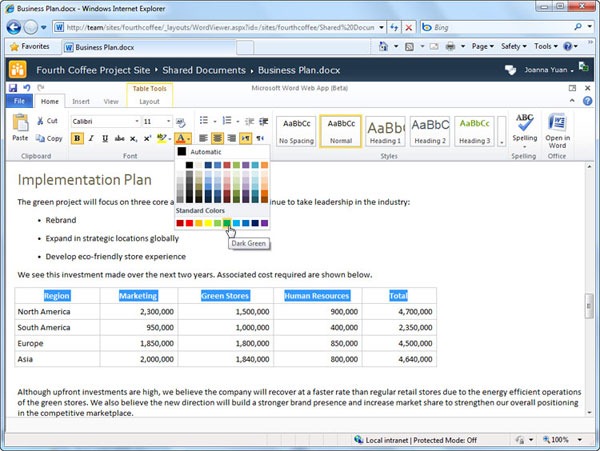
office2010-wordwebappOoh.  Have you heard?  Microsoft Online Services Suite customers are gonna be getting not only Exchange Online, Sharepoint Online, Office Communications Online, and LiveMeeting… but also OFFICE WEB APPS.  Yup.  For those who don’t know, that includes:

  • Word Web App
  • Excel Web App
  • PowerPoint Web App
  • OneNote Web App

Microsoft: Office Web Apps coming to its hosted business suite
By Juan Carlos Perez

October 4, 2010 03:21 PM ET

Microsoft has definite plans to add Office Web Apps to its hosted Business Productivity Online Standard Suite (BPOS), but the company isn’t providing a specific timetable for the integration.

Without those applications, BPOS continues to trail other rivals, namely Google Apps, which offer office productivity applications as a default component of their broader cloud-based collaboration and communication suites.

"We’ll certainly be talking a lot more about Office Web Apps delivered through BPOS as part of future capabilities of BPOS," said Betsy Webb, general manager of Microsoft’s Online Services division, in a phone interview.

Office Web Apps offers hosted versions of Word, Excel, PowerPoint and OneNote that have a subset of the features found in the on-premise Microsoft Office suite.

…

Read more at:
http://www.computerworld.com/s/article/9189323/
Microsoft_Office_Web_Apps_coming_to_its_hosted_business_suite_

App Analysis did a study on the privacy of Android apps which was written about at PC World:

From the article:

imageThe researchers looked at 30 popular Android apps, including The Weather Channel, MySpace, Evernote, BBC News Live Stream, Yellow Pages, and Spongebob Slide. They used a home-made tool called TaintDroid to track what data was being shared and with whom. The skinny:

  • Two thirds of these apps violated user privacy by sharing location data or information that could identify individual handsets.
  • Half of them sent user location information to advertising networks like Admob or analytics companies like Flurry without user consent.
  • Seven of the apps sent the unique device identification numbers of the GSM user and the handsets’ SIM card to its servers.
  • Two of the apps captured the users’ cell phone number along with the ID number and the users’ geographical coordinates.

Based on a study located at http://appanalysis.org/tdroid10.pdf.

« Newer Posts - Older Posts »

Categories