clip_image001

Hi guys.  I have the opportunity to offer a limited number of my customers a COMPLIMENTARY PASS to the 7th International Cloud Expo in Santa Clara, CA on November 1-4th, courtesy of Microsoft, a Platinum Plus Sponsor.

The Cloud Computing Expo (http://cloudcomputingexpo.com/) labels itself as “The Only Enterprise IT Event in 2010 Covering the Entire Scope of the Cloud Computing Spectrum”. The conference description is as follows:

Cloud Expo was announced on February 24, 2007, the day the term "cloud computing" was coined. That same year, the first Cloud Expo took place in New York City with 450 delegates. This coming November 2010, Cloud Expo is returning to Santa Clara with more than 5,000 delegates and over 100 sponsors and exhibitors.

"Cloud" has become synonymous with "computing" and "software" in two short years. Cloud Expo is the new PC Expo, Comdex, and InternetWorld of our decade. By 2012, more than 50,000 delegates per year will participate in Cloud Expo worldwide.

The cloud is certainly a compelling alternative to running all applications within a traditional corporate data center. But moving from theory into practice is where things get complicated, and this is where attending a top industry event like Cloud Expo comes in.

No one can take full advantage of cloud computing without first becoming familiar with the latest issues and trends, which is why the organizing principle of the 7th International Cloud Expo on November 1-4, 2010, is to ensure – through an intensive four-day schedule of keynotes, general and breakout sessions, and our bustling Expo Floor – that attending delegates leave the Santa Clara Convention Center with abundant resources, ideas and examples they can apply immediately to leveraging the Cloud, helping them to maximize performance, minimize cost and improve the scalability of their Enterprise IT endeavors.

Delegates will leave 7th Cloud Expo with dramatically increased understanding of the entire scope of the cloud computing spectrum, from storage to security.

The Santa Clara Convention Center is the only place to be November 1-4, 2010, if you build, sell or purchase applications or infrastructure delivered as a cloud service. End users, IT professionals and vendors alike are all encouraged to participate.

WHO SHOULD ATTEND:
Senior Technologists including CIOs, CTOs, VPs of technology, IT directors and managers, network and storage managers, network engineers, enterprise architects, communications and networking specialists, directors of infrastructure Business Executives including CEOs, CMOs, CIOs, presidents, VPs, directors, business development; product and purchasing managers.

COMPLIMENTARY REGISTRATION:
If you are interested in taking advantage of this offer (valued at $2500):

  1. Contact me – if you are a customer of mine – for a registration code.
  2. Visit the Cloud Expo registration page at:
    https://www3.sys-con.com/cloud2010west/registernew.cfm?a1=gold
  3. Under registration choices, enter the registration code I provided to you.
    This will provide you with a Golden Pass which provides full conference access including all 4 days of conference sessions at the Cloud Computing Conference and Expo as well as the Virtualization Conference & Expo. Additionally, Gold Pass registration includes: Welcome Reception on Day 2, and refreshment breaks, collectible conference bag and access to all conference sessions including all technical sessions, the exhibit floor, keynotes, vendor technology presentations, and SYS-CON.TV Power Panels.
  4. Follow the remainder of the registration instructions.

image If you intend on attending CES 2011 for the expo, you need to register ASAP – and before September 30th.

FREE registration to the Las Vegas Consumer Electronics Expo – Jan 6-9, 2011 – is available until the end of the month by using Registration Code “LC2”.  After this the cost is $100 for online registration – $200 for onsite registration. 

The Consumer Electronics Expo web site is http://www.cesweb.org.

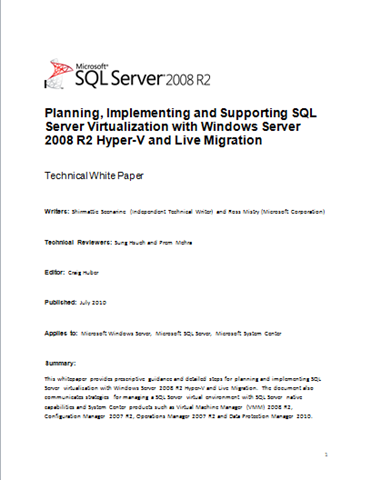
imageThis white paper provides prescriptive guidance and detailed steps for planning and implementing SQL Server virtualization with Windows Server 2008 R2 Hyper-V and Live Migration. 

The document also communicates strategies for managing a SQL Server virtual environment with SQL Server native capabilities and System Center products such as Virtual Machine Manager (VMM) 2008 R2, Configuration Manager 2007 R2, Operations Manager 2007 R2 and Data Protection Manager 2010.

Posted by: kurtsh | September 24, 2010

OFFER: Save 25% on TechNet Subscription Professional

ts3Save25Save 25% on TechNet Subscription Professional
With an annual subscription, you can evaluate more than 70 full-version Microsoft software titles such as Windows 7 and Office 2010 without time or feature limits. But hurry, the offer ends October 31, 2010. Use promo code TNITQ413.

image Developers, we’re pleased to announce another free offering: Moving to Microsoft Visual Studio 2010 (Microsoft Press, 2011; 336 pages), written by Patrice Pelland, Pascal Paré, and Ken Haines.

Here’s a little bit about the authors: Ken Haines is a software development engineer at Microsoft, working in the Consumer and Online Division. He has a passion for distributed applications in the cloud and strives to help customers and partners find the right solution for their needs. Pascal Paré has worked at Microsoft since 2006, where he has held positions as a software engineer on both development and testing teams. Patrice Pelland is a principal development manager at Microsoft, working in the Consumer and Online Division. He leads a development team that is focused on innovation and incubation across all Microsoft consumer products.

Moving to Microsoft Visual Studio 2010 was written with three audiences in mind:

Part I is for developers moving from Visual Studio 2003 to Visual Studio 2010.

Part II is for developers moving from Visual Studio 2005.

And Part III is for developers moving from Visual Studio 2008.</!–ENDFRAGMENT–>

Please see this post for an extensive description of the book’s content, including “Who Is This Book for?,” “What Is the Book About?,” and “How Will This Book Help Me Move to Visual Studio 2010?” (Note that the links in that post are to a draft preview version of the book. Links to the final and complete book appear immediately below in this post.)

clip_image002

If you haven’t seen this, this is an very impressive web site that leverages Silverlight & Microsoft Live Labs Pivot technology to graphically show the front pages of over 1000+ Sharepoint-based Internet facing Web Sites throughout the world. 

You can select criteria to rapidly filter and “re-pivot” around the following sorting categories:

  • Country (US, UK, Japan, Canada, etc.)
  • Industry (Healthcare, Financial, Prof Services, Manufacturing, Entertainment, etc.)
  • Rating (1-5)
  • Platform (MOSS2007, WSS v3, SPS2010, SPF 2010)
  • When Added (i.e. “age”)

As you filter, the images of the web sites reorganize themselves in a visually appealing manner to the eye. Live Pivot makes sorting and sifting through data a pleasant task for end users.  Give it a look see and at the very least, share it with other Sharepoint users so they can see how many people aren’t just using Sharepoint but using it as the basis of their External Web sites for its content management, search, and other out-of-the-box capabilities that minimize custom development.

image

We’re excited to introduce Microsoft Lync, the new name for the next generation of our real-time communications products, known until today as Communications Server and Communicator. 

Lync Server 2010 ushers in a new connected experience transforming communication into an interaction that is more collaborative, engaging and accessible from any location with internet connectivity. A single interface unites voice, IM, audio-, video-, and web-conferencing into a richer, more contextual offering and a single identity makes it easier and more efficient for users to find contacts, check their availability and connect with them.  Lync Server 2010 works consistently with Microsoft Office, enriching the experience of familiar applications like Microsoft Outlook, Microsoft Word, Microsoft SharePoint, and more.

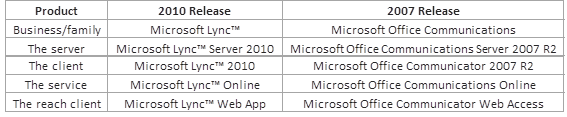
For folks looking to understand the “rebranding” analogies, here’s a table:

image

image Some interesting features to look forward to:

  1. Switch between your head-set and phone in the middle of a call with device switching.
  2. Gotta run? Leave the office and take your call with you on your mobile phone.
  3. Select multiple people and click to make a group call, and then drag-and-drop someone into the conference from Outlook.
  4. Connect with family while you’re travelling – start a high-definition voice and video conversation with a Windows Live Messenger user.
  5. Hush that annoying meeting participant.   When someone is causing bad audio on the conference call, Lync will identify which phone to mute to improve quality – and productivity.

Public Announcement is available here:

Release Candidate download available here:

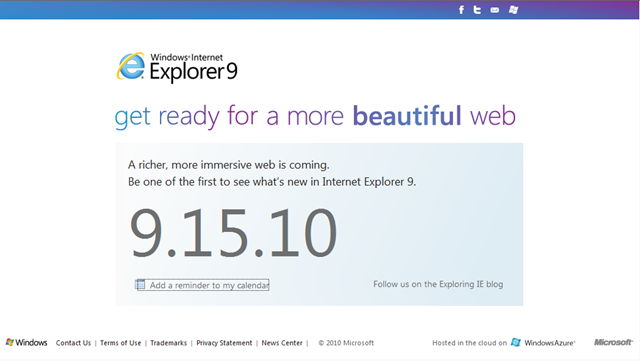
image We’ve been pretty tight lipped about this but Internet Explorer 9’s BETA is launching on September 15th.

The event will be in San Francisco and available for viewing online at http://www.beautyoftheweb.com.

Ed Bott’s got a post about the event or at least what he knows/surmises about what to expect.

Interested in avoiding company-wide “Reply-All Storms”?

Microsoft Research released a new version of the NoReplyAll Outlook Add-in to prevent Enterprise-wide “reply all storms” to known provocative emails or messages to get sent across distribution groups that are known to be large.

image NoReplyAll Outlook Add-In
The primary function of this add-in is to add a couple of buttons to the Outlook ribbon to prevent people from replying to all the recipients of your message or forwarding it. The add-in uses a facility built into Outlook and Exchange that is more lightweight than information-rights management but is not exposed in the existing UI. The add-in also includes a check for common email errors, such as omitting attachments or subject lines.

For more information visit the blog page for the “NoReplyAll Outlook Add-In” at http://research.microsoft.com/en-us/projects/researchdesktop/noreplyall.aspx for details on usage.

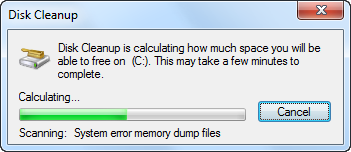
image Let’s say you’re managing many desktop computers and you need to patch them all or upgrade the version of Office on all of them.  And you discover… you don’t have enough drive space on many of the computers to do the update.  What do you do?

AUTOMATING DISK CLEANUP TO FREE DRIVE SPACE
It turns out that we’ve documented how to automate/script the included “Disk Cleanup” tool in Windows to clear disk space across the desktops in your environment, assuming you have the ability to run a logon script on them or execute a script package across them all using a Desktop Management system like System Center Configuration Manager.

Cleanmgr.exe is designed to clear unnecessary files from your computer’s hard disk. You can use command-line options to specify that Cleanmgr.exe cleans up certain files. You can then schedule the task to run at a specific time by using the Scheduled Tasks tool.
To start the Disk Cleanup tool, either run the Cleanmgr.exe command, or click Start, point to Programs, point to Accessories, point to System Tools, and then click Disk Cleanup.
Disk Cleanup supports the following command-line options:

  • /d driveletter: – This option specifies the drive that you want Disk Cleanup to clean.
    Note: The /d option is not utilized with /sagerun: n.
  • /sageset: n – This option displays the Disk Cleanup Settings dialog box and also creates a registry key to store the settings that you select. The n value, which is stored in the registry, allows you to specify tasks for Disk Cleanup to run. The n value can be any integer value from 0 to 65535. To have all of the options available when you use the /sageset option, you might need to specify the drive where Windows is installed.
  • /sagerun: n – This option runs the specified tasks that are assigned to the n value if you use the sageset option. All drives on the computer are enumerated and the selected profile runs against each drive.
    For example, in Scheduled Tasks, you could run the following command after you run the cleanmgr /sageset:11 command:

    cleanmgr /sagerun:11

    This command runs Disk Cleanup and includes the options that you specified with the cleanmgr /sageset:11 command.

« Newer Posts - Older Posts »

Categories