Posted by: kurtsh | September 29, 2010

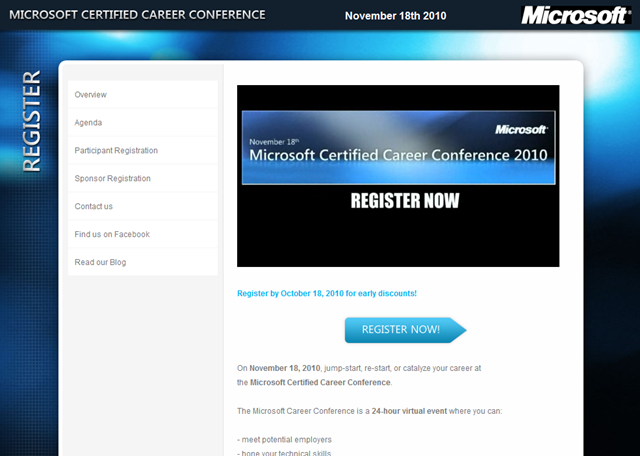
EVENT: The Microsoft Certified Career Conference, Nov 18th

image We are proud to announce The Microsoft Certified Career Conference.

Why this event? Well, staying competitive in the job market is top of mind for most people these days. Skills and knowledge can give you the competitive edge – whether you are just starting your career in IT or looking at your next career step. The Microsoft Certified Career Conference is a series of virtual events where you can meet potential employers, hone your technical knowledge, acquire job-seeking skills, network with fellow professionals, and glean career advice from real-life experts in the field.

What will you learn? Well, we will be offering a number of tracks that will help you build the technical skills as well as the soft skills that can make you stand out in the crowd. In addition you can visit the Career Fair and meet potential future employers. Whether you want to see who is hiring around the world, what types of positions are currently open in the market, or just want the opportunity to chat directly with company recruiters about their ideal candidates – The Career Fair offers a wide variety of opportunities. A full company list for your review will be available for download closer to the event date.

The conference’s main tracks:

  • First Course: Technical sessions based on Microsoft Official courses where you will get a ‘taste’ of the course. We will offer sessions for IT Professionals, Developers, and Office power users and they will be delivered by MCTs and courseware authors. Audience: anyone considering taking Microsoft Training, each session will focus on one specific course.
  • Super Cert Me: Thinking about taking an exam? How about some help in preparing for the exam? Audience: these high tempo exam preparation sessions assume a proficient level of knowledge on the course’s topic.
  • Best practices: landing a job is an art – these sessions will help you identify the job that is right for you, write great letters, prepare for job interviews etc. etc.
  • People and Technology: Whether you are in an IT career or whether you manage a team, new technologies impact the way we all work. What impact can ‘Cloud Computing’ have on your career or on your team? Will Unified Communications change the way we work? Audience: Hiring Managers, MCPs
  • Opportunity Knocks: New technology = new business opportunity. Learn more about the technology, find out how where the business opportunities are and how to get started.
  • The 60 Minute Rock Star: whether you are in accounting, marketing or an administrative assistant, we will show you tricks that will boost your productivity and amaze your colleagues
  • A Day in the Life: What is it actually like to be an IT manager, an Enterprise Administrator, or an application developer? People in these roles will share what life is like for them, the challenges they face, the opportunities they see, the skills they learned on the job etc.
  • MCT & Educator track: Microsoft Certified Trainers and academic educators are invited to learn about new courses and the tools of the trade. Audience: MCTs and Educators.

We’re still working on these tracks and of course we would love to hear your suggestions and input. At the same time, we look forward to the Career Fair, where you can meet potential future employers and discuss potential job roles. Be a part of it and register now.

MCPs and MCTs: keep an eye out for the MCP and MCT Newsletters for an attractive MCP discount!

Look out for more updates here on Born to Learn and of course: Find us on Facebook.

[taken from http://borntolearn.mslearn.net/btl/b/weblog/archive/2010/09/17/announcing-the-microsoft-certified-career-conference.aspx]

Posted by: kurtsh | September 28, 2010

WHITEPAPER: Internet Explorer 9.0 Product Guide

image The new Internet Explorer 9.0 Beta has been released with many new features as outlined in the Internet Explorer 9 Product Guide. 

This product guide outlines new features in Internet Explorer 9 Beta, highlights the top features, and provides additional information on features specific for end users, developers, and IT professionals.

What’s new in Internet Explorer 9?

Once IE9 is installed:
Head over to www.beautyoftheweb.com to learn about the rest of IE9 and experience some of the early sites developers and designers have been able to build using IE9 and Windows. Enjoy fully hardware accelerated HTML5 with KEXP Airplay Data Visualization, Speed Reading, Fish Tank and Flickr Explorer .

Find resources on how to deploy, manage, and develop with Internet Explorer 9.

Posted by: kurtsh | September 28, 2010

RELEASE: Microsoft Online Service Health Dashboard

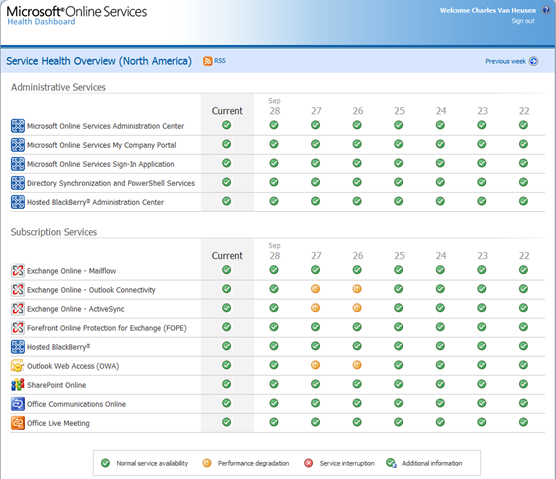
image We recently released a new dashboard for customers of Microsoft Cloud-based services such as Exchange Online, Sharepoint Online, and Office Communications Online.  [taken from the Microsoft Online blog]

Introducing the Microsoft Online Service Health Dashboard

As I mentioned in my previous post, the mission of my team is to make sure that BPOS customers have a great experience with our services. Since writing my first post for this Team Blog, I have talked with a number of customers and followed your comments closely. One theme that has carried through – both in past and more recent conversations – is the desire of our customers to have more detailed information about the status of their services. 

Today, we’re taking a step forward in delivering more timely, accurate and targeted information about BPOS service status by introducing the Microsoft Online Service Health Dashboard.  It is designed to provide a greater level of information regarding the status of all services and tools, and it includes information about current service status as well a 35-day status history.

Accessing the Service Health Dashboard

There are separate Service Health Dashboard for each of our three data center regions: Americas, serving customers in North America and Latin America (NOAM); Europe, the Middle-East and Africa (EMEA); and Asia-Pacific (APAC).

Administrators can navigate to their regional Service Health Dashboard using one of the following URLs; administrators then use their normal BPOS credentials to access the Dashboard:

Datacenter Location

Service Health Dashboard URL

Americas (NOAM)

https://health.noam.microsoftonline.com/

Europe, the Middle East and Africa (EMEA)

https://health.emea.microsoftonline.com/

Asia-Pacific (APAC)

https://health.apac.microsoftonline.com/

Using the Service Health Dashboard

Upon logging into the Service Health Dashboard, administrators are presented with the status of the current day and week for all BPOS services.  The status for each service or tool represented in the Service Health Dashboard is represented by one of four icons, each representing a different level of service availability.

Current day status displays the status as of the last login or page refresh. The historical status displays the greatest level of service degradation for the given day. The Additional Information, Performance Degradation, and Service Interruption icons are clickable, providing drilldown information about service status the given service and day. Clicking the Previous Week link allows administrators can navigate to historical service status for preceding weeks.

With all improvements to BPOS, we’re trying to increase our timeliness, accuracy and granularity of information.  I encourage every administrator to poke through the site and provide us with feedback regarding usage and improvements.  We hope the service health dashboard gives you confidence that we take information regarding status very seriously, and that you can stay ahead of questions from your own internal customers and users. 

As always, if you are experiencing service issues or have questions about the Service Health Dashboard, we encourage customers to contact us. Our customer support is available, 24 hours a day, by telephone or via Service Requests submitted from the Microsoft Online Services Administration Center.

Posted by: kurtsh | September 28, 2010

RELEASE: BizTalk Server 2010

image Today we are excited to announce that we have Released to Manufacturing (RTM) BizTalk Server 2010 and it will be available for purchase starting October 1st, 2010.

BizTalk Server 2010 is the seventh major release of our flagship enterprise integration product, which includes new support for Windows Server AppFabric to provide pre-integrated support for developing new composite applications.  This allows customers to maximize the value of existing Line of Business (LOB) systems by integrating and automating their business processes, and putting real-time, end-to-end enterprise integration within reach of every customer.  All this coupled with the confidence of a proven mission-critical integration infrastructure that is available to companies of all sizes at a fraction of the cost of other competing products.

According to Steven Smith, President and Chief Executive Officer at GCommerce, “GCommerce has bet our mission-critical value-chain functionality on BizTalk Sever 2010 which we use to automate the secure and reliable exchange of information with our trading partners.   Additionally, the Windows Azure Platform allows us to extend our existing business-to-business process into new markets such as our cloud-based inventory solution called the Virtual Inventory Cloud (VIC), which is based upon Windows Azure and SQL Azure.   This extension to our trading platform allows us to connect our buyers experience from the purchasing process within VIC all the way through to the on-premises business systems built around BizTalk.  This new GCommerce capability drives both top-line revenue as well as reduces bottom line costs, by making special orders faster than before.” Details are available in the GCommerce case study.

The new BizTalk Server 2010 release enables businesses to:

  • Maximize existing investments by using pre-integrated BizTalk Server 2010 support with both Windows Server AppFabric and SharePoint Server 2010 to enable new composite application scenarios;

  • Further reduce total cost of ownership and enhance performance for large and mission-critical deployments through a new pre-defined dashboard that enables efficient performance tuning and streamlining deployments across environments, along with pre-integration with System Center;

  • Efficient B2B integration with highly-scalable Trading Partner Management and advanced capabilities for complex data mapping.

BizTalk Server 2010 also delivers updated platform support for Windows Server 2008 R2, SQL Server 2008 R2, .NET Framework 4 and Visual Studio 2010.

BizTalk Server is the most widely deployed product in the enterprise integration space with over 10,000 customers and 81% of the Global 100. 

This release is another step in the on-going investments we have made in our application infrastructure technologies. Along with the releases earlier this calendar year of .NET Framework 4, Windows Server AppFabric and Windows Azure AppFabric, BizTalk Server 2010 makes it easier for customers to build composite applications that span both on-premises LOB systems and new applications deployed onto the public cloud. 

To learn more regarding the BizTalk Server 2010 release and download our new free developer edition, please visit BizTalk Server website; more detailed product announcements about BizTalk Server 2010 are also contained on the BizTalk Server product team blog.  You can learn more about Microsoft’s Application Infrastructure capabilities by exploring on-demand training at www.appinfrastructure.com.

[taken from Zane Adam’s blog]

imageI disallow comments on my blog.  Call me anti-social but “socializing” or “providing feedback” is not what this blog is for.  It exists solely as a conduit to communicate information to my Financial Services customers in Southern California.  If some other people get value out of it… so be it, but I’ve found that I simply don’t have the bandwidth to “answer questions” or “plz help meee” queries.

MIGRATING FROM SPACES TO WORDPRESS… ENABLES COMMENTS
This blog has existed for 6 years and has close to 3000 posts on it.  When WordPress migrated all of the Spaces blog content to this new platform, it ENABLED COMMENTS on all 3000 blog posts.

So when you look up how to disable comments across all 3000, this is what I get:

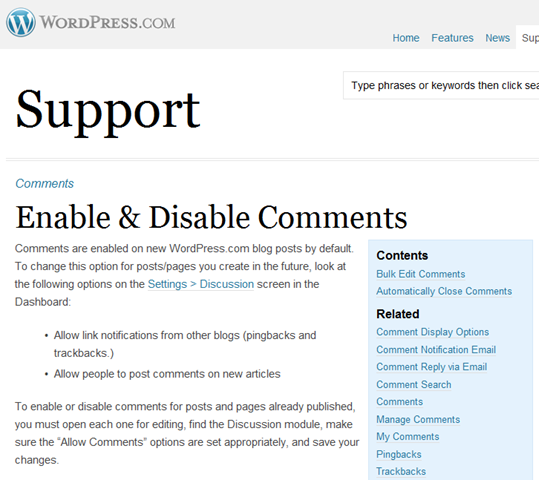
To enable or disable comments for posts and pages already published, you must open each one for editing, find the Discussion module, make sure the “Allow Comments” options are set appropriately, and save your changes.(http://en.support.wordpress.com/enable-disable-comments/)

CRAP.  I am NOT gonna manually edit 3000 comments one-at-a-time.  But I sure as heck don’t want random folk posting comments either.  Especially these douchebag spammers advertising their ‘Gold Farming services’ or their ‘Laptop Battery eStore’.

A WORKAROUND:  BULK EDIT COMMENTS
The same page has two key areas of instructions:

Bulk Edit Comments

There is not a way to turn comments on or off for all published posts and pages in a blog at once. However, you can use the bulk edit feature to change multiple posts/pages at a time.

  1. Go to the Posts page in your blog dashboard.
  2. Select the posts you would like to modify or check the box next to ‘Post’ at the top to select all posts on that page.
  3. Select Edit from the Bulk Actions drop down menu.
  4. Click the Apply button.
  5. Change the options for Comments and Pings to Allow or Do not allow.
  6. Click the Update Posts button.

Automatically Close Comments
It is also possible to turn comments off automatically after a certain number of days. To do that, go to the Settings > Discussion page and look for Other comment settings on the left. Check the box next to the following option, fill in the number of days, and save.

  • Automatically close comments on articles older than __ days.

(http://en.support.wordpress.com/enable-disable-comments/)

CONCLUSION
Right now, the EASIEST way to disable comments seems to be to set the “Automatically close comments on articles older than __ days” field to 1.  However I don’t know if that will work – nor did I want to wait for 24 hours to see if this worked.

Instead what I did was a Bulk Edit, meaning that I had to view and select multiple posts in the the Posts page of the blog dashboard.  If you have a large number of posts that you want to simultaneously edit, you need to be able to view them on a single page.  So the key is:

  • Go to “view # of posts per page” setting under “Screen Settings”.  Set this number to 200.  (I found that 500 & 1000 didn’t work with this process, whereas 200 worked fine.)
  • Select ALL posts by checking the box next to the word “Title”.
    (Wait until the page completely resolves before clicking this checkbox)
  • Click the “Bulk Actions” drop down box and select “Edit” then click the Apply button.
  • Select the comments drop down box and select “Do not allow” then click the “Update” button. 
    NOTE:  THIS MAY RESULT IN A DNS ERROR OR A “CANNOT DISPLAY WEBPAGE” ERROR.  Simply refresh the page (press F5) and the bulk edit instruction will be issued.
  • Go to the next page of posts and repeat the above process until you’ve applied it to every post.

Because of the volume of posts that I have (3000) I had to do this process 15 times.  But it worked.  Every post now has “comments disabled”.

Posted by: kurtsh | September 27, 2010

NEWS: Windows Live Spaces is moving to WordPress.com

 image

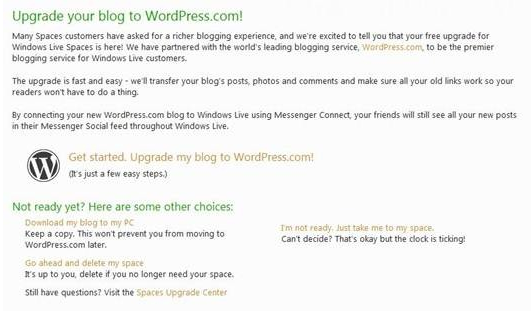
Windows Live Spaces is moving to WordPress.com.  There’s nothing much more for me to say than just to point to the original post off of the Windows Team Blog.

  1. imageWe will be moving all customers from Windows Live Spaces to WordPress.com via a migration system that has been built and tested over the past year plus.
  2. Messenger integration will be available to all users moving to WordPress.com
  3. You have until March 2011 but you should upgrade to WordPress.com today!
    • For now, you can still make posts to your Spaces blog, and you can decide when to upgrade.
    • Starting January 2011, if you haven’t upgraded yet, you will no longer be able to add content to your Spaces blog, but your existing content will still be visible. The same options to upgrade, download or delete your blog will still be available.
    • March 2011 will be the last chance for you to get your stuff. Why not upgrade today?
  4. Users can download their blog & embedded pictures to their local PC as well as migrate their content to WordPress.com.  You can not however automatically download Windows Live SkyDrive photos, videos and files to your local PC in this automated fashion – this needs to be done manually.

This has been a fascinating experience.  My blog has existed since the very beginning of Windows Live Spaces so I have close to 7 years of content to download.  The transfer time will obviously vary depending on the user however I’ve been downloading my blog for a few minutes and it’s already up to 84MB in size.  (The transfer seems to be an FTP transfer of sorts called SPACES.ZIP because it doesn’t tell me how large the actual file is.)

Original post as follows:

imageIf you’re someone that depends on SQL Server, you really shouldn’t miss the SQL Server PASS Summit, coming up this November.  It’s the premier event for SQL Server architects, solutions builders, and DBAs.

Think of this as the TechEd for people that leverage SQL Server.  As you can see below, despite PASS being an independent organization, our involvement is quite heavy for obvious reasons:

  • Microsoft Keynotes
  • Microsoft Session Topics
  • Microsoft Hands-On-Labs
  • Microsoft Product Pavilion
  • Ask the Experts Tables
  • Chalk-Talk Theater

Details follow.

——————-

Microsoft Keynotes

  • Ted Kummert, senior vice president of the Business Platform Division, will begin PASS 2010 by highlighting continued innovation across Microsoft’s business and information platform. In the opening keynote on Nov. 9, Kummert will explore Microsoft’s key technical investments that help solve the toughest issues for various roles across an organization, from IT Professionals to developers. Kummert will explore Mission Critical applications, getting the most out of your datacenter, and the accessibility of Business Intelligence in an effort to deliver on Microsoft’s vision of enabling data platform customers to be more efficient through integrated tools.
  • Tom Casey, General Manager for SQL Server Business Intelligence, will highlight SQL Server 2008 R2 self-service BI customer success stories and also discuss the latest BI advances within the data platform, including the transition of BI to the Cloud.
  • David DeWitt, Technical Fellow leading the Jim Gray Systems Lab, returns as a crowd favorite to speak on SQL Query Optimization 101 (this topic was voted on by last year’s PASS Summit attendees).  Query optimization is the process of compiling a SQL query into an executable plan that is as efficient as possible. While the basic fundamentals for cost-based query optimization were first described in a seminal paper by Pat Selinger of IBM Research in 1979, optimizing complex queries continues to be very challenging 30 years later. In this talk, David DeWitt will describe the fundamentals of query optimization, why it remains a very hard problem today, and present several recent research results that promise to improve the quality of plans produced in the years to come.

Microsoft Session Topics
For the most up to date list of sessions titles, abstracts and speakers, please click here to view the information on the PASS Summit website.

Topic Area

Key Focus Areas

Cloud Computing Platform

Presence: 12 sessions

• Microsoft SQL Azure: fully relational cloud database solution

• Microsoft SQL Azure Data Sync service: connects cloud services with on-premise data

• Codename “Dallas”: authoritative public data sources platform for data and web services

Business Intelligence Platform

Presence: 13 sessions, 1 full-day seminar

• Self-service access to information – Ad-hoc reporting & analytics, visualization & dashboards

• Core BI – Operational Reporting, Enterprise Information Management, OLAP

• Scorecards & Dashboards

• Collaboration, Search, and Business Intelligence

Mission Critical Platform

Presence: 21 sessions, 5 full-day seminars

• Scale your Data Warehouse from 10s to 100s of TB

• Fully integrated software/hardware appliances (OLTP and PDW) for plug-n-play predictability

• Maximizing Availability, Security and Scalability for Mission-Critical systems

• Gain Rapid Insight from High-Speed Data using StreamInsight

Next Generation Application Platform

Presence: 9 sessions

• Data-centric application programming

• Making data access straightforward

• Making data more accessible from the enterprise to lower-tier applications

• Navigating the pitfalls of database programming

Optimized Datacenter

Presence: 8 sessions

• Server consolidation

• Discovery and monitoring of instances and applications

• Easier management of servers and applications

Microsoft Hands-On-Labs
As part of the PASS Summit 2010 experience, we are bringing a large amount of SQL Server based Hands-on-Labs to the Hands-on-Labs area for the upcoming PASS 2010 Summit.  Below is a list of labs that are currently planned for PASS. 

SQLPassLabCode

Track

Lab Title

BINHOL201

Business Intelligence

Creating Excel 2010 PowerPivot Reports

BINHOL203

Business Intelligence

Developing KPI’s and Scorecards with SharePoint 2010 PerformancePoint Services

BINHOL204

Business Intelligence

Developing Reports and Dashboards with SharePoint 2010 PerformancePoint Services

BINHOL205

Business Intelligence

Loading and Preparing Data in the Excel 2010 PowerPivot Client

BINHOL206

Business Intelligence

Working with ATOM Data Feeds in SQL Server 2008 R2 Reporting Services

BINHOL301

Business Intelligence

Defining DAX Calculations with Excel 2010 PowerPivot

BINHOL302

Business Intelligence

Managing Excel 2010 PowerPivot Solutions in SharePoint 2010

BINHOL303

Business Intelligence

Developing and Consuming Report Libraries in SQL Server 2008 R2 Reporting Services

BINHOL304

Business Intelligence

Visualizing Data with Maps in SQL Server 2008 R2 Reporting Services

BINHOL305

Business Intelligence

SQL Server 2008 R2 – Authoring Reports using Bing Maps Integration with Report Builder 3.0

BINHOL306

Business Intelligence

SQL Integration Services – Introduction

BINHOL307

Business Intelligence

SQL Integration Services – Intermediate to Advanced

BINHOL308

Business Intelligence

Introduction to PowerPivot

BINHOL309

Business Intelligence

Reporting Services – Sparklines, DataBars and Indicators

DBHOL200

Database

Introduction to SQL Azure for Visual Studio 2010 Developers

DBHOL202

Database

SQL Azure: Tips and Tricks

DBHOL202

Database

SQL Server 2008 R2 – Implementing Transparent Data Encryption (TDE)

DBHOL203

Database

Implementing Policy Based Management

DBHOL204

Database

Change Data Capture

DBHOL205

Database

Working with Date/Time datatypes

DBHOL206

Database

Multi-Server Management

DBHOL207

Database

Extracting and Upgrading a Data-Tier Application

DBHOL208

Database

SQL Azure -Migrating Databases from SQL Server to SQL Azure

DBHOL209

Database

Working with Database SnapShots

DBHOL301

Database

Create a Windows Server 2008 R2 MSDTC Cluster

DBHOL303

Database

Install a SQL Server 2008 +SP1 clustered instance

DBHOL304

Database

Creating and Deploying a Data-Tier Application

DBHOL305

Database

Managing Change in Data Tier Application Projects in Visual Studio 2010

DBHOL306

Database

Querying Events in SQL Server 2008 R2 StreamInsight using LINQ

DBHOL307

Database

Working with the SQL Server 2008 R2 StreamInsight Event Flow Debugger

DBHOL308

Database

Working with an End-to-End StreamInsight Application

DBHOL310

Database

Install a clustered instance of SQL Server 2008 R2 on Windows Server 2008 R2 Failover Cluster

DBHOL311

Database

SQL Server 2008 R2 – Table and Index Partitioning

DBHOL312

Database

Upgrading to SQL Server 2008 R2 from SQL Server 2000

DBHOL313

Database

Upgrading to SQL Server 2008 R2 from SQL Server 2005

DBHOL314

Database

Resource Governor

DBHOL315

Database

SQL Server 2008 R2- Compliance

DBHOL400

Business Intelligence

Bare Metal Part 1

DBHOL401

Business Intelligence

Bare Metal Part 2

DBHOL402

Business Intelligence

Bare Metal Part 3

Microsoft Product Pavilion
The Microsoft Product Pavilion will host a number of product demonstration kiosks, the Product Pavilion Showcase Theater, and an information desk staffed by Microsoft product managers and developers as well as industry experts and speakers.

The Product Pavilion Showcase Theater Schedule will feature 30-60 minute sessions/demos from the kiosk/topics below as well as our Product Pavilion Hardware Sponsor, Hewlett Packard.

Kiosk Name

Microsoft® SQL Server® Data Warehousing

Microsoft® SQL Server® Mission Critical

Microsoft® SQL Server® OLTP Database

Microsoft® SQL Server® Data Integration

Managed Self Service Business Intelligence

Microsoft SQL Server Reporting Services

Microsoft SQL Server Analysis Services

Microsoft SharePoint Insights

Microsoft SQL Azure

Windows Azure AppFabric

Microsoft codename “Dallas”

OData & Entity Framework

Microsoft Learning – Training & Certification


Ask the Experts Tables
Building on the momentum of last year’s successful PASS Summit, the PASS will have 10 Ask the Experts tables available to answer attendee questions and provide demos.

Table Description

Focus Areas

SQL Server Business Intelligence

Self-Service BI, Excel Services, PerformancePoint Services, SSAS,

OLAP and Data Mining

Data Warehousing

SQL Server 2008 DW,  Fast Track Data Warehouse, Project Madison,

Compression, Partitioning, Performance

SQL Server Reporting Services

Report Design, Reporting Services Management, Reporting Services

& SharePoint Integration

SQL Server Integration Services

High-Speed Connectivity, DTS to SSIS Migration

Data Development

Sync Framework, Entity Framework, LINQ, ADO.NET, ADO.NET Data

Services, ODBC, OLE DB,TSQL, PHP Driver, JDBC Driver, Oslo, M,

Quadrant and Repository, SQL Azure

SQL Server Programmability

T-SQL, Spatial, XML, Filestream, Full-Text Search, Service Broker,

Sparse Columns, Filtered Indexes, Hierarchy ID

High Availability, Virtualization, Consolidation

Clustering, Mirroring, Log Shipping, Data Recovery, Replication,

Hyper-V™, What to consider while setting up SQL for virtualization,

best practices and guidelines, Use of virtualization for HA

(Host clustering–Windows team), Live migration and other

provisioning–Windows team

Manageability, Security, Compliance

Setup, Policy-Based Management, Data Collector, PowerShell™,

Management Studio, Encryption, Auditing, Compliance

Performance & Scalability

Optimizer, Shared Databases, Resource Governor,

SQLCAT

Architecture, Design, Project Discussion, Customer Learnings

Chalk-Talk Theater
PASS will be hosting this year’s chalk-talk theater inside the Technical Learning Center in the Expo Hall at the Summit.  There will be 8 Microsoft chalk-talks this year, with topics ranging from Cloud BI to the revamped SQL Server Master certification

Posted by: kurtsh | September 25, 2010

DOWNLOAD: Halo: Reach “Gift Pack”

image

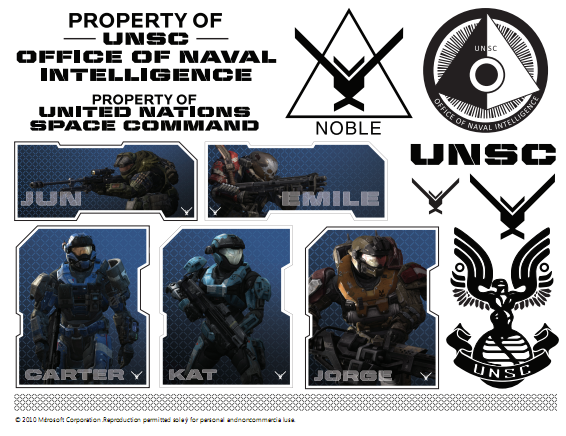
I’m kinda surprised no one else has reported on this.  Maybe everyone missed it but we released a downloadable “gift pack” for Halo: Reach – a large 19MB ZIP file filled with assorted digital posters, graphics, and other goodies for the Halo aficionado.

A sample from the downloadable pack is in the snapshot to the right:

imageHalo: Reach Gift Pack
Get print-ready Halo: Reach posters, stencils, and seal stickers to decorate your game room, cubicle wall, laptop cover, or anywhere else you want to show your love for Halo.*

So download it while it’s still available!


Posted by: kurtsh | September 25, 2010

RELEASE: Virtual Machine Servicing Tool 3.0

image Virtual Machine Servicing Tool 3.0 helps you reduce IT costs by making it easier to update your offline virtual machines, templates, and virtual hard disks with the latest operating system and application patches—without introducing vulnerabilities into your IT infrastructure.

This Solution Accelerator includes the following components:

  • Brief Overview. Available online only on Microsoft TechNet. Summary for business and technical managers that briefly explains how this Solution Accelerator can fit into an organization’s IT infrastructure management strategy.
  • VMServicing_x64 and VMServicing_x86. Setup files for the tool, for 64 bit and 32 bit versions of Windows with Microsoft® System Center Virtual Machine Manager (VMM) 2008 or 2008 R2.
  • Virtual Machine Servicing Tool Getting Started Guide. Provides information about how the tool works, explains prerequisites for the tool, and describes how to install and configure the tool.
  • VM_Servicing_Tool_3.0_Release_Notes.rtf. Notes provide information about this release, describe known issues in the tool, and include feedback instructions.

DESCRIPTION:
The increasing use of virtual machines—for purposes ranging from support of older operating system environments to power savings—has created new challenges for IT.

In particular, virtual machines may be left offline (stored in a non-operating state) for extended periods of time, which conserves resources when the server capacities of the virtual machines are not needed or frees up physical computing resources for other purposes.

However, offline machines, templates, and virtual hard disks do not automatically receive operating system, antivirus, or application updates that would keep them compliant with current IT policy. An out-of-date virtual machine may pose a risk to the IT environment. If deployed and started, the out-of-date virtual machine might be vulnerable to attack or could be capable of attacking other network resources.

Therefore, IT groups must take measures to ensure that offline virtual machines, templates, and virtual hard disks remain up-to-date and compliant. At present, these measures involve temporarily bringing the virtual machine online, applying the necessary updates, and then storing it again.

Benefits

VMST 3.0 helps you more effectively—and safely—manage the workflow of updating you offline virtualization environment. Using VMST 3.0, you can now service:

  • Offline virtual machines in a SCVMM library.
  • Stopped and saved state virtual machines on a host.
  • Virtual machine templates.
  • Offline virtual hard disks in a SCVMM library by injecting update packages.

DOWNLOAD: Virtual Machine Servicing Tool 3.0
http://www.microsoft.com/downloads/en/details.aspx?FamilyID=8408ECF5-7AFE-47EC-A697-EB433027DF73&displaylang=en

clip_image001

We want to extend a special invitation to our SQL Server customers to attend the PASS Summit 2010 conference, Nov. 8-11, in Seattle, WA – hosted by the Professional Association for SQL Server.

PASS Summit 2010 is the must-attend event for anyone interested in getting the most out of their SQL Server and BI investments, and we’re pleased to offer a special discount to our most valued customers: $200 off the Full (3-Day) Summit registration prevailing rate if you register by November 7, with the Microsoft discount code.

Make sure you also include my name and email address under the “Did you hear about PASS Summit 2010 from a Microsoft contact” question during registration and your name will automatically be entered in a draw for a DELL Streak – the new and highly sought after high-tech smart phone and tablet computer hybrid! Find out more about the contest details.

PASS Summit features the most knowledgeable and dynamic SQL Server and Business Intelligence (BI) speakers in the industry. Microsoft will be out in full force to share best practices, tips, techniques, and strategies. From technical sessions to “Ask the Experts” Lounge to the CSS First Aid Station and hands-on labs, you’ll have direct access to the Microsoft developers, engineers, and support teams who create and support the mission-critical features your business depends on.

You can find details about PASS Summit 2010 at http://www.sqlpass.org/summit/na2010/. Remember, register by Nov 7 with the Microsoft discount code for your $200 in savings and don’t forget to add my name and email as the referrer and you could go home with a new Dell Streak!

I encourage you not to miss this opportunity to save on this exceptional SQL Server and BI event. Hope to see you in Seattle!

DISCOUNT CODE:
Please contact me if you are a customer of mine for information about our PASS Summit discount code.

« Newer Posts - Older Posts »

Categories