imageThe release of the Microsoft Software Product License Dependency Reference Guide makes it easy for anyone licensing a given server product to understand what other licenses need to accompany it in production to be compliant.

The information provided in this guide is intended to help you understand the licensing requirements of software that is used together with one or more Microsoft products. (For example, to use SQL Server software, a server needs to be assigned both a SQL Server license and an operating system license.)

You should read and use this guide in conjunction with the terms and conditions under which Microsoft products are licensed. If you acquire licenses under the Microsoft Volume Licensing Program (for example, Enterprise Agreement or Select License), you should refer to the product use rights for the products and the program agreement under which the licenses are acquired. The type and number of licenses required may vary based on how and where you deploy the software.

image

Microsoft Security Essentials is the #1 anti-malware product in North America & is closing in on becoming #1 worldwide.

Microsoft increased substantially since OPSWAT’s last report, rising to the top of the market and surpassing Symantec, who held the lead for the past three consecutive
quarters. As mentioned for global market share, Microsoft’s rise could be linked with the visibility and easy installation of their antivirus soware through Windows Update as well as its compatibility with other leading Microsoft products. AVG also rose this quarter to hold the second leading position for the second consecutive quarter. Symantec rounds out the top three with 14.47% of the North American market.  For the first time in OPSWAT’s past three reports, AVAST is not one of the top three vendors in North America, possibly related to the altering breakdown of the data’s countries of origin.
Several countries where AVAST has led in past reports accounted for smaller percentages of this report’s data.

Read more at:

imageIt bears repeating: 

NO, Silverlight is not going away.

In terms of Microsoft’s official response, it has been very consistent since questions in this area first surfaced:

A friend in our Developer & Platform Evangelism group, as an attempt to clarify and dispel the doubts without going into too much detail, wrote the following:

  • There are a lot of things Microsoft did not mention in our recent announcements with Windows 8 (http://www.microsoft.com/presspass/features/2011/jun11/06-01corporatenews.aspx) and the BUILD conference (http://blogs.msdn.com/b/somasegar/archive/2011/06/01/building-a-bright-future.aspx), which Mary Jo-Foley based much of her opinions on. But that does not imply the technologies not highlighted are being de-emphasized or phased out
  • Silverlight, latest in version 5 beta, has a lot more capabilities than HTML, and will continue to be developed and enhanced to stretch the boundaries of a cross-platform application platform. It will continue to be innovated at a faster pace than HTML and JavaScript
  • Microsoft has always focused on bringing optimized solutions for addressable problem spaces; not really about one-size-fits-all. Silverlight and HTML5 have some overlaps, but they also differentiate in some areas. It’s important to understand the project requirements and then choose the appropriate technology. In general, rich and more complex apps that are not intended for mass consumption are ideally suited for Silverlight (more robust dev tools, runtime, performance, security models, app compatibility, manageability, and richer user experiences, etc.). Apps that are intended for mass consumption (e.g., public-facing websites for millions of users) that need enhanced user experiences from what HTML4 offers today, should use HTML5
  • Silverlight is also being optimized as the native application platform across Windows-based devices (it will still work on MacOS and Linux; just Microsoft using Silverlight on more device platforms) – such as Windows desktop, Windows Phone, and more to come (thus Microsoft’s own dependency on it is increasing)

Wanna take a tour of the upcoming Windows 8 user interface?
(Yes, it’s officially codenamed “Windows 8”)

Building Windows 8–Video #1

Here’s some press content about the new user interface and what has been demonstrated and announced:

imageMicrosoft Deployment Toolkit (MDT) 2012 Beta 1 rides the next wave of System Center releases with support for System Center Configuration Manager 2012.

For Lite Touch installations, MDT 2012 improves the overall client-side user experience, while also providing behind-the-scenes enhancements for partitioning, UEFI, and user state migration.

These features, combined with many small enhancements, bug fixes, and a smooth and simple upgrade process, make MDT 2012 Beta 1 more reliable and flexible than ever.

Key Benefits:

  • Fully leverages the capabilities provided by System Center Configuration Manager 2012 for OS deployment.
  • Improved Lite Touch user experience and functionality.
  • A smooth and simple upgrade process for all existing MDT users.

Tell us what you think!
We value your input. Download the beta on Connect and tell us what you think!Please submit your feedback through Connect and direct any support questions you may have tosatfdbk@microsoft.com.

Availability
This program is now open. The beta review period will run through August 2011.

Tell your friends
To join the beta review program for Microsoft Deployment Toolkit (MDT) 2012, visit Microsoft Connect:
https://connect.microsoft.com/site14

Learn more

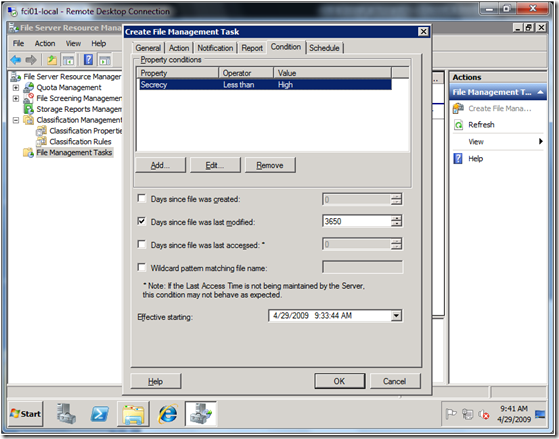
imageDesigned to help reduce the cost and complexity of data compliance, the Data Classification Toolkit for Windows Server 2008 R2 helps organizations consistently identify, classify, and protect data across multiple file servers.

Using out-of-the-box classification knowledge, this toolkit gives organizations visibility into how data is distributed across their organizations to help them apply the right policies, protect critical data, and identify potential data storage efficiencies.

Tell us what you think!
We value your input. Download the beta on Connect and tell us what you think!Please submit your feedback through Connect and direct any support questions you may have tosecwish@microsoft.com.

Availability
This program is now open. The beta review period will run through June 29, 2011. Beyond June, we will continue to accept your feedback until the beta is available. The feedback received after June will be considered for future releases.

Tell your friends
To join the Beta Program for the Data Classification Toolkit for Windows Server 2008 R2, visit Microsoft Connect:http://go.microsoft.com/fwlink/?LinkId=217117

Learn more

Thank you for your interest in the development of the Data Classification Toolkit. We look forward to receiving your feedback!

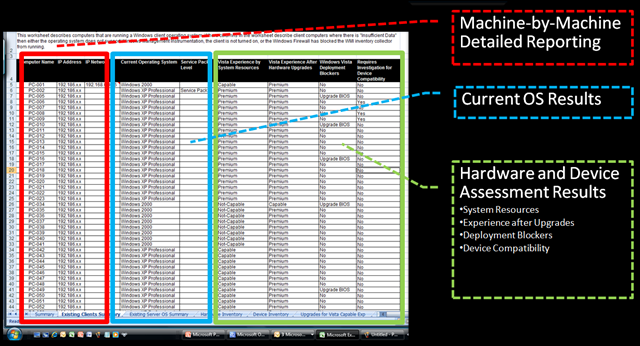
imageThe latest beta release from the Microsoft Assessment and Planning (MAP) team provides organizations with tools to accelerate the adoption of Microsoft private and public cloud platforms.

Download the beta materials on Connect:
http://go.microsoft.com/fwlink/?LinkId=219165

MAP 6.0 Beta: Accelerate the adoption of Microsoft private and public cloud platforms
Planning your journey to the cloud just got a bit easier. The next release of the Microsoft Assessment and Planning (MAP) Toolkit—version 6.0 Beta—includes assessment capabilities to evaluate workloads for both public and private cloud platforms. With MAP 6.0 Beta, you now have the ability to identify workloads and estimate the infrastructure size and resources needed for both Windows Azure and Hyper-V Fast Track. Also new to MAP 6.0 Beta is the Office 365 client assessment, enhanced VMware inventory, and Oracle schema discovery and reporting. Expanded assessment and discovery capabilities from MAP help you streamline planning for your next migration project. Plan what’s next with MAP.

New features and benefits from MAP 6.0 Beta release help you:

  • Analyze your portfolio of applications for a move to the Windows Azure Platform
  • Accelerate planning to private cloud with Hyper-V Cloud Fast Track onboarding
  • Identify migration opportunities with enhanced heterogeneous server environment inventory
  • Assess your client environment for Office 365 readiness
  • Determine readiness for migration to Windows Internet Explorer 9
  • Discover Oracle database schemas for migration to SQL Server

Tell us what you think!
We value your input. Download the beta on Connect and tell us what you think! Send your comments to the MAP team:MAPfdbk@microsoft.com.

Availability
This program is now open. The beta review period will run through mid-July, 2011.

Tell your friends
To join the beta review program for Microsoft Assessment and Planning (MAP) Toolkit 6.0, visit Microsoft Connect:http://go.microsoft.com/fwlink/?LinkId=219168

Learn more

MAP works with the Microsoft Deployment Toolkit and Security Compliance Manager to help you plan, securely deploy, and manage new Microsoft technologies —easier, faster, and at less cost. Learn more athttp://www.microsoft.com/solutionaccelerators.

Thank you for your interest in the development of the MAP Toolkit. We look forward to receiving your feedback!

Sincerely,

Solution Accelerators MAP Team
Microsoft Corporation

Follow Solution Accelerators on Twitter to get the latest tips and updates:@MSSolutionAccel

Posted by: kurtsh | May 27, 2011

BETA: System Center Orchestrator… what to expect!

imageSystem Center Orchestrator is the next release of what was formerly called Opalis. 

It is a radical departure from the original codebase which was built in a combination of Java/JBOSS and Open Source components.  Rewritten to leverage .NET and Silverlight in particular for console activities and designed against Microsoft’s Common Engineering criteria, this promises to be a refined product with great opportunity for datacenters looking to automate processes reliably and securely.

A listing of all the changes made in the BETA are available here:

http://blogs.technet.com/b/scorch/archive/2011/05/17/what-to-expect-in-the-system-center-orchestrator-beta.aspx

imageMicrosoft Corporate Vice President Robert Wahbe delivered the opening keynote this morning at Microsoft Tech-Ed North America 2011 in Atlanta, Georgia. During his talk, Wahbe outlined how the cloud is changing IT and demonstrated how Microsoft and Windows Azure are helping customers move their businesses to the cloud. One of the examples he used was Travelocity; their story is worth delving into because it illustrates the benefits a move to the cloud can create for an organization.

Founded in 1996, Travelocity is an online travel agency that connects millions of travelers with airlines, hotels, car-rental companies, and other services. In March 2010, business partners asked Travelocity to collect website metrics on customer shopping patterns. Travelocity decided to deploy the application in the cloud to avoid burdening its own data center.

Travelocity uses Windows Azure to provide compute power and storage for its business intelligence and analysis system. In doing so, it avoids burdening the capacity of its on-premises infrastructure, Thanks to cloud computing, Travelocity has fulfilled its partners’ requests for a system that collects metrics on customer interactions.

The company is also experiencing a shift in how it manages its development efforts. Because Microsoft manages the servers, configuration, and maintenance, Travelocity is able to build and deploy applications on a per-month subscription basis. It reduces costs while reaching its large customer base.

The company also benefits from the enormous scalability offered by Windows Azure, which ensures that customers from around the world can access Travelocity’s services reliably. Plus, because of a faster time-to-market and a flexible development environment, the company can experiment with new offerings and enhance the customer experience.

Click here to watch Wahbe’s opening keynote. Click here to read more about today’s announcements. You can read the Travelocity case study here.

[taken from Windows Azure Team Blog]

imageLCDS version 2.7 is now live! The Microsoft Learning Content Development System (LCDS) is a free tool that enables the Microsoft Learning community to create high-quality, interactive, online courses and Microsoft Silverlight Learning Snacks.

The LCDS allows anyone in the Microsoft Learning community to publish e-learning courses and Learning Snacks by completing the easy-to-use LCDS forms that seamlessly generate highly customized content, interactive activities, quizzes, games, assessments, animations, demos, and other multimedia.

With the LCDS, the Microsoft Learning community can:

  • Develop and deliver content quickly, while it is timely and relevant.
  • Deliver web content that conforms to SCORM 1.2, and which can be hosted in a learning management system.
  • Upload or attach existing content. (LCDS supports multiple file formats.)
  • Choose from a wide variety of forms for authoring rich e-learning content and Silverlight-based interactive components.
  • Develop course structure and easily rearrange it at any time.
  • Download sample courses (LCDS must be installed)
  • Develop Learning Snacks on Microsoft SnackBox

DOWNLOAD: Microsoft Learning Content Development System (LCDS)
http://www.microsoft.com/learning/en/us/training/lcds.aspx#tab1

« Newer Posts - Older Posts »

Categories