image

Microsoft Project Conference 2012 will be held in Phoenix, Arizona on
March 19 – 22, 2012.  Registration will open Fall 2011.

Project Conference is the premiere Microsoft-led event to share Project and Portfolio Management best practices and connect with your peers from around the globe. Join customers, partners, industry-leading experts and the Microsoft Project team to learn about their success with Microsoft Project and how you can take your success to the next level.

Stay connected for future announcements on Conference Registration, Call for Content , Sponsorship Opportunities and Agenda. Add yourself to the Keep Me Notified list above.

Also, to learn more about Microsoft Project 2010 and get a first-hand look at Customer successes, visit http://www.microsoft.com/project.

Posted by: kurtsh | September 5, 2011

RELEASE: Windows Azure Pricing Calculator

image

The following online calculator was put on line back in May 2011 to provide estimates of what Windows Azure will cost for customers looking for general budgeting information based on their own inputs.

The following warning is presented to all users:

You should not interpret any output you receive as a part of this process to be a commitment on the part of Microsoft, and Microsoft makes no guarantees regarding the accuracy of any information presented in the report. You should not view the results of this report as a substitute for engaging with a third party expert to independently evaluate you or your company’s specific computing needs. The analysis report you will receive is for informational purposes only.  MICROSOFT MAKES NO WARRANTIES, EXPRESS, IMPLIED OR STATUTORY, AS TO THE INFORMATION PROVIDED BY THIS PRICING CALCULATOR.

The calculator presents to pricing models:

  1. Introductory special (* click for more info)
  2. Pay-as-you-go model

The calculator requests the following information:

  • Size & number of compute instances
  • Size of relational databases
  • Size of storage and transaction count
  • Size of Content Dlivery network
  • Number of access control-based transactions
  • Number of service bus connections
  • Size of caches


Windows Azure Pricing Calculator
http://www.microsoft.com/windowsazure/pricing-calculator/

Posted by: kurtsh | September 5, 2011

RELEASE: Office 365 Cost Estimator

image

Office 365 is a flexible per user/per month subscription service with a number of plan and service options. Choose plans and stand-alone services below, enter the number of users for each, and see how affordable Office 365 can be.
This calculator is for estimation purposes only; actual costs may vary.

The estimator assumes an understanding of the differences between the 6 plans available:

  • E1:
    For organizations that need communication and collaboration tools accessible from PCs, the web and mobile devices.
  • E2:
    For organizations that need communication and collaboration tools and the ability to read and do lightweight editing of documents with Office Web Apps.
  • E3:
    The best plan for organizations that need full productivity, communication and collaboration tools with the familiar Office suite, including Office Web Apps.
  • E4:
    For organizations that need full productivity, communication and collaboration tools with Office Professional Plus and Office Web Apps, and on-premises server rights to information protection and enterprise voice capabilities.
  • K1:
    For people in your organization who don’t have dedicated PCs, but need occasional access to web email and internal sites.
  • K2:  
    For people in your organization who don’t have dedicated PCs, but need occasional access to web email, internal sites, and documents with Office Web Apps.

Office 365 Cost Estimator:
http://www.microsoft.com/business/office365tools/estimator/cost-estimator.aspx

Posted by: kurtsh | September 5, 2011

NEWS: Ceton External USB-Digital Cable Quad Tuner

Oh sweet.  Another reason to upgrade to Windows 7.

imageKIRKLAND, WA — August 18, 2011 Ceton Corporation today announced InfiniTV 4 USB, the company’s new, external CableCARD quad-tuner that turns virtually any style of Windows 7-based PC into an entertainment platform for television. InfiniTV 4 USB will be available for pre-order tomorrow, August 19, 2011, from Cannon PC and Fluid Digital at a suggested retail price of $299, with pre-orders expected to ship on September 19, 2011. InfiniTV 4 USB will be available from the company’s other retailers – Amazon, Micro Center, the Microsoft Store, Newegg, Velocity Micro and Zones – later in September at the same price. Ceton also announced a reduction in suggested retail price for the company’s InfiniTV 4 PCI Express (PCIe) model to $299.

InfiniTV 4 USB brings the company’s award-winning multi-tuner CableCARD technology to an external, USB-connected design, making it an ideal solution for virtually any compatible Windows 7-based PC, including laptops, tablets, All-in-One PCs, desktops, towers, home theater PCs and slimline entertainment PCs. InfiniTV 4 USB joins the company’s currently shipping InfiniTV 4 PCIe model, positioning Ceton as the only company offering both internal and external solutions for CableCARD-based premium digital cable TV services through the PC.

A Ceton InfiniTV-equipped PC makes exciting new entertainment scenarios possible in the home, including:

  • Watching and recording up to four live HD channels at once;
  • Streaming live HD channels or recordings to multiple TVs and making Digital Video Recording (DVR) available on virtually every TV using Windows Media Center Extenders;
  • Enjoying cable TV, Internet TV, music, photos, videos and more, all through one device, with the Media Center experience from Microsoft;
  • Eliminating cable set-top boxes and their expensive rental fees;
  • Sharing individual tuners with other Windows 7-based PCs to enable watching TV programming on PC displays as well as TV sets.

“The Ceton family of InfiniTV digital cable tuners is transforming the PC into the world’s most advanced entertainment platform for television,” said Gary Hammer, president and chief executive officer of Ceton Corp. “With the introduction of InfiniTV 4 USB, Ceton now offers solutions for the full range of PC platforms, bringing a new generation of television and entertainment services to almost any consumer.”

“In Windows 7 we enabled support for premium cable TV services in the US to create a high-quality entertainment experience on your PC,” said Todd Rutherford, Windows Entertainment Product Manager at Microsoft Corporation. “with the availability of the Ceton’s InfiniTV 4 USB tuner, a wider range of PC platforms and consumers will now be able to enjoy this entertainment service.”

PRESS ANNOUNCEMENT:
Link to Ceton Announces External USB-Based Digital Cable Quad-Tuner Solution

REVIEW: Ceton InfiniTV 4 USB First Look
http://thedigitalmediazone.com/2011/08/31/ceton-infinitv-4-usb-first-look/

MORE REVIEWS:
http://www.cetoncorp.com/company_press.php

IMAG0163Do you own a Samsung Series 9 laptop?Does the lid “snap” open whenever you open it?  It’s not supposed to and you likely only noticed it after using the laptop for a month or so.

The reason this is happening is likely because the duralumin plate along the LCD display has bent on the bottom right side of the laptop and is getting stuck on the duralumin plate on the base of the laptop, where the keyboard & motherboard are.

You can see the photo, the black paint has worn off on the duralumin plate on the right corner of the laptop’s base from being constantly caught by the duralumin plate connected to the LCD display.

The solution I came up with and used was simple: 

  1. I flattened the metal on the laptop base a little so that it was firmly against the plastic the ‘power button’ is connected to.
  2. I bent the metal at the very corner of the display back a little to ensure there was no more friction against the laptop base.

So you know, I’ve seen this issue on multiple Samsung Series 9s.  I used to think it was because my machine got somehow bumped while in my carrying case and the duralumin plate got warped… but the issue is definitely not unique to me so I decided to write this up to let people know that they’re not alone in this “snapping lid” issue.

Posted by: kurtsh | September 2, 2011

INFO: Samsung Series 9… a fracture in the corner plastic

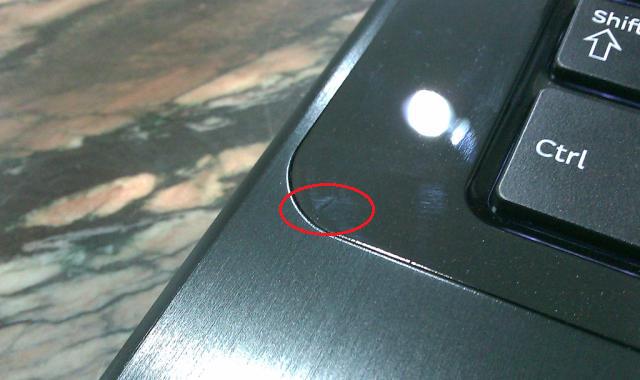
imageIf you’ve been using a Samsung Series 9… and particularly if you’re left handed, you may notice a small fracture appearing on your computer.

See, right-handed folks tend to hold their machines with their left hand when they carry them from point to point.  In the case of the Samsung Series 9, I’ve noticed on several units that the plastic that meets the duralumin plate on the base of the unit develops a fracture over time.

I assume that this is a result of people grabbing and holding that left side of the base of the laptop as they move from meeting to meeting.  In any case, I’ve seen it appear on at least half a dozen laptops.  (EDIT:  Actually, that’s an exaggeration.  I’ve seen it on 3 laptops, to be precise)  It’s not a big deal and I haven’t seen the fracture grow to much more than a 1/8th of an inch but it’s something to be aware of.

And know that you’re not the only one that’s got it… if you have this ‘crack’.

It’s out of beta.  The Data Classification Toolkit for Windows Server 2008 R2 was designed in many ways for MICROSOFT ourselves.  It’s actively in use here at Microsoft to protect file shares (the few that we still actively use over SharePoint document repositories) from storing unprotected, unsecured personally identifiable information and protect company and our customers.

This Solution Accelerator is designed to help enable an organization to identify, classify, and protect data on their file servers. The out-of-the-box classification and rule examples help organizations build and deploy their policies to protect critical information.

The Data Classification Toolkit for Windows Server 2008 R2 is designed to help enable an organization to identify, classify, and protect data on their file servers. The out-of-the-box classification and rule examples help organizations build and deploy their policies to protect critical information in a cost-effective manner. This release includes sample classification rules for PCI DSS and NIST 800-53.

Note: Use of the Microsoft Data Classification Toolkit for Windows Server 2008 R2 does not constitute advice from an auditor, accountant, attorney or other compliance professional, and does not guarantee fulfillment of your organization’s legal or compliance obligations. Conformance with these obligations requires input and interpretation by your organization’s compliance professionals.
Successful data classification programs require proper planning around these key critical areas:

  • Identification of applicable IT GRC authority documents
  • Definition of appropriate classification policies
  • Implementation and evidence of appropriate controls

When used with the Microsoft System Center Service Manager IT GRC Process Management Pack, organizations can easily map classification requirements from various authority documents, such as PCI DSS and NIST 800-53. In addition, they can build and deploy their data classification policies, implement controls through Windows Server 2008 R2 File Classification Infrastructure, and provide evidence of data classification policies to auditors.

The Data Classification Toolkit for Windows Server 2008 R2 includes the following components:

  • Microsoft Data Classification Toolkit.msi – Microsoft Data Classification Toolkit for Windows Server 2008 R2 Installer
  • Data Classification Toolkit for WS2008R2 – Release Notes.rtf – Microsoft Data Classification Toolkit for Windows Server 2008 R2 Release Notes
Posted by: kurtsh | September 2, 2011

BETA: System Center Data Protection Manager 2012

imageThis has been a long time coming.  DPM 2012’s beta has finally arrived.  A huge update from 2010.  Especially the Operations Manager integration & Hyper-V virtual machine optimization.

The key DPM 2012 features that will be available for BETA validations are –

  • Centralized Management (Built on the Ops Manager platform)
    • Centralized Monitoring and Troubleshooting
    • Remote Administration
    • Remote Recovery
    • Push To Resume Backups
    • Role Based Access
  • Continued Best of Breed Application Support
    • SharePoint Item Level recovery without restoring Content DB
    • SQL FILESTREAM support
    • SharePoint RBS support
    • Hyper-V Item Level Restore from a DPM running in a VM
    • Faster protection of VMs on stand-alone Hyper-V servers.
  • Fresh DPM 2012 Console User Interface
  • Data Source Extensibility Framework
  • Certificate Based Protection of non-AD machines
    • File Server
    • SQL Servers
    • Hyper-V servers
    • Clustered Data sources
    • Secondary DPM servers.
  • Tape Enhancements:
    • Enhanced Granular Media Co-Location
    • Tape Reliability Enhancements
  • Multiple DPM DB databases share a single remote SQL Instance
  • Upgrade support from DPM 2010

We do not recommend to deploy this Beta into Production. This Beta is not supported by Customer Services and Support (CSS). If you have questions, please visit the DPM 2012 Beta Forum on http://social.technet.microsoft.com/Forums/en-US/dataprotectionmanager

Help improve SCDPM 2012 Beta by submitting bugs to the Connect Feedback Center.

Posted by: kurtsh | September 2, 2011

NEWS: Windows Phone 7.5 Mango-class hardware

image

Two of the first Windows Phone 7.5 Mango-class devices have been announced!

HTC “Titan” Windows Phone 7.5 Mango-class Phone

  • Mango Windows Phone 7.5 operating system
  • 4.7” screen
  • 1.5Ghz processor – Qualcomm MSM8255
  • 512MB RAM
  • 8MP backside camera – BSI sensor with AF, F2.2/28mm. 2X LEDs flash
  • 1.3MP frontside camera
  • 9.9mm – thinner than iPhone 4
  • 11 hours/15 days battery
  • 3G
  • Brushed aluminum body

HTC “Radar” Windows Phone 7.5 Mango-class Phone

  • Mango Windows Phone 7.5 operating system
  • 3.8” screen
  • 1.0Ghz processor – Qualcomm MSM8255
  • 512MB RAM
  • 5MP backside camera – BSI sensor with AF, F2.2/28mm. 1X LED flash
  • VGA frontside camera
  • Aluminum body
  • 10 hours/20 days Battery
  • 3G
  • 5.1 surround sound

For more on these designs, check out:
http://www.microsoft.com/windowsphone/en-us/cmpn/htc.aspx?cmpid=FBP_09012011_P1

Taken from the PacITPro’s meeting description:
Tuesday, September 20, 2011, 6:00 PM

imageTuesday, September 20th, we’ll welcome Edward Horley and Richard Hicks for a great technical presentation.

Ed Horley: Deploying IPv6 in a Microsoft Enterprise Network

The presentation is focused on the basic deployment items that system and network administrators need to pay attention to for Enterprises networks that are primarily Microsoft focused. Topics covered include default IPv6 behavior of different Windows OS’s, when transition technologies are enabled, what Microsoft products will use IPv6 and deployment guide modifications for Exchange, DirectAccess, Forefront UAG and TMG. In addition, if time allows, some design challenges around DHCP and DNS and how Windows 7 will behave vs Apple OSX or Linux implementations.

Richard Hicks: DirectAccess, the Microsoft remote access technology of the future. Built on Windows 7 and Server 2008/R2, DirectAccess represents a paradigm shift in secure remote access to corporate resources. DirectAccess relies heavily on IPv6, and during the presentation he’ll explain how a DirectAccess deployment can be an effective way to gain experience with IPv6, while at the same time providing transparent, always-on corporate network connectivity for remote users. In addition, Richard will explain the benefits of DirectAccess for systems management engineers, information security officers, and compliance managers.

Presenters Bio’s:

Ed Horley is a Principal Solutions Architect at Groupware Technology in the San Francisco Bay Area. Ed is actively involved in IPv6 serving as the co-chair of the California IPv6 Task Force http://www.cav6tf.org/ and additionally helping with the North American IPv6 Task Force.

Ed is a current Microsoft MVP (first awarded back in 2004) and has spent the last 15 years working in networking as an IT Professional. Contact him at ed (@) howfunky.com or check out his blog at http://www.howfunky.com/

Richard Hicks is a network security specialist and Microsoft Most Valuable Professional (MVP) in Forefront protection technologies. He has designed and deployed edge security and remote access solutions using Forefront Threat Management Gateway (TMG) 2010 and Unified Access Gateway (UAG) 2010 for small and mid-sized businesses, military, government, and Fortune 500 companies around the world. Richard is a MCITP-Enterprise Administrator and is a contributing author for popular technology web sites ISAserver.org and TechRepublic.com. You can find his blog at http://tmgblog.richardhicks.com/.

We have some amazing prizes to giveaway at this event, including:

  • Windows 7 Ultimate
  • Office 2010 Pro
  • TechNet+ Subscriptions

VERY IMPORTANT PARKING INFORMATION:

If you Park at the Wells Fargo Building (where the office is) you will be charged $40.00 – $50.00 dollars.

The least expensive Parking for LA is at Joe’s Auto Park – closest locations are:

  • 252 S. Hill Street
  • 338 S. Hill Street

MEETUP: Technical Deep Dive: IPv6 & DirectAccess @ Microsoft in DT Los Angeles
http://www.meetup.com/pacitprosla/events/26490521/

« Newer Posts - Older Posts »

Categories