The new & improved VGA Dongle for Samsung Series 9 is now available!
How do I know?  I GOT ONE!  And it works!
imageBACKGROUND:
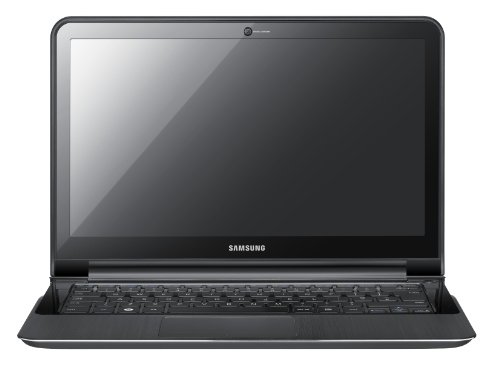
The Samsung Series 9 is a fantastic ultrabook-style laptop, weighing less than a MacBook Air and thinner than one too.  It has a hard aluminum plating (‘Duralumin’ – the stuff used to build airplanes) that surrounds the outside of the machine and protects the device by shielding it from damage while prevents bending or warping of it’s thin profile… something a certain “other” competing laptop doesn’t do so well.

ISSUE… VGA PROJECTION OVER LONG CABLING
One problem it has however is it’s VGA output:  It actually has a micro-HDMI port on it and depends on a micro-HDMI-to-VGA dongle to provide VGA output for things like presentation projectors.  While it works fine for short distances, this dongle has not worked for me for VGA cable lengths exceeding 10-12 feet.

This is a problem because as one would expect, many customer presentation projectors are built into conference room ceilings.  (At Microsoft, virtually all conference rooms have this)  The VGA cabling usually extends from the conference room table, into the floor, along the wall and to the ceiling where the projector is mounted.  Consequently, this cabling is ALWAYS longer than 10-12 feet.

The result, when projection is attempted, is that the signal doesn’t reach the projector… or the laptop won’t even attempt to send the duplicated display… usually leaving you in a lurch when you’re trying to present to a customer.  On rare occasions, I’ve found that the projection system I’m connecting to, hits a video receiver of sorts that’s within 10-15 feet and then outputs the signal to the project & in this case, I can get a ‘shaky’ signal to the projector which flickers and moves annoyingly but is still sort of visible.

ALTERNATIVES:
My original solution was to buy a Plugable USB VGA adapter (http://www.amazon.com/gp/product/B004D0QC0A) – which works all the time for me.  For ~$40, it effectively provides ‘another’ VGA port through your USB ports.  The adapter allows for duplicating your laptop display through this second VGA port, and thus providing the desired effect of showing what’s on your laptop display on the projector… without cable length limitations, as the Plugable USB VGA adapter doesn’t suffer from the same limitations as the Samsung microHDMI-to-VGA dongle.  It does sometimes not fully get the right screen size but it ALWAYS projects a display and is very reliable.  I wrote about it in these posts:
https://kurtsh.com/2011/07/17/info-samsung-series-9-micro-hdmi-to-vga-dongle-or-how-to-use-a-vga-projectors-with-a-samsung-series-9/
https://kurtsh.com/2011/08/01/info-additional-accessories-for-the-samsung-series-9/

AND NOW?
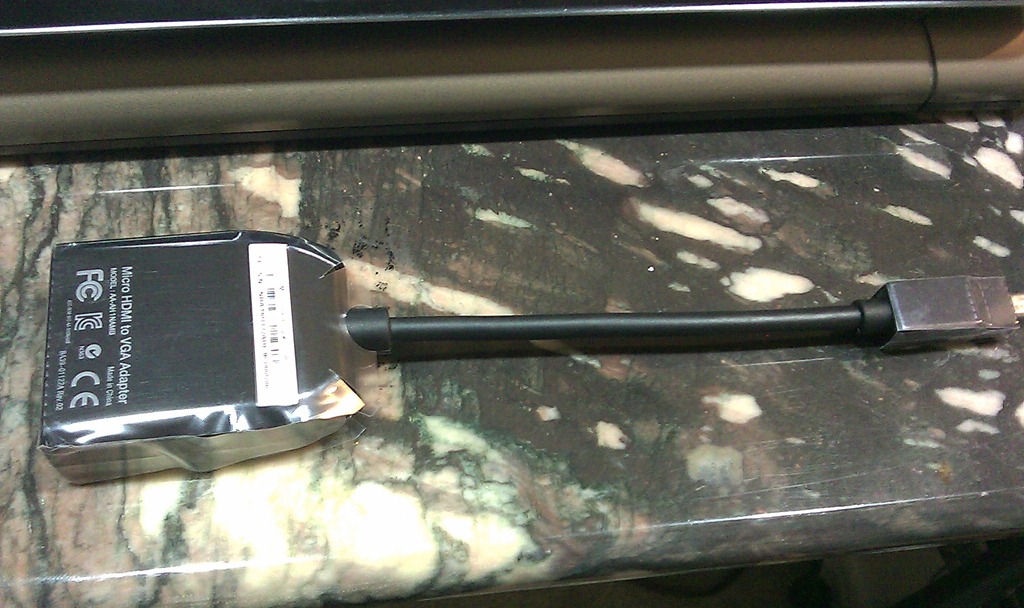
Enter the REV:02 VGA dongle for the Samsung Series 9 laptop:
IMAG0283

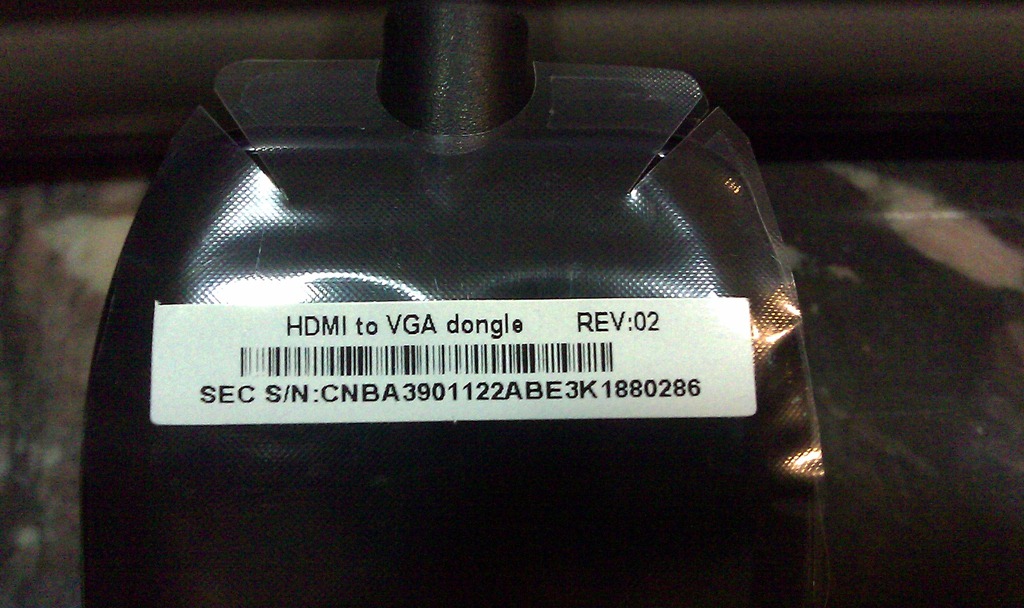
You’ll notice that I’ve purposely left on the plastic layer that covers the ‘heavier/larger’ VGA end of the dongle above.  This is because this plastic has a label on it and this is the only indicator that it is in fact the REV:02 version of the HDMI to VGA dongle.  This is the dongle that WORKS with longer VGA cabling, and thus the one I want to use for presentations.  See below:
IMAG0282

Anyway, I thought some folks might want to actually see what this new dongle looks like so they can verify that they bought the right one.

(UPDATE 11/21/11:  Rumor has it that this might be a link for the Rev 02 dongle.  I really don’t know if this is true, but if anyone wants to try spending $95 (??) for the dongle, you’re on your own.  I make no guarantees since I’ve never ordered from this site.  http://www.samsungparts.com/Products/Parts_and_Accessories/PID-BA39-01122A.aspx?model= )
Please note: System Center 2012 Configuration Manager and System Center 2012 Endpoint Protection are now provided as a single installation package.

imageSystem Center 2012 Configuration Manager helps you to empower people to use the devices and applications they need to be productive, while maintaining corporate compliance and control. As more and more consumer devices enter the workplace, IT faces the challenge of delivering a rich experience to users across multiple devices – both personal and corporate-owned – without giving up the control needed to protect company assets. Configuration Manager provides a unified infrastructure for mobile, physical and virtual environments. Configuration Manager also helps you to be more efficient with simplified administrative tools and improved compliance enforcement.
New features in the release candidate include:

  • Improved endpoint protection functionality, with integrated setup, management and reporting of System Center 2012 Endpoint Protection. (see below)
  • Improved application catalog design that provides a better, more responsive experience when requesting and downloading applications.
  • New support for Windows Embedded devices, including Windows Embedded 7 SP1, POS-Ready 7, Windows 7 Think PC, and Windows Embedded Compact 7.
  • Improved compliance enforcement and tracking, with the ability to create dynamic collections of baseline compliance and generate hourly compliance summaries.
  • Platform support for deep mobile device management of Nokia Symbian Belle devices. Pending a platform update by Nokia later this calendar year for these devices, customers will be able to try out the management of Nokia devices with Configuration Manager.

imageSystem Center 2012 Endpoint Protection (previously known as Forefront Endpoint Protection 2012) protects client and server operating systems against the latest threats using industry-leading malware detection technologies. It is built on System Center 2012 Configuration Manager, giving customers a unified infrastructure for client security and compliance management. This shared infrastructure lowers ownership costs while providing improved visibility through user-centric malware reporting and control over endpoint management and security.
New features in the release candidate include:

  • Support for System Center 2012 Configuration Manager, including integrated setup, management, and reporting.
  • Role-based management across security and operations.
  • Improved alerting and reporting, with near real-time and user-centric data views.
  • More efficient delivery of signature updates using new automatic software deployment model.

Need more information? See the System Center 2012 Configuration Manager and System Center 2012 Endpoint Protection product details pages.

Posted by: kurtsh | October 28, 2011

BETA: System Center App Controller 2012

imageFinally!  System Center App Controller 2012 Beta has hit the Download Center.  And while it’s destined to be the most misunderstood product in the System Center suite, it may ultimately be the most influential for this generation of Cloud management products because really no one has anything like this.  That’s right.  I said it.

App Controller 2012 essentially provides:

  1. PORTAL:  End user self-service portal for cloud services
  2. PUBLIC/PRIVATE CLOUD:  Control over both on-prem & off-prem services
  3. APP TEMPLATE CREATION:  Allow app owners to create & maintain on-going profiles of their n-tier apps to define how to build/scale them
  4. TEMPLATE LIBRARY:  Catalog of App Templates for automating scale, builds, maintenance
  5. DEPLOYMENT:  Automation of cloud app creation, maintenance, scale through SCOM, SCCM, SCVMM, & most importantly Orchestrator.

System Center App Controller 2012 beta provides a common self-service experience across private and public clouds that can help you:

  • Easily configure, deploy, and manage services through a highly intuitive service-centric interface, while using a library of standard templates
  • Create, manage, and move services using a web-based interface that presents a customized view of resources based on your role in the organization
  • View private and public cloud services in a single view and get granular control of application components at each layer

Benefits
System Center App Controller 2012 delivers the following benefits:

  • Self-service Application Management Across Private and Public Clouds
    Using System Center App Controller 2012, datacenter administrators can flexibly delegate a customized, role-based view of your private cloud services (deployed on Virtual Machine Manager based infrastructure) and Windows Azure services, thus allowing you to easily manage them yourself. App Controller 2012 also enables you to move applications and components fluidly within public and private cloud environments.
  • Easy Deployment and Operations for Your Application Services Through a Highly Intuitive Service-centric Interface
    App Controller 2012 enables you to design, build, configure, and deploy services using a library of delegated templates with predefined configuration values. Your datacenter administrators can assign to you the required authority to deploy applications, confident in the knowledge that these predefined service templates will be compliant with company IT standards and policies.
  • Visibility and Control with Unified Console Across Private and Public Cloud Resources and Applications
    App Controller 2012 offers consolidated views of your private and public cloud services, including the virtual machines that represent those services. It also empowers you with granular control and visibility into application components, along with the ability to track on-going jobs and maintain a detailed history of changes.

DOWNLOAD:  System Center App Controller 2012 Beta
http://www.microsoft.com/download/en/details.aspx?id=27843

Posted by: kurtsh | October 28, 2011

BETA: System Center Orchestrator 2012 Release Candidate

image

Remember Opalis Integration Server?  The lone “Java” product in Microsoft’s management family?  It’s about to be come a distant memory because the .NET version is about to be released as an official System Center product… Integration Packs and all!

The System Center Orchestrator 2012 Release Candidate provides the capability of automation of workflows (Runbooks) across other System Center and 3rd party products. These runbooks are created in the Runbook Designer, deployed via the Deployment manager and run and monitored locally or remotely via the Orchestrator Console.
Feature Summary:
As part of the release candidate we have delivered the following features:

  • Install Experience
    • Improved prerequisite checks
    • Implementation of Customer Experience Improvement Program (CEIP), error reporting and interface with Microsoft Update
    • Allow user to log on as a service and select different service accounts for each service
    • Design Improvements( Error handling, port # for DB, increased logging, enabling log on as a service automatically)
    • UI Consistency between other System Center components
    • Time bomb(easy conversion from EVAL to licensed SKU)
  • Security improvements
    • Encryption of DB connection
    • Encryption/decryption of passwords
  • Globalization
    • Unicode capable
    • Convert SSH to Unicode
  • Web service
    • Versioning
  • Orchestration Console
    • Browse events
    • View events
    • UI Updates
  • Bug fixes across all product features

The System Center Orchestrator 2012 Integration Toolkit contains wizard-based utilities for creating new activities and integration packs for System Center Orchestrator 2012. It also allows developers utilizing the Orchestrator SDK to create new custom integration packs for System Center Orchestrator 2012.
Feature Bullet Summary:
Orchestrator Integration Toolkit

  • Rebranding, security enhancements, new generic activity icons
  • Wizards can upgrade 6.3 activities and IPs to be compatible with Orchestrator
  • Fixes issues with upgrading IPs multiple times
  • Fixes issues with DLL / dependent file conflicts among different IPs

The System Center Orchestrator 2012 Release Candidate Integration Packs provides the capability to interface and control other existing System Center products through custom activities which are used to create runbooks.
System Center products supported:

  • System Center 2007 Operations Manager
  • System Center 2010 Service Manager
  • System Center 2008 Virtual Machine Manager
  • System Center 2010 Data Protection Manager
  • System Center 2007 Configuration Manager

DOWNLOAD: System Center Orchestrator 2012 Release Candidate
http://www.microsoft.com/download/en/details.aspx?id=27842

LINK:  User Guide for System Center Orchestrator 2012 Release Candidate
http://technet.microsoft.com/en-us/library/hh237242.aspx

Posted by: kurtsh | October 28, 2011

BETA: System Center Service Manager 2012

It’s official.  System Center Service Manager 2012 Beta is now available.

imageSystem Center Service Manager 2012 Beta

System Center Service Manager 2012 beta provides flexible self-service experiences and standardized datacenter processes that can help you integrate people, workflows, and knowledge across enterprise infrastructure and applications.

System Center Service Manager 2012 beta helps standardize service delivery across your organization by:

  • Enabling IT to deliver flexible self-service experiences so application owners can request private cloud capacity to deploy services.
  • Integrating people, processes, and information across enterprise infrastructure and applications.
  • Standardizing datacenter processes with workflows designed around industry best practices.

Benefits:

  • Enables Self-Service for Application Owners and End-Users
  • Integrates People, Processes, and Information Across Enterprise Infrastructure and Applications
  • Standardizes Datacenter Processes with Workflows Designed Around Industry Best Practices
  • System Center Service Manager Authoring Tool (For SCSM 2012 Beta)

DOWNLOAD:  System Center Service Manager 2012 Beta
http://www.microsoft.com/download/en/details.aspx?id=27844

imageJoin us beginning at 10:00PM as we celebrate the launch of “Halo: Combat Evolved – 10th Anniversary Edition”

Show off your skills in tournaments and enter to win great prizes. Bonus: The first 100 gamers attending a launch event will receive a complimentary gift bag.

Pre-order and score $25!
Pre-order Halo: Combat Evolved – 10th Anniversary Edition and get a $25 gift card per title when you pick up your purchases. **

* Open to guests 17 years and older with proof of age. Guests under 17 no admitted without parent or legal guardian.

** Limited-time offer value with pre-order of eligible products through 11/14 or while supplies last. Requires pre-order deposit, which is non-refundable if pre-ordered product is not purchased or refund is not requested within 120days of the product release date. Offer cannot be redeemed for cash or combined with any other offer or promotion. Not available online. Limit one gift card per pre-order game title. Value of gift card may not be applied to purchased of the eligible products. Pre-order and gift card terms and conditions apply. See an associate for details.

Halo Combat Evolved Anniversary E3 2011 Debut Trailer

DATE/TIME:
November 14th 10:00PM-1:00AM

LOCATION:
Westfield Century City
10250 Santa Monica Blvd
Los Angeles, CA 90067
3102283550
http://microsoftstore.com/losangeles

Posted by: kurtsh | October 27, 2011

TRAINING: Technet “IT Camp"– Los Angeles, Nov 14

imageJoin us for an informal event where the true agenda is up to you! That’s right, we will have a list of topics (such as ways to get on Windows Server 2008 R2) plus your write-in topic(s) and we will put it to a vote. The ones that get the most votes will be the ones that get discussed. This will be very interactive and works best with participation from everyone. We look forward to having you join us for this new informal event.

DATE/TIME:
Monday, November 14, 2011 1:00 PM-5:00PM

LOCATION:
Microsoft Los Angeles Office
MPR
333 S Grand Ave
Suite 3300 Los Angeles California 90071

REGISTRATION:
Technet Events:  IT Camp
https://msevents.microsoft.com/CUI/EventDetail.aspx?EventID=1032497246&Culture=en-US

Event ID: 1032497246

Register by Phone: 1-877-MSEVENT (9AM-7PM EST M-F)

Does your organization have multiple server loads deployed in production? Would you like to monitor their compliance configuration using Microsoft® System Center Configuration Manager 2007 R3?

As part of a select group of our key customers, we invite you to participate in the Beta review program for the following Configuration Packs designed to work with Configuration Manager 2007 R3:

  1. Microsoft Exchange Server 2010 SP1 BPA Configuration Pack
  2. Microsoft SQL Server® 2008 R2 BPA Configuration Pack
  3. Microsoft Office SharePoint® Server 2007 SP2 BPA Configuration Pack
  4. Microsoft Windows Server® 2008 R2 SP1 DHCP Server Role BPA Configuration Pack (supported on Server Core as well)
  5. Microsoft Windows Server 2008 R2 SP1 Remote Desktop Services Server Role BPA Configuration Pack
  6. Microsoft Windows Server 2008 R2 SP1 Web Server (IIS) Role BPA Configuration Pack

These new configuration packs are designed to provide organizations with an end-to-end solution to help monitor server workload compliance against the desired state for your organization. By participating in this Beta review program, you have the opportunity to provide timely feedback to help us ensure that these resources meet your needs!

TIMELINE
In order to influence the final version of these configuration packs, we encourage you to provide your constructive feedback during the Beta review period. Feedback will be accepted through November 7, 2011.

FEEDBACK
Attached to the download for this Beta review, please examine the user guides and scenario documents for each configuration pack. If you observe any scenario gaps, functionality issues or code defects, please provide this as feedback to us. We will carefully review your feedback and fix any issues that are critical to success of these configuration packs for your organization.

To submit your feedback, please use the Feedback link in the left pane of the Beta review program page (see the screenshot below) or send us an email message at smcpbeta@microsoft.com.

DISCUSSION GROUP
Our team has established a newsgroup for our Beta customers to facilitate additional discussion and provide you with a means to ask questions to the product team. To access the discussion group, click the Discussions link in the left pane of the Beta review program page.

HOW TO DOWLOAD THE BETA REVIEW PROGRAM
Follow these steps in sequence, OR THE DOWNLOAD WON’T WORK.

  1. Sign in with your Windows Live® ID and access theProgram Home Page (https://connect.microsoft.com/site715/program6809).
  2. Reference the download link for this Beta review program (it will be available through November 7,2011) and clickDownload (http://connect.microsoft.com/site715/Downloads/DownloadDetails.aspx?DownloadID=39357).

We look forward to hearing from you! Thank you for taking the time to review and provide feedback on these Beta materials. Please let us know if you have any questions.

image

MMS News and Updates!
To receive news and updates about the MMS 2012 event, please email the MMS 2012 Notification Request alias.

WEB SITE:
http://www.mms-2011.com/mms2012

Get Ready for Tomorrow, Today – Hyper-V Virtualization for the Cloud
Virtualization is one of the critical elements of networks operations of all kinds. Virtualization is a key to cloud operations. Joins us as we discuss the key components of virtualization that provide the operational foundation for both Public and Private Cloud.

Private Cloud 201: Microsoft Private Cloud Tools and Technologies
So you have heard the private cloud story from a 101 level and you want to know more. Join us as we discuss Private cloud in greater detail with a focus on the tools and technologies that make Private Cloud such an appetizing It and business opportunity for business both large and small.

DATE/TIME:
Monday, November 14, 2011 8:30 AM-12:30PM

LOCATION:
Microsoft Los Angeles Office
MPR
333 S Grand Ave
Suite 3300 Los Angeles California 90071

REGISTER:
“TechNet Events Presents: The Pathway to the Private Cloud – Los Angeles”
https://msevents.microsoft.com/CUI/EventDetail.aspx?EventID=1032497081&Culture=en-US

REGISTER BY PHONE:
1-877-MSEVENT (9AM-7PM EST M-F)
Event ID: 1032497081

« Newer Posts - Older Posts »

Categories