Posted by: kurtsh | October 11, 2011

TOOL: IEZoneAnalyzer v3.5 with Zone Map Viewer

<taken from US Govt Configuration Baseline Technet blog>

imageIEZoneAnalyzer is a utility for viewing and comparing Internet Explorer security zone settings – that is, the configuration settings that grant web sites in the Intranet zone more capabilities in the browser than web sites in the Internet zone. Earlier today, I wrote about the surprisingly complex rules that determine whether and when explicit mappings of websites to security zones take effect or are ignored. IEZoneAnalyzer version 3.5 adds a Zone Map Viewer that shows which web sites have been specifically assigned to security zones and whether the assignment is effective. Click on the “Zone Map Viewer” button in the main dialog’s toolbar to display the Zone Map Viewer. You can toggle the Zone Map Viewer between an “Effective Settings” view and a “Raw Settings” view with labeled toolbar buttons.

“Effective Settings” lists the configured web sites and the zones to which they are mapped. The Comments column calls out settings that are applicable only to 32-bit processes or only to 64-bit processes, or that are completely overridden and never take effect. For example, the first screenshot below shows a number of site assignments to Trusted Sites that are overridden because they are defined in User Preferences, but overridden both because the “use only machine settings” group policy is in effect and because a Computer Configuration Site-To-Zone Assignment policy is in effect. The screenshot also shows two overridden settings that are in effect only when Enhanced Security Configuration (ESC) is enabled, which is not the case as shown by the informational lines at the top of the listing. A given site is listed only once in the Effective Settings view. If a site is mapped the exact same way in a registry location that is in effect and in another that is not in use, the “overridden” one is not shown. That is, a setting is shown as “overridden” only if is defined somewhere differently from what is actually in effect.

To download the tool and read more about it’s use, visit:

image

Taken from the intro page:

Who is this for?
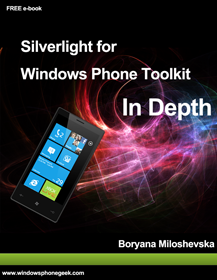
The target audience of this book is anyone who is interested in Silverlight for Windows Phone development. It covers all controls from the Microsoft Silverlight for Windows Phone Toolkit 7.1 – Aug 2011 SDK (Mango).

This book contains all the information necessary to get you started with the Silverlight for Windows Phone Toolkit. It is suitable for both beginners and advanced developers. 

Before you begin you will need to have a basic understanding of:

  • Silverlight principles
  • Windows Phone principles
  • C# programming

What this book covers?
The book covers “in depth” all controls from the Microsoft Silverlight for Windows Phone Toolkit including:

  • AutoCompleteBox
  • ContextMenu
  • DatePicker 
  • DateTimeConverters
  • ExpanderView
  • Gestures
  • HeaderedItemsControl
  • HubTile
  • ListPicker
  • LocalizedResources
  • LockablePivot
  • LoopingSelector
  • LongListSelector
  • MultiselectList
  • Page Transitions
  • PerformanceProgressbar
  • PhoneTextBox
  • WrapPanel

Boryana Miloshevska is a software developer with more than 6 years of professional experience with .NET technologies. She is a co-founder of www.windowsphonegeek.com – one of the biggest windows phone development communities. She is also working as a consultant in the areas of Silverlight and Windows Phone application development.

What else?

  • Active blogger and tech enthusiast trying to contribute to the windows phone development community in various ways. Author of more than 300 development articles, tutorials and guides related to Silverlight and Windows Phone 7 technology most of which published on www.windowsphonegeek.com .
  • MCTS, MCPD Web and Desktop development
  • Winner of the Microsoft “Engineering Excellence Achievement” Award
  • MSc Computer Science
  • MSc Technology Entrepreneurship (UCL , London UK)

DOWNLOAD:  "Silverlight for Windows Phone Toolkit In Depth"
http://windowsphonegeek.com/WPToolkitBook

image

Greetings! We’re happy to announce that we’re in the process of creating a free ebook similar to Introducing Microsoft SQL Server 2008 R2 (which we released in 2010). Its title is currently Introducing Microsoft SQL Server Code Name “Denali,” and it will describe many of the new features and capabilities of the next version of SQL Server. This ebook, like that earlier one, is being authored by the fantastic team of Ross Mistry and Stacia Misner.

And today, to help celebrate PASS Summit 2011, please enjoy a DRAFT Preview excerpt containing two chapters: Chapter 2, “High Availability and Disaster Recovery Enhancements,” written by Ross, and Chapter 6, “Integration Services,” written by Stacia. You can download the DRAFT Preview ebook here.

Please keep in mind that this excerpt provides early content from an ebook currently in development and is still in draft, unedited format. This excerpt was written against SQL Server Code Name “Denali” Community Technology Preview 3.

By the way, here’s the outline for the full free ebook that we’ll publish in the spring:

Ross’s chapters:
PART I Database Administration

  • Chapter 1. Denali Editions and Enhancements
  • Chapter 2. High Availability and Disaster Recovery Enhancements
  • Chapter 3. Scalability and Performance
  • Chapter 4. Security Enhancements
  • Chapter 5. Beyond Relational

Stacia’s chapters:
PART II Business Intelligence Development

  • Chapter 6. Integration Services
  • Chapter 7. Data Quality Services
  • Chapter 8. Master Data Services
  • Chapter 9. Analysis Services
  • Chapter 10. PowerPivot
  • Chapter 11. Reporting Services

[taken from Microsoft Press blog]

Posted by: kurtsh | October 9, 2011

INFO: Uninstalling Ghostery for Internet Explorer 9.0

imageA while back I was trying a browser add-in for Internet Explorer 9.0 called “Ghostery”.  Basically, it displays what “tracking” services are being used on you whenever you visit a web site.  The simple explanation is that it monitors the Javascript on each web site for known tracking cookies & techniques & blocks them if you wish. 

For example, whenever you go to a web site using tracking services like “Doubleclick” or “Google AdSense”, your actions and details are transmitted to a central site, completely separately from the web site you’re visiting.  So if you visit Galpin Toyota’s web site, you might enter your zip code.  If you go to ESPN.com you might enter your birthdate to be allowed to access certain areas.  In GAP.com you might enter your sex.  These tracking services will aggregate that you are a 35 year old Male from Los Angeles, CA – and continue to learn more about you depending on what other sites you visit using the same tracking service. 

Ghostery would tell you what tracking service was being used and allow you to specifically BLOCK that tracking service.  Cool ‘eh?

SO WHAT’S THE PROBLEM?
The problem was, Ghostery could REALLY slow down your browser.  I found that pages could take 2x-3x as long to bring up as Ghostery would rifle through the Javascript to produce a summary of what services were in use.

Worse yet, in many cases Ghostery became very difficult to remove from your system.  On several systems, simply using “CONTROL PANEL – PROGRAMS & FEATURES –> GHOSTERY [UNINSTALL]” wouldn’t remove the plug in.  IE would still load the plug in, the registry entries for the plug in would remain, etc.

The alternative is to use IE9’s Tracking Protection which would allow you to ‘subscribe’ to a list of services to block – by default.  This list evolves and expands as time goes by and your browser automatically pulls in the new list to block these service’s cookies & trackers.

HOW DO YOU UNINSTALL GHOSTERY THEN?
It basically comes down to following this rather sloppy process:

  1. Open Internet Explorer. 
  2. Open TOOLS – Manage Add-Ons
  3. Right click on “Ghostery” & select ‘Disable’
  4. Right click on “Ghostery BHO” & select ‘Disable’
  5. Close Internet Explorer & shutdown your computer.
  6. Power it up again and hold F8.  You should start in the SAFE MODE here.
  7. Login and go to c:\program files (x86)\GhosteryIEplugin
  8. Delete the folder
  9. Reboot

This leaves behind the reference to Ghostery in "Manage Add Ins" but at least the plug ins aren’t loading any more so they won’t slow down your browser.

CONCLUSION:
This would really be a valuable plug in for Internet Explorer 9.0 if it was faster & executed an uninstall cleanly.  I really hope they fix the uninstall procedure for IE & improve the plug in performance in the future.  It seems like such a great idea to provide real-time notification of privacy concerns to the end user but it’s really hard to justify using Ghostery considering it’s issues versus using IE9’s built-in Tracking Protection.

Posted by: kurtsh | October 6, 2011

A tribute to a great man.

301305_2326453194075_1032008114_32633798_1343614477_n[1]

Company flags are being flown at half mast today across all Microsoft campuses.

Posted by: kurtsh | October 5, 2011

TOOL: Metro UI Tweaker for Windows 8 Dev Preview

image

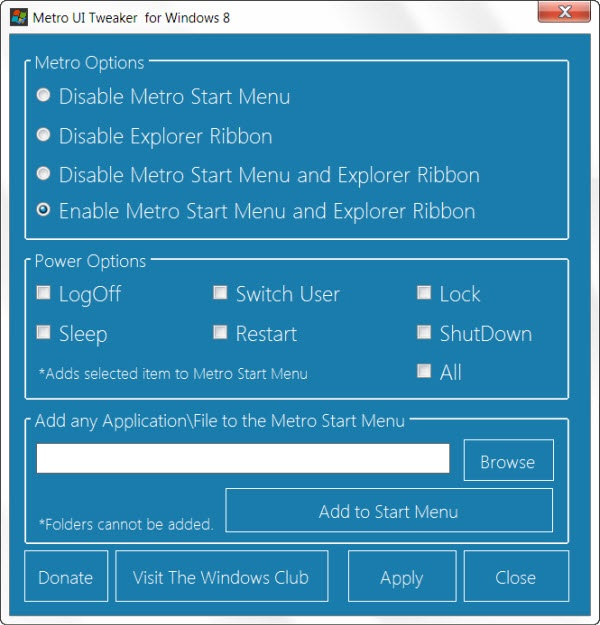
Windows Club went and built a tweaking tool for Windows 8 Dev Preview.

They list the following tweaks:

  1. Disable Metro Start Menu: Disables only Metro Start Menu Screen. This function requires editing a System File. It does not remove the file.
  2. Disable Metro Ribbon: Disables only the Metro Ribbon UI. This function I discovered myself. It requires Taking Ownership of a System File. It does not remove this file.
  3. Disable Metro Start Menu and Ribbon: Disables the Metro Start Menu UI, Ribbon UI, Metro Task Manager UI and the Lock Screen.
  4. Enable Metro Start Menu and Ribbon: Re-enables all available Metro UI options.
  5. Add Power Options to the Metro Start Menu Screen: Logoff, Switch User, Lock, Sleep, Restart and Shutdown
  6. Add any Application/File to the Metro UI Start Menu Screen: Some Applications/Files may not be available to you to add to the Metro Start Menu Screen. This program allows you to add those Applications/Files which would otherwise be unavailable.

Looks good.

imageThis is pretty incredible.   Mike Ormond, Developer Evangelist for Windows Phone, wrote a book with the assistance of Colin Eberhardt, Pete Vickers, Andy Gore, Mike Hole, Gergely Orosz, Sasha Kotlyar, Dominic Betts, Will Johnson, Ben Cameron, James Bearne, Samidip Basu, Paul Marsh, Stuart Lodge.

Here’s the result: 
Building Windows Phone Apps: A Developer’s Guide

This book combines useful, technical information about the platform, written by those who’ve been there and done it, with some stories about the people and the apps they’d written. The book will act as a handy reference that gives you a “puddy up” into developing on the platform and, importantly, helps you to avoid making the same mistakes others have made.

Posted by: kurtsh | October 5, 2011

BETA: WebMatrix 2.0 Development Suite Beta 2

image

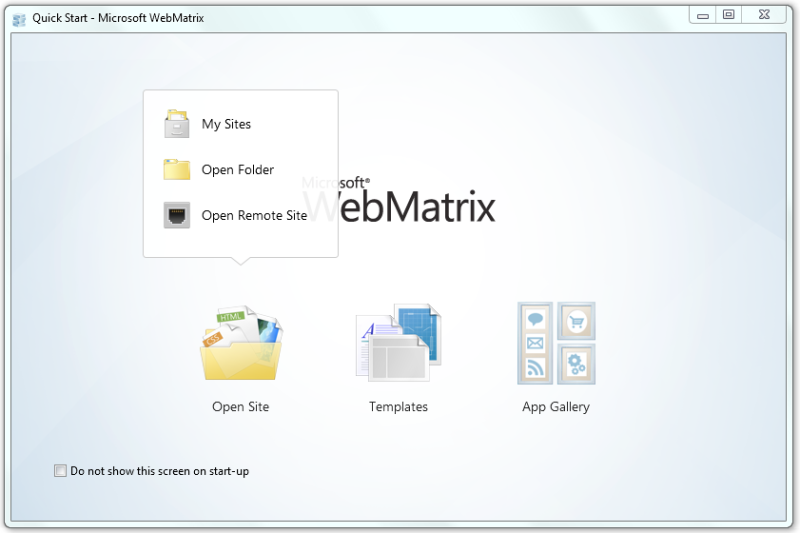
A new web development tool is being made available called “WebMatrix” from Microsoft.  It’s a brand new web development tool from Microsoft that includes everything you need for website development. Start from open source web applications, built-in web templates or just start writing code yourself. It’s all-inclusive, simple and best of all free.

WebMatrix is the easiest way to build, test and deploy Web sites. WebMatrix installs in minutes and elegantly integrates a Web server, database and programming frameworks into a single integrated experience. Connect from WebMatrix to Visual Studio or SQL Server Express to take advantage of Microsoft’s professional tools and servers.

README:
http://www.microsoft.com/web/post/webmatrix-2-beta-readme

FEATURES:
http://www.microsoft.com/web/webmatrix/betafeatures.aspx

DOWNLOAD:
http://www.microsoft.com/web/gallery/install.aspx?appid=webmatrix&prerelease=true

I forgot to write a post about this but I’m so proud of our team, I’m gonna do it way, way late.  Pffffht.

image

Microsoft competed in the “After Hours Gaming League”, a Starcraft 2 competition for charity featuring competitors from some of the biggest names in the tech industry, including:

The final results?

FINAL RANKING TEAM WINS LOSSES
1 Microsoft 7 0
2 Google 5 2
3 Zynga 5 2
4 Amazon 5 2
5 Twitter 3 4
6 Dropbox 2 5
7 Facebook 1 6
8 Yelp 0 7


Yup.  A perfect record – beating Google, Amazon, Facebook, and most importantly Zynga in the tournament finals. 

In recognition of Microsoft’s win, $5000 was donated to their charity.  Congratulations to Amnesty International & the Microsoft Starcraft 2 team on your FLAWLESS VICTORY.

  • LINK: Long Zheng’s post on Microsoft’s Undefeated Win in the After Hours Gaming League on istartedsomething.com
    http://t.co/1SgWTaE
Posted by: kurtsh | September 25, 2011

INFO: Microsoft signs patent agreement with Casio & Samsung

UPDATE (10/23/11):
Wow!  Yet another announcement – this time from Taiwan’s Compal:

Today Microsoft announced its tenth license agreement providing coverage under our patent portfolio for Android mobile phones and tablets. Today’s agreement is with Compal, one of the world’s largest Original Design Manufacturers, or ODM. Compal is based in Taiwan, where it produces smartphones and tablet computers for third parties and has revenue of roughly $28 billion per year.

Today’s announcement marks Microsoft’s ninth Android agreement in the last four months. More important, today’s announcement means that companies accounting for over half of all Android devices have now entered into patent license agreements with Microsoft.

UPDATE (9/29/11):
Whoops!  There goes another rubber tree plant!  An even BIGGER announcement – dare I say, the biggest one could imagine!

imageMicrosoft announced today that it has signed a definitive agreement with Samsung Electronics Co. Ltd., to cross-license the patent portfolios of both companies, providing broad coverage for each company’s products. Under the terms of the agreement, Microsoft will receive royalties for Samsung’s mobile phones and tablets running the Android mobile platform. In addition, the companies agreed to cooperate in the development and marketing of Windows Phone.

“Microsoft and Samsung see the opportunity for dramatic growth in Windows Phone and we’re investing to make that a reality,” said Andy Lees, president, Windows Phone Division, Microsoft. “Microsoft believes in a model where all our partners can grow and profit based on our platform.”

——————–

ORIGINAL POST (9/28/11):
Big announcement on Sept 20th:

imageMicrosoft Corp. and Casio Computer Co. Ltd. have entered into a broad, multiyear patent cross-licensing agreement that, among other things, will provide Casio’s customers with patent coverage for their use of Linux in certain Casio devices. This licensing agreement is an extension of the long-standing relationship between the two companies; Casio utilizes a wide variety of Microsoft software for its products, including its industrial handheld terminals and business information systems. Although the details of the licensing agreement are confidential, the parties acknowledge that Microsoft is being compensated by Casio.

I’m a big fan of Casio’s and I hope this could mean greater collaboration between them and Microsoft without the messiness of patent issues.  I just love their consumer grade rapid shot cameras.  Makes it so easy to take photos of the little one who’s always on the move!

Incidentally, here’s the patent agreements between Microsoft and users of Linux that have been announced to date near as I’ve been able to track: (Emphasis is mine)

« Newer Posts - Older Posts »

Categories