Posted by: kurtsh | January 9, 2012

NEWS: Soluto’s Roee Adler… on Apple

imageRoee Adler of “Soluto” fame (if you don’t know what that is, you’re probably not a desktop IT guy) wrote a post that I thought was observant & insightful called, “The greatest trick Apple ever pulled was making you think it’s YOUR fault”.


Here’s a quote that seems to have ruffled some feathers:

"People who have a negative experience with an Apple product just suffer in silence, assuming it’s their own fault"

This thing got retweeted all over the Internet so I’m not even going to bother posting a larger snippet here.

Posted by: kurtsh | January 9, 2012

INFO: Installing System Center Service Manager 2012 Beta

imageAlaa Ajweh has written a very thorough post on how to install System Center Service Manager 2012’s BETA release.

Installing System Center Service Manager 2012 Beta Step by Step

Alright folks, the Service Manager has just been released! its time to give it a shot and see what the ins and outs of the products.

I’ve summarized the installation steps for you so you can use this guide to start right away with your lab (this isn’t intended for production environments, more thorough planning should take place). I suggest that you take a quick look at the release notes for SCSM 2012 here

As for the installation, remember the good old days when you had to patch Server 2008 to get the latest System Center (R2, R3 stuff), but Server 2008 R2 worked out of the box just fine because it’s a lovely modern OS? well, hate to break the news for ya, but those days are gone; you better get your Server 2008 R2 SP1 Server running and START PATCHING! (actually 2 Servers) here is what you need:

  1. Go get Hotfix 2600907 for Server 2008 R2 here (needs a restart)
  2. Get the Authorization Manager hotfix here (included in Server 2008 R2 SP1)
  3. Get the Microsoft Analysis Management Objects (X64) which is required by the
  4. management console so it can work with SQL Server Analysis Services (SSAS)
  5. Install Microsoft Report Viewer Redistributable Security Update KB971119 (no links?
  6. yes! its in the Prerequisites folder of the SCSM Media, horray!)
  7. Get .NET Framework 4 (for the Self Service Portal if you need it)

Read the entire post at Ajweh’s Blog:

image

Here’s a list of things I’m not interested in seeing at CES 2012 this year:

3D anything.  Geezus.  The consumers have spoken with their wallets.  No one cares.  Photos, cameras, displays, glasses, laptops.  You 3D advocates just won’t give up, will you?

Blu-ray.  Attention Sony:  The world has spoken.  Everyone is going streaming.  No one is interested in buying a new media format, new TVs, or rebuying their DVD library.  See you on Xbox Live Video Marketplace or Netflix.

Wireless power.  After 5 years, prototypes are just not interesting.  If it’s not consumer purchasable at a reasonable price, I don’t care any more.

Near-field Communications (NFC).  Here’s a simple observation:  I can buy things right now with very little effort & a very high successful transaction rate using magstrip credit cards.  Why does anyone want to spend a ton of money on an infrastructure to do exactly what we already do with cheap plastic & wallet sized cards?

TV-embedded Set-top Boxes.  Hey LG, Samsung, and all you other clowns?  No one cares about your proprietary, rarely updated, alien-UI-sporting, sluggish, obscure set-top box technology.  Nobody bought it last year – no one’s going to buy it this year.  You throw this crap against a wall and seriously believe someone’s going to us it over an Xbox 360 or Apple TV, or WDLive or Google TV.  Here’s a hint:  They’re not… or I should say, they DIDN’T.

Cheap, Useless, Piece-of-Junk Tablets.  These disposable, craptacular tablets that have been coming out with marginal utility (and lots of bugs) for the same price as an iPad are not worthy of CES.   A fully-powered Android tablet like the Kindle Fire at $199 is a device matched with an appropriate price.  But $500 for an Honeycomb-based tablet?  Go fish, loser.

iPhone Accessories.  I’m avoiding most of North Hall like the plague.  I don’t, don’t, don’t care about headphones for iOS, jackets for iOS, batteries of iOS.  I could buy all that junk on eBay… but I don’t own an iPhone so I don’t care.

Sony Playstation Move.  C’mon guys.  Now it’s just sad.  Move on.  No pun intended.

Microcell.  Did anyone ever buy into this?  It sounded like a good idea… until the carriers revealed their master strategy for getting consumers to implement them.

That 55” OLED TV.  Why?  Because you can’t buy it that’s why.  It’s a prototype.  It’s out of their research org.  It’s not for sale.  There’s no announced availability date.  So it could be sexier that Salma Hayek:  I don’t care about it.

Cameras with no innovation.  I keep going to Poloroid & Canon, etc. and I never see anything that jumps out at me.  Casio always shows something interesting because they actually demonstrate some new technology that promises to make picture taking easier & better.  Not so much from the others.

Digital Photo Frames.  $100 for 7” diagonal?  With WiFi?  And SD flash memory slot?  Yawn.

eReaders.  All of them.  Or almost all of them:  If it doesn’t say “Kindle” somewhere on it, I’m not interested.

imageAre you an Official Xbox Magazine subscriber?  Then you may have noticed that this month’s issue (February 2012) has something conspicuously missing. 

The DemoDVD is GONE.

At first I thought that someone had ripped off my disc as my copies always came in plastic with a DVD along side the magazine inside.  But alas, Future, the publisher, has the decided to stop shipping the DemoDVD.  After 131 discs, that’s all she wrote.  SOB!

WAIT A SECOND.  I PAID TOP DOLLAR FOR THOSE DVDS.
Yeah, they know that.  As a result, they are providing all subscribers with 3 extra issues of the magazine to compensate for not having DVD’s any more.  Yeah, I know.  Kinda weak sauce.  But at least it’s something.  And they’ve spent the money in other ways to enhance the magazine.  For example:  The paper stock used in the magazine is noticeably thicker & stronger, and print is clearer and colors more vivid.

HOW TO GET YOUR 3 COMPLIMENTARY ISSUES OF OXM
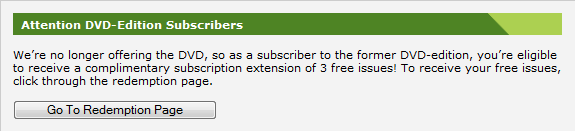
To get your 3 complimentary issues of Official Xbox Magazine – IF YOU’RE AN EXISTING MAGAZINE SUBSCRIBER:

  1. Login to the site http://www.oxmonline.com/customerservice
    You’ll need your email address that was used with your subscription and your zip code.  You’ll see the following frame.

    image

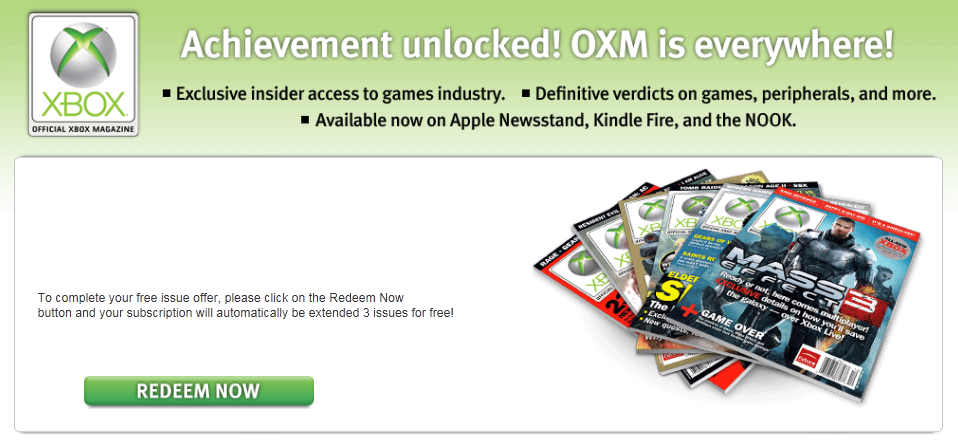
  2. Hit the Go To Redemption Page button.  This will lead you to this page:

    image

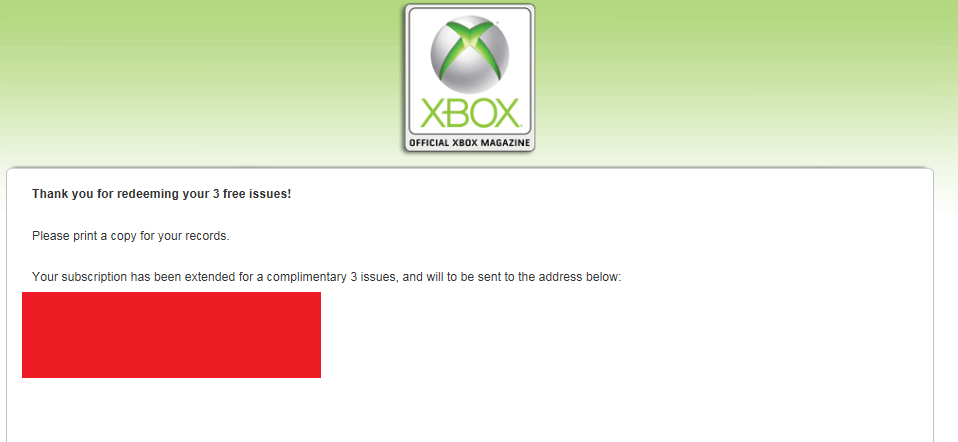
  3. Press the REDEEM NOW button.  You should see this final screen.

    image

WHAT ELSE IS THERE?  HOW ABOUT DIGITAL VERSIONS OF ALL THE PAST ISSUES?
Another thing that they’ve introduced is they now have the entire back catalog of OXM Magazines available in .PDF form.  The WHOLE BACK CATALOG.  To get to it, here’s the URL:

Here’s the last issue posted from the holiday season:

[NOTE 1/5/12:  There is a problem currently with downloading issues from 2008 and before.  I contacted OXM about it and hopefully they are working on it.]

imageHere it is… an actual discount offer for TechNet Professional Subscriptions – 15% off. 

If you’re in the market for TechNet Pro, you better take advantage of this.

This is a great opportunity to get access to full versions of software (for evaluation purposes only) with no time bombs or feature limits. Read the terms and conditions for the offer and make sure to use promo code TNFLA12.

(Note: You’re supposed to be a subscriber of the “TechNet Flash Newsletter” in order to take advantage of this deal.  To sign up for TechNet Flash Newsletters, go to THIS LINK.)

From now until February 29th, 2012 Microsoft TechNet Flash subscribers will receive a 15% discount on a new Microsoft® TechNet Subscriptions Professional (the “Offer”):

  • The Offer is available to Microsoft TechNet Flash subscribers only. The 15% discount is based on the estimated retail price in USD; however, actual prices may vary by country, exchange rate and local taxes. Each individual acquiring a subscription in connection with the Offer (the “Subscriber”) is responsible for all related taxes.
  • The Offer is valid only for a new twelve (12) month subscription to TechNet Subscriptions Professional and may not be combined with any other promotions, discounts or offers.
  • The Offer is limited to one (1) per individual Subscriber and may not be used on volume license orders.
  • To receive the Offer, the Subscriber must be a current TechNet Flash subscriber.

For details on your use rights for evaluation software, evaluation and testing usage scenarios and a list of product titles included with your new subscription to TechNet Subscriptions Professional, please visit: http://technet.microsoft.com/subscriptions and become familiar with the Microsoft TechNet Subscriptions Software License Terms, the TechNet Terms of Use, and the Microsoft Privacy Statement.

imageWe’re pleased to announce the beta version release of updated product baselines for the Microsoft Security Compliance Manager (SCM 2) tool that are now available for download and review!

Available beta baselines are:

  • Windows 7 SP1 Security Compliance Baseline
  • Windows Vista SP2 Security Compliance Baseline
  • Windows XP SP3 Security Compliance Baseline
  • Office 2010 SP1 Security Baseline
  • Internet Explorer 8 Security Compliance Baseline

SCM 2 enables you to quickly configure and manage your desktops and laptops, traditional data center, and private cloud using Group Policy and Microsoft System Center Configuration Manager.

After you import the beta baselines into SCM 2 using the Import Baselines Wizard, provide us with your feedback.

Posted by: kurtsh | December 29, 2011

HOWTO: Reinstall hidden/unlisted apps on Windows Phone apps

I have numerous Microsoft Internal, only “corporate” applications installed on my Windows Phone (as in “unlisted & not available to the public”) and for a number of reasons such as uninstalls, etc., I needed to reinstall several of them.

So the question is:

How do you reinstall applications that AREN’T publicly viewable on the Windows Phone Marketplace? (i.e. Unlisted applications)

HIDDEN & NOWHERE TO BE FOUND: “THE ZUNE DESKTOP CLIENT”
The problem is, since the applications are “MS Internal” as we call them, there’s no reference to them other than the original installation links for these apps.

Typically the installation links are for the Zune software and look like this*: http://social.zune.net/External/LaunchZuneProtocol.aspx?pathuri=navigate%3FphoneAppID%3Db63f3651-0875-e011
(* See below for a discussion about an alternative installation link type)

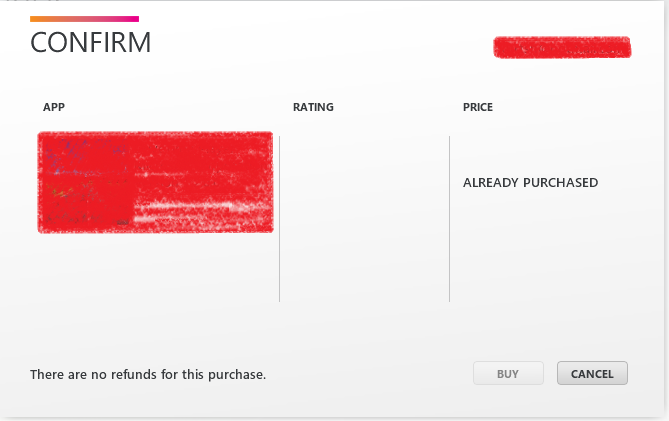
The reasonable assumption is that if you go to the Zune Desktop client, you should be able to just reinstall the apps, right? NOPE.  When you go back to that link to “reinstall” the app, this is all you get:

image

(Notice that there’s no “reinstall” option/button.  So you’re stuck.)

HIDDEN & NOWHERE TO BE FOUND: THE ON-DEVICE & ONLINE WINDOWS PHONE MARKETPLACE
In the other locations where you would typically install software, there’s no indicators of how to get at these internal/unlisted applications you’d previously installed.
image

If you go to your device and visit the Windows Phone Marketplace (i.e. the MARKETPLACE app), there’s obviously no place to look for the app (because it’s an “internal”, Microsoft-only application, remember?) so I can’t just look it up on the phone to re-download.  And there’s no listing on the phone for “previously downloaded” or “currently purchased/owned applications” so that idea’s out the window.  (Interestingly, this was a feature of the Windows Mobile Marketplace back with Windows Phone 6.5.)

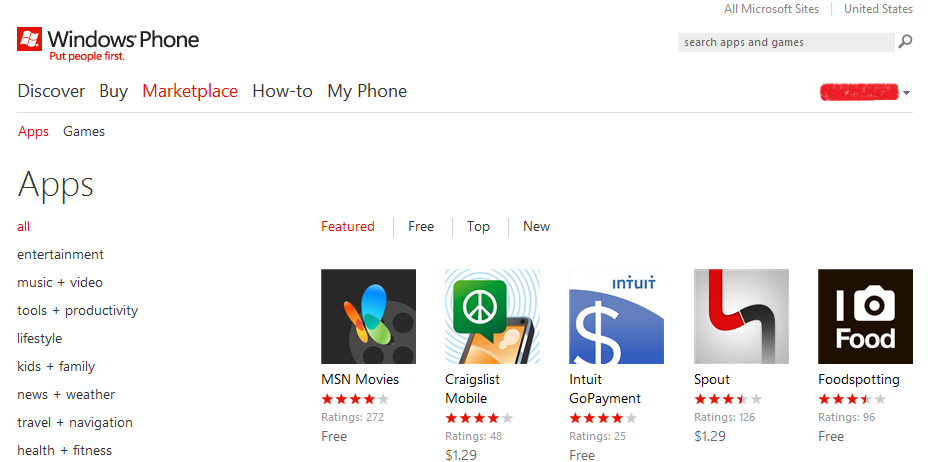
Now if you go to the Windows Phone Marketplace online, (i.e. http://www.windowsphone.com/en-US/marketplace) you still won’t find the internal application because, again, there’s no public listing and no “special place” for those apps to reside.

image

(In case you weren’t counting, that’s THREE places to install applications from on the Windows Phone platform – and none of them have a place to reinstall previously downloaded applications – especially those that are internal/unlisted in the marketplace.  And not even the original link works.  [insert tech rage here])

SOLUTION:  YOUR ACCOUNT’S “APP PURCHASE HISTORY” ON WINDOWSPHONE.COM
It turns out there’s yet, a FOURTH place to download software from.  It’s located in your “account” on WindowsPhone.com.  There is an installation history located online for your phone (which you can’t get rid of near as I can tell) that lists every application that you’ve installed – free or otherwise.  This of course includes “internal/unlisted” applications.

Here’s how to find & reinstall those apps:

  1. Login to https://www.windowsphone.com with the Windows Live ID you used for your Windows Phone.
  2. Click “My Phone”.
  3. Click “Account”
  4. Scroll below to “App Purchase History”
  5. Select the application that you’d previously installed and click “Reinstall” next to it.

———————–
A QUICK WORD ABOUT “APP INSTALLATION LINKS”:
Most links that I’ve seen for Windows Phone applications begin with http://social.zune.net… leading to the installed Zune Desktop Client on your Windows PC.

Recently, there is a new Windows Phone application installation link that I’ve seen that’s doesn’t depend on the Zune Desktop Client, and instead leads you to the Windows Phone Marketplace web site on the Internet.  It’s something like:

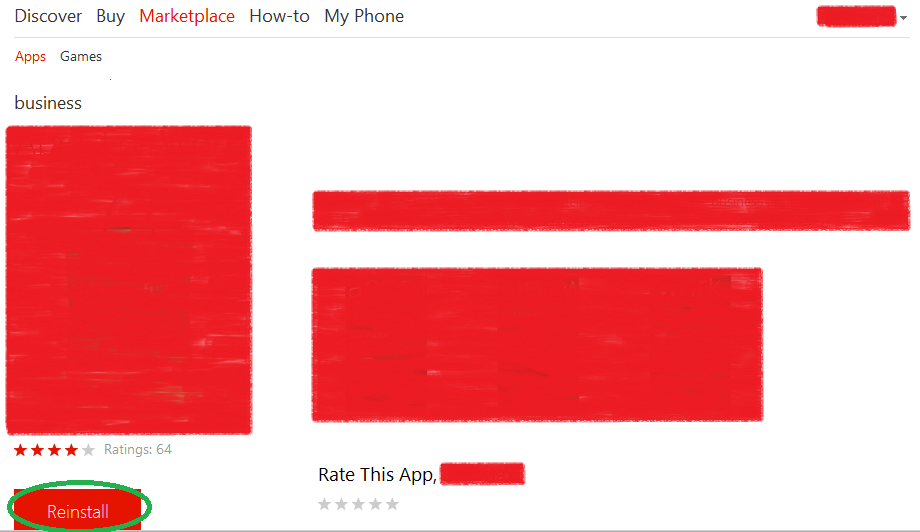
This is important because as you can see below, there’s a LINK that says REINSTALL.  This is the only place I’ve seen this and while useful, only certain unlisted/private applications have this link available.  So if you have a link like this, you’re fortunate:  Reinstallation should be as easy as pressing the big RED “Reinstall” button below.

image

Posted by: kurtsh | December 28, 2011

VIDEO: The Microsoft “BlueHat” Briefing

imageTwice a year Microsoft hosts an invite only security briefing on the Redmond campus called “BlueHat”.  While attendance is open to Microsoft employees, access to the event is invite only for non Microsoft employees. 

The good news is that some of the briefings are recorded and made available to the public on the “BlueHat Security Briefings” TechNet page here:

Available videos include:

There are more, these are just a sample.

In addition to videos of the current sessions, there is an archive of many of the previous BlueHat events available for perusal.

Posted by: kurtsh | December 28, 2011

RELEASE: TechNet Magazine – November 2011

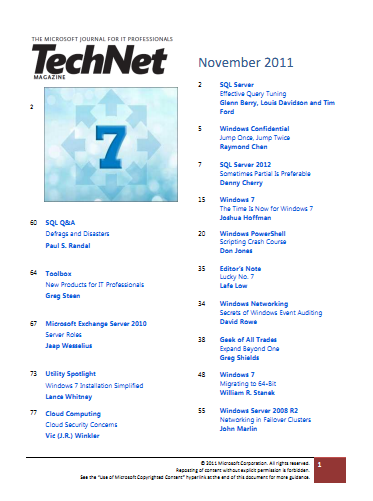
imageRemember Microsoft TechNet Magazine?  Did you know that you can download digital versions of the magazine now at no cost?

The November 2011 issue released a few weeks ago with the December on the way.  All previous issues area also available to download.

This November issue covered:

  1. SQL Server – Effective Query Tuning
  2. Windows Confidential – Jump Once, Jump Twice
  3. SQL Server 2012 – Sometimes Partial is Preferable
  4. Windows 7 – The Time Is Now for Windows 7
  5. Windows PowerShell – Scripting Crash Course
  6. Editor’s Note – Lucky No. 7
  7. Windows Networking – Secrets of Windows Event Auditing
  8. Geek of all Trades – Expand Beyond One
  9. Windows 7 – Migrating to 64-Bit
  10. Windows Server 2008 R2 – Networking in Failover Clusters
  11. SQL Q&A – Defrags and Disasters
  12. Toolbox – New Products for IT Professionals
  13. Microsoft Exchange Server 2010 – Server Roles
  14. Utility Spotlight – Windows 7 Installation Simplified
  15. Cloud Computing – Cloud Security Concerns

Past issues are available here to download:

Posted by: kurtsh | December 28, 2011

INFO: So you’re going to CES 2012. Now what? (Part 3)

image_thumb[1]_thumbA coworker asked me to summarize some things they should look into for their first trip to CES in Las Vegas.

Here’s the continuing thread of stuff I thought of:

Things NOT to do:

  • CENTRAL HALL FOOD
    Don’t eat at the Sbarro Pizza/Nathan’s Hot Dogs/Eatery just outside of the Central Hall. There’s always a massive line, it’s packed and the food is half-cooked and terrible. You’ve been warned. Your alternatives are as follows:

      • Hilton
        There’s tons of places to eat at the Hilton and it’s worth the walk.  Plan your lunch ahead of time however and go either at 11:00AM or 1:30PM to avoid the rush to Tres Rios Cantina, Paradise Café, or Superbook Deli.
        http://www.lvhilton.com/Hotel/dining
      • Renaissance Hotel
        ENVY Steakhouse is one of the best steakhouses in Las Vegas and it’s right next door to the Convention Center.  Literally right next door.  Open from 11AM-2PM for lunch.
        http://www.envysteakhouse.com/
  • CES END OF SHOW PARTY
    If you’re interested, there’s a monster party at TAO Nightclub at the Venetian on Friday. Personally, I wouldn’t bother with the end of show party because it’s hell & you probably won’t get in anyway.
    http://www.cesweb.org/events/tao-htm.htm

Other things to do:

  • CES BADGE HOLDER DISCOUNTS
    Review the CES badge holder discounts for dinner deals and stuff.
    http://www.cesweb.org/hotelTravel/lasVegas.asp#Discounts-and-Coupons
  • RESERVATIONS FOR EVERYTHING
    Make your show, restaurant, spa, whatever reservations way beforehand.
    For restaurants, I naturally use Opentable.com like everyone else.
    For shows, I personally go to Vegas.com for most of what I do because it’s the most convenient (they have a line into every show and every gig) and admittedly I’ve screwed up my reservations before and they’ve taken care of me no muss – no fuss on the phone.  Worth every penny.
  • GET GIFT CERTIFICATES
      • VEGAS.COMGo to the COSTCO in Marina Del Rey and pick up VEGAS.COM $100 gift certificates for $80.  That’s right – 20% off.  Use those for your trip and save.
      • SPAFINDER.COM – Go to COSTCO and purchase gift certificates for SpaFinder at 20% off.  These can be used at:
      • RESTAURANT.COM – Visit RESTAURANT.COM for pre-paid gift certificates for meals. (Use code SAVE to get 80% off the certificates)
        http://restaurant.com

Here’s some previous posts that I made about CES:

« Newer Posts - Older Posts »

Categories