Posted by: kurtsh | February 1, 2012

RELEASE: Kinect for Windows

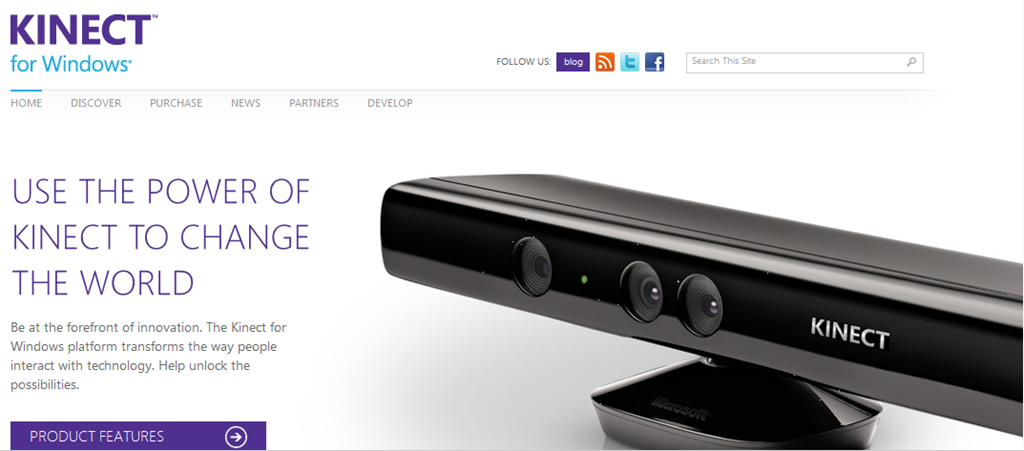
imageKinect shows the promise of Natural User Interface (NUI) and the role Microsoft plays as a thought-leader and technical innovator in this exciting space. 

During CES, Steve Ballmer announced that Microsoft would ship Kinect for Windows on February 1st and earlier today, version 1.0 of the commercial SDK and runtime were made available for download. 

Kinect for Windows gives developers an end-to-end platform to leverage NUI to drive innovation and enhance their business.

Why Kinect for Windows?

  • Utilize Kinect skeletal-tracking, sophisticated microphone array, and other sensor technologies
  • Explore the limitless opportunities to transform products, processes, and businesses
  • Link computers to Kinect devices running Windows 7 and Windows Embedded Standard 7
  • Run applications built with the Kinect for Windows Commercial Software Development Kit (SDK)
  • Use the Kinect for Windows SDK to build applications with Visual C++, Visual C#, or Visual Studio Basic by using Microsoft Visual Studio 2010

What is Kinect for Windows?

  • Software—a free SDK and runtime giving developers and organizations the tools they need to take Kinect beyond the living room.
    http://www.microsoft.com/en-us/kinectforwindows/download/ 
  • EULA – a license that gives businesses the ability to develop Kinect-enabled applications for commercial usage, and
  • Hardware—a Kinect sensor optimized for Windows

Things to know about Kinect for Windows:

And the web site…

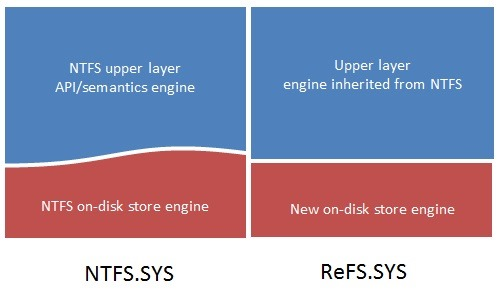
imageThis was posted by Steven Sinofsky, about the newly announced file system to be included in “Windows Server 8”.

In this blog post I’d like to talk about a new file system for Windows. This file system, which we call ReFS, has been designed from the ground up to meet a broad set of customer requirements, both today’s and tomorrow’s, for all the different ways that Windows is deployed.

The key features of ReFS are as follows (note that some of these features are provided in conjunction with Storage Spaces).

  • Metadata integrity with checksums
  • Integrity streams providing optional user data integrity
  • Allocate on write transactional model for robust disk updates (also known as copy on write)
  • Large volume, file and directory sizes
  • Storage pooling and virtualization makes file system creation and management easy
  • Data striping for performance (bandwidth can be managed) and redundancy for fault tolerance
  • Disk scrubbing for protection against latent disk errors
  • Resiliency to corruptions with "salvage" for maximum volume availability in all cases
  • Shared storage pools across machines for additional failure tolerance and load balancing

In addition, ReFS inherits the features and semantics from NTFS including BitLocker encryption, access-control lists for security, USN journal, change notifications, symbolic links, junction points, mount points, reparse points, volume snapshots, file IDs, and oplocks.

And of course, data stored on ReFS is accessible through the same file access APIs on clients that are used on any operating system that can access today’s NTFS volumes.

For more information:
http://blogs.msdn.com/b/b8/archive/2012/01/16/building-the-next-generation-file-system-for-windows-refs.aspx?prod=Win8&type=BL

image

Register for the SQL Server 2012 Virtual Launch event!

On March 7th, 2012 this online event will allow you to immerse yourself in the exciting New World of Data with SQL Server 2012. Engage not only Microsoft product teams, but with our partners and our most ground breaking customers. SQL Server 2012 is part of the broadest Data Platforms in technology today. Discover how it enables mission critical confidence, blazing fast performance, and stunning interactive data visualizations.

imageFor more information:
http://www.sqlserverlaunch.com/
ww/Home?prod=SQL&type=EV

Posted by: kurtsh | February 1, 2012

RELEASE: SQL Server 2012 Early Adoption Cook Book

image

Interested in moving to SQL Server 2012 really soon?

Introducing the SQL Server 2012 Early Adoption Cookbook.

If you are on the “bleeding edge” of SQL Server 2012 early adoption, and you need content, samples or upgrade resources to move the ball forward, read on!

Microsoft creates a lot of content designed to drive early adoption for new releases of SQL Server. We use this as a tool to arm trainers, consultants and evangelists with the content they need to introduce developers and IT Professionals alike to key improvements in a new release so they can help us drive adoption. We don’t always do a good job of communicating what all of these content assets are.

To address this problem, I’m pleased to announce the immediate availability of the SQL Server 2012 Early Adoption Cook Book TechNet wiki…

For more information, visit:
http://blogs.msdn.com/b/rdoherty/archive/2012/01/31/announcing-the-sql-server-2012-early-adoption-cook-book.aspx

Posted by: kurtsh | February 1, 2012

CES 2012: Day 1 Highlights & Lowlights – South 1,2

Here’s a rapid collection of things I saw while at CES 2012 that I thought were noteworthy tech gifts or tools of the trade in South 1, 2 on Day ONE:

image


A few extra highlights of Vegas…

  • Microsoft at CES: Video of 15 years of keynotes — Exclusive Pogo Remix http://t.co/4gN9i1eI
  • Hugo’s Cellar. OMG. This is the richest salad I’ve ever had. Sweet onion, Romaine, Roma tomatoes, mushrooms… And the prime rib?  Better than Lawry’s. http://t.co/eVkkyopZ

Annnnnd finally, a few lowlights for me were:

  • Andre’s @ Monte Carlo.  A fantastic meal.  Truly one of the better meals I’ve had in Vegas.  So why was it a lowlight?  Because they charge a $1 for the owner’s charity without telling its patrons.  I accidentally caught it while reviewing my bill and had to ask about it.  I mean, I tipped the waiter nearly $30:  ONE DOLLAR ain’t going to kill me and I’d absolutely make the contribution, but it’s the principle of not telling patrons about the charge.  This stealth billing garbage is disingenuous & distasteful.  Really soured the meal.
  • Jabbawockeez @ Monte Carlo.  I get how the younger set might like this show – many are into “dance crews” and that’s fine.  I ain’t.  And few people I know are.  If you’re over the age of 30, there’s just no way you’re gonna enjoy this.  It’s a boring, poorly paced story, with uninspired audio, and lackluster production.  The performers themselves are VERY SKILLED – so no knock on them.  But the overall show is 1 hour too long & simply not worth the money.

clip_image002

SQLServer 2012 Special Ops Tour – Irvine, CA – March 5, 2012

Irvine Marriott
18000 Von Karman Ave
Irvine, CA 92612
http://specialops.sqlpass.org/Agenda.aspx#fbid=v6awmYddPoK

Event Details
The time to activate is now. Microsoft SQL Server 2012 is launching soon. Be a part of this highly anticipated event! Join us for our 12-city road tour where Microsoft experts and local DBAs will show you the power of SQL Server 2012. At the Tour stop in your city, you will:

  • Dive deep into the tools, solutions and options that will enable mission critical confidence at a low TCO
  • Discover breakthrough insight with pervasive data discovery
  • Learn options to create & scale your current business solutions by managing the cloud on your terms
  • Preview RC0 with tips and tricks to help you succeed, & build your learning plan for certification

THE TOUR AGENDA

  • 1:30 – 2:30 PMSQL Server 2012 – The New World of Data
    SQL Server 2012 as the Mission Critical, cloud-enabled Data Platform, ready for the world of BigData. Learn about SQL Server 2012, as the Mission Critical, cloud-enabled Data Platform, ready for the world of BigData. We’ll introduce SQL Server 2012 key pillars: Mission Critical Evidence, Breakthrough Insights and Cloud on Your Terms. You will learn how SQL will enable mission critical confidence at a low TCO, and be introduced to the Fast Time to Solution scenarios with SQL Server Appliances, Developer Tools and blazing fast performance.
  • 2:30 – 3:15 PMIntroduction to SQL Server 2012 AlwaysON – Availability Groups
    In this session, you’ll learn how to configure and implement SQL Server AlwaysOn Availability groups. We’ll explore the architecture, concepts, and steps for configuring High Availability in SQL Server 2012.
  • 3:15 – 3:30 PMBREAK
  • 3:30 – 4:15 PMSelf-Service BI using PowerPivot and PowerView
    Discover the new capabilities of PowerPivot and Power View in SQL Server 2012, allowing people from all levels of the organization to unlock new insights with pervasive data discovery across structured, unstructured and cloud data resources, backed by self-service managed B.I. We’ll dive deep into the technical underpinnings and integration with SharePoint and Excel for rapid data exploration and visualization.
  • 4:15 – 4:45 PMUnderstanding Microsoft Training & Certifications for Microsoft SQL Server 2012
    Are you interested in becoming certified in SQL Server? Do you already hold a SQL certification and wonder about getting certified in the new program? In this session, Pete Harris will provide an overview of the certifications and training offered by Microsoft for SQL Server 2012. We’ll discuss the value of being certified, and then discuss the different certifications, upgrade paths and the related training options offered by Microsoft Learning.
  • 4:45 – 5:15 PM – In Summary
    15 minute session to go over the highlights + QA

—————————–

Date/Time:
March 5th – 1:00PM

Location:
Irvine Marriott
18000 Von Karman Ave
Irvine, CA 92612

Registration:
http://specialops.sqlpass.org/Agenda.aspx#fbid=v6awmYddPoK

clip_image001[6]

How can you meet advanced analytical, data warehousing and application performance needs while keeping costs under control?

Join renowned visionary Bill Inmon, the father of data warehousing, at our upcoming seminar at the Irvine Microsoft Technology Center on Wednesday, February 29th to find out.

Learn how leading organizations are realizing significant cost savings and performance gains with an integrated architecture that combines servers, storage, and database software into a unified system.

For more information – including event agenda, speaker bios and complimentary admission, visit the seminar Web site.

To reserve your seat, call Jen Tobin on (617) 431-9722 or apply online:

clip_image001

About this seminar:

What: A free, half-day seminar sponsored by Microsoft, HP and Intel®

When: Wednesday, February 29th, 2012, 8:30 a.m. – 12:30 p.m.

Where: Microsoft Technology Center, 3 Park Plaza, Suite 1600, Irvine, CA

Who: Senior IT and LOB decision makers, CIOs, VPs of IT, BI directors, data warehousing professionals, IT managers, business analysts, data analysts, database managers, solution architects, etc.

Event highlights:

  • Featured keynote presentation by Bill Inmon, the father of data warehousing
  • Hear strategies for reducing data management operating costs
  • Learn how to consolidate workloads to reduce data center complexity
  • Discover the latest technologies available from HP, Microsoft and Intel®
  • Join in lively, interactive roundtable discussions with local peers and leading data warehousing industry experts.

clip_image001[1]Don’t miss this exclusive opportunity to interact with senior IT decision-makers and line of business professionals grappling with similar data warehousing challenges you face.

Call Jen Tobin on (617) 431-9722 or apply online today:
We look forward to hosting you in Irvine on February 29th!

clip_image001[9]Each attendee will receive a complimentary copy of Bill Inmon’s recently published book, Building an Unstructured Data WarehouseIn addition, attendees will be entered into a raffle and eligible to win an HP Mini !

NOTE: Public sector employees are not eligible to participate in the HP Mini prize drawing.

P.S. This event will highlight how leading companies are currently benefiting from the latest advances in data warehousing technology.  Apply online today!

Agenda

8:30 AM

Registration and Morning Refreshments

9:00 AM

Keynote Presentation: The Ever-evolving Data Warehouse: A Work in Progress
Bill Inmon

10:00 AM

Appliance Roadmap and DW Appliance

11:00 AM

Networking Break

11:15 AM

Database Consolidation Appliance and Building Your Private Cloud

12:00 PM

Roundtable Panel Discussion and Q&A

12:30 PM

Networking Lunch and Optional MTC Tour

The PST Capture tool for Exchange 2010 & Office 365 just hit RTW.  The tool is used to discover and import .pst files into Exchange Server or Exchange Online.

Today marks the much anticipated release of the Microsoft Exchange .PST capture tool that allows businesses of all types and sizes to methodically seek out and destroy err, find all the local archive files (AKA .PST files) and then migrate them into the user’s mailbox. This tool works with both Exchange 2010 and Office 365 and helps address the corporate email compliance that personal archives pose inside of an organization. Keeping with the Exchange 2010 theme of large, low-cost mailboxes, pulling a user’s old personal archives back into their mailbox not only brings these emails back into the control of the Exchange Admins, but it also increases user productivity as all of these emails will now be indexed and searchable through both Outlook and Outlook Web App.

PST Capture is used to discover and import Outlook Personal Folder (.pst) File Format files into Exchange Server and Exchange Online. PST Capture helps an organization that wishes to gain more control over their email data repositories by placing them into Exchange. By optionally installing PST Capture Agents on target machines, administrators can determine where .pst files are located and who their file owner is via the PST Capture Console. Administrators can import .pst files via Import Lists to Exchange Server or Exchange Online. Data can be directly imported into the primary mailbox or associated archive mailbox.

Read more about the PST Capture Tool here:
http://blogs.technet.com/b/bobh/archive/2012/01/30/microsoft-pst-capture-tool-for-exchange-2010-and-office-365-released-deep-dive-technet-radio-episode-coming.aspx

Read the Exchange Blog post about the PST Capture Tool here:
http://blogs.technet.com/b/exchange/archive/2012/01/30/pst-time-to-walk-the-plank.aspx

Download the PST Capture Tool here:
http://www.microsoft.com/download/en/details.aspx?displaylang=en&id=28767

View documentation on the PST Capture Tool here:
http://technet.microsoft.com/en-us/library/hh781036.aspx

imageWindows XP and Office 2003 End of Support is just over 800 days away! 

More specifically, Windows XP SP3 and Office 2003 will no longer be supported from April 8, 2014 onwards. After this date, Microsoft will not provide any public support for these products, including security patches, non-security hotfixes or incident support.

Running Windows XP SP3 and Office 2003 in your environment after their end of support date may expose your company to potential risks, such as:

  • Security & Compliance Risks – Unsupported and unpatched environments are vulnerable to security risks. This may result in an officially recognized control failure by an internal or external audit body, leading to suspension of certifications, and/or public notification of the organization’s inability to maintain its systems and customer information.
  • Lack of Independent Software Vendor (ISV) & Original Equipment Manufacturer (OEM) Support – A recent industry report from Gartner Research suggests "many independent software vendors (ISVs) are unlikely to support new versions of applications on Windows XP in 2011; in 2012, it will become common". And it may stifle access to hardware innovation: Gartner Research further notes that in 2012, most PC hardware OEMs will stop supporting Windows XP on the majority of their new PC models. See Creating a Timeline for Deploying Windows 7 and Eliminating Windows XP SP3, June 2011.

Please take a moment to familiarize yourself with the great End of Support resources available at www.microsoft.com/endofsupport.

Also… for your desktop:
Windows XP End of Support Countdown Widget

Posted by: kurtsh | January 30, 2012

CES 2012: The Intel Ultrabook Revolution cometh

image

The biggest & most ubiquitous sight at CES 2012 this year were everyone’s Ultrabooks.  It seemed as if every OEM – even consumer electronics companies like LG – had one.

What are Ultrabooks, anyway?
Ultrabooks are the next evolution in the traditional PC/Notebook form-factor.  Intel holds the trademark for the name “Ultrabook,” and provides Ultrabook specs:

  • Weight <3.1lbs;
  • Thickness <21mm;
  • Battery life 5-8 hours;
  • Price ~$1000

imageUpcoming Ultrabooks:
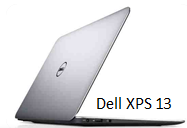
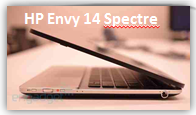
All major OEMs have announced their own Ultrabook versions (HP Envy 14 Spectre, Dell XPS 13, ASUS UX 31, Lenovo Ideapad Yoga, etc.) and even smaller OEMs are coming.

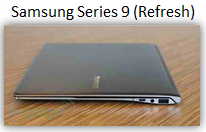
  • The Samsung Series 9 revolutionized PC design last year with the ultraslim notebook. This year they are making it lighter, with softer edges, and better touchpad integration.
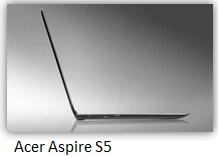
  • Both the Acer Aspire S3 (available now) and the Acer S5 (coming soon) are touted to be the thinnest PCs in the world.
  • The Toshiba Z835 offers business class performance and includes an on-board TPM security device.
  • Keep an eye on the super light HP Folio 13, with up to 9.5 hours of battery life.

image

image

« Newer Posts - Older Posts »

Categories