Alright – so I’m late… really late… on this one.  It turns out that Office 2011 for Macintosh has full support for Rights Management Services in Windows Server 2008 R2.  The same technology that Enterprises have enjoyed for years on the Windows platform.
imageFor those of you who don’t know what “Rights Management Services” is, think of a solution that:

  • Encrypts email messages, .DOC/.XLS/.PPT files, web pages using AES-256 bit
  • Allows “usage policies” to adhere to the encrypted mail/doc/page such as:
      • Disallow ‘forwarding’
      • Disallow ‘printing’
      • Disallow ‘copy & pasting’
      • Disallow ‘screen capture’
      • Disallow reading after a specified date (a.k.a. timebombing content)
      • Logging of access of content (centrally auditing who reads the content)
  • Enables indexing of encrypted content on SharePoint sites
  • Provides robust enterprise level key management (i.e. allows you to recover content via super users)
  • Extended access outside of the corporate firewall via Internet web services
  • etc.

Yeah.  Pretty cool ‘eh?  Well now Macintoshes can read the same content if they are participants in Right Management policies.

Here’s the guide for deploying RMS on Macs:

The Rights Management Service blog (or at least the main support engineer’s blog) has a blurb on this:

Posted by: kurtsh | February 25, 2012

BETA: PowerShell v3 Technical Guide (CTP2)

For those looking for a jumpstart to the all-new PowerShell v3, (now with a GUI) check out this Wiki we started.

imageThis page is designed to be a starting point for PowerShell V3 knowledge. If adding to this page please create all new wiki’s starting with "Powershell V3".

PowerShell V3 is the latest version of PowerShell. Currently, PowerShell V3 is at an early stage of development with Community Technology Preview 2 being released. CTP1 is included in the developers Preview of Microsoft Windows 8 client and Server and is also available as a download for installation on WIndows 7 and Server 2008 R2 systems.

The Powershell team blogged about CTP2 when it was released

Table of Contents

WIKI: PowerShell v3 Technical Guide
http://social.technet.microsoft.com/wiki/contents/articles/4725.powershell-v3-guide-en-us.aspx

imageThis download contains product documentation for System Center 2012 – Service Manager.

System Center 2012 – Service Manager provides an integrated platform for automating and adapting your organization’s IT service management best practices, such as those found in Microsoft Operations Framework (MOF) and Information Technology Infrastructure Library (ITIL). It provides built-in processes for incident and problem resolution, release management, service request fulfillment, change control, and asset lifecycle management. In addition, Service Manager includes reports and advanced analytics using OLAP data cubes for its data warehouse.

WHITEPAPER: System Center 2012 – Service Manager Product Documentation
http://www.microsoft.com/download/en/details.aspx?id=27850

imageSystem Center Advisor is a cloud service that enables IT pros to assess their server configuration and proactively avoid problems, while helping support staff to resolve issues faster by accessing current and historical configuration data, all with the security features that meet their needs. Additionally, System Center Advisor helps reduce downtime by providing suggestions for improvement, and notifying customers of key updates specific to their configuration.

Benefits

  • Proactively Avoid Problems
      • Increase awareness around the state of server deployment through assessment of configuration, and alerts for configuration-related issues.
      • Resolve issues before they become critical through ongoing assessments of the server environment for undetected configuration issues.
      • Assess and understand server configurations from virtually anywhere with from a secure cloud service with security features that meet customer needs.
  • Resolve Issues Faster
      • Decrease time to resolve issues by easily viewing configuration changes over time with historical data.
      • Decrease time to resolve issues with the ability to share server configuration data with internal support staff or Microsoft Customer Support Services.
      • Accelerate problem solving with instant access to step by step guidance , self-help information and community forums related to identified issues.
  • Help Reduce Downtime and Improve Performance
      • Increase performance and availability of servers by understanding configuration state and receiving suggestions for improvement to help ensure availability.
      • Help reduce server downtime by getting notifications for key updates specific to the configuration of the server environment.
      • Increase collaboration between IT professionals through centralized data of an organization’s deployment configurations.

Requires Software Assurance
System Center Advisor is available as a benefit of Software Assurance for supported entitled server products. This service brings new support and maintenance value to Software Assurance coverage at no additional cost. For additional information on purchasing software assurance, please visit http://www.microsoft.com/licensing/software-assurance/default.aspx.

Customers can sign up today for a free 60-day trial at http://www.systemcenteradvisor.com

imageI got the following question from a volume licensing customer:

  • “Where’s Windows XP Multilanguage User Interface pack?”

The Windows XP Multilanguage User Interface (MUI) pack installs over volume licensed versions of Windows XP Professional. 

It reconfigures the Windows user interface for the language of the user logged in.  One machine can provide an English, French, Spanish, Japanese, and Arabic interface and the language can change depending on the user that is logged in.  (Note: Windows XP MUI usage requires Volume licensing & Windows Client Software Assurance.)

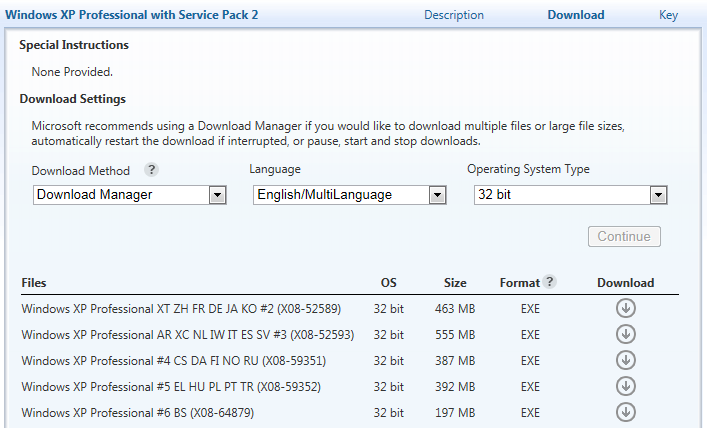
The software download for the MUI is somewhat hidden.  To locate the Windows XP MUI download on the VLSC website:

  1. Sign in to the VLSC site at https://www.microsoft.com/licensing/servicecenter/ using your Windows Live ID.
  2. Click on downloads and Keys
  3. On the Left hand side check off the Box that states Archive.
  4. Locate the download labeled as Windows XP Professional with Service Pack 2 and then click on the download button to the right of the product name.
  5. Here you will need to choose your download settings. You will need to change the Language from English to English/ Multilanguage.

There will be multiple options for you to download depending on the language you are looking for.

(Note: You specifically have to go into “Windows XP Professional with Service Pack 2” – not Service Pack 3.)

Posted by: kurtsh | February 14, 2012

RELEASE: Microsoft Outlook Configuration Analyzer Tool

The Outlook Configuration Analyzer Tool (OCAT) was developed by a pair of support engineers at Microsoft. These support engineers have over 30 years of combined experience in supporting Microsoft Office, Microsoft Outlook, and Microsoft Exchange Server. Based on their support experience, they compiled a set of detection rules that look for Outlook configurations that have historically been possible sources of problems.

To wrap these rules into a useful framework, the same infrastructure first used by the Microsoft Exchange Best Practices Analyzer was chosen for the development and final implementation of OCAT.

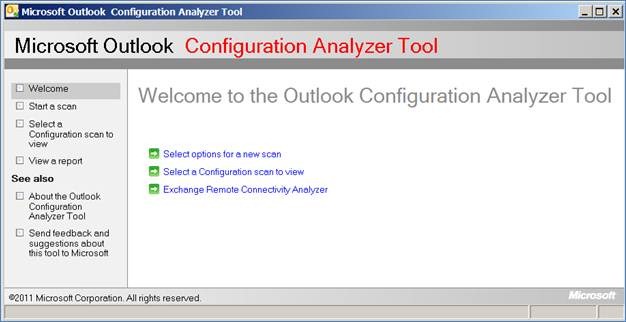
The end-result of this work is shown in the following figure.

clip_image002

You can use this first version of OCAT to do the following:

  • Scan your computer
  • Open a previously run scan on your computer
  • Import a scan from another computer
  • Use several reporting formats to view the scan results
  • Start the Exchange Remote Connectivity Analyzer tool
  • Send feedback to the OCAT team

These features are discussed in detail in this document.

We expect that OCAT will eventually be updated to include new functionality that includes automatic updating of OCAT to download new detection rules. You can follow the OCAT team on Twitter clip_image004 to receive news of any publicly available OCAT updates.

Support for OCAT
There is no available support for OCAT. This tool is provided as-is.

If you encounter any problems when you use OCAT, you can send a detailed email message to OCATsupp at microsoft dot com. We appreciate your feedback. However, we cannot reply to your email message. We will review your feedback and determine whether any changes or issues can be incorporated or fixed in a later version of OCAT.

image

This user guide shows step-by-step instructions for how to register, view account details, download products and more from the Microsoft Volume Licensing Service Center (VLSC). It also includes screenshots, technical support information, and a glossary.

  1. Overview of Volume Licensing Service Center
  2. About Administration Tasks on the VLSC
  3. Viewing Licensing Summary and Relationship Summary Information
  4. Using the Downloads and Keys Page
  5. Using the Subscriptions Page (MSDN, Expression, TechNet, Online Services)
  6. About Microsoft Software Assurance for Volume Licensing
  7. Creating and Managing OLS License Reservations

WHITEPAPER:  Microsoft Volume Licensing Service Center (VLSC) User Guide (3.3MB, 69pgs)
http://www.microsoft.com/download/en/details.aspx?displayLang=en&id=10585

imageWell, apparently no one knows we released System Center Advisor.  ARRRRGH!

QUICK VERSION:  System Center Advisor is a no-charge benefit for Software Assurance customers.  Technically, it’s an agent that installs on some or all of your servers that reports information to a Microsoft-hosted cloud service.  That information is analyzed similarly to a Best Practice Analyzer and identifies areas of improvement or areas that are not following best practices.  These best practices are updated frequently since the service exists in the cloud.  Access to the reporting on these best practices against your servers is handled securely on an admin web site at http://systemcenteradvisor.com

Today, Microsoft announced the general availability of System Center Advisor (formerly Microsoft codename ‘Atlanta’) enabling IT Professionals to proactively avoid server configuration problems by assessing static, runtime and operational data to identify potential issues that cause outages or poor performance.

System Center Operations Manager is great at alerting you to server issues as they happen, enabling you to quickly respond – but what if you could actually prevent server configuration problems before they ever impact your server’s performance or availability?

System Center Advisor is a cloud service hosted on Windows Azure that regularly analyzes your servers’ configuration, drawing on the wisdom and experience of Microsoft support staff and its countless interactions with IT professionals to automatically highlight server configuration problems and their solutions for Windows Server and SQL Server. You check for any recommendations by logging into the Advisor portal. You also have the option of email alerts and recommendations delivered directly to your inbox.

Posted by: kurtsh | February 13, 2012

INFO: Gartner Group research on Microsoft Licensing

imageSoftware asset managers often ask Gartner for advice on where to start with regard to Microsoft Licensing.  We have licensed – for a limited time – several Gartner Group reports for public consumption at no cost to you.  This research will help prioritize tasks and allocate time to initial assessments as you start to establish important areas of process improvement activity.

imageRead more from Gartner, IDC, and Forrester at the Volume Licensing Site:
http://www.microsoft.com/licensing/about-licensing/value-of-volume-licensing.aspx

Posted by: kurtsh | February 13, 2012

WHITEPAPER: “Building The Untethered OrganizatiOn”

image

There’s an interesting whitepaper of sorts published on Microsoft.com called the “Untethered OrganizatiOn”.  It focuses on the value of providing employees with mobility & and strengths of concepts like telecommuting & VPN like technologies such as DirectAccess.

Here’s an excerpt:

Are executives at communications giant Sprint Nextel leaders or followers when it comes to workplace flexibility? The answer de-pends on your point of view.

Sure, the Overland Park, Kan.-based company is a trailblazer in em-powering one-time desk jockeys to work whenever and wherever they choose, whether that’s home, a customer site, the office, or almost anyplace else with Internet access. But when decision-mak-ers rolled out the Sprint Mobile Workforce initiative back in 2004, it was at least partially in reaction to changes that employees were implementing on their own.

“We’ve always been big proponents of flexible work arrange-ments,” says Scott Woodrome, a strategy manager at Sprint Nextel. “But one reason we launched the Sprint Mobile Workforce program was because people were already working where they wanted, when they wanted, and how they wanted.”

Sensing an opportunity, the company decided to embrace rather than resist that trend. It pulled together a project team of IT, HR, and facilities leaders, along with representative front-line employees. It deployed a sophisticated unified communications solution based on Microsoft Office Communications Server (now Microsoft Lync) and Microsoft Exchange Server, so workers could connect from anywhere via Web-based telephony, online conferencing, instant messaging, and e-mail. And it gave its office sites a top-to-bottom makeover, replacing fixed desk assign-ments with a smaller set of unassigned work stations that employees could use temporarily whenever they came in from the road.

The impressive results have included some $9.3 million a year in communications savings, $30 million a year in real estate savings, and a workforce that’s not only happier but significantly more productive too. “People just get more done when they don’t have to spend time on things like commuting and business travel,” Woodrome observes.

Sprint Nextel’s experiences are but one example of an ongoing revolution currently transforming the world of work. Call it the rise of the untethered organization. For centuries, most office work-ers have done their job in the same place, at the same time, in the same way, with the same tools day after day. Today, however, corporate employees are less and less tied to a specific desk, device, or location. And as businesses are increasingly discovering, that greater freedom to roam can produce dramatic increases in productivity.

Download the entire document here:

« Newer Posts - Older Posts »

Categories