Strengthen your compliance experience with new features from the Data Classification Toolkit for Windows Server 8 Beta.

Key features include:

  • Knowledge
    • Out of box classification configuration package
    • Mapping with PCI-DSS and NIST 800-53 standards
  • Enhanced User Experience
    • Scenario driven User Interface
    • Classification wizard to configure file server classification infrastructure
    • Claims wizard to help configure a claim value
  • New features to support Windows Server 8 Dynamic Access Control
    • Support for out of box rights management file management Tasks
    • Support for global and secure  properties
    • Manage and report default Central Access Policy on file servers
    • User and device claims wizard to help determine the set of values for claims
    • Active Directory Central Access Policy Configuration Export and Import tool to configure central access policy across forest
    • Support for both Windows Server 8 and Windows Server 2008 R2 file servers

Top Benefits:

Get ready for Windows Server 8 Beta and stay on top of your compliance. The toolkit offers support for new Windows Server 8 Beta features, Dynamic Access Control, and forward compatibility for existing functionality from the earlier version of the toolkit. The Data Classification Toolkit provides support for configuring data compliance on both Windows Server 8 Beta file servers and Windows Server 2008 R2 file servers to help automate the file classification process, and make file management more efficient. The final release of Windows Server 8 is right around the corner; make sure your compliance process and policies are up to date!

Simplify configuring Central Access Policy. This version of the toolkit allows you to provision and standardize Central Access Policy across the forest, and apply default access policy on your file servers. It also provides a tool to provision user and device claim values based on Active Directory Domain Services (AD DS) resources to help simplify the configuration process of Windows Server 8 Beta Dynamic Access Controls. In addition, you can easily track and report existing Central Access Policy on file shares.

Strengthen your user experience. The toolkit adds UI to the existing Windows PowerShell experience, including a Classification Wizard for managing file classification and Central Access Policy on the file servers in your organization. The UI also provides a wizard that you can use to build claim values in AD DS.

This toolkit is designed to help enable an organization to:

  • Identify, classify, and protect data on its file servers.
  • Provide support for Windows Server 8 Beta, as well as for hybrid environments of Windows Server 8 Beta and Windows Server 2008 R2.
  • Easily configure default Central Access Policy across multiple servers.
  • Build and deploy policies to protect critical information in a cost-effective manner.

Join the beta program and download the beta materials on Connect: http://go.microsoft.com/fwlink/?LinkId=217117

imageNot unlike Novell users who moved from a Directory-centric solution to an solution like Windows Server that focused on Applications & Services, many VMware users are already planning on moving from a Virtualization & Hypervisor-centric solution to a solution like System Center that focuses on management of the most important aspects of a Datacenter.

Virtualization is just a dimension of the Datacenter:  Providing a single management infrastructure for both Physical & Virtual, both Private & Public cloud, both OS & Applications… that’s the future of core infrastructure.

VMware to Hyper-V converts share lessons learned

Beth Pariseau, Senior News Writer Published: 2 May 2012

Some IT pros will move from VMware to Hyper-V when new virtualization management tools in Microsoft’s System Center 2012 and a new version of Hyper-V hit later this year.

Though switching hypervisors can be a challenge, some say that the cost savings make it a worthwhile move.

One VMware shop based in Chicago will move the last VMware holdouts in its virtualization environment to Hyper-V when Windows Server 2012 becomes available. The Walsh Group, a contractor and construction management company, will save $150,000 per year in slashed VMware Inc. licensing and staffing costs by switching to Microsoft Hyper-V, estimated Patrick Wirtz, manager of technology innovation.

The company, which spreads its IT services between a main data center in Chicago and 100 to 150 remote job sites, will also add automation to its environment with System Center 2012.

Meanwhile, about 20% of the environment — including a mission-critical ERP application in the data center and some of the servers at remote job sites — remain on VMware, at least for now. The company will move the ERP app to Hyper-V as part of an application upgrade, Wirtz said, but only when Windows Server 2012 Hyper-V supports more virtual CPUs (vCPUs) per virtual machine (VM).

In the developer preview released last fall, Microsoft said each guest can support up to 32 vCPUs and 512 GB of memory, up from a limit of 4 vCPUs and 8 GB of RAM.

“Being able to allocate those extra CPU cores to mission-critical apps, like our financial system, is really key for us,” Wirtz said.

Another new Hyper-V feature, shared-nothing live migration, will help the company migrate off VMware at remote job sites where there is only one server, Wirtz added.

Read the rest of the article here:
http://searchservervirtualization.techtarget.com/news/2240149514/VMware-to-Hyper-V-converts-share-lessons-learned

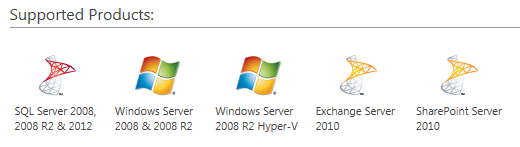
imageSystem Center Advisor quietly added monitoring & best practices support for several of Microsoft most in-demand server products:

  • Exchange Server 2010
  • SharePoint Server 2010
  • SQL Server 2012

Previously only support for Windows Server 2008 (R2) as well as SQL Server 2008 (R2) was available.  Here’s the announcement:

On April 17, Microsoft announced System Center Advisor (SCA) support for SharePoint 2010, Exchange Server 2010 and SQL Server 2012 at the Microsoft Management Summit in Las Vegas.

Below is a brief overview of SCA:

System Center Advisor is a cloud service that enables IT pros to assess their server configuration and proactively avoid problems, while helping support staff to resolve issues faster by accessing current and historical configuration data, all with the security features that meet their needs. Additionally, System Center Advisor helps reduce downtime by providing suggestions for improvement, and notifying customers of key updates specific to their configuration.

Currently supported technologies:

  • SQL Server 2008+
  • Windows Server 2008+

On April 17 Microsoft announced support for the following technologies:

  • SharePoint 2010
  • Exchange Server 2010
  • SQL Server 2012

Security

  • SCA management packs are designed to avoid collection of PII.  No guarantees against unintended collection of sensitive data. There is a mechanism to inspect data before upload.  Microsoft carefully considers every report of customer privacy concerns.
  • Like most other services, the SCA team will capture metadata/management/utilization metrics to improve the service.  Please refer to the SCA Privacy Statement.

System Center Advisor is available in 26 locations in English language to Software Assurance customers.  Any customer can sign up for a 60-day free trial at http://www.SystemCenterAdvisor.com

Holy cow.  It finally released!  I’d given up on this.

Forefront Hotfix Rollup 4 for Forefront Security for Office Communications Server has now been released. This allows the product to be used with Lync 2010.

Features of the hotfix rollup
Hotfix Rollup 4 allows FSOCS to be installed on Lync 2010 (running on Windows 2008 R2 or Windows 2008 SP2 x64) in addition to Office Communications Server 2007 and Office Communications Server 2007 R2. As the feature set and patch level are the same as RU3, customers who have already deployed RU3 can update but are not required to do so.

Read more here:

Today, Windows Intune addresses the management and security of PC’s with all of the features below in a single console:

  • Anti-Virus/Malware protection with Forefront endpoint protection
  • Patching for Windows and 3rd party applications
  • Software deployment via the cloud anywhere around the world
  • License management for Microsoft and 3rd party licenses
  • Inventory reporting for HW and SW (Microsoft and 3rd party)

We just announced the next release of Intune slated for June release. The agility the cloud delivers equates to aggressive, 6 month release cycles offering major features made available to customers with no on-premise infrastructure requirements. Our next release (slated for June) will allow customers to:

  • clip_image001clip_image002clip_image004clip_image005set policies AND deploy LOB software to iPad, iPhone, Windows Phone, Android
  • Active Directory Federated services integration with Intune
  • Peer caching for remote sites who are receiving Application Downloads – we maximize the bandwidth at the subnet level

Here’s the release:

Windows Intune April 2012 Pre-Release Now Available

Windows Intune is an integrated, cloud-based client management solution that provides tools, reports, and upgrade licenses to the latest version of Windows. Windows Intune helps keep your computers up-to-date and secure, and lets your users more securely access and install targeted licensed software applications and perform other common tasks, from virtually anywhere. NOTE: In this pre-release of Windows Intune we are providing access to some of the new features and enhancements that are coming soon. It is important to understand that this pre-release is designed for use in a test environment and should not be linked to existing production servers. Once the full release of Windows Intune is available, the ability to connect to your production infrastructure will be enabled.

See also:

imageWut.

That’s what I said when I heard about this.  There’s a post that popped up yesterday by Rod Trent, System Center MVP extraordinaire, that is entitled, “Download all the MMS 2012 PPTs in one fell swoop”.

It’s exactly what the title states.

I’m downloading it right now as I type this post and since I have only a 3Mb pipe, it’s about a half hour download.  It’s a 655MB ZIP file that contains every single presentation that was presented at MMS 2012 that’s available on DigitalMMS.  That more than 160 decks on everything from System Center to PowerShell to Virtualization to Deployment & Configuration to Security to Datacenter Automation.

(What I don’t get is how they’re paying for the network connectivity costs.  That’s more than half a terabyte for each download.  Whaadddever.  Grab it before they run out of bandwidth!)

imageDownload all the MMS 2012 PPTs in one fell swoop
This download includes all of the PPTs and XML files from MMS 2012.
Content provided by myITforum. Read the rest: http://myitforum.com/myitforumwp/2012/04/24/download-all-the-mms-2012-ppts-in-one-fell-swoop/

image

Combining the broad reach of Windows, best-in-class developer tools, a reimagined user experience, support for new chipsets, and a built-in store with industry-leading business terms—Windows 8 is the largest developer opportunity, ever.

Join us for this free, full-day event designed to share all the knowledge you need to start building Metro-style applications for Windows 8—today. We’ll begin by showing you how to use Microsoft Visual Studio to code fast, fluid, immersive, and beautiful Metro-style applications in HTML5/JavaScript, XAML/C#, and C/C++. Your existing investments in these languages carry forward, making Windows a no-compromise platform for developers.

Whatever language you choose, your app gets deep integration with the Windows shell, including notifications, live tiles, deep links, and contracts with other apps. And now you can build once and support all Windows customers, no matter what type of PC they have—from tablets to laptops to convertibles to desktops.

We’ll cap the day off with an open, hands-on lab session. It’s the perfect opportunity to get your dream application under way, or finish that app you’ve already started—with Windows 8 experts available to guide you through every step. Bring your laptop or tablet to join in the fun, and show off your skills while getting started on developing your company’s first Metro application.

Prerequisites
Please bring a laptop or tablet and your personal identification. Also, we recommend you check out the Windows Dev Center, and download the Windows 8 Consumer Preview before you come so you can be prepared for the hands-on portion of the event.

Important: Windows 8 Consumer Preview requires a clean install. If you decide to go back to your previous operating system, you’ll need to reinstall it from the recovery or installation media that came with your PC, which is typically DVD media. If you don’t have recovery media, you might be able to create it from a recovery partition on your PC using software provided by your PC manufacturer. Check the support section of your PC manufacturer’s website for more information. After you installWindows 8, you won’t be able to use the recovery partition on your PC to go back to your previous version ofWindows.

Notes
This free event is brought to you by Microsoft; however, you are responsible for booking and funding your own travel and accommodations. Please note that there is limited space available for this event, so be sure to register early at a location near you

Registration opens at 8:30 A.M.
Event starts at 9:00 A.M.
Paid parking at this event will be available.

Seating is limited, so register today.

Location:
Microsoft Los Angeles
333 S Grand Ave
Suite 3300
Los Angeles, California 90071

Registration: Los Angeles, CA
http://www.microsoft.com/click/services/Redirect2.ashx?CR_CC=200099466&CR_EAC=300043006

clip_image001

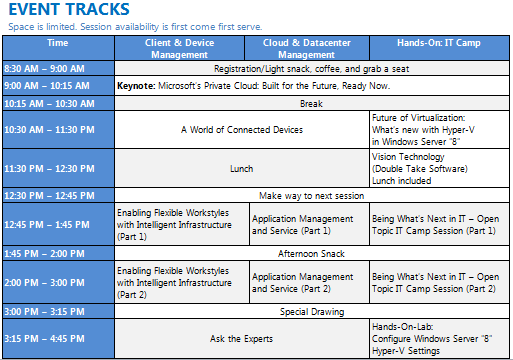
The Best of Microsoft Management Summit is coming to Los Angeles! Microsoft is bringing Vegas to you with the Microsoft Private Cloud Summit & Best of Microsoft Management Summit 2012 Replay! Join us at this special one-day event to learn how the new System Center 2012 can help you manage nearly everything in your infrastructure.

Hear directly from our Redmond-based System Center product team as they share the best from MMS 2012. Bring your laptop and get hands-on experience installing and configuring the trial with Microsoft technology evangelists. Engage our panel of experts to get your questions answered. And get a sneak peak at Windows Server “8”. This is your chance to build your skillset by learning how to simplify management of your devices and infrastructure, monitor and remediate application issues, automate routine tasks, and take control of across clouds!

image

Microsoft Private Cloud Summit, Los Angeles
Tuesday, May 22, 2012
8:30 AM – 5:15 PM

Westin LAX
5400 West Century Boulevard
Los Angeles, California 90045

imageHey whaddyaknow.  It turns out that The Next Web published content exclusively for IE9 users.  The content is eventually made available at a later time but if you want to see what’s being published for IE users only, check this site out:

imageStay Informed: Microsoft Licensing Series:  System Center 2012 Licensing

Please join us Friday, April 27, 9:00 A.M.–10:00 A.M. Pacific Time while we continue our customer licensing webcast series with Microsoft System Center 2012.

System Center 2012 represents an evolution in the Microsoft management strategy, a response to the emergence of cloud computing and management challenges that our customers face running applications in private cloud and "hybrid IT" computing environments. To better address these needs, System Center 2012 is becoming a single integrated product, and System Center licensing, packaging, and pricing is being updated to support these changes. Please register now for the webcast on April 27.

« Newer Posts - Older Posts »

Categories