Windows 8 changes everything.
Combining the broad reach of Windows, best-in-class developer tools, a re-imagined user experience, support for new chipsets, and a built-in store with industry-leading business terms, Windows 8 is the largest developer opportunity – ever.

Our Hackathon is an open Windows 8 code fest, where you’ll put what you know into practice and be eligible to win some great prizes! Code to your heart’s content, with Windows 8 experts available to guide you through every step of the process. It’s the perfect opportunity to get your dream application underway, or to finish that app you’ve already started.

This full-day event will be filled with coding, sharing, plenty of food, and perhaps the occasional Lightning Talk on topics determined by your apps and questions. Bring your PCs installed with Windows 8 Release Preview, your apps and your cool ideas and get ready to create!

Hackathon Agenda:

  • 8:30 AM – Registration
  • 9:00 AM – Welcome and Logistics
  • 9:15 AM – The Hacking Begins
    Coding, answers, instruction, and advice
  • 12:00 PM – Lunch
  • 12:30 PM – The Hacking Continues
    Coding, answers, instruction, and advice
  • 6:00 PM – Dinner
  • 7:00 PM – AppX
    Show off your app and see what everyone else has been coding. Whether your app is completed or is still in development, show it off! The winning apps will receive great prizes.
  • 8:30 PM – Prizes and Wrap-Up

*Agenda is subject to change.

Register today and join us for this fantastic (and free) developer opportunity.
Join us for our Windows 8 DevCamp too! www.msdnevents.com/windows for dates and locations!

Windows 8 Hackathon
Event ID: 1032516492
Microsoft LA Office (Downtown)
MPR 1 & 2
333 South Grand Ave, Suite 3300
Los Angeles California 90071
United States

Register by Phone: 1-877-MSEVENT (9AM-7PM EST M-F)

Register by Web: https://msevents.microsoft.com/CUI/EventDetail.aspx?EventID=1032516492&Culture=en-US

Meal: Yes
Language(s): English.
Product(s): Windows 8.
Audience(s): Pro Dev/Programmer.

Starts: Saturday, September 15, 2012 9:00 AM
Ends: Saturday, September 15, 2012 9:00 PM
Time zone: (GMT-08:00) Pacific Time (US & Canada)
Welcome Time: 8:30 AM

Windows 8 changes everything.
Combining the broad reach of Windows, best-in-class developer tools, a re-imagined 4user experience, support for new chipsets, and a built-in store with industry-leading business terms, Windows 8 is the largest developer opportunity – ever.

Our DevCamp covers Windows 8 Release Preview from top to bottom, featuring sessions that run from introductory to intermediate as the day unfolds. These sessions will be followed by an InstallFest to prepare your system for hands-on app development.

DevCamp agenda:

  • 8:30 – Registration
  • 9:00 – The Windows 8 Platform for Metro-Style Apps and the Windows Store
    Windows 8 is Windows re-imagined. Join this session to learn about the new platform for building Metro-style applications. You’ll get a deeper understanding of the platform design tenets, the programming language choices, and integration points with the operating system and across Metro-style apps. We’ll also demo the Windows Store and the many different ways to monetize your application, including subscriptions, trial apps, advertisement, and in-app purchases.
  • 9:45 – Designing Apps with Metro Principles and Windows Personality
    Windows 8 marks the next step in the evolution of the Metro design style. Through the bold use of color, typography, and motion, Metro design style represents a fresh approach to the user experience. In this talk, you’ll learn the design principles behind Metro and get insights into how to apply these principles to your own apps.
  • 10:30 – Break
  • 10:45 – Everything Web Developers Must Know to Build Metro-Style Apps
    Learn how to use your web skills to build Windows 8 Metro-style apps. In this session, you’ll discover how to harness the rich capabilities of Windows 8 through JavaScript and Windows Runtime. You’ll also learn about navigation, user experience patterns and controls, inherent async design, and the seamless operating system integration that enables you to create incredible, Metro-style apps.
  • 11:30 – Building Metro-Style Apps with XAML: What .NET Developers Need to Know
    If you’re experienced with .NET or Silverlight and familiar with XAML, this session will teach you everything you need to know to create a Metro-style app for Windows 8. We’ll cover updates to familiar features and explore concepts that are new for Windows 8. We’ll also show you how to turn your XAML skills into money-making, Metro-style apps.
  • 12:00 – Lunch
  • 12:45 – Integrating the Windows 8 Experience with Contracts
    Contracts are agreements between Windows and your Metro-style app that allow you to integrate Windows 8 features into the app. For example, Windows 8 enables users to share content from one application to another by using the Share contract. In this session, you’ll learn how contracts work, and how to implement built-in contracts such as Search, Share, Settings, and Play To.
  • 1:30 – Building a Windows 8 Metro-Style UI
    Windows 8 introduces a new and ready-to-use set of user interface controls to help you quickly create beautiful, Metro-style apps. Learn about these powerful and highly flexible controls and how to implement common patterns that deliver great Windows 8 Metro-style apps.
  • 2:15 – Break
  • 2:30 – How and When Metro-Style Apps Run
    Learn the fundamentals of Process Lifetime Management and how to structure your app to suspend and resume quickly, save app states properly, and behave consistently. For media or real-time communications, we’ll show you how to keep your experiences available and always connected, while still letting Windows manage the system resources – providing a great end-user experience and long-lasting battery life.
  • 3:15 – Bring Your Apps to Life with Tiles and Notifications
    Tiles draw users back into your app by awakening your tile on the Start screen. Notifications delivered through the Windows Push Notification Service draw your users back into your app, even when it’s not running. In this session, you’ll learn how to implement Tiles and Notifications. You’ll also learn how to create tiles that let users personalize their Start screens by creating deep links to specific places within your app.
  • 4:00 – Building Metro-Style Apps That Leverage Modern Hardware
    MultiTouch, camera, near-field-communications, and sensors for location, light, and motion are just a few of the many hardware components available in Windows 8. Learn how to take advantage of these hardware components to create better, Metro-style apps.
  • 4:45 – Windows 8 & Visual Studio 2012 InstallFest
    Get ready for the hands-on coding in Day Two by installing Windows 8, along with the developer tools you need to create Metro-style apps. Experts will be ready to guide you and to answer your questions.
  • 7:00 – Wrap Up

*Agenda is subject to change.

Join us for our Windows 8 Hackathon too! www.msdnevents.com/windows for dates and locations! Bring your best ideas or apps in progress to win prizes.

Registration Details:

Windows 8 Developer Camp
Event ID: 1032516862
Microsoft Los Angeles Office
MPR 1 & 2
333 S Grand Ave
Suite 3300
Los Angeles California 90071
United States

Register by Phone: 1-877-MSEVENT (9AM-7PM EST M-F)

Register by Web:
https://msevents.microsoft.com/CUI/EventDetail.aspx?EventID=1032516862&Culture=en-US

Starts: Friday, September 14, 2012 9:00 AM
Ends: Friday, September 14, 2012 8:00 PM
Time zone: (GMT-08:00) Pacific Time (US & Canada)
Welcome Time: 8:30 AM

ORIGINAL POST:
It’s been declared the top PC innovation of all time, and for good reason. You use USB every day to copy files, print information, and charge devices. If your PC is less than five years old, chances are you’re using USB 2.0 (also known as USB High-Speed). It works well for moving a few of documents or a music file, but if you move large files or a lot of files, you’ve undoubtedly yearned for a faster option. If this sounds familiar, your day has come!

USB 3.0 (also known as USB Super-Speed) came on the scene in January 2010. This new standard significantly reduces the time required to move information. It’s 10x faster than USB 2.0, charges devices 9x faster, reduces power consumption, and is backward compatible with USB 2.0 devices (but will only operate at USB 2.0 speeds in this instance).

Even more recently released is Thunderbolt; developed by Intel and brought to market by Apple in early 2011 in their MacBook Pro line. Thunderbolt is just starting to appear in Windows PCs and offers improvements over USB 2.0 and USB 3.0 including 2x faster data transfer, 10% faster device charging, the ability to carry both HD audio and video signals, and the ability to carry signal on longer cables than USB without signal loss. Thunderbolt’s biggest disadvantage is its lack of device compatibility compared with USB.

Here’s a quick chart to help folks understand the differences in a nutshell:


USB 2.0

(USB Hi-Speed)

USB 3.0

(USB Super-Speed)

Thunderbolt

(code named Light Peak)

Official Logos

clip_image002

clip_image004

clip_image005

Transfer Speed

Moves data at up to 480 megabits per second

Moves data at up to 5,000 megabits per second which is ten times faster than USB 2.0. USB 3.0 device must be used with a USB 3.0 port to realize its speed potential

Moves data at 10,000 megabits per second which is twenty times faster than USB 2.0 and twice as fast as USB 3.0. Thunderbolt device but must be used with Thunderbolt port to realize its speed potential

Directional Transfer

Unidirectional: data moves one direction at a time like an alternating single-lane bridge

Bidirectional: data moves both ways at once, like a 2-way, 2-lane bridge

Cables and Ports


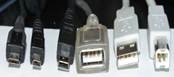
clip_image006


Various USB 2.0 cable ends

(from left to right):

3 different styles for mini ports, female, male & printer

clip_image007clip_image008clip_image009

The SS (Super Speed) moniker differentiates USB 3.0 from 2.0. USB 3.0 cables are often, but not always blue

clip_image010clip_image011


A Thunderbolt cable end and PC port

————————-
UPDATE 7/15/12:

I just found an epic post about this that, for the more technically inclined, goes into great detail about the technical specifics of USB 2.0 vs USB 3.0. I really have no intention of ever using Thunderbolt (it’s past & future seems identical to that of IEEE1394/FireWire) so these are the only two standards that I wanted a lot of reference information on… and boy did I find it.

Posted by: kurtsh | July 9, 2012

NEWS: CES 2013 registration now active!

imageYeah, I don’t actually know if I’m going to attend this year being that we’re no longer going to be a sponsor or participant in the event however I think there’ll still be some worthwhile things to look for at CES 2012 this year… and it is after all in Vegas so how bad can it be? <grin>

Anyway, registration just went live at:

One thing to know is that you have until August 31 to get an Exhibits Pass for FREE.  After that, they start charging you.  So do it now – what have you got to lose?

Exhibits Plus Pass

The fee structure for admission to all exhibits, TechZones, SuperSessions, keynote addresses and select conference sessions has changed. Please take note of these important dates:

By August 31, 2012 at 11:59 p.m. EST FREE
September 1, 2012 at Midnight EST through January 2, 2013 at 5 p.m. EST $100.00
January 2, 2013 at 5:01 p.m. EST through January 11, 2013 $200.00

imageLooks like they’re already improving the awesome 2012 release with new features.  WOW.

Thanks for your ongoing interest and participation in the MDT beta review program. We are pleased to announce that Microsoft Deployment Toolkit (MDT) 2012 Update 1 Beta 1 is now available for download!

Download MDT 2012 Update 1 Beta 1 now!

Download the latest release to stay up-to-date on your deployment needs. New features and enhancements make large-scale desktop and server deployments smoother than ever!

This release expands your deployment capabilities with support for the latest software releases, including Windows 8 Release Preview, Windows Server 2012 Release Candidate, and System Center 2012 Configuration Manager SP1 Community Technology Preview.

Notable new features include:

  • Support for using the DaRT 8 Beta with the Windows 8 Release Preview version of the Assessment and Deployment Kit (ADK).
  • New “Build Your Own Pages” support for User-Driven Installation (UDI), enabling IT pros to create new wizard panes using simple drag-and-drop operations – no coding required.
  • Integration with System Center Orchestrator, enabling task sequences to invoke Orchestrator runbooks at any point in the deployment process.
  • Completely reworked “Roles and Features” logic, supporting both installation and removal, as well as providing a new Lite Touch wizard pane for selecting roles and features to install at deploy time.
  • Support for PowerShell 3.0 to make it easier to run PowerShell scripts inside task sequences on Windows 8, Windows Server 2012, and Windows PE 4.0.
  • Simple monitoring functionality for Configuration Manager task sequences, leveraging the monitoring capabilities provided initially in MDT 2012 for Lite Touch deployments.
  • Improved “boot from VHD” deployment capabilities, supporting both bare metal and refresh deployments.

Learn more

Visit the MDT home page:www.microsoft.com/MDT

Get the latest news straight from the MDT team:http://blogs.technet.com/b/msdeployment/

MDT works with the Microsoft Assessment and Planning Toolkit and Security Compliance Manager to help you plan, securely deploy, and manage new Microsoft technologies—easier, faster, and at less cost. Learn more atwww.microsoft.com/solutionaccelerators.

There’s so many awesome Windows Phone apps out there that I decided to start publishing some of my favorites that I find throughout the week.

  • imageCamCard
    http://www.windowsphone.com/en-US/apps/3c3052ac-115d-e011-854c-00237de2db9e
    CamCard is a professional business card reader. Take a picture of a card with phone camera and contact information will be recognized via cloud based service. The contact information can be recognized automatically and saved in Card Holder. You can easily manage all cards in Card Holder by searching, sorting, editing and so forth.


  • imageAircharge
    http://www.windowsphone.com/en-US/apps/201dd3ee-1dd9-48d3-8816-563211c39c1d
    Turn your cell phone into a “sell” phone. AIRCHARGE technology enables you to perform credit card swiped and manual transactions right on your cell phone – no more declined credit cards or delayed payments. Accept credit card payments in your car, at trade shows, while traveling . . . anywhere your phone will go! The AIRCHARGE solution allows you to obtain real-time authorizations just about anywhere.


  • imageSeeIt!
    http://www.windowsphone.com/en-US/apps/89493cf2-e7eb-4563-bbd1-08d7adce839d
    Record videos w/o being noticed. Pics too! Similarly, you may take pictures in a really stealthy way without being noticed. Capture video and photos while looking at a text, black screen or photo. Start SeeIt! in stealth mode so if someone tries it on your phone, all they get is a note-taking app. Filter your files by using a date and time. Upload videos to SkyDrive easily. Automatic or manual picture capture with optional vibration feedback.

imageThis might seem trivial but it should serve as a reminder to everyone that everything in computers these days is configurable and that Bing’s capabilities are no exception.

One of the most important pages for Bing users to know is:
http://www.bing.com/account/web

This is where you can set:

  1. How many results you get per page?
    (The default is 10.  Do you really want to click next page, next page, next page… over and over again?)
  2. What language you want?
    (The default is “all languages”.  Do you care about Chinese language results if you don’t speak Chinese?)
  3. Open links in new browser window?
    (You leave your search results page if you click on a link.  Do you want to keep having to click the back button?)

Do it once & forget about it.

imageI’ve bought several laptop cooling pads & the best I’ve bought to date was the “Targus Dual Fan USB 2.0 4-port Chill Hub”, partially because I love that it’s a USB 2.0 hub, but mostly because it’s lasted me a long time.  Most of these laptop cooling pads run into 1 of 3 problems:

  1. NOISE – The fans get clogged with dust or just start to warp from heat and wear.  The result is buzzing, clicking, and otherwise annoying noises that you have to deal with while you work.  Dealbreaker.
  2. FAILURE – The fans STOP.  This has happened on the majority of the cooling pads that I’ve used over the past 20 years.  I have historically run powerhouse laptops that run very hot and I don’t know if it’s the head dissipation that gets them or just that their MTBF sucks but they usually eventually die in a year or two.  Dealbreaker again.
  3. OVERLOAD – These units consume power off your USB bus, and if the unit is also a USB hub, you can bet that the power drain off your USB will stack.  The only resolution for this is if the unit supports a secondary AC power adapter, which only makes sense being that you’re not gonna move from place to placed with this cooling pad.  But alas, most manufacturers don’t supply an AC adapter and depend purely on the USB port.

I have 5 laptops in my home, all running and most of the cooling pads I bought were cheap and failed.  Why am I not just buying a new Targus unit?  Well, it’s cooling capability – while functional – isn’t really very good.  And the cooler your laptop runs, the longer it operates… and the better actual speed & performance you see from it.  (Ask any gamer)

So here’s the results of my quest for a new laptop cooling pad standard:
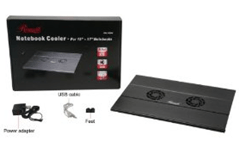
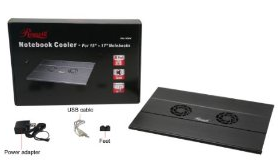
imageRosewill 15.4" – 17" Notebook Cooler with 4-Port USB Hub Model RNA-7600W ($39.99)
http://www.amazon.com/Rosewill-15-4-Notebook-Cooler-RNA-7600W/dp/B004PCB36E

While the unit can be powered directly off your laptop’s USB port, what’s interesting about the Rosewill is that it comes with an AC adapter to power the unit’s fans & backup the 4-port USB 2.0 hub.  Eff yeah.  No more "you’ve-plugged-in-one-too-many-USB-devices”.  It also comes with some rubber feet to ensure your laptop stays in place.  Nice touch.  The only thing is, the fan vents are clearly not very “open” and overall, the configuration, even with the USB 2.0 4-port hub is somewhat pricey.
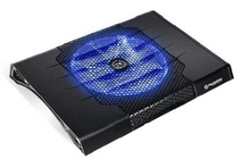
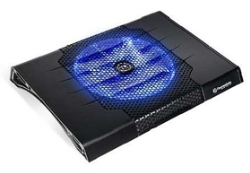
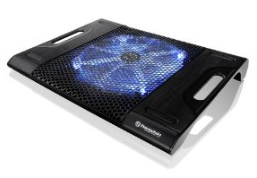
imageThermaltake Massive23 ST Notebook Cooler ($29.95)
http://www.amazon.com/Thermaltake-CLN0009-Massive23-Notebook-Cooler/dp/B002JM1RLS/

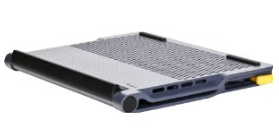
Thermaltake is a renowned name in the computer cooling industry so they know their stuff.  The unit has a massive fan under it to ensure maximum cooling.  This is clearly targeted at folks like me that have quad core laptops with the potential for significant heat build up.  And it has a glitzy blue neon light that emanates from the fan area, which can be disabled if it bugs you.  It doesn’t matter where the vent is on your laptop’s underside:  The Massive23 ST will aerate it.  A little pricier than most units but if you want top notch cooling, you’ll pay top notch prices.  My only concern is the noise generated from the fan but Thermaltake historically knows how to keep the fans quiet and the feedback on Amazon about it’s lack of noise appears to be very satisfactory.  One drawback is that the power cable does chew up a USB port since it’s USB powered.
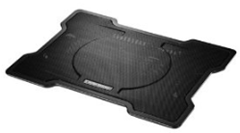
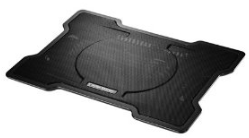
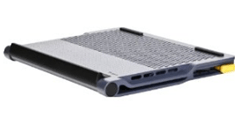
imageCooler Master X Slim Notebook Cooler (R9 NBC XSLI GP) ($16.23)
http://www.amazon.com/Cooler-Master-Slim-Notebook-XSLI/dp/B005C31HC0/

Cooler Master is the “other” big name in the cooling industry famous for their PC chassis fans and water cooling technology.  Again, their X Slim offering has a massive fan under it with a mesh layer beneath to ensure good airflow and maximum cooling.  Interestingly, I’ve read that despite it being MUCH cheaper than the Thermaltake, it cools better.  Several comments stated that this unit for whatever reason produces significantly greater air flow and overall better cooling so this may be a big factor for some.  One thing about this unit however is that it’s THIN and appears to be designed to provide a lower profile than other units.  And it comes with a USB 2.0 passthrough connector to power the fan so while it has to plug into a USB port, you don’t lose the port for use with something else like a mouse.
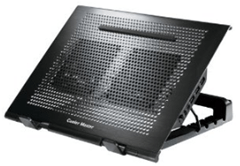
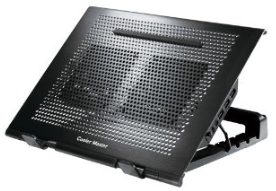
imageCooler Master NotePal U Stand with USB Hub ($40.99+$6.49 = $47.49)http://www.amazon.com/gp/product/
B005KQ3AFG/ref=ox_sc_act_title_1?ie=UTF8&m=ATVPDKIKX0DER

WHOA.  Now we’re talkin’.  This appears to be the big brother to the X Slim.  Definitely not as low profile but with a 4 port USB 2.0 hub off of it, who cares?  Equipped with TWO 100mm fans, the unit is barebones to maximize air throughput like the X Slim above but also has the trademark Cooler Master grill.  One thing that is a little annoying:  The unit does NOT come with an AC power adapter for the USB 2.0 4-port hub which isn’t technically necessary unless you are concerned about USB bus power – which I am.  Ultimately, this is a separate purchase at about $6.49 making the total a VERY pricey $47.49:
http://www.amazon.com/Premium-External-Adapter-2-5-inch-Enclosure/dp/B001PUSERA/ref=pd_bxgy_e_text_b
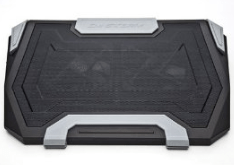
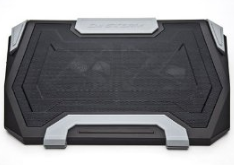
imageCooler Master Storm SF-19 19" Laptop Cooler with USB 2.0 (SGA-4000-KKNF1) ($49.99)
http://www.amazon.com/Cooler-Master-Storm-Laptop-SGA-4000-KKNF1/dp/B004G603E2/

Again, another Cooler Master with a USB 2.0 hub on it.  What differentiates it is that it comes with the AC adapter for the hub while also adding on LED lighting similar to the ThermalTake unit above with user selectable colors and ambient glow effects.  Interesting.  And excellent all around reviews as well as the fans are replaceable and the whole unit seems to be quite modular.  However, its pricey at $49 and even with the AC adapter included, it prices above the Cooler Master Notepal U stand.
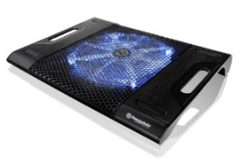
imageThermaltake Massive23 LX Laptop Notebook Cooler Oversized 230mm Blue LED Fan USB CLN0015 ($27.90)
http://www.amazon.com/gp/product/
B003ZUXXWO/ref=ox_sc_act_title_1?ie=UTF8&m=ATVPDKIKX0DER

I’m not going to write much about this other than to say that with only 2 USB ports on it, and some rather all-over-the-place feedback on it’s performance as an actual cooling system, I’m probably just going to pass.   It seems very similar to the Massive23 ST though.
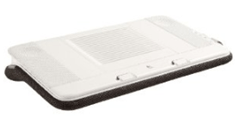
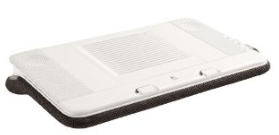
imageLogitech Speaker Lapdesk N700 ($97.99)
http://www.amazon.com/Logitech-939-000287-Speaker-Lapdesk-N700/dp/B0032ALZIQ/ 

$100 for a laptop cooler:  Riiiiight.  But this is different:  It’s got a multispeaker digital sound system built into it for high quality audio.  Intrigued?  Tell you more?  I thought so.  The unit requires only a hidden USB cable to be connected to your laptop and you instantly get both USB-powered cooling as well as digital audio-over-USB sound, including a subwoofer at the base.  Nice.  And there are integrated volume & fan controls on the side.  The one big issues is that… it’s big.  It’s designed truly for LAPS and not really for seated office use.  I might still look into this though… at least for my wife who computes on the bed a lot.

—————————–

CONCLUSION
In the end, I picked up 1 unit of Cooler Master NotePal U Stand with USB Hub and 3 units of Cooler Master X Slim Notebook Cooler.  I will report back after I’ve put them into good use however based on the feedback I’ve read, I think I’m going to be running a lot cooler and worry a lot less.

A WORD ABOUT CLEANING THE HEAT SINK:
As a side note, the best tool you can get is a $5 can of non-chemically based compressed air to clear out the heat sink on your laptop.  A single cleaning of the heat sink on your laptop by blowing air into the air vent will take 5 seconds & for those that haven’t done it before, can drop heat retention & build up by a good 400%.  It’s astonishing how dust on the heat sink prevents heat dissipation.

imageOn Monday, July 2, 2012, Charlie Rose interviewed Bill Gates about his philanthropic work and The Gates Foundation.

The video is about 53 minutes long and is a good overview of the things that Bill has been working on recently.

And he talks a little bit about ‘tablets’.

Posted by: kurtsh | July 3, 2012

DOWNLOAD: Desktop background for the Surface geek

Awesome.

GotitWantit2

« Newer Posts - Older Posts »

Categories