imageIf you’re going to deploy Windows 8 and/or Windows Server 2012 in your company using KMS, you’ll need to update the KMS Host Key for activation.

KMS activation for either Windows 8 or Windows Server 2012 requires that a new ‘KMS Host Key’ associated with the product to be obtained from Volume Licensing Services Center & imported in to your KMS Host Server using the SLMGR.VBS tool.  This is discussed in the TechNet article entitled, “Windows 8: Volume Activation Overview”:
http://technet.microsoft.com/en-us/library/hh831612

NOTE:  I’m going to assume you have the rights to, & know how to download the KMS Host Key for your organization from the Volume Licensing Services Center at https://www.microsoft.com/licensing/servicecenter.  If not, you need to find out who the Administrator is for your company’s Volume Licensing Agreement and either have them grant you rights or have them get you the key you need because the rest of this isn’t going to matter if you don’t have at least that.

THREE THINGS TO KNOW ABOUT UPDATING YOUR KMS HOST
As an Enterprise KMS service administrator, there’s three important things to know about provisioning an existing KMS host that will activate Windows 8 & Windows Server 2012:

  1. YOU MUST PATCH YOUR WINDOWS SERVER 2008 R2-BASED KMS HOST SERVERS FOR WIN8/WS2012 ACTIVATION
    Before you install the KMS Host Key to begin activating Windows 8 & Windows Server 2012 installations on your corporate network, there is an ‘update’ available for your KMS Host servers if the service is hosted on Windows 7 or Windows Server 2008 R2 known as KB2691583:
    http://support.microsoft.com/kb/2691586
  2. NO PATCH IS AVAILABLE FOR WINDOWS SERVER 2003-BASED KMS HOSTS
    There is no patch to enable KMS Hosts running on Windows Server 2003 to activate Windows 8 or Windows Server 2012.  I’ve been told that the choices for customers in this scenario are as follows:
        1. Leave the current KMS host as is. Install Windows Server 2012 and configure Active Directory Based Activation. This will activate Windows 8/Windows Server 2012. The Windows Server 2003 KMS host will handle everything else that it currently activates.
        2. Decommission the Windows Server 2003 KMS host. Install Windows Server 2012 and configure Active Directory Based Activation (for Windows 8/2012) then setup a Windows Server 2012 KMS host for Windows 7/Windows Server 2008 R2/etc.
        3. Decommission the Windows Server 2003 KMS host. Install Windows Server 2008R2 KMS host, install the KB2691586 update, install Windows Server 2012 KMS host key, and that will activate everything. Configure Active Directory based activation also for Windows 8/Windows Server 2012, or execute this at later date.
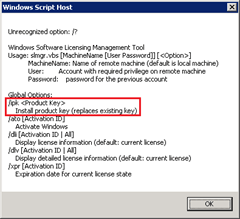
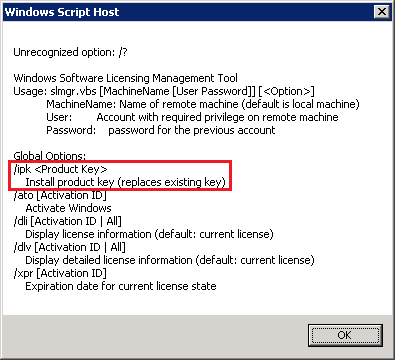
  3. imageA NEW WIN8/WS2012 KMS HOST KEY WILL REPLACE THE OLD WIN7/WS2008R2 KMS HOST KEY
    When you install the new WIN8/WS2012 KMS Host Key on your KMS Server, as stated in the SLMGR script, you will be replacing the old activation host key that you used for Windows 7/Windows Vista and/or Windows Server 2008/R2.

    The new WIN8/WS2012 host key will provide activation for down level operating systems, depending on the type of KMS Host Key being installed.

        1. The Client Product Key for Windows 8 will enable the KMS Host to activate:
          (KMS must be hosted on a Windows 7 or greater installation)
          Windows Vista Business
          Windows Vista Enterprise
          Windows 7 Professional
          Windows 7 Enterprise
          Windows 8 Professional
          Windows 8 Enterprise
        2. The Server Product Key for Windows Server 2012 will enable the KMS Host to activate:
          (KMS must be hosted on a Windows Server 2008 installation or greater)
          Windows Vista Business
          Windows Vista Enterprise
          Windows 7 Professional
          Windows 7 Enterprise
          Windows 8 Professional
          Windows 8 Enterprise
          Windows Server 2008 (all editions)
          Windows Server 2008 R2 (all editions)
          Windows Server 2012 (all editions)

Here are some other references:

imageIf you’re interested in downloading recordings of the Virtualization section from the Windows Server 2012 virtual launch this morning, please click the following links:

Other Launch Videos:

Posted by: kurtsh | September 4, 2012

DOWNLOAD: Windows Server 2012 RTM hits TechNet/MSDN

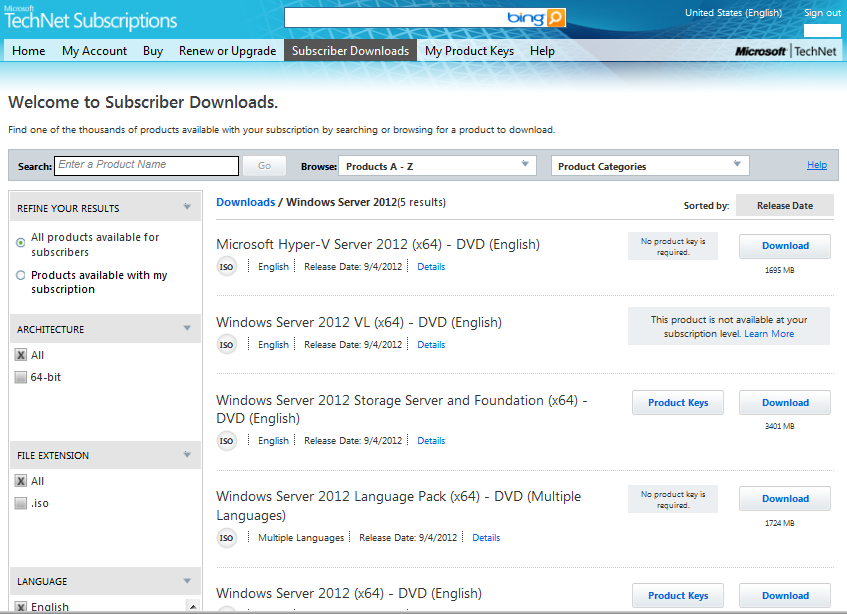
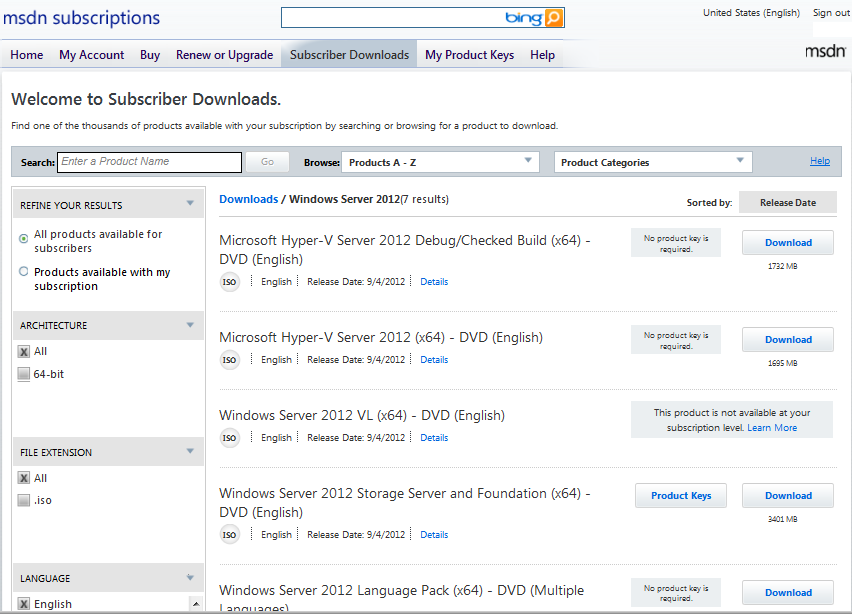
imageDownload away!  The release software for Windows Server 2012 just hit TechNet/MSDN with the Windows Server virtual online launch happening today at http://www.windows-server-launch.com/Home

The following .ISO/package files have been posted:

  • Microsoft Hyper-V Server 2012 (x64) – DVD (English) (1695MB)
  • Windows Server 2012 VL (x64) – DVD (English)
  • Windows Server 2012 Storage Server and Foundation (x64) – DVD (English) (3401MB)
  • Windows Server 2012 Language Pack (x64) – DVD (Multiple Languages) (1724MB)
  • Windows Server 2012 (x64) – DVD (English) (3524MB)

imageProduct keys are available, as usual, on the same page as the downloads.  If you are a TechNet/MSDN subscriber, the software is now available for download!

Posted by: kurtsh | September 3, 2012

INFO: Technical print magazines that I STILL subscribe to

Personally, I love getting a good magazine in the mail.  Do they pile up?  Sure.  But at least I can get to them when I want, leave them around as bathroom reading or on the nightstand as “non-essential"’, read them when the stupid airplane is ‘taking off/landing’, and most importantly, pass the issue on to friends & coworkers when I’m done.

It’s that last item that I find so compelling about print:  Print is “casually sharable”.  You can give your copy to a friend, tear out the pages of one important article, leave your back issues in the lunch room for others to read, etc.  In this siloed “all-about-me” world we’re transforming into, where everyone isolates themselves to their own narrow their vision & opinions, (including myself) being able to be casually, non-directly educated about theories & different vantage points is critically important to have a broader perspective.

So here’s the tech magazines I subscribe to.  Enjoy.

  • imageLaptop Magazine (12 issues, $14.99)
    I have issues with their editorial content which is pretty narrow in scope & I’ve found myself referring to the magazine as “iPad & Android” magazine since they’ve been dedicating sometimes 50% or more of their column inches to non-laptop device articles, however no paper publication beats Laptop Magazine for laptop & mobile device reviews.  Hands down, they’re the most detailed, thorough, and consistent out there.  There’s no wiggle room around their process & very rarely do I ever see inconsistency in their evaluation process and that’s great.  Only Maximum PC does as a good a job IMHO.
    https://secure.ablesoftsolutions.com/pdmg/
    SecurePages/NewSub.aspx?n=1&pi=lapt


  • imagePC World (12 issues, $19.97)
    PC World has proven to be a great magazine for timely “topical” articles discussing relevant computing & IT issues – not just products or new technologies – but “solution areas” in print form.  The research they do in these articles could probably by found in bits and pieces elsewhere however PC World ties it all into comprehensive articles of 8-10 pages and that saves me time.  And this way I don’t have to go through all “social consciousness” content of Wired.  Their last publication discussed “privacy” and the different perspectives on the matter, including a well-researched discussion about “device fingerprinting” (cookieless tracking), something that no other magazine has touched as far as I’ve seen and I appreciate that.  Very different from hardcore technology rags like Laptop Magazine or Maximum PC.
    http://pcworld.com/subscribe


  • imageMaximum PC (12 issues, $19.95)
    My favorite magazine – the magazine I leave until last to read, kinda like how I used to leave “Bloom County” for reading last when I’d parse through the daily funnies in the newspaper.  Similar to the Wall Street Journal – except for techs – Maximum PC magazine always has SOMETHING to learn in there around new hardware or software technology.  I have no qualms saying that it helps give me an edge in discussing IT technology because the information is SO CURRENT, but again, it’s pretty niche, low-level technical in nature and focused more for hardware jockeys so it may be appreciated at various levels by different people.
    https://w1.buysub.com/pubs/IM/MAX/MAX-subscribe.jsp?cds_page_id=63027&cds_mag_code=MAX


  • imageComputerworld (24 issues, $129 – or FREE if qualified)
    I really have mixed feelings about Computerworld.  Computerworld has occasionally gotten desperate, writing articles for shock value & occasionally even being dragged through the dirt due to some ethically challenged individuals like Randall C. Kennedy.  Sometimes I even get the feeling that their articles are trending toward the print version of talk radio just for the hype/controversy around the online version.  But just as I often find myself cringing but still forging ahead while listening to TWiT Network’s Tech News Today, I’ll read Computerworld, because it’s pretty much the only game in town left for print news about general computer technology that’s published more than once month.  Ultimately, beggars can’t be choose and besides, the publication is free to most folks in IT.
    http://www.cwsubscribe.com/cgi-win/cw.cgi?ADD


  • imageOfficial Xbox Magazine (12 issues, $24.95)
    Yeah, I know.  This seems like pure fun.  I frankly don’t have time to read IGN or Kotaku or Destructoid or any of the gaming-oriented sites any more sadly – not even via RSS.  I just can’t allocate bandwidth to it.  But I can read a magazine in my totebag or occasionally flip through an issue during lunch or while travelling, and for that reason, I keep my subscription alive, as I have since the magazine first started back in 2001.  The glimpse it provides into new games coming out is good information and provides me with an idea of what the trends are in electronic entertainment gaming techniques – and with gamification becoming a steadily growing business, I think this is a worthwhile investment for any one in IT.
    https://w1.buysub.com/pubs/IM/BOX/OXM-subscribe.jsp?cds_page_id=6258&cds_mag_code=BOX
Posted by: kurtsh | September 3, 2012

INFO: Windows Movie Maker 2012 references & links

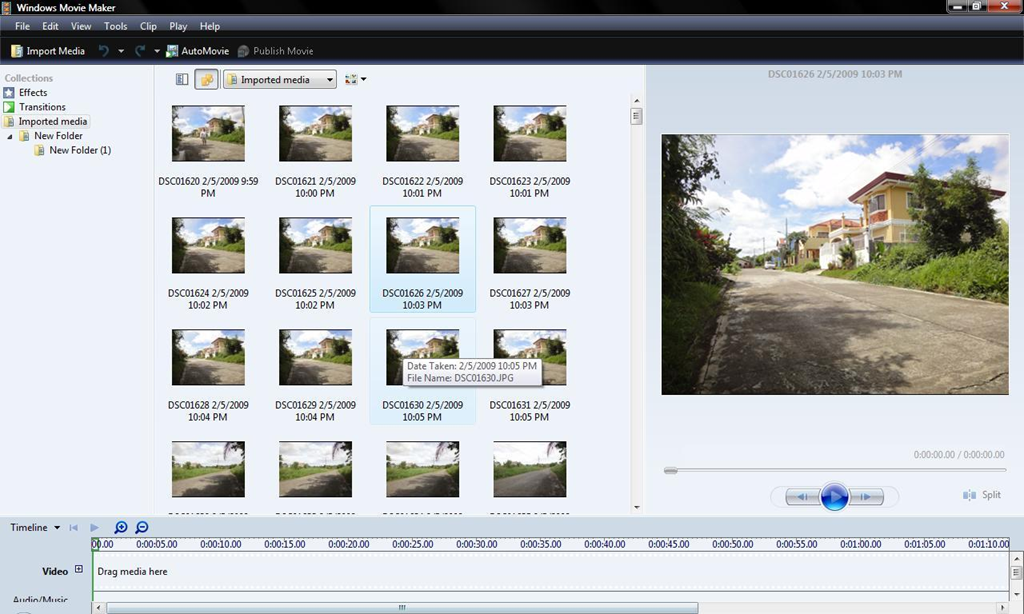
imageWe released Windows Movie Maker 2012.  Yay.

If you look at the version information, you’ll see that it lists, “Version 2012 (Build 16.4.3503.0728)”.  According to the site, Windows Essentials 2012 requires the following:

  • Operating system: 32- or 64-bit version of Windows 7, or 32- or 64-bit version of Windows 8 Release Preview, or Windows Server 2008 R2.
  • Processor: 1.6 GHz or higher with SSE2 support. SSE2 is supported on Pentium 4 processors or newer, and AMD K8 processors or newer.
  • Memory: 1 GB of RAM or higher
  • Resolution: 1024 × 576 minimum
  • Internet connection: Online services require dial-up or high-speed Internet access (provided separately—local or long-distance charges might apply). High-speed Internet access is recommended for some features.
  • Graphics card: Windows Movie Maker requires a graphics card that supports DirectX 10 or higher and Shader Model 2 or higher.

Beyond all of this, finding information about Windows Movie Maker 2012 can be a bit difficult.  So here are a few references for folks looking for more information about the new release:

Posted by: kurtsh | September 2, 2012

HOWTO: Get Windows Gadgets working on Windows 8

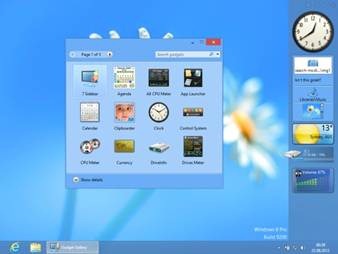
clip_image002I’m not going to lie:  I LOVE WINDOWS GADGETS.  Being informed about my system status (CPU / RAM / bandwidth / storage usage, running processes, etc.) has become a critical element of my daily routine.  I’m a data junkie and it makes me feel more empowered.

So you can imagine the quiet dismay I had when as a company, we chose to ‘remove all Windows Gadget functionality’ out of Windows 8’s desktop.  I mean, seriously.  I thought this was one of the most glorious functions we got with Windows Vista and now it was going down the tubes.

NOT SO.

imageENTER “8GADGETPACK”
Turns out that the nice people at BPlaced, makers of the free 7Sidebar (a 3rd party sidebar we got rid of when Windows 7 was released) have struck again, this time by providing a FREE tool that essentially ADDS WINDOWS GADGET FUNCTIONALITY BACK INTO WINDOWS 8.  They’ve released a gadget hosting sidebar similar to 7Sidebar and it works gloriously.  And it’s, again, completely free.

Even cooler:  It comes with a set of 31 tested, reliable gadgets.  All in one downloadable package.  So go grab it.  Do it now.

imageWAIT – DIDN’T MICROSOFT GET RID OF GADGETS BECAUSE OF A SECURITY RISK?
Yes, this is true.  Illicit gadgets could supposedly bypass some of the security protections within Windows 8 making untrusted gadgets a point of risk.  So instead of changing the development framework of Windows Gadgets – which had been shutdown more than a year ago, with the development team scattered to the four winds – Microsoft chose to simply eliminate the technology for Windows 8.

Again, this may sound unreasonable however remember that there was no new development occurring for Windows Gadgets, and as much as it pains me to say it, there’s technically no real future in the gadget framework.  Windows Gadget functionality appears to be getting replaced by Windows 8 Live Tiles, with the tiles providing similar functionality as we transition to Modern-style applications in Windows 8.

That being said, I still LOVE Windows Gadgets & the risk around Windows Gadgets (as I understand it) revolves around new, unknown gadgets – not existing ones with good reputations as being safe and reliable.  So what’s the harm is keeping them around if you find them useful?  Right?

imageWHERE DO I GET GADGETS FROM THESE DAYS?
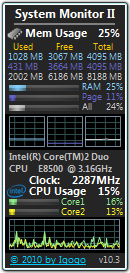
If you’re looking for a place to get some top quality gadgets from, a good place to start is at Dr. Igor Bushin’s site which has some of my personal favorites, including a CPU monitor, Memory monitor, Bandwidth monitor, GPU monitor, Drive monitor, Process monitor, Battery monitor, etc.

  • DOWNLOAD:  My Favorite Gadgets – Dr. Igor Bushin’s site
    Most Wanted and Popular Windows 7, Windows 8, Windows Vista and Windows Server 2008 Gadgets. Real gadgets for real Geeks.
    http://www.myfavoritegadgets.info/
Posted by: kurtsh | September 2, 2012

INFO: IT Professional questions regarding Windows 8?

imageIf you have IT Professional-level questions about Windows 8, don’t forget that you can submit them to our TechNet Managed forums to be answered by other knowledgeable IT professionals, our MVPs, or our own support personnel. 

We have specific forums (see below) for each area of interest around Windows 8.

ATTENTION CORPORATE USERS WITH SOFTWARE ASSURANCE:
And if your company has Software Assurance, remember that you can have your Microsoft/Windows Live account flagged as a ‘priority’ user account (TechNet Subscriber privileges for Managed Forums) so that your questions & submissions rise to the top of the heap in terms of order answered by MVPs & support engineers within our Managed Forums. 

For priority forum users under Software Assurance, the stated SLA for getting technical questions answered is two business days with review by Microsoft support professionals. (For details on this benefit of Software Assurance, please visit:  http://www.microsoft.com/licensing/software-assurance/technet-benefits.aspx)

TECHNET:  Windows 8 IT Professional Forum
http://social.technet.microsoft.com/Forums/en/category/w8itpro

imageFolks – a kind suggestion to those of you using Lync to do broadcast presentations: 

  • Please upload your PowerPoint into Lync when delivering webcasts.  Conversely, never “share your screen” to do a PowerPoint presentation.

All you have to do is click the “SHARE” button within Lync and select “PowerPoint Presentation”.  This will allow you to upload the deck into the Lync session & automatically convert it into an HTML5 presentation, complete with full animations, transitions, etc.

Please note that this process may take a few minutesto complete depending on the size of the presentation but the results are excellent and a little forethought/preparation before presenting should not be a big deal.

WHY AM I POSTING THIS?
I ask because ‘sharing’ one’s desktop to deliver a PowerPoint presentation is considered bad form with customers & attendees.  The reason for this is, while it may look okay to you as a presenter, from the stand point of an attendee (especially those with highly questionable bandwidth or weak QoS at their Internet gateway) pixel-level desktop sharing takes forever to do screen updates when using POWERPNT.EXE, especially at typical 1280×1024 resolutions & 24-bit color depth.

In a phrase, it can be downright PAINFUL & it’s inconsiderate to your audience.

WHAT ARE THE BENEFITS OF UPLOADING THE .PPTX FILE?
When you load the presentation into Lync, there are 5 major benefits for attendees viewing the PowerPoint in this manner, instead of ‘screensharing’ POWERPNT.EXE:

  1. IMMEDIATE SLIDE CHANGES
    All slide changes are immediate, eliminating the annoying pauses & frame rate issues that occur during screensharing while the screen refreshes on a pixel-by-pixel level.  For attendees with crappy bandwidth, a single 1280x1024x64k slide change can take close to a minute.  Meanwhile, the presenter is likely yammering away, while the slide hasn’t even appeared on his attendees screens & has no idea how bad the experience is on their end.
  2. SMOOTH TRANSITIONS & ANIMATIONS
    All animation & transitions are supported and appear smoothly, whereas pixel-sharing can make animations at 1280x1024x64k run at less than a frame per second when delivered over a 64kbps connection, which can happen when the attendee is viewing the presentation with bad Internet access.  When the file is uploaded to the Lync session, the presentation is automatically scaled to the attendee’s local desktop resolution, so the presenter’s desktop resolution isn’t relevant.  (During desktop sharing for things like application demos, smart presenters normally shuttle down their resolution/color depth beforehand to minimize network I/O to the attendees)
  3. CLIENT-SIDE SLIDE CACHING
    The attendee’s Lync client will pre-cache the entire PowerPoint presentation on the attendee’s machine locally and display the first presentable slide immediately, making bandwidth usage irrelevant after the initial slides of the deck are cached.  This allows presenter slide changes to occur immediately on the attendee’s screens & also provide…
  4. SLIDE LOOKAHEAD/LOOKBACK
    If an attendee wants to look back at a previous slide, they have the ability to do so unless the presenter specifically restricts them from doing so.  This gives them freedom to review the content on their own.
  5. POWERPOINT DECK DOWNLOAD
    Once uploaded to Lync, the attendee has the ability (unless again you’ve restricted them) to download the .PPTX for their offline use, which is a common request from attendees.
Posted by: kurtsh | September 1, 2012

COMMENTARY: A brief graphic about Windows 8

I hope Robert doesn’t mind my repost but this graphic he made perfectly expresses my thoughts on the Windows 8 Start button ‘matter’.

  1. Much like the Office ‘Ribbon’/Fluent, all it takes is an earnest attempt on the new user’s part to try to use the Start page to discover why we’re making the change.  And when someone won’t even try it to see if it’s truly better, it really betrays an individual’s inability to adapt to change.
  2. Meanwhile, every time I read a story about some OEM ‘potentially adding’ a crapware Start menu to their Windows 8 PCs, I’m reminded of why it is we’re building Surface.

image

If you’re looking to investigate Windows Server 2012’s Hyper-V Virtualization technology & compare it with VMware’s latest technology:

imageCompetitive Advantages of Windows Server 2012 Hyper-V over VMware vSphere 5.0
There is an excellent whitepaper called “Why Hyper-V:  Competitive Advantages of Windows Server 2012 Hyper-V over VMware vSphere 5.0” that provides a more narrative comparisons between Windows Server 2012 Hyper-V and VMware’s 5 technology.

It is a 656MB, 24-page document that goes over: The benefits of today’s Windows Server 2008 R2 Hyper-V product, and the advancements made in todays 2012 product.

VIDEO TRAINING:
Now if you’re more of a ‘video’/show me’ kind of person, not to worry.  We’ve produced numerous videos that help people understand the competitive advantages of Windows Server 2012.

« Newer Posts - Older Posts »

Categories