imageRecently I was asked how to extract individual files or folders from a Windows Backup Full Drive image done on Windows 7. 
The issue is that the backup files are stored in a .VHD file, the contents of which are unreadable directly from File Explorer. 

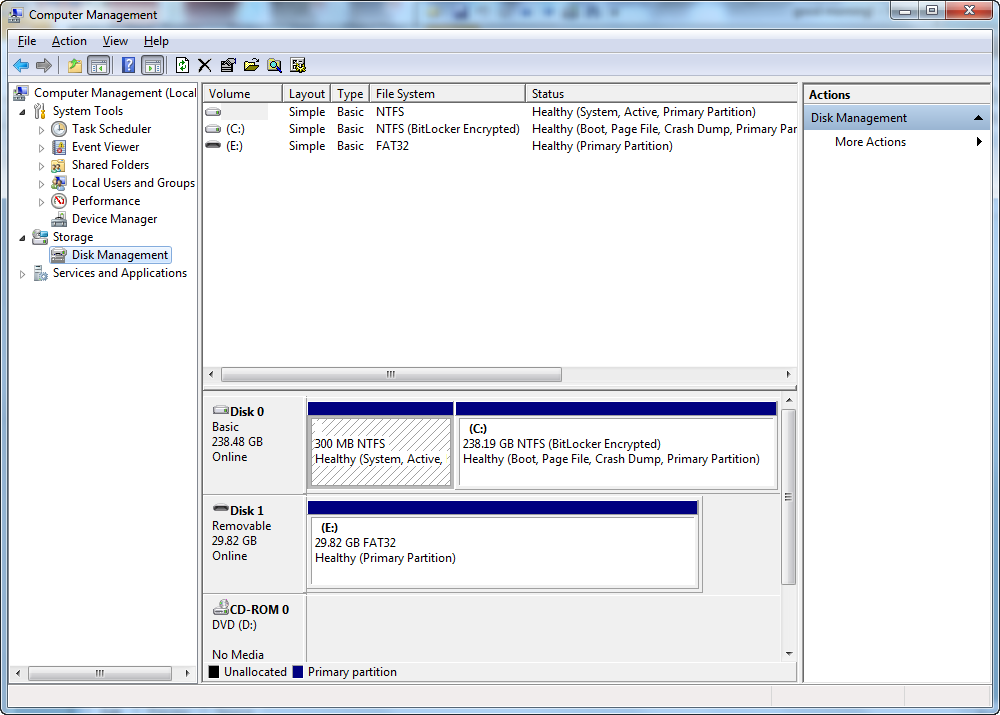
The answer is that you have to “Attach” the .VHD file as a ‘virtual drive’ to your system, then navigate that ‘virtual drive’ to find the files you need and copy them off the backup image, then “Detach” the .VHD file once you’re done.

Here’s some basic steps:
(Note:  You must have Administrator privileges to proceed – or provide yourself with FULL administrative privileges over the Backup/.VHD files in question)

  1. Click START button
  2. Right click computer, select “Manage”.
  3. Click Disk Management
  4. Right click Disk Management, select “Attach VHD”.
  5. In the File dialog, find the VHD file and attach it.  This will result in a new “DISK” appearing in the graphical display representing the disks connected to your computer.  This “new disk” isn’t really a new disk drive but rather the backup image of your computer.  (This is generally known as ‘mounting a drive’)
  6. You should be able to go to My Computer at this point and find a new drive available to navigate – this is the “backup” that the Windows Backup made.   Navigate the directory structure of the drive and copy the files out of the backup that you need to your local drive or to a USB flash drive.
  7. When done detach the VHD by going back into Disk Management.
  8. Select the Disk that represents the VHD you mounted, and right click on the word “DISK” on the left hand side.  Select “Detach VHD”.
Posted by: kurtsh | September 30, 2012

RELEASE: Microsoft Products Portfolio 2.8

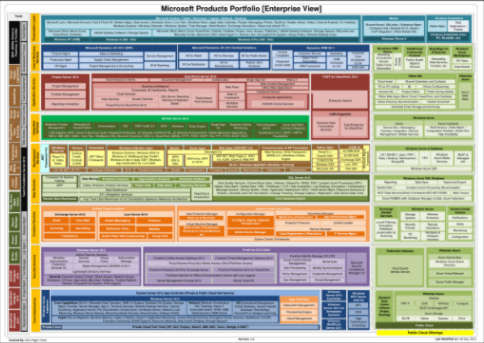
imageWe’ve just released v2.8 of two customer-ready documents known as our Product Portfolio One-pager.

The one-page shows all of Microsoft products in a single scalable view. I have them available in .PDF as well as a Visio document for managed customers of mine that are interested.

The documents are viewable from ZOOM.IT, leveraging Microsoft Deep Zoom technology.

The following products were added since 2.7:

  • PowerPoint Storyboarding
  • Microsoft Lync
  • Windows 8 Modern App and Windows Runtime | Windows SDK for Windows 8 | Multilingual App Toolkit | Windows 8 Ads in Apps SDK | Windows App Certification Kit | Live SDK
  • Windows Server 2012 for Embedded Systems
  • Azure Media Services
  • Windows Azure Online Backup Service
  • Project Online under 0ffice 365
  • Microsoft Surface (under Microsoft Hardware)
  • Windows Azure Mobile Services
  • WebMatrix 2
  • SuperPreview
  • Microsoft Office (Word, Excel, PowerPoint, Outlook, OneNote, Project, Visio, Access, Publisher) (Enterprise View only)
  • Microsoft Office (All-up view only)
  • MSN (All-up view only)
  • MSN TV (All-up view only)
  • Windows Phone 7.8 (All-up view only)

The following was changed between 2.7 & 2.8:

  • Windows 7 to Windows 8 along with Major changes
  • Windows Phone 7.5 to Windows Phone 8 along with Major changes
  • Windows Server 2008 R2 to Windows Server 2012
  • Major changes into Office 365
  • Hyper-V Cloud Fast Track to Private Cloud Fast Track
  • Detailed capabilities of the Windows Azure Appliance are removed and just a place holder exist.
  • EMC2 added into the Private Cloud Fast Track
  • Windows Small Business Server Essentials to Windows Server 2012 Essentials
  • .NET Framework 4.0 to .NET Framework 4.5
  • ASP.NET 4.0 to ASP.NET 4.5
  • MVC 3.0 to MVC 4.0
  • WebForms to ASP.NET Web Pages 2
  • Fast Track Data Warehouse 3.0 Appliance | HP Business Decision & Consolidation Appliance to Fast Track Data Warehouse 4.0 & Consolidation Appliance Reference Architecture
  • MSF has been removed since MOF includes the principles of MSF
  • Parallel Processing to MPP
  • Robotics  Dev Studio 2008 to Robotics  Dev Studio 4 (All-up view)
  • Team Foundation Server 2010 to Team Foundation Server 2012
  • Forefront Protection for Exchange Server to Forefront Online Protection for Exchange
  • Forefront Online Protection for Exchange to Forefront Protection 2010 for Exchange Server
  • Forefront Security for OCS R2 to Forefront Security for Office Communications Server
  • Forefront Security for SharePoint Server to Forefront Protection 2010 for SharePoint
  • TMG Server to Forefront Threat Management Gateway 2010
  • Identity Manager to Forefront Identity Manager 2010 R2
  • UAG Server to Forefront Unified Access Gateway 2010
  • HPC (MPI & Dryad [Map Reduce]) to Hadoop
  • Created Reporting & Visualization category under SQL Server and included SSRS | Power View | Data Alerts
  • LightSwitch to VS LightSwitch
  • AVICode to Application Performance Management
  • WP7 SDK to WP8 SDK
  • System Center Virtual Machine Manager Self Service Portal 2.0 To System Center 2012 App Controller (Private & Public Cloud Self Service)
  • SCVMM Self Service Portal 2.0 To App Controller along with Cloud Management (Capability)
  • Forefront Endpoint Protection (Client) to Endpoint Protection
  • Windows Server 2012 features are split into multiple categories:
      • Server features. Following features are added into Core Capabilities
          • IIS 8.0
          • Offloaded Data Transfers
          • SMB 3.0 Support
          • Resilient File System
          • Storage Mgmt. Provider
          • Server Manager
      • Hyper-V features. Following features are added into Hyper-V
          • Live Migration
          • Dynamic Memory
          • Hyper-V Replica
          • Hyper-V Application Monitoring
          • Cluster Shared Volumes
          • Encrypted cluster volumes
          • Multitenant security and isolation
          • PVLAN
          • Hyper-V Extensible Switch
          • Extension monitoring
          • Network virtualization
          • NUMA support
          • Resource Metering
          • Data Center Bridging
      • VDI features.  Following features are added into VDI
          • Centralized Management
          • Virtual Desktops
          • Session-Based Desktops
          • RemoteApp
          • RemoteFX
          • Intelligent patching
      • Networking features.  Following features are added into Networking
          • Network Virtualization
          • NIC Teaming
          • Hyper-V Extensible Switch
          • IPAM
          • SMB Multichannel & SMB Direct
      • Dynamic Access Control & IPV6 support are added into Security area of Windows Server 2012

The following was removed since 2.7:

      • Home server (No roadmap)

See the diagrams here:

(If you’re a customer of mine, contact me and I’ll get the updated 2.8 files to you.)

Posted by: kurtsh | September 30, 2012

INFO: Calling Microsoft for Help

imageEver wonder:

“How do I call Microsoft for help?”

Many of these numbers are listed at:
http://support.microsoft.com/contactus/

But if you’re looking for a direct number, here’s some to keep on record:

  • Consumer Answer Desk/Support: 800-MICROSOFT
    (Note: Phone support is fee-based.  You may be eligible for complimentary support if you have your product ID and are within the support timeframe)
        • Monday – Friday 5:00 – 21:00 Pacific Time
        • Saturday 6:00 – 15:00 Pacific Time
        • Sunday 6:00 – 15:00 Pacific Time
  • Xbox Support: (800) 469-9269
        • 6 am to 10 pm Pacific Time
  • Games for Windows Live Support:  (877)-274-4349
        • 7 am to 9 pm Pacific Time
  • Skype:  Customer Chat only
    https://support.skype.com/en/faq/FA10656/What-is-l​ive-chat-support
  • Priority (Business) Technical Support: (800) 936-4900
  • Volume Licensing Service Center & Software Assurance Benefits Support line: (866) 230-0560
  • Terminal Services/Remote Desktop Services Activation: (888) 571-2048
  • Product Activation: (888) 352-7140
  • TechNet Plus (non-Software Assurance TechNet): (800) 344-2121
  • Premier Support (Corporate support; contract ID req.): (800) 936-3500
  • Volume Licensing Media Information: (800) 360-7561
  • Online Services (Office 365, Windows Intune, Windows Azure): (866) 676-6546
  • MSDN Help Desk: (866) 230-0560

imageThe 17-page summary known as the Windows 8 Product Guide for Business was updated for the RTM release on Sept 18th.  It goes through all the business-focused improvements made to Windows 8 as well as the technologies it inherits and improves upon from Windows 7 including:

  • Changing work environments and Windows 8
  • New possibilities for mobile productivity
  • Enhanced end-to-end security features
  • Manageability and Virtualization Advancements

In particular, there’s a great discussion of Client Hyper-V, Trusted Boot, and Windows-to-Go… all brand new ‘super features’ of Windows 8.

RELEASE: Free eBook: “Windows 8 Product Guide for Business”
http://www.microsoft.com/en-us/download/details.aspx?id=28970

Posted by: kurtsh | September 29, 2012

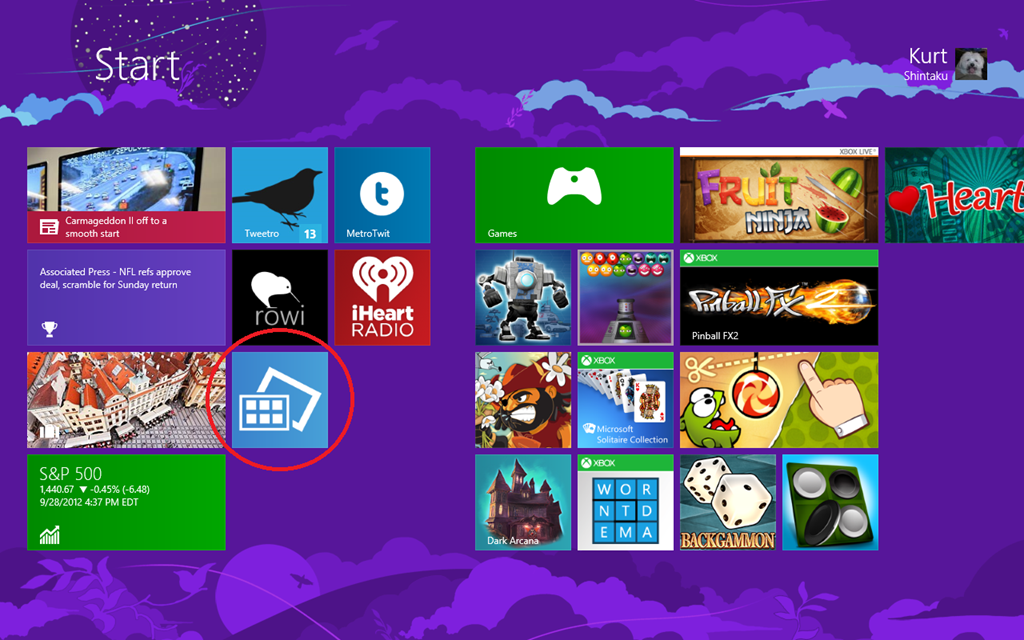
DOWNLOAD: “Server Posterpedia” app for Windows 8

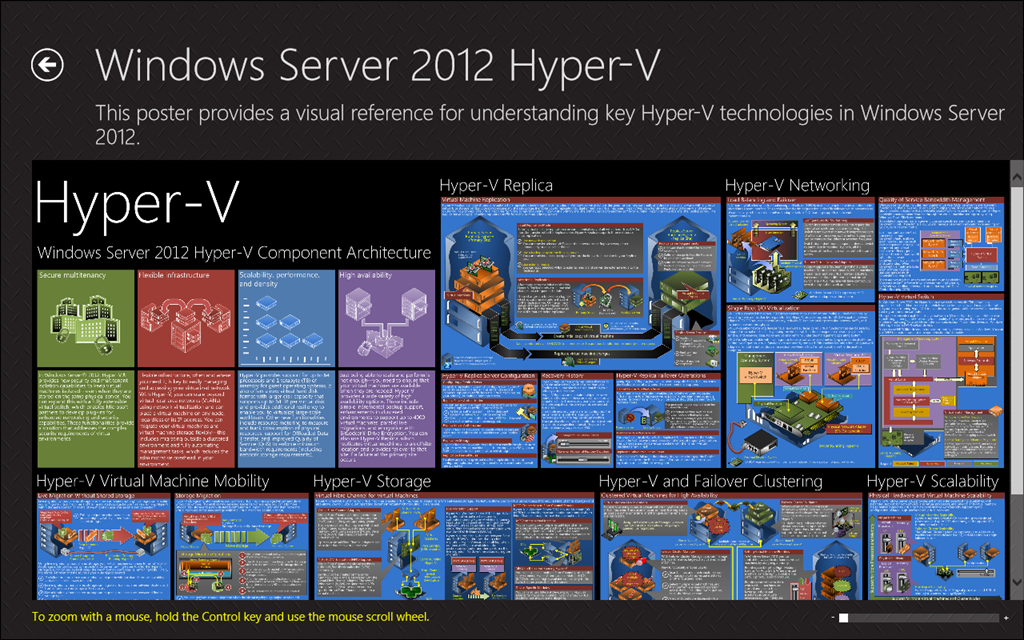
This is a pretty cool app that posted recently to the App Store for Windows 8.  It lists all the current vector-based posters that we’ve made public on Microsoft.com in .PDF format.  The posters they include, current as of 9/29/12, are:

  • Hyper-V for Windows Server 2012
  • Hyper-V for Windows Server 2008 R2 with SP!
  • Hyper-V for Windows Server 2008
  • Remote Desktop Services for Windows Server 2008 R2 with SP1
  • Features and Technologies for Windows Server 2008 R2
  • Features and Technologies for Windows Server 2008
  • Active Directory for Windows Server 2008
  • Active Directory for Windows Server 2003
  • Architecture for Exchange Server 2010
  • Architecture for Exchange Server 2007
  • Services for SharePoint Server 2010
  • Deployment for SharePoint Server 2010
  • SQL Database Federation for Windows Azure

Screenshots below:

ServerPedia1

ServerPedia2

ServerPedia3

Any Network Monitor fans out there?

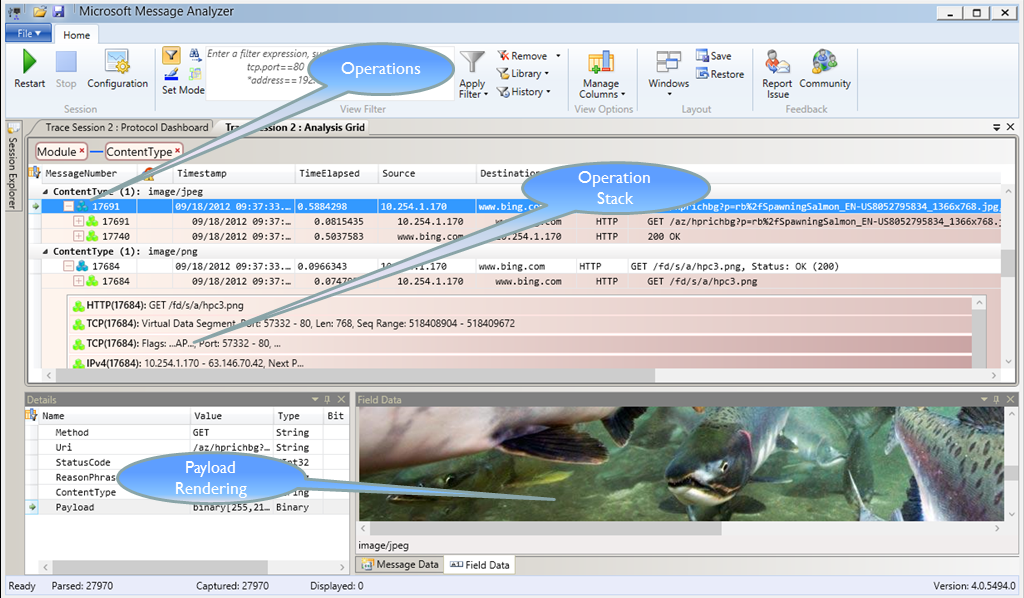
imageMicrosoft Message Analyzer has been released to the public, available here:
https://connect.microsoft.com/site216
(you’ll have to join the Message Analyzer and Network Monitor program to see the downloads and access other parts of or our site.)

As you might guess from the name, Message Analyzer is much more than a network sniffer or packet tracing tool. Key capabilities include:

  • Integrated "live" event and message capture at various system levels and endpoints
  • Parsing and validation of protocol messages and sequences
  • Automatic parsing of event messages described by ETW manifests
  • Summarized grid display – top level is “operations”, (requests matched with responses)
  • User controlled "on the fly" grouping by message attributes
  • Ability to browse for logs of different types (.cap, .etl, .txt) and import them together
  • Automatic re-assembly and ability to render payloads
  • Ability to import text logs, parsing them into key element/value pairs
  • Support for “Trace Scenarios” (one or more message providers, filters, and views)

We are providing this beta release to give you an opportunity to let us know what you like and don’t like and where we need to focus our energy as we drive towards a mid-2013 RTM date.

Please install, take it for a spin, and send us your thoughts! There are “Report Issue” and “Community” buttons built into the ribbon, and we have a new blog here: http://blogs.technet.com/messageanalyzer.

(To capture at the NDIS and Firewall layers without running as admin, you must log off and back on after installation to pick up the necessary credentials. Please do this!)

Have a ball!

Taken from: http://blogs.technet.com/b/messageanalyzer/

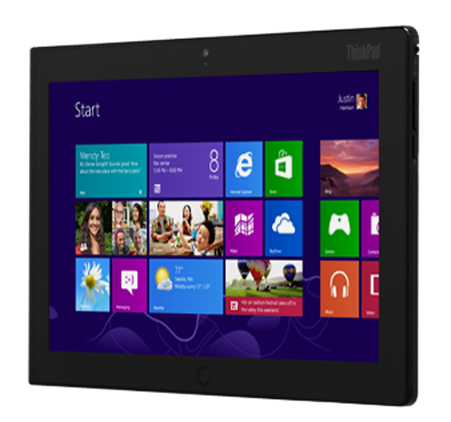
imageFor those of you looking for a list of all the different Windows 8 machines publicly announced to date, here’s a table that breaks down all the announced devices to date along with the link to the device’s press release or published public announcement.

Listed devices include both ARM & x64 processors as well as touch screen tablets & keyboard-enabled PCs.

OEM

Model

Platform

Form Factor

Touch

Screen size

Resolution

Press Release

Acer

ICONIA TAB W510

Intel SOC

Tablet

Y

10.1

1366×768

Link

Acer

Aspire S7-391

ULV/Core

Notebook

Y

13.3

1920×1080

Link

Acer

Aspire S7-191

ULV/Core

Notebook

Y

11.6

1366×768

Link

Acer

ICONIA TAB W700

ULV/Core

Tablet

Y

11.6

1920×1080

Link

Asus

Vivo Tab

Intel SOC

Tablet

Y

11.6

1366×768

Link

Asus

Vivo Tab RT

ARM

Tablet

Y

10.1

1366×768

Link

Dell

XPS 12

ULV/Core

Convertible

Y

12.5

1920×1080

Link

Dell

XPS 10

ARM

Tablet

Y

10.1

1366×768

Link

Fujitsu

Stylistic Q702

ULV/Core

Convertible

Y

11.6

1366×768

Link

Fujitsu

ESPRIMO X

ULV/Core

AIO

Y

23

1920×1080

Link

Fujitsu

Esprimo Q910

Core

Desktop


n/a

n/a

Link

HP

Elitebook 9470m

Core

Notebook


14

1366×768

Link

HP

Z820

Xeon

Desktop


n/a

n/a

Link

HP

Spectre XT Pro

ULV/Core

Notebook


13.3

1366×768

Link

Lenovo

ThinkPad Tablet 2

Intel SOC

Tablet

Y

10.1

1366×768

Link

Lenovo

ThinkCenter M92p Tiny

Core

Desktop


n/a

n/a

Link

Lenovo

ThinkCentre Edge 92z

Core

AIO

Y

23

1920×1080

Link

Lenovo

ThinkPad X1 Carbon

ULV/Core

Notebook


14

1600×900

Link

Samsung

ATIV Tab

ARM

Tablet

Y

10.1

1366×768

Link

Samsung

ATIV Smart PC

Intel SOC

Tablet

Y

11.6

1366×768

Link

Samsung

ATIV Smart PC Pro

ULV/Core

Tablet

Y

11.6

1920×1080

Link

Samsung

Series 5 Ultra 13

ULV/Core

Notebook


13.3

1366×768

Link

Samsung

Series 5 Ultra 13 Touch

ULV/Core

Notebook

Y

13.3

1366×768

Link

Samsung

Series 9 13

ULV/Core

Notebook


13

1600×900

Link

Samsung

Series 9 15

ULV/Core

Notebook


15

1600×900

Link

Sony

Vaio Duo 11

ULV/Core

Tablet

Y

11.6

1920×1080

Link

Toshiba

Z930

ULV/Core

Notebook


13.3

1366×768

Link

Posted by: kurtsh | September 25, 2012

INFO: Where is System Center Virtual Machine Manager 2012?

A customer asked me yesterday, “Where is System Center Virtual Machine Manager 2012”?  I see the previous versions like 2008 R2, but I can’t seem to find the 2012 version and I thought it was released?

As of System Center 2012, Virtual Machine Manager & the other System Center family of server management products are only sold as a single suite.  The suite is sold per processor comes in 2 editions:  Standard & Datacenter.  The difference is that Standard is targeted at physical servers and licensable for 2 instances, while Datacenter is licensed for Virtualization Hosts (such as Hyper-V of VMware) that require management of Server OSs running as hosted virtual machines.

In other words:

  • If you need to manage a physical server without virtualization, you’ll probably want System Center 2012 Standard Edition
    …this is the most cost-effective way to manage that one server while providing redundancy.
  • If you need to manage host server that has multiple guest servers running on it (like a Hyper-V Server or a VMWare ESX host) then you’ll probably want System Center 2012 Datacenter Edition.
    …this is the most cost-effective way to manage the host server OS (if using Windows Server) as well as ALL the virtual machines running server on the host.

SO HOW DO YOU GET IT?
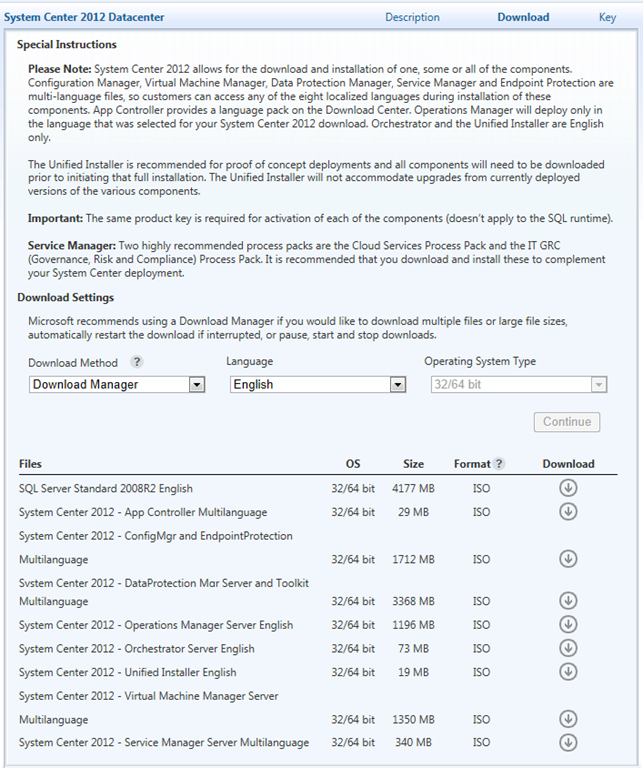
If you want to get SCVMM2012, you’ll need to go to the download for System Center 2012 Datacenter or Standard in the Volume Licensing Service Center.  (Assuming of course you have access to the Volume Licensing downloads for your organization) 

Once you click download, you’ll be asked if you want to use the Download Manager or HTTP.  Once you click OK, a full display of all the downloads for System Center 2012 will be available.  See below:

image

The following was communicated to all of you, my customers, via your security leadership on Friday, Sept 21st, 2012.

———————————–

This alert is to provide you with an overview of the new security bulletin being released (out of band) on September 21, 2012, for new vulnerabilities in Internet Explorer.

Microsoft is also releasing one new security advisory today for Adobe Flash Player in Internet Explorer 10 on Windows 8 and Windows Server 2012.

New Security Bulletin
Microsoft is releasing one new security bulletin (out-of-band) for newly discovered vulnerabilities:

Bulletin Identifier

Microsoft Security Bulletin MS12-063

Bulletin Title

Cumulative Security Update for Internet Explorer (2744842)

Executive Summary

This security update resolves one publicly disclosed and four privately reported vulnerabilities in Internet Explorer. The most severe vulnerabilities could allow remote code execution if a user views a specially crafted webpage using Internet Explorer. An attacker who successfully exploited any of these vulnerabilities could gain the same user rights as the current user. The security update addresses the vulnerabilities by modifying the way that Internet Explorer handles objects in memory.

This security update also addresses the vulnerability first described in Microsoft Security Advisory 2757760.

Severity Ratings and Affected Software

  • This security update is rated Critical for Internet Explorer 6, Internet Explorer 7, Internet Explorer 8, and Internet Explorer 9 on Windows clients.
  • This security update is rated Moderate for Internet Explorer 6, Internet Explorer 7, Internet Explorer 8, and Internet Explorer 9 on Windows servers.
  • Internet Explorer 10 is not affected.

Attack Vectors

  • An attacker could host a specially crafted website that is designed to exploit this vulnerability through Internet Explorer and then convince a user to view the website.
  • The attacker could also take advantage of compromised websites and websites that accept or host user-provided content or advertisements. These websites could contain specially crafted content that could exploit this vulnerability.

Mitigating Factors

  • An attacker would have no way to force users to view the attacker-controlled content. Instead, an attacker would have to convince users to take action, typically by getting them to click a link in an email message or in an Instant Messenger message that takes users to the attacker’s website, or by getting them to open an attachment sent through email.
  • An attacker who successfully exploited this vulnerability could gain the same user rights as the current user. Users whose accounts are configured to have fewer user rights on the system could be less impacted than users who operate with administrative user rights.
  • By default, all supported versions of Microsoft Outlook, Microsoft Outlook Express, and Windows Mail open HTML email messages in the Restricted sites zone. The Restricted sites zone, which disables script and ActiveX controls, helps reduce the risk of an attacker being able to use this vulnerability to execute malicious code. If a user clicks a link in an email message, the user could still be vulnerable to exploitation of this vulnerability through the web-based attack scenario.
  • By default, Internet Explorer on Windows Server 2003, Windows Server 2008, and Windows Server 2008 R2 runs in a restricted mode that is known as Enhanced Security Configuration. This mode mitigates this vulnerability. See the FAQ section for this vulnerability for more information about Internet Explorer Enhanced Security Configuration.

Restart Requirement

This update requires a restart.

Bulletins Replaced by This Update

MS12-052

Full Details

http://technet.microsoft.com/security/bulletin/MS12-063

New Security Advisory
Microsoft published one new security advisory on September 21, 2012. Here is an overview of this new security advisory:

Security Advisory 2755801

Update for Vulnerabilities in Adobe Flash Player in Internet Explorer 10

Affected Software

Internet Explorer 10 on Windows 8 and Windows Server 2012

Executive Summary

Microsoft is announcing the availability of an update for Adobe Flash Player in Internet Explorer 10 on all supported editions of Windows 8 and Windows Server 2012. The update addresses the vulnerabilities in Adobe Flash Player by updating the affected Adobe Flash libraries contained within Internet Explorer 10.

Mitigations

  • In a web-based attack scenario where the user is using Internet Explorer 10 for the desktop, an attacker could host a website that contains a webpage that is used to exploit any of these vulnerabilities. In addition, compromised websites and websites that accept or host user-provided content or advertisements could contain specially crafted content that could exploit any of these vulnerabilities. In all cases, however, an attacker would have no way to force users to visit these websites. Instead, an attacker would have to convince users to visit the website, typically by getting them to click a link in an email message or Instant Messenger message that takes users to the attacker’s website.
  • Internet Explorer 10 in the Windows 8-style UI will only play Flash content from sites listed on the Compatibility View (CV) list. This restriction requires an attacker to first compromise a website already listed in the CV list. An attacker could then host specially crafted Flash content designed to exploit any of these vulnerabilities through Internet Explorer and then convince a user to view the website. An attacker would have no way to force users to view the attacker-controlled content. Instead, an attacker would have to convince users to take action, typically by clicking a link in an email message or in an Instant Messenger message that takes users to the attacker’s website, or by opening an attachment sent through email.
  • By default, all supported versions of Microsoft Outlook and Windows Live Mail open HTML email messages in the Restricted sites zone. The Restricted sites zone, which disables script and ActiveX controls, helps reduce the risk of an attacker being able to use any of these vulnerabilities to execute malicious code. If a user clicks a link in an email message, the user could still be vulnerable to exploitation of any of these vulnerabilities through the web-based attack scenario.
  • By default, Internet Explorer on Windows Server 2012 runs in a restricted mode that is known as Enhanced Security Configuration. This mode can help reduce the likelihood of exploitation by these vulnerabilities in Adobe Flash Player in Internet Explorer 10

More Information

http://technet.microsoft.com/en-us/security/advisory/2755801

Public Bulletin Webcast
Microsoft will host a webcast to address customer questions on the new security bulletin:

Resources related to this alert

Regarding Information Consistency
We strive to provide you with accurate information in static (this mail) and dynamic (web-based) content. Microsoft’s security content posted to the web is occasionally updated to reflect late-breaking information. If this results in an inconsistency between the information here and the information in Microsoft’s web-based security content, the information in Microsoft’s web-based security content is authoritative.

image

Look what made the certified list for Windows-to-Go devices?

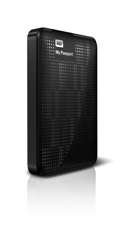
Western Digital My Passport Enterprise
Model: WDBHEZ5000ABK-NESN

Specifically designed to support Windows To Go
My Passport Enterprise is specifically designed for Windows To Go, a feature within Windows 8 Enterprise edition, offering portability, reliability and protection for the road warrior.

Yes, yes, yes.  I get that it’s only 500GB.  But remember that there are some stringent requirements to be a Windows-to-Go device that includes not just USB 3.0 connectivity but it should also be capable of registering as fixed storage – not removable.

And remember:  This is your System partition.  It’s the OS & whatever else you wanna load on there!

« Newer Posts - Older Posts »

Categories