Posted by: kurtsh | December 12, 2012

DOWNLOAD: Windows Azure Poster for IT Pros & Devs

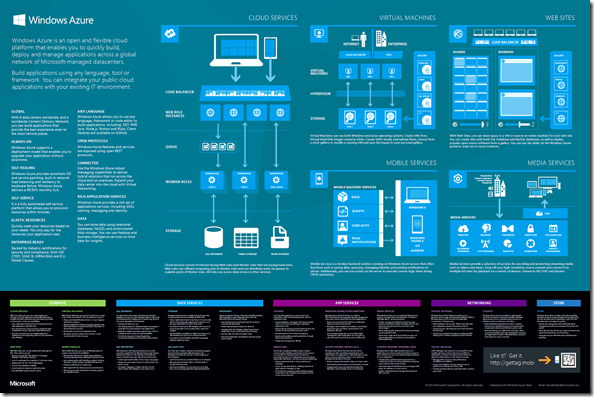
This poster introduces Windows Azure for developers and IT pros. It summarizes benefits such as global coverage and extensive language support and provides a description of current services by category: app services, data services, compute, networking, and store. The poster also depicts common uses including Cloud Services, Virtual Machines, Web Sites, Mobile Services, and Media Services.

The poster is intended to be printed and measures 26" x 39”.

image

(taken from the MSDN UK blog)

UPDATE 12/15/12:
I’ve updated the list for my own benefit to allow more fine-grained analysis of battery life across device choices. (v1.10)  And for the record, the ‘Stylus’ column means “Active Digitizer”.  I don’t consider capacitive touch stylii to be useful in that users requiring pens also need the precision & pressure sensitivity that only an Active Digitizer can provide.
——————-
ORIGINAL POST 12/10/12:
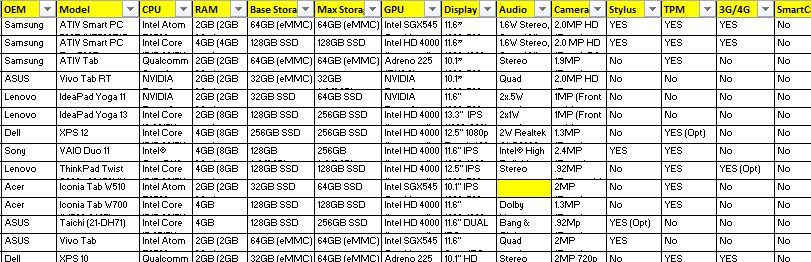
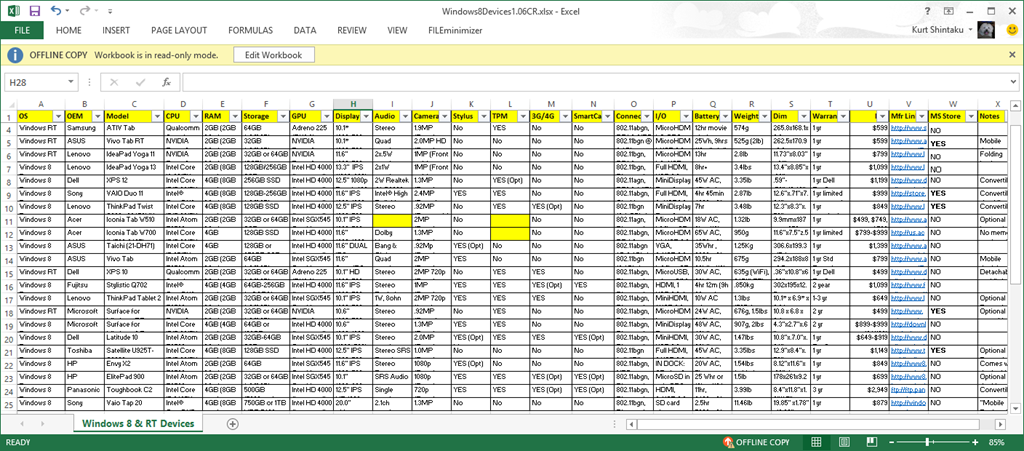
This is a list of all the Windows 8/RT Tablet devices that I am aware of as of December 10, 2012.  (Updated with manufacturer quoted battery longevity, power supply wattage, and expansion battery availability)

I created this because I wanted an easy way to quickly filter on certain technical requirements and see what models were available.  To be clear, this is obviously unofficial & just of my own creation (I’ve documented where I got most of the data for each row in the “Manufacturer’s Link” column) but it’s been useful for me and I thought I’d share.

image

Among other features, I’ve included next to each model:

  • 3G/4G Wireless WAN option
  • Trusted Platform Module (TPM) chip inclusion
  • Stylus/Active Digitizer availability
  • Windows 8 Pro or Windows RT
  • Smartcard availability
  • SD Card expansion
  • IvyBridge/Clovertrail/Qualcomm/Nvidia
  • Memory/Storage
  • Battery life
  • Camera resolution & I/O Ports
  • Networking, Bluetooth, & NFC
  • Weight, Dimensions
  • Price
  • …etc.

image

Like I said, you can filter the list based on your technical priorities at the top.  You’ll notice there’s a couple cells that are highlighted in yellow.  This is because I was unable to find any information about that capability for that particular device.

BTW: One of the columns is labeled “MS Store”.  This is any indicator if the device is available to see & use at the Microsoft Store as of Nov 30th, 2012.

Enjoy.

——————————-
Please note: I’m providing this just as a curiosity for others.  I make no commitment to maintaining this document, nor do I guarantee its accuracy.  It’s just something I created for my own use and thought others might find it interesting as well.

As most know by now, there is a constantly refreshing whitelist of web sites that Internet Explorer 10 on Windows RT will display Adobe Flash on.  (This is known as the Compatibility View list)

This is a section of the MSDN article that discusses the Compatibility View list which enables Flash to be enabled within the IE 10 browser on Windows RT, including the process of submitting a website for consideration.

Submitting your site for consideration

Developers can submit their sites that they want to be included on the CV list to Microsoft via email.

To submit your site for consideration to the CV list, email iepo@microsoft.com and include the following details:

  1. Your name, company, title, and contact information
  2. The domain you want considered (http://contoso.com/) and the specific pages containing Flash content ( http://contoso.com/video, http://contoso.com/media)
  3. The approximate unique users per month that visit the domain
  4. The capabilities your Flash content requires. For more info see Guidelines for Flash Content in Internet Explorer 10 in this topic.
  5. The name and version of the SWF your site is using, including version number for third party .SWF files if appropriate (for example, videoplayer.swf v1.2 from Contoso)
  6. A list of any other plugs-ins (not Flash) your domain depends on and the specific pages containing those controls. Be aware that if your site depends on other plug-ins, users will be directed to open your site in Internet Explorer 10 for the desktop.
  7. The results of your testing of the pages listed in step two (2) of these steps. For more info see Test Guidance and Test Cases in this topic.
Posted by: kurtsh | December 10, 2012

BETA: Windows Azure Online Backup Preview

imageThe Microsoft Online Backup Service is a cloud based backup solution for Windows Server 2012 which allows files and folders to be backed up and recovered from the cloud in order to provide off-site protection against data loss due to disasters. The service provides IT administrators with the option to back up and protect critical data in an easily recoverable way from any location with no upfront hardware cost or resources other than an Internet connection.

This service is built on the Windows Azure platform and uses Windows Azure blob storage for storing customer data. Windows Server 2012 uses the downloadable Microsoft Online Backup Agent to transfer file and folder data securely and efficiently to the Microsoft Online Backup Service. Once installed, the Microsoft Online Backup Agent exposes its functionality through the familiar Windows Server Backup interface.

  • Peace of mind—your server backups in the cloud
    Help protect your important server data with easily accessible backups stored in the cloud.
  • Simple to manage
    Manage cloud backups from the familiar backup tools in Windows Server 2012, Windows Server 2012 Essentials, and the System Center 2012 Data Protection Manager component to provide a consistent experience configuring, monitoring, and recovering backups across local disk and cloud storage. After data is backed up to the cloud, authorized users can easily recover backups to any server.
  • Efficient and flexible
    With incremental backups, only changes to files are transferred to the cloud. This helps ensure efficient use of storage, reduced bandwidth usage, and offers point-in-time recovery of multiple versions of data. Configurable data retention policies, data compression and data transfer throttling also offer you added flexibility and help boost efficiency.

Customers of Windows Server 2012, Windows Server 2012 Essentials, and System Center 2012 can preview Online Backup as a no-charge, fixed storage quota subscription. (10GB)

This is a collection of articles that you should read if you’ve downloaded the recently published Office Professional Plus 2013 from the Volume Licensing Service Center web site, http://www.microsoft.com/licensing/servicecenter.

UPDATE 12/10/12:
”How the heck do I get my Office Professional Plus 2013 KMS Host Volume Activation Key?”
If it hasn’t been posted to your account at the Volume Licensing Service Center, Office Professional Plus 2013 KMS Host Keys can be obtained from the US Product Activation Call Center at (716) 871 2781 or Toll Free (888) 352 7140.

clip_image002Legal IT published the results of the Global Legal IT Professionals Cloud Survey in a 27 page document that goes over topics including:

  • Moving key applications to the cloud
  • Are people changing their minds about cloud computing?
  • Are clients worried about legal IT in the cloud?
  • Cloud on the horizon
  • BYOD and the public cloud
  • Which applications/services are suitable for the public cloud?
  • What issues still need to be addressed?
  • Reaping the benefits

Here are a few excerpts:

  • Clients are rightly concerned about whether their data is held in the cloud or on-premise. Clients should note that the Data Protection Act does not prevent transfer of data outside the EU, nor does the FBI have easy access to data under the USA Patriot Act.” – Frank Jennings, Partner, DMH Stallard LLP
  • I have always been a big supporter of purchasing as much of a ‘service model’ as I can from my vendors. This way I can focus mine and my team’s energy on understanding our business and helping address real business and client problems.” – Stuart Walters, IT Director, Taylor Wessing
  • …this is also where BYOD (bring your own device) and consumer technology influences legal IT. As connectivity – particularly mobile connectivity – becomes ubiquitous, and lawyers, like everyone else, become culturally accustomed to accessing everything online, cloud computing is likely to become the de facto delivery model for information and applications.
  • I am sure this is happening in all firms, it is almost impossible to try and stop. Anyone with a credit card and an internet connection can buy numerous cloud services. Once you block one site or service something else appears. Also some clients insist on using these services. We use all the relevant security products and firewalls to help mitigate the risk, but the best approach is to educate your lawyers and do it in a way that they understand.” – Stuart Walters, IT director, Taylor Wessing

Download a free copy of the report here:

imageFor those of you looking for a jumpstart on understanding Windows Server 2012, this is an opportunity to jump onto some of the courses we deliver to our partner consulting organizations.  Microsoft Virtual Academy posts these courses on our web site and despite their intended purpose, they’re basically available to basically anyone.

Microsoft Virtual Academy: Windows Server 2012 courses

Microsoft Virtual Academy offers nine free Windows Server 2012 courses, from the Technical Overview to detailed modules on key capabilities such as Management and Automation, Identity and Access, and Virtual Desktop Infrastructure.

  1. Windows Server 2012 Technical Overview
  2. Windows Server 2012: Server Virtualization
  3. Windows Server 2012: Management & Automation 
  4. Windows Server 2012: Storage
  5. Windows Server 2012: Networking
  6. Windows Server 2012: Identity and Access
  7. Windows Server 2012: Web & Application Platform
  8. Windows Server 2012: Virtual Desktop Infrastructure
  9. Using Solution Accelerators to Prepare for Windows Server 2012

Click here for the courses:
http://www.microsoftvirtualacademy.com/colleges/windowsserver2012

Announced yesterday on the Azure Blog:

imageToday we are happy to announce another price reduction for Windows Azure Storage by as much as 28%, effective on December 12th.  This follows our March 8th 2012 reduction of 12% furthering our commitment to best overall value in the industry.

Reducing prices is only part of the story; we’ve also added more value to our storage offerings in a number of ways. Our Geo Redundant Storage continues to lead the market in durability with more than 400 miles of separation between replicas.  We recently announced deployment of a flat network for Windows Azure across all of our datacenters to provide very high bandwidth network connectivity for storage clients which significantly enhances scenarios like MapReduce, HPC, and others. We also announced increased scalability targets for Windows Azure Storage and continue to invest in improving bandwidth between compute and storage.

Here’s the money graphic:

image

Read more here:

Posted by: kurtsh | December 4, 2012

CONFERENCE: Microsoft Management Summit 2013 opens today!

image

Registration for the 2013 Microsoft Management Summit opens December 5th!  This year’s summit takes place at the Mandalay Bay in Las Vegas from April 8-12, 2013. 

About MMS

The Microsoft Management Summit (MMS) brings together the brightest IT professionals from around the world to increase their technical expertise through deep hands-on training, best-practice sharing, and interaction with innovators in desktop, device, and datacenter management, as well as cloud technologies.

When we say deep, we mean it – with session content delving into the 300 and 400 level. Only hard-core geeks will feel comfortable in this exclusive setting. With keynotes, sessions, hands-on labs, certification opportunities, and face-to-face access to Microsoft and industry experts, MMS provides a “can’t-miss” opportunity to be among the first to learn about new technologies.

Need help getting your boss on board? No worries, we’ve done the legwork. Click here.

imageI’m happy to say that we at Microsoft been busy helping Santa over the last few months, and on December 1st, the North American Aerospace Defense Command (NORAD) launched their annual NORAD Santa Tracker… with the help of Microsoft. 

(Specifically Bing & Windows Azure!)

Here’s the NORAD Press Release:
http://www.norad.mil/News/2012/113012a.html

NORAD is ready to track Santa’s flight
NORAD and USNORTHCOM Public Affairs
November 30, 2012

PETERSON AIR FORCE BASE, Colo. – The North American Aerospace Defense Command is prepared to track Santa’s yuletide journey! The NORAD Tracks Santa website, www.noradsanta.org, is going live today at 7 p.m. EST. It features a holiday countdown, games and daily activities, video messages from students around the world, and more. The website is available in eight languages: English, French, Spanish, German, Italian, Japanese, Portuguese, and Chinese.

Official NORAD Tracks Santa apps are also available in the Windows Store, Apple Store, and Google Play, so parents and children can countdown the days until Santa’s launch on their smart phones and tablets! Tracking opportunities are also offered on Facebook, Twitter, YouTube, and Google+. Santa followers just need to type @noradsanta into each search engine to get started.

Starting at 12 a.m. MST on Dec. 24, website visitors can watch Santa make the preparations for his flight. Then, at 4:00 a.m. MST (6:00 a.m. EST), trackers worldwide can speak with a live phone operator to inquire as to Santa’s whereabouts by dialing the toll-free number 1-877-Hi-NORAD (1-877-446-6723) or by sending an email to noradtrackssanta@outlook.com. NORAD’s “Santa Cams” will also stream videos as Santa makes his way over various locations.

NORAD Tracks Santa is truly a global experience, delighting generations of families everywhere. This is due, in large part, to the efforts and services of numerous program contributors. New to this year’s program are Bing, HP, iLink-Systems, Kids.gov, Microsoft’s Windows Azure, BeMerry! Santa, and SiriusXM. Returning collaborators include the 21st Space Wing, Acuity Scheduling, Air Canada, American Forces Network, Analytical Graphics Inc., Avaya, Citadel Mall, Colorado Springs Chamber of Commerce Military Affairs Council, CradlePoint, Defense Video Imagery Distribution System (DVIDS), Federal Aviation Administration, First Choice Awards & Gifts, Globelink Foreign Language Center, Marine Toys for Tots Foundation, Meshbox, National Tree Lighting Ceremony, Naturally Santa’s Inc., Newseum, OnStar, PCI Broadband, Pentagon Channel, RadiantBlue, Space Foundation, TurboSquid, twtelecom, UGroup Media, Verizon, and VisionBox. Santa’s Countdown Calendar and the Santa Cam videos will feature music by military bands, including the Naden Band of the Maritime Forces Pacific, Air Force Academy Band, Air Force Band of Liberty, Air Force Band of the Golden West, Air Force Band of the West, Air Force Band, Air Force Heartland of America Band, U.S. Army Ground Forces Band, U.S. Merchant Marine Academy Band, Air Force Band of Mid-America, and the West Point Band. Santa trackers can also purchase official NORAD Tracks Santa licensed goods by visiting the “Official Licensed Products” link on the site.

It all started in 1955 when a local media advertisement directed children to call Santa direct – only the number was misprinted. Instead of reaching Santa, the phone rang through to the Crew Commander on duty at the Continental Air Defense Command Operations Center. Thus began the tradition which NORAD carried on since it was created in 1958.
« Newer Posts - Older Posts »

Categories