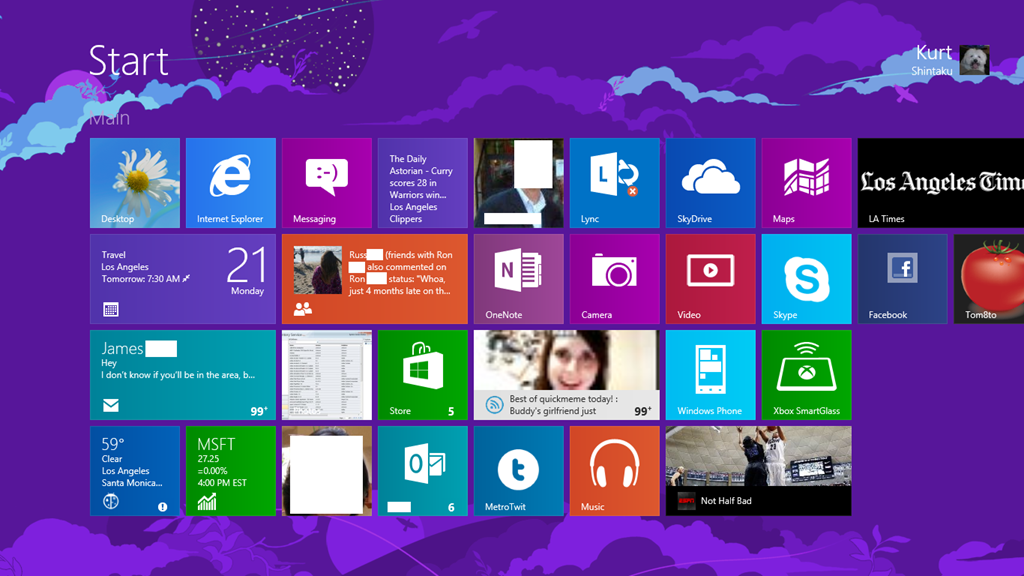
This is the START page on my Surface for Windows RT.  Notice anything different?

imageFour rows of tiles on a Surface for Windows RT Start page

What you need to do is:

  1. Open the Registry via the desktop using REGEDIT.EXE
  2. Create the following key[HKEY_LOCAL_MACHINE\SOFTWARE\Microsoft\Windows\
    CurrentVersion\Explorer\Scaling]
  3. Create the following String value in this key:
    MonitorSize"="12.1
  4. Reboot

Don’t fully know all the side effects of this change, other than the keyboard getting a bit smaller and the fonts looking a little less sharp.  You can however roll back the changes by removing the Scaling key.

More info here: http://support.microsoft.com/kb/2737167

imageMuch to my delight, I believe, sometime toward the end December 2012, the 20MB download limit on Windows Phone was apparently raised to 50MB.  Maybe it started around 2013 but whenever it was, it’s certainly changed now. 

WHO CARES?
Well, I do.  And so does anyone that uses podcasts.  Y’see, this has bothered me primarily because I’m a heavy podcast listener.  Having to drive more than 1hr to many of my customers means that I’m spending a lot of time in the car… and most radio these days no longer captures my interest.  (Except maybe JACK-FM:  Yes, CBS Radio, you guys know what you’re doing because I’m clearly that demographic that you’re losing on ‘the other radio station’)

When podcasts get downloaded to Windows Phone, if it exceeded 20MB, it would get “backed up” in a queue, stating that the user need to connect to a WiFi point to get the download.  So on a regular basis, I’d turn on WiFi just to get a “full download” of my podcasts.

WAIT.  IT’S ALREADY BEEN CHANGED?
Anyway, this has been one of my pet peeves on Windows Phone because, it was frankly so easily fixable.  It was a software limitation, not one enforced on the network by the carriers.  I got to pinging Daniel Rubino, the editor-in-chief of WPCentral, and he informed me that the limit had already been adjusted to 50MB.

Which suddenly made sense… because for the past week or so, I haven’t had any notifications show up on my phone telling me that I had podcasts backed up, ready to download over WiFi.

So looks like we both won:  Daniel wrote up a post for it today & frankly, I think it’s an exclusive because I searched long and hard and couldn’t find any reference to this change in the download limit.

Read the details of the change here, who it applies to, etc.:

image

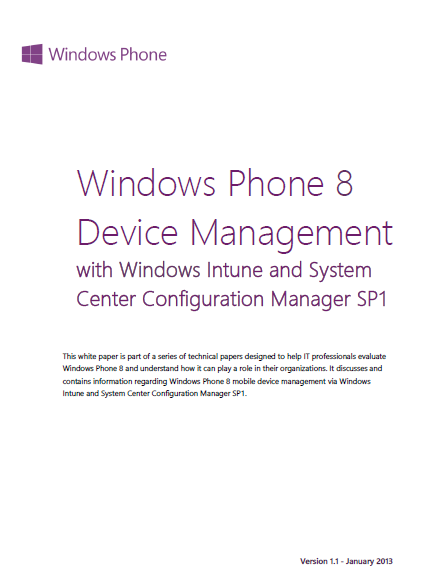
This 11 page document goes over the management capabilities of SCCM 2012 SP1 & Windows Intune.

  • Using Windows Intune for Direct Management of Windows Phone devices
  • Configuring Windows Intune to Manage Devices
  • Setting up Windows Intune for Windows Phone 8
  • Enrolling Windows Phone Devices in Windows Intune
  • Using System Center Configuration Manager SP1 to manage Windows Phone Devices 9
  • Resources

If you’re using Windows Intune, one step involves the synchronization of your Active Directory with Windows Azure Active Directory to provide external recognition of users & computer objects.  This may be a little involved so read this section carefully. 

For System Center Configuration Manager 2012 users, the release of Service Pack 1 lets you manage Windows Phone 8 devices by using the Windows Intune service over the Internet. Although you use the Windows Intune service, management tasks are completed by using the Configuration Manager console. You can use the Windows Intune connector site system role in the Configuration Manager console to connect to the Windows Intune service.

<original post from WMPowerUser>

imageThis is what we know will happen April 8th, 2014.

  • All patches for Windows XP will cease on this final Patch Tuesday.
  • One last release of patches will be made before the spigot on security patches is turned off for Windows XP.
  • The remaining 15-25% of the world still running on Windows XP will no longer be secure from this day forward.

Now I had a horrible thought the other day about this scenario.  What if, on April 8th, 2014, the following hypothetical scenario occurs:

  • Microsoft turns out to be aware of more bugs in their products than they can patch, and thus they patch opportunistically based on the level of the threat & the imminence of danger.  On April 8th, anything remaining goes unpatched.
  • Having known about April 8th, 2014 for a while, “Black Hats” release malware (viruses, trojans, browser flaws, etc.) that they’ve been saving specifically for this date, knowing that their flaws will not be fixed.
  • Antivirus & traditional thread detection is rendered moot.  Primary attack vectors turn out to be the quickest, most difficult-to-prevent means of infection, such as by browsing a web page with a Javascript threat… or possibly the means with the widest reach on day one: Email attachment executable.
  • To sustain the threat as long as possible, polymorphism will be the default, to attempt to mitigate protection through rapid ‘zero-day’ virus definition updates, knowing that antivirus agents are the only protection XP systems have.
  • Compromised workstations are zombied to initiate infections remotely to peer workstations on the same LAN segments. Network traffic increases to astronomical congestive levels from beaconing infected workstations. 
  • Even if patches were available, networks without managed QoS find themselves unable to emergency patch PCs dues to overwhelming traffic.
  • Antivirus companies are swamped with 911 calls to update definitions.  Response times for analysis are slowed to a crawl.

Again, “what if” in the aftermath:

  • Organizations that have not moved off of Window XP without Microsoft Custom Support agreements, scour the web for ‘renegade’ fixes written by independent organizations.  Illicit public domain patches become the easiest way for blackhats to implement other threats at an administrative level.
  • Meetings are held to estimate the costs of a Windows XP custom support agreement for customers with Premier Support in place that are eligible for CSAs.  Costs for support exceed the cost of simply upgrading Windows XP.
  • Business grinds to a halt for organizations with infected Windows XP PCs.  PC-to-PC manual remediation is found to, at least initially, be the only way to reduce traffic until desktop management software can be effective again.
  • Body shops are called in to assist.  Overnight, round-the-clock shifts are taken to mitigate the threats as they come.
  • Security engagements with white hat/cybersecurity teams skyrocket to investigate more complex threat penetration to key systems such as Domain Controllers.
  • Reports… lots of reports, status, CYA documentation… must be written.

And while the Business section of the newspaper reports the impact to the world, companies with IT depts that migrated off Windows XP look on with a sense of relief.

Posted by: kurtsh | January 17, 2013

NEWS: Office 2013 available on Home Use Program

imageExciting News!  As of January 17th, US customers with qualifying agreements will be able to take advantage of purchasing a copy of Office 2013 for $9.95 via the Home Use Program (HUP)!

HUP provides customers with the latest version of Office that their end-users can purchase for home use.  Therefore Office 2010 will no longer be available on the HUP site for purchase, effective immediately.

Note: If an end-user purchased Office 2010 and they still have an existing agreement in place, that same end user can purchase the new version, Office 2013, without it affecting their license count.  They will need to pay the $9.95 again, as that’s a third party administrative fee.  Please reference the current Product List, Section 7 for additional policy details around this.

Please visit the HUP site for additional information: www.microsofthup.com.

Posted by: kurtsh | January 16, 2013

Been out of town. Sorry.

imageYes, in case it’s not apparent, I’ve been out of town for a VERY long time on vacation.  The posts that I’ve made over the past couple weeks have only been things I could crank out quickly.  I have a few posts coming including my CES 2013 Summary.

In the meantime, here’s news that I found worth reading over the holiday.

Phone

Windows/PCs

image

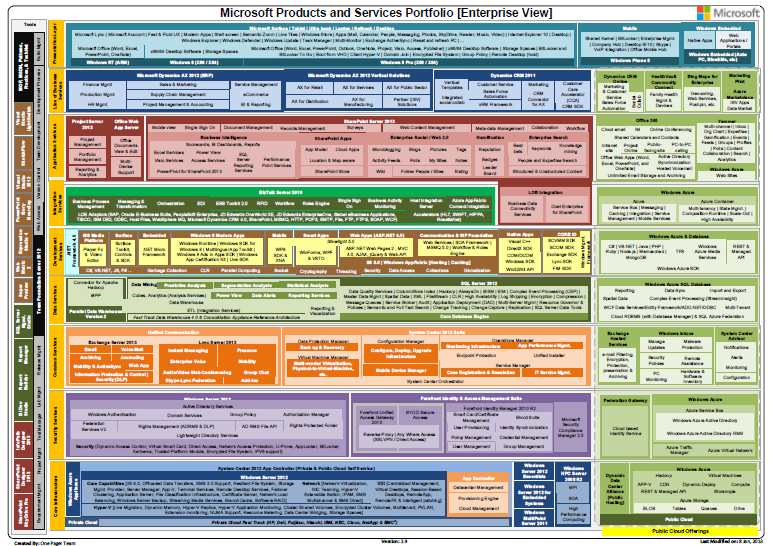
The Microsoft Products Portfolio documents have been updated to version 2.9. 

What got added:

  • Storsimple under Azure
  • eCommerce under Ax 2012
  • MarketingPilot under LOB apps
  • Yammer under Application Services with following capabilities
    • Multi-channel
    • Inbox
    • Org Chart
    • Expertise
    • Gamification
    • Events
    • Private Messages
    • Feeds
    • Groups
    • Profiles
    • Polls
    • Content Collaboration
    • Search
    • Analytics
  • BYOD Secure Access under Forefront Identity & Access Management Suite
  • Dynamic Deploy under Windows Azure
  • Windows Azure Active Directory RMS under Security services (Cloud)
  • Office Web App Server as an entity separate from SharePoint 2013

(Lots of things also got changed & removed.  If you really wanna see all the changes let me know, if you’re a customer of mine.)

Posted by: kurtsh | January 14, 2013

NEWS: Today’s Security Advisory (2757760, MS12-063)

I sent it to all my customers.  And before you skim it without reading it… no, it’s NOT old.  And update to this was issued recently, hence the advisory.

——————-

Today, Microsoft released MS12-063 to protect customers against the issue described in Security Advisory 2757760. The security update resolves one publicly disclosed and four privately reported vulnerabilities in Internet Explorer. The most severe vulnerabilities could allow remote code execution if a user views a specially crafted webpage using Internet Explorer.

Microsoft encourages customers to test and deploy the update as soon as possible.


What is the purpose of this alert?

This alert is to provide you with an overview of the new security bulletin being released (out of band) on September 21, 2012, for new vulnerabilities in Internet Explorer.

Microsoft is also releasing one new security advisory today for Adobe Flash Player in Internet Explorer 10 on Windows 8 and Windows Server 2012.

New Security Bulletin
Microsoft is releasing one new security bulletin (out-of-band) for newly discovered vulnerabilities:

Bulletin Identifier

Microsoft Security Bulletin MS12-063

Bulletin Title

Cumulative Security Update for Internet Explorer (2744842)

Executive Summary

This security update resolves one publicly disclosed and four privately reported vulnerabilities in Internet Explorer. The most severe vulnerabilities could allow remote code execution if a user views a specially crafted webpage using Internet Explorer. An attacker who successfully exploited any of these vulnerabilities could gain the same user rights as the current user. The security update addresses the vulnerabilities by modifying the way that Internet Explorer handles objects in memory.

This security update also addresses the vulnerability first described in Microsoft Security Advisory 2757760.

Severity Ratings and Affected Software

  • This security update is rated Critical for Internet Explorer 6, Internet Explorer 7, Internet Explorer 8, and Internet Explorer 9 on Windows clients.
  • This security update is rated Moderate for Internet Explorer 6, Internet Explorer 7, Internet Explorer 8, and Internet Explorer 9 on Windows servers.
  • Internet Explorer 10 is not affected.

Attack Vectors

  • An attacker could host a specially crafted website that is designed to exploit this vulnerability through Internet Explorer and then convince a user to view the website.
  • The attacker could also take advantage of compromised websites and websites that accept or host user-provided content or advertisements. These websites could contain specially crafted content that could exploit this vulnerability.

Mitigating Factors

  • An attacker would have no way to force users to view the attacker-controlled content. Instead, an attacker would have to convince users to take action, typically by getting them to click a link in an email message or in an Instant Messenger message that takes users to the attacker’s website, or by getting them to open an attachment sent through email.
  • An attacker who successfully exploited this vulnerability could gain the same user rights as the current user. Users whose accounts are configured to have fewer user rights on the system could be less impacted than users who operate with administrative user rights.
  • By default, all supported versions of Microsoft Outlook, Microsoft Outlook Express, and Windows Mail open HTML email messages in the Restricted sites zone. The Restricted sites zone, which disables script and ActiveX controls, helps reduce the risk of an attacker being able to use this vulnerability to execute malicious code. If a user clicks a link in an email message, the user could still be vulnerable to exploitation of this vulnerability through the web-based attack scenario.
  • By default, Internet Explorer on Windows Server 2003, Windows Server 2008, and Windows Server 2008 R2 runs in a restricted mode that is known as Enhanced Security Configuration. This mode mitigates this vulnerability. See the FAQ section for this vulnerability for more information about Internet Explorer Enhanced Security Configuration.

Restart Requirement

This update requires a restart.

Bulletins Replaced by This Update

MS12-052

Full Details

http://technet.microsoft.com/security/bulletin/MS12-063

New Security Advisory
Microsoft published one new security advisory on September 21, 2012. Here is an overview of this new security advisory:

Security Advisory 2755801

Update for Vulnerabilities in Adobe Flash Player in Internet Explorer 10

Affected Software

Internet Explorer 10 on Windows 8 and Windows Server 2012

Executive Summary

Microsoft is announcing the availability of an update for Adobe Flash Player in Internet Explorer 10 on all supported editions of Windows 8 and Windows Server 2012. The update addresses the vulnerabilities in Adobe Flash Player by updating the affected Adobe Flash libraries contained within Internet Explorer 10.

Mitigations

  • In a web-based attack scenario where the user is using Internet Explorer 10 for the desktop, an attacker could host a website that contains a webpage that is used to exploit any of these vulnerabilities. In addition, compromised websites and websites that accept or host user-provided content or advertisements could contain specially crafted content that could exploit any of these vulnerabilities. In all cases, however, an attacker would have no way to force users to visit these websites. Instead, an attacker would have to convince users to visit the website, typically by getting them to click a link in an email message or Instant Messenger message that takes users to the attacker’s website.
  • Internet Explorer 10 in the Windows 8-style UI will only play Flash content from sites listed on the Compatibility View (CV) list. This restriction requires an attacker to first compromise a website already listed in the CV list. An attacker could then host specially crafted Flash content designed to exploit any of these vulnerabilities through Internet Explorer and then convince a user to view the website. An attacker would have no way to force users to view the attacker-controlled content. Instead, an attacker would have to convince users to take action, typically by clicking a link in an email message or in an Instant Messenger message that takes users to the attacker’s website, or by opening an attachment sent through email.
  • By default, all supported versions of Microsoft Outlook and Windows Live Mail open HTML email messages in the Restricted sites zone. The Restricted sites zone, which disables script and ActiveX controls, helps reduce the risk of an attacker being able to use any of these vulnerabilities to execute malicious code. If a user clicks a link in an email message, the user could still be vulnerable to exploitation of any of these vulnerabilities through the web-based attack scenario.
  • By default, Internet Explorer on Windows Server 2012 runs in a restricted mode that is known as Enhanced Security Configuration. This mode can help reduce the likelihood of exploitation by these vulnerabilities in Adobe Flash Player in Internet Explorer 10

More Information

http://technet.microsoft.com/en-us/security/advisory/2755801

Public Bulletin Webcast
Microsoft will host a webcast to address customer questions on the new security bulletin:

Resources related to this alert

Regarding Information Consistency
We strive to provide you with accurate information in static (this mail) and dynamic (web-based) content. Microsoft’s security content posted to the web is occasionally updated to reflect late-breaking information. If this results in an inconsistency between the information here and the information in Microsoft’s web-based security content, the information in Microsoft’s web-based security content is authoritative.

Posted by: kurtsh | January 9, 2013

INFO: CES 2013 – Preshow stuff I’ve seen so far

imageLENOVO
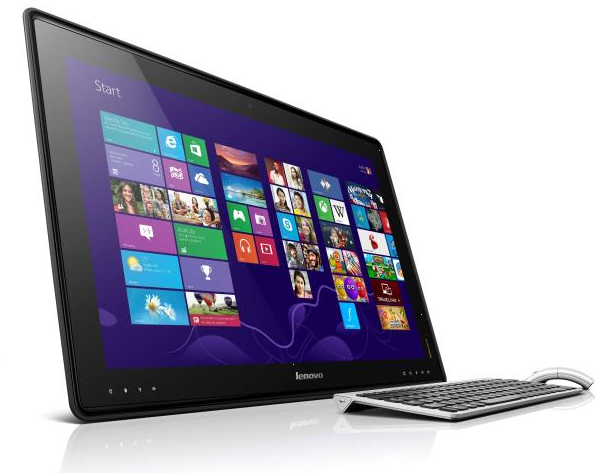
Remember this past November, when Sony introduced that battery-powered Vaio Tap 20 all-in-one desktop? How does a 27-inch version from Lenovo sound?  Lenovo has different ambitions for its new Horizon Table PC than Sony has for its desktop-tablet hybrid. The size of the Horizon alone makes it harder to confuse for a giant tablet, for one thing. But Lenovo also wants customers to think of the 27-inch multitouch Horizon not so much as a semi-portable desktop (battery life is limited to an estimated 2 hours), but instead as a multiuser device.  Read more here:
http://reviews.cnet.com/desktops/lenovo-ideacentre-horizon-27/4505-3118_7-35561100.html
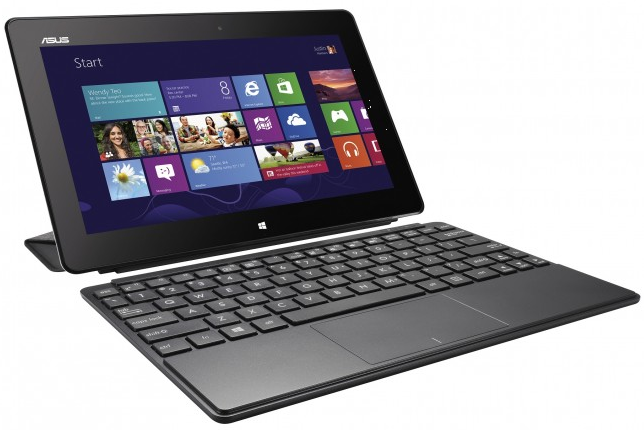
imageASUS
The ASUS VivoTab (pictured above) is a 10.1" tablet that features an Intel Atom Z2760 dual-core processor. The tablet is 9.7mm thin and weighs in at 580g. The display offers a 1366×768 HD resolution. Other features of note includes NFC support, 8MP rear camera, 2MP front facing camera and ASUS SonicMaster Audio. The VivoTab does have a TranSleeve Keyboard accessory that can pull extra duty as a tablet cover and stand.

The ASUS Transformer Book TX300 is a convertible Ultrabook that can switch between an Ultrabook laptop and tablet by detaching the keyboard. The Transformer Book sports a Intel Core i7 processor with HD4000 graphics. The 13" Full HD display has a resolution of 1920×1080 with multi-touch capabilities. Asus SSD and HDD storage, 4GB DDR3 Dual Channel RAM, Bluetooth 4.0 and USB 3.0 and the Transformer Book will be a nice mobile computing option to consider.

The ASUS Tranformer AiO is for those who want more in their tablet than a 10" screen. The Transformer AiO is part tablet, part all-in-one computer that has an extended 18.4", 10 point touch, LED-backlit, IPS display. The computer/tablet is powered by a 3rd Generation Intel Core processor and for those inclined can seamlessly switch between Windows 8 and Android 4.1 while on the go.

ASUS TAICHI Ultrabook/Tablet. The TAICHI is offered in both 11.6" and 13.3" models that have double sided LED backlit, IPS/FHD displays. When closed, the outside lid plays the role of a Windows 8 tablet. When opened up, the TAICHI performs as an Ultrabook laptop computer.

Read more here:
http://www.wpcentral.com/asus-announces-slew-windows-8-tablets-and-ultrabooks

imageTRAKDOT
Stepping off a plane to discover that your luggage has gone missing is a major annoyance for travelers, and an all too common one. Even worse is the feeling of not knowing how long it will take the airline to locate it and return it safely to you.
GlobaTrac’s Trakdot luggage tracking system aims to eliminate that problem—or at least provide some peace of mind in case your luggage goes missing. The Trakdot is a palm-sized cellular-based tracking device that you pair with your cell phone and pack in your suitcase before you check your bag. Once you land at your destination, the Trakdot will send an SMS message or an e-mail to your phone, which notifies you of your bag’s location. The device can be paired with up to 20 mobile numbers. So, if you land in Los Angeles and everything ran smoothly, Trakdot will send a message saying it (and your bag) is in Los Angeles, too.  Read more here:
http://www.pcworld.com/article/2023823/trakdot-helps-track-down-lost-luggage.html

INTEL
Very important reading for those in the Windows ecosystem.  The coming of ultrapower conservative 7W Ivy Bridge+ (the refresh of the Core iX CPU for laptops/tablets), superspeedy 22nm Bay Trail (the successor to Atom Clovertrail), & the upcoming release of Haswell. (The next MAJOR/’tock’ generation of the Core series CPUs)  Read more here:
http://gizmodo.com/5973896/intels-new-chips-everything-you-need-to-know-updating

Posted by: kurtsh | January 7, 2013

NEWS: CES 2013 – Special feature coverage

imageCES coverage is sort of a crap shoot.  There’s some folks that are really good at some things like opinions on big picture matters, and there’s other folks that are more technically inclined to help praise or call B.S. on a product announcement.

Here’s a list of news sources that have special coverage of CES in a feature on their sites:

« Newer Posts - Older Posts »

Categories