image

Free eBook (pdf) “Microsoft Lync Server 2013 Step By Step for Anyone eBook” by Microsoft Lync MVP Matt Landis. This book is an experiment in a new format the author is calling "blog to book" which mean the book is contantly updated so make sure you keep an eye on this page.

  • Step by Step Installing Lync Server 2013 Standard Edition Front End
  • Step by Step Installing Lync Server 2013 SE Monitoring Server
  • Step by Step Installing Lync Server 2013 Persistent Chat Server
  • Step by Step Installing Your 2nd Lync Server 2013 SE Server Associated Backup Pool for Resiliency
  • Step by Step Enabling Lync Server 2013 Enterprise Voice Features, Response Groups and Managers
  • Using Lync 2013 and OneNote 2013 Integration
  • Music on Hold and Lync
  • Configuring Skype federation to Lync 2013

Grab the book here:

Posted by: kurtsh | March 25, 2013

RELEASE: BizTalk Server 2013 now available

BizTalk Server 2013 has RTM’d and is available for download for MSDN subscribers.

imageWe are excited to announce that BizTalk Server 2013 is now “Released to Manufacturing” (RTM)!

BizTalk Server 2013 will be available for download on MSDN starting today. The English locale SKUs will be available for purchase starting April 2013. Other language SKUs will be available for purchase starting May 2013. Host Integration Server 2013 will ship at a later date, however, BizTalk Server 2013 is fully compatible with Host Integration Server 2010.

This is the eighth release of BizTalk Server, another step in the on-going investments we are making in BizTalk.  As discussed in our Beta announcement, we’ve made improvements in the following areas:

  • Improved Performance
  • Simplified Development and Management Experience
  • Cloud Connectivity
  • Running BizTalk Server in the cloud (IaaS)
  • Support for the latest platform and standards
Posted by: kurtsh | March 21, 2013

RELEASE: Pandora for Windows Phone 8

image

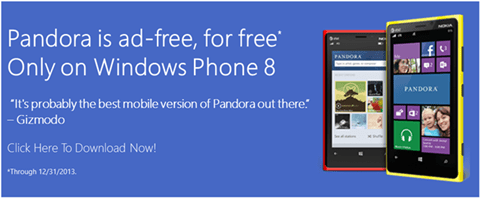
It’s here!  Pandora has launched on Windows Phone 8 and it’s the ONLY free version of Pandora with no ads and no monthly streaming limits – download Pandora today!

Pandora is better on Windows Phone because you get to:

  • Listen to Ad-free music, for free through 2013, with no monthly streaming limits
  • Pin your favorite stations to the Start screen for one-touch access
  • Automatically filter explicit content by launching Pandora in Kid’s Corner

Download it now!

Posted by: kurtsh | March 18, 2013

RELEASE: Twitter Analytics for Excel 2013 (UPDATE)

The new Twitter Analytics for Excel tool provides users with the ability to analyze five Twitter handles at a time, analyze all results in summary tab, view top posters, and conduct drill downs on specific tweets.  This is a great tool for demos, roundtables and EBCs.

Twitter is one of the most popular marketing and news channels for businesses, and its popularity continues to grow. Extended Results has teamed up with Microsoft to build the utlimate add-on for Microsoft Excel and make it available to you as a FREE download! Since most everyone already has a copy of Excel 2010 or 2013, we thought Excel is the best place to do your Twitter insights. Well, now you can do it with a tool you use everyday and it is FREE.

With the release of Excel 2013, we decided to revisit our previous solution and update it with a new interface and functionality only found by using Excel 2013. And what did we discover?

  • Several features for in-application development allow for better control with integration with Web services like Twitter and pulling all kinds of data content.
  • Better UI control so we can apply new styling that drives better insight.
  • Application dialog (displayed above) showing the data/content being pulled.
  • Better integration of PowerPivot so you don’t have to go behind the screens to refresh.
  • And much more…

DOWNLOAD: Twitter Analytics for Excel 2013
http://www.extendedresults.com/products/twitteranalytics/

image

TONIGHT!  We have an launch event that the Microsoft Store is holding in Century City/Los Angeles for Gears of War: Judgment.

  • Free pizza. 
  • Free raffle giveaways.
  • And as usual, a few surprises.

DATE/TIME:

Wednesday, March 18th 10PM

LOCATION:

Microsoft Store Los Angeles
(Westfield Century City)

10250 Santa Monica Blvd
Los Angeles, CA 90067
Phone: (310) 228-3550

(Damn.  I thought I’d posted this a long time ago but I guess I didn’t.)

imageThe Lync Team just released the new Lync 2013 Mobile clients for Windows Phone and iPhone and iPad.   This is exciting since the new releases enables audio and video calls from the mobile device.   Take a look at the following post for a complete update of the feature enhancements:

Here is the specific link for the Windows Phone version”

Here are the links for iPhone and iPad:

Posted by: kurtsh | March 11, 2013

INFO: Shop Microsoft Press for books & references

imageNeed Microsoft official books in both print & eBook reader format (MOBI, ePUB, PDF)?  Look no further than the Microsoft Press catalog on O’Reilly.

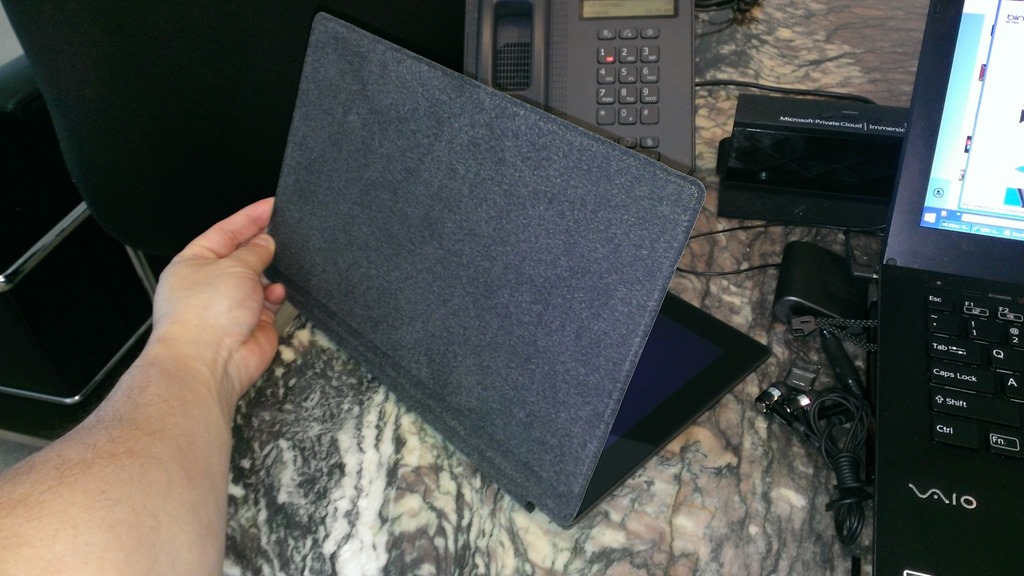
WP_20130308_001I’ve gotten asked this 3 times now in the past 48 hours:

“What’s with the felt on the back of the black touch/type covers for Surface?”

In case you haven’t noticed, the black versions of both the Type Cover and the Touch Cover have a backside made of a Polartec felt-like material.

I asked the question internally here at Microsoft and received a variety of responses.

  • The Polartec material is easy to clean and provides a better grip for the keyboard’s base than just the plastic.
  • The Polartec backside acts as a cleaner for the glass on your Surface.  Flip it over and use it to rub off smudges & fingerprints.  It does a great job.
  • The black plastic that would normally be there instead of the Polartec ‘felt’ can get marked up from standard use & susceptible to easily visible scuff marks due to the way scuffs appear on the black.  Other colors don’t have this issue because of their vivid light reflection but against black, the smudges/ discoloration can really show.

If I get an official response, I’ll post it here but right now, it looks like these are the reasons.

Posted by: kurtsh | March 8, 2013

OT: A Microsoft Executive photo from 2003 (and me)

I was doing some personal documentation and found this photo that was taken of me & others when I received an award called “Circle of Excellence” here at Microsoft. 

There are 4 key executives in this photo, two of which are obvious.  The other two are Orlando Ayala (FAR LEFT: former President of Worldwide Sales, now head of Microsoft’s Unlimited Potential program) & Kevin Johnson (FAR RIGHT: former VP of North American Sales, now CEO of Juniper Networks)

image

Posted by: kurtsh | March 8, 2013

RELEASE: Exchange Server 2013 Deployment Assistant

Available for Exchange Server 2010 & 2013:

We’re excited to announce the availability of the Exchange Server 2013 Deployment Assistant at http://technet.microsoft.com/exdeploy2013. The Exchange Deployment Assistant is a web-based tool that helps you deploy Exchange 2013 in your on-premises organization, configure a hybrid deployment between your on-premises organization and Office 365, or migrate to Office 365. It asks you a small set of simple questions and then, based on your answers, creates a customized checklist with instructions to deploy or configure Exchange 2013. Instead of trying to find what you need in the Exchange library, the Deployment Assistant gives you exactly the right information you need to complete your task.

imageThe first scenarios available show you how to deploy Exchange 2013 in an organization with no previous installations of Exchange and show you how to configure a hybrid deployment between your on-premises Exchange 2013 organization and Office 365. We’re working hard on additional scenarios, such as upgrading from Exchange Server 2007 and Exchange Server 2010. These additional scenarios will be added in the coming months.

The Deployment Assistant for Exchange 2013 is supported on most major browsers and has a completely redesigned interface that’s no longer dependent on Silverlight technology. Here’s a screenshot from the Deployment Assistant after the initial set of questions were answered and the customized checklist was generated.

Of course, we can’t forget about Exchange 2010! If you still need to deploy Exchange 2010, you can access the Deployment Assistant for Exchange Server 2010 at http://technet.microsoft.com/exdeploy2010.

Reposted from:
http://blogs.technet.com/b/exchange/archive/2013/03/04/exchange-server-2013-deployment-assistant-available.aspx

« Newer Posts - Older Posts »

Categories