imageJust released, Forefront Identity Manager 2010 R2 SP1 adds additional features, increased speed and updated product support to rock-solid Identity Management.

To learn more about FIM 2010 R2 SP1:

Released today 2/21, Unified Access Gateway 2010 SP3 updates client support, fixes federation bugs and expands application publishing support. 

imageTo learn more about UAG 2010 SP3:

Posted by: kurtsh | February 20, 2013

NEWS: Windows 8 touch PC demand strong

The fervor over Surface & the incredible demand shouldn’t be terribly surprising in retrospect.  There’s been plenty of evidence that Windows on tablets has had accelerated growth & demand over the last 6 months.

CNET: Windows 8 touch PC demand strong
Touch-screen WIndows 8 PCs are in demand. In fact, PC makers can’t get enough supply of some models.
Dec 4th, 2012

“"Touch machines are actually selling above expectations," said Bob O’Donnell, a program vice president at IDC.

And that means supply shortages. "Some vendors are actually facing shortages because touch panels are in limited supply. Vendors are saying they can’t get as many touch-based machines as they would like to meet the demand that they’re seeing."

Rhoda Alexander, an analyst at IHS iSuppli, echoed O’Donnell’s comments. "We’ve talked to a number of PC makers that are having trouble obtaining touch panels and some of the vendors I’ve talked to said they can’t keep them on the shelf," she said.”

Read more at:
http://news.cnet.com/8301-10805_3-57557191-75/windows-8-touch-pc-demand-strong/

Posted by: kurtsh | February 20, 2013

WEBCAST: Office 365 Virtual Launch Event–Feb 27th

clip_image002

Office 365 Virtual Launch Event:
Join us for a Virtual Launch Event for the new Office 365 for business.

February 27th marks an important milestone with the general availability of the new Office 365 for business.  I would like to personally invite you to attend the virtual launch event to learn about the new enhancements to help drive productivity within your organization. As part of this event the CTO of Toyota, based here in southern California, will be highlighting their experience with the office 365 platform. Given our recent conversations around Office 365 I think this would be a valuable session for you and your team to attend.

Date:
Wednesday, February 27th 8 am PDT and 5 pm PDT

imageWhy Attend?

  • Learn how the new Office 365 can help people do
    their best work in a world of devices and services
  • Hear customers talk about how Office 365
    is transforming the way they deliver productivity
    tools across their organization
  • See how Office 365 delivers new experiences
    combining the power of social with collaboration,
    email and unified communications
  • Join in a live Q&A with Microsoft executives
    and product experts

REGISTER: Office 365 Virtual Launch Event
http://aka.ms/virtuallaunch

image

Together Microsoft and Crestron Offer a Collaboration and Video Solution for the Conference Room; Debuts at Microsoft Lync Conference 2013 in San Diego:

Crestron, a world leader in enterprise automation and management solutions, and Microsoft®, a world leader in software and services, have developed a powerful video-enabled collaboration solution for the meeting room. Crestron RL™ is a comprehensive solution that combines Crestron hardware with Microsoft Lync® software.

Read more here:
http://www.crestron.com/about/press_room/press_releases/show_release.asp?press_release_id=1801

imageRecently, a customer asked the question:

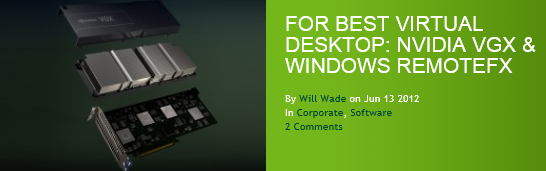
“With regard to virtual desktops on Microsoft’s hypervisor (Windows Server 2012 Hyper-V), can you leverage Nvidia VGX/GRID GPUs?”

The answer is, YES, the Nvidia VGX/GRID GPUs are some of the GPUs that Nvidia supports on the Windows Server 2012 RemoteFX vGPU solution.  So these are some of the GPUs you can virtualize to deliver vGPU enabled virtual desktops.

This is documented in the following articles:

image

Informative Graphics along with Gig Werks, also Microsoft Managed Partner, presented a webinar on January 29th specifically targeted to the AEC (Architecture, Engineering and Construction) industry. 

This is the recording of that session on Redlining, Publishing, and Distribution through SharePoint Server.

[Yet another article, I couldn’t help crosspost]

imageWhen I first heard of ReFS my immediate first question was whether ReFS as a file system was a direct replacement for NTFS. It didn’t take long before my customers began to ask me the same question. In learning about this new file system in Windows Server 2012, it became apparent fairly quickly that ReFS, while a new file system, is built differently. ReFS stands for Resilient File System. NTFS has its place, and so does ReFS. While ReFS may appear to have some similarity to NTFS, it does not contain all the underlying NTFS features and scales efficiently to handle data sets far larger than NTFS.

Read more here:
http://blogs.technet.com/b/askpfeplat/archive/2013/01/02/windows-server-2012-does-refs-replace-ntfs-when-should-i-use-it.aspx

Posted by: kurtsh | February 16, 2013

INFO: Outlook 2013 deprecated features and components

[This was interesting enough that I thought I’d just cross post it]

imageAs much as we love adding new features to Outlook, for the maintainability of our product we sometimes need to remove those that are out of date and aren’t utilized by a large number of users.  This allows us to focus on improving the Outlook features that most of you, our customers, rely on.

The following are some features that we’ve removed from Outlook 2013, and we want to make sure you are aware so there aren’t any surprises when you go to use or deploy the new version. 

Read about the 8 features no longer in Outlook 2013 here:

Interested in Windows RT devices * x.509 certificate enrollment?

imageWindows RT devices run on ARM processor, which is different from a typical computer, but it does have a full version of the Windows® operating system. Windows RT devices cannot be Active Directory Domain Services (AD DS) domain members. Otherwise, a Windows RT device is no different than a typical Windows computer from certificate enrollment and certificate management perspective. In another words, when it comes to certificate enrollment and certificate management, Windows RT devices share the same story with typical Windows computers that are not joined to an AD DS domain.

Prior to Windows RT, a typical Windows computer, could have a certificate in both the computer context and user context. Certificates in the computer context are stored in the computer account profile, these certificates are organized into different certificate stores, (My store, Root store, and so on). Each user would also have its own certificate stores in the user profile (with certificate stores similar to those in the computer context). The Windows Store apps used on Windows 8 and Windows RT devices also have their own profile and  owner certificate stores.

This means that Windows 8 and Windows RT devices can place their certificates in the Local Machine/My certificate store, User/My certificate store, or an application specific My certificate store. Further, a Windows Store app could use certificates from the computer Root store for certificate validation (chain building). Also, if a Windows Store app has SharedUserCertificate capability, the App can use certificates from the user context My store.

Read more of the article to see the following implementation steps.

  1. Enroll for a computer or user certificate by using a Windows RT device
        1. Establish trust to the Certificate Enrollment Policy Web Services and Certificate Enrollment Web Services
        2. Enrollment for a certificate
        3. Configure certificate for auto renewal
        4. Test the renewal
  2. Getting certificate for a Windows Store App
Posted by: kurtsh | February 16, 2013

RELEASE: Microsoft Assessment & Planning Toolkit 8.0

[Taken from the MAP blog… pardon my blatent plagarism of our other blogs but I’m trying to catch up on 2 months of backlog here and I just plain don’t have the time]

I am pleased to announce the Microsoft Assessment and Planning (MAP) Toolkit 8.0 is now available for download.

In this version of the MAP Toolkit, there has been numerous improvements to improve overall usability, to help you accelerate your migration to Windows Server 2012, Windows 8, Windows Azure Virtual Machine, Office 2013, and Office 365.
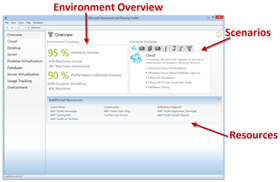
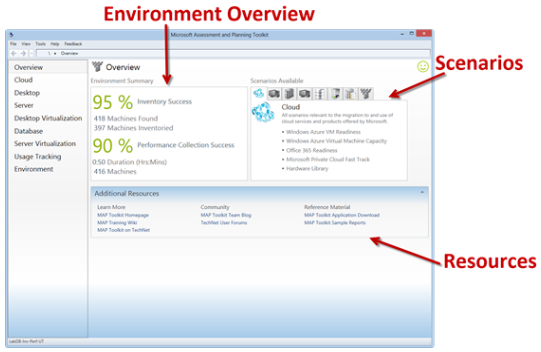
imageThe New MAP User Interface

One of the most obvious improvements is a completely new user interface. The Overview page of the new user interface serves as a homepage for the application and provides a basic overview of the data collected in your environment, descriptions of all the scenarios available in the product, and supporting resources. For a complete overview of the new user interface, see http://blogs.technet.com/b/mapblog/archive/2012/11/29/the-new-map-toolkit-user-interface.aspx.

Determine your Windows Server 2012 readiness

MAP 8.0 assesses the readiness of your IT infrastructure for a Windows Server 2012 deployment. This feature includes detailed and actionable recommendations indicating which machines meet Windows Server 2012 system requirements and which may need hardware updates. A comprehensive inventory of servers, operating systems, workloads, devices, and server roles is included to help in your planning efforts.

Determine your Windows 8 readiness

MAP 8.0 assesses the readiness of your IT environment for a Windows 8 deployment. This feature evaluates your existing hardware against the recommended system requirements for Windows 8. It provides recommendations detailing which machines meet the requirements and which may need hardware upgrades. 

Key benefits include:

  • Assessment report and summary proposal to help you understand the scope and benefits of a Windows 8 deployment
  • Inventory of desktop computers, deployed operating systems, and applications

Assess your environment for Office 2013 and Office 365

MAP 8.0 assesses readiness for Office 2013 and Office 365 and provides an in-depth assessment of client desktops for upgrading or migration. This feature also offers support for Office 365 features such as web apps, Exchange Online, SharePoint Online, or full Office 365 client support.

Migrate to Windows Azure Virtual Machines

MAP 8.0 performs a comprehensive assessment of Windows Server and Linux machines to determine feasibility of a migration to Windows Azure Virtual Machines. MAP then provides suggested changes to prepare targeted machines for migration. This feature helps you reduce the operating costs of hosting on-premise servers, as well as estimating the required size and monthly network and storage usage required to migrate on-premise Windows and Linux servers to Windows Azure Virtual Machines using actual data from the targeted environment.

Additional Resources

« Newer Posts - Older Posts »

Categories