Posted by: kurtsh | July 27, 2013

INFO: Lync 2013 Keyboard Shortcuts

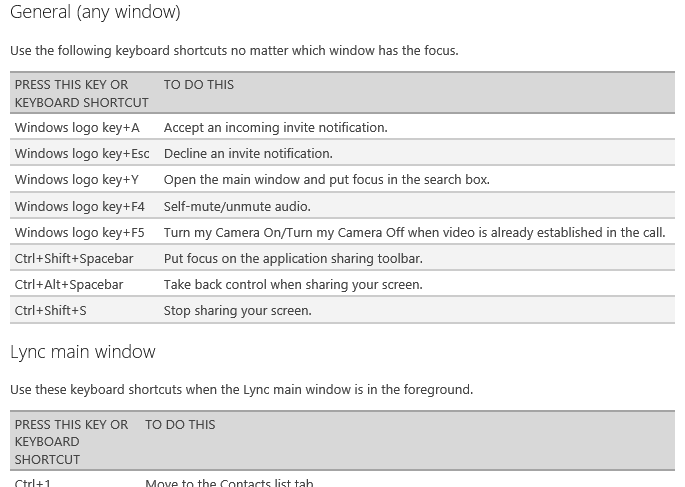
imagePrint this page out and hang it in your office/cube.  You’re welcome.

Keyboard shortcuts are combinations of two or more keys that, when pressed, can be used to do a task that would typically need a mouse or other pointing device. The keyboard shortcuts described here refer to the United States keyboard layout. Keys on other layouts might not correspond exactly to the keys on a U.S. keyboard.

These Lync keyboard shortcuts relate to the feature areas of the Lync user interface (UI). So, for example, you’ve have to be in a contact card for the Esc key to close the contact card.

Tab and Shift+Tab are common ways of moving through any UI. Tab moves through the UI in order, whereas Shift+Tab moves through it in reverse order.

Some features might not be available for your account. We’ve indicated these.

Posted by: kurtsh | July 27, 2013

INFO: Lync 2013 & Support for Large Meetings

imageBy default, Lync 2010 & 2013 supports up to 250 simultaneous participants.

For meetings greater than this, it is possible to deploy the topology for Large Meeting Support (1000 users).  This is a very specific usage scenario for Large Meetings.

Support for Large Meetings – Lync 2013 On-Premise

Lync Server 2013 can support meetings with up to 1000 participants using audio/video (A/V) conferencing, including sharing PowerPoint presentations. This support requires a dedicated pool configured to support large meetings and managed in a way that ensures hosting of only a single large meeting at a time.

This section describes how to support large meetings using a dedicated Lync Server 2013 pool. It describes scalability considerations and the implementation requirements for a dedicated pool, including topology, hardware, software, and configuration requirements. It also provides a set of best practice recommendations for supporting large meetings, a summary of the test methods and results of server scalability testing conducted by the Lync Server engineering team, and the answers to frequently asked questions about support for large meetings.

Read more here:

TECHNET: Support for Large Meetings (Lync 2013 On-Premise)
http://technet.microsoft.com/en-us/library/jj205090.aspx

imageAs part of our release cycle, Microsoft deploys virtually all the products & versions that we create into production within Microsoft itself. 

But a lot of folks don’t know that Microsoft’s own IT department documents a fair amount of what they do when they deploy Microsoft technologies.  They have to go through most of the same challenges that our customers have to BEFORE the product ships. 

This helps improve the product before it reaches customers but also documents process & frankly, WORKAROUNDS, that are necessary in order to make things happen. 

Here are some of the more recent publications from Microsoft IT, a.k.a. MSIT, that may be useful to you.

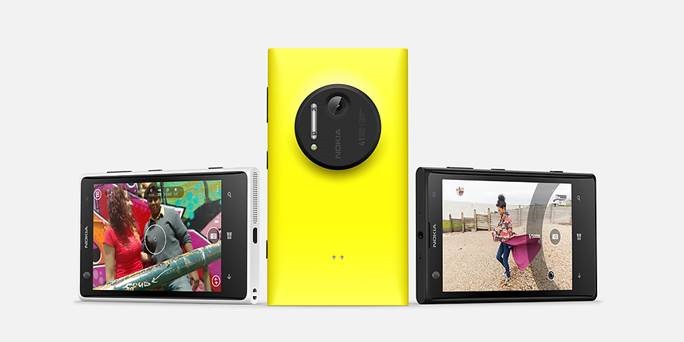
clip_image001We’ll be launching the new Nokia Lumia 1020 at the Microsoft Store in Century City on Friday, July 26-28th.

Store advisors will be on hand to demo this revolutionary new phone.  If you hadn’t heard, the Lumia 1020 has a feature that no other current-gen Smartphone has on the market today:

A 41 megapixel camera. 

No, that’s not 4.1MP.  That’s a whopping 41MP, providing the clearest most precise oversampled photos of any smartphone available.  It surpasses the quality of most point-and-shoot cameras while providing a smartphone solution in a single body.

Attendees of the launch will not only get to see the new device and how it performs but also get a “swag bag” to take home.

Date/Time:
July 26-27 11AM-7PM
July 28 2PM-5PM

Location:
Microsoft Store Los Angeles
(Westfield Century City)

10250 Santa Monica Blvd
Los Angeles, CA 90067
Phone: (310) 228-3550

imageThis white paper addresses how to replace the social features in SharePoint Server 2013 with equivalent Yammer features in a SharePoint Server 2013 on-premises deployment.

The new Yammer app for SharePoint enables you to embed your Yammer feeds into SharePoint Server 2013 sites, making them more social and engaging.

Posted by: kurtsh | July 25, 2013

BETA: Microsoft Monitoring Agent 2013 Preview

Microsoft Monitoring Agent is a service that monitors computer infrastructure and application health.

It collects various diagnostic data, such as performance metrics, event logs, and traces. When connected to System Center Operations Manager, the agent calculates the health state of the monitored computers and objects, and then reports back to the management server.

The management servers centrally distribute the configuration to agents and store data received from the monitored computers. Microsoft Monitoring Agent includes the full functionality of System Center Operations Manager Agent, .NET Application Performance Monitoring, and IntelliTrace Standalone Collector, and it can be used for monitoring applications that are running in production environments.

imageDoug Symalla, Premier Field Engineer, is writing a series of blog posts on how to plan and upgrading your Windows Server Active Directory environment to 2012. 

This is worth paying attention to.  He’s got two posts out so far with more to come:

Remote Server Administration Tools for Windows 8.1 Preview enables IT administrators to manage roles and features that are installed on computers that are running Windows Server 2012 or Windows Server 2012 R2 Preview from a remote computer that is running Windows 8.1 Preview.

The tools include Server Manager, Microsoft Management Console (MMC) snap-ins, consoles, Windows PowerShell cmdlets and providers, and command-line tools for managing roles and features that run on Windows Server 2012 and Windows Server 2012 R2 Preview.

In limited cases, the tools can be used to manage roles and features that are running on Windows Server 2008 R2 or Windows Server 2008. Some of the tools work for managing roles and features on Windows Server 2003. For more information, see KB article 2693643: Description of Remote Server Administration Tools for Windows 8 ; Remote Server Administration Tools (RSAT) for Windows Vista, Windows 7, Windows 8, Windows 8.1, Windows Server 2008, Windows Server 2008 R2, and Windows Server 2012 and Manage Multiple, Remote Servers with Server Manager

imageWork Smart Guide Zip Download is a set of editable, customizable versions of Work Smart materials to use as samples and reusable templates that specifically address the scenarios and processes in your information worker environment.  Think of them as quick reference guides for Microsoft products that were created by Microsoft IT.

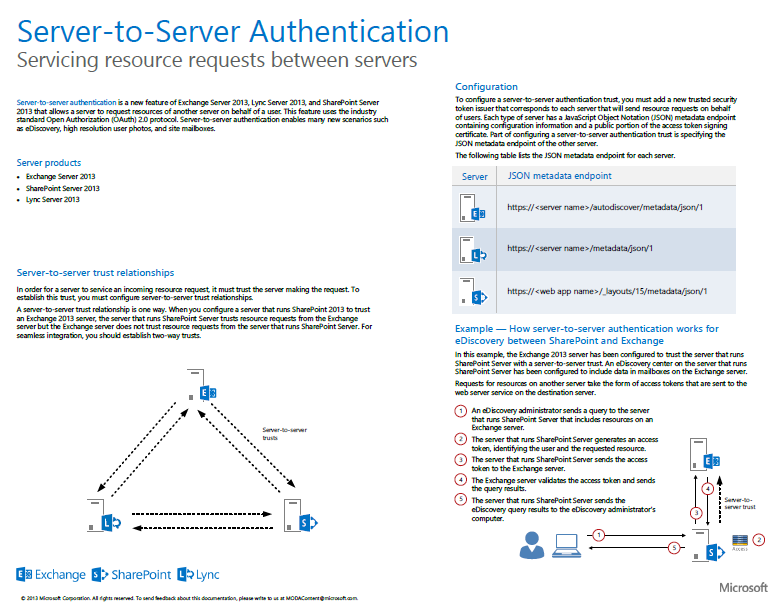
Did you ever wonder, what kind of integration persists throughout the Office family of products?  Authentication?  Identities & Presence?  Office Web Apps?

imageThis 10-page document, “Feature Integration Across Microsoft Office Products ”, presents illustrations for cross-server features & client-server features.  This multi-tab file includes descriptions and architecture illustrations for features that work across Microsoft Office server products (Exchange Server, Lync Server, and SharePoint Server).

« Newer Posts - Older Posts »

Categories