Windows Phone 8 was designed to operate completely without the need for a desktop. All firmware updates, software/app installations, and music downloads happen over either cellular or WiFi.
But what if I want to sync with my PC? If you’re running Windows 8 on your desktop, you have two options for syncing with your Windows Phone. One of which is the “Windows Phone app for Windows desktop”.
The Windows Phone app for Windows desktop makes it easy to:
Sync music, photos, movies, TV shows, and podcasts from your existing Apple iTunes library or your Windows Libraries to your Windows Phone 8.*
Automatically import pictures and videos you’ve taken with your phone to your PC.
See at a glance how much space you’re using for each type of content, so it’s easy to make sure you never run out of room on your phone.
Get your playlists on your phone.
Find songs that will work as ringtones and add them to your phone.
If you’re licensing & deploying System Center Configuration Manager 2012 CML… do you also need to license Windows Server CALs?
For answers to questions like this, read the Microsoft Software License Dependency Reference Guide!
Licensing Brief – Microsoft Software License Dependency Reference Guide
Summary
This brief provides Microsoft Volume Licensing program customers with a list of Microsoft software and the associated dependent Microsoft software licenses that are required to use that software. This is sometimes referred to as the “software stack.”
What’s New in this Brief
This brief replaces a previous version published in April 2012. Significant changes in this new version include updated references to Windows 8 and the addition of Microsoft Dynamics AX 2012.
For those of you that have to work for a living ;-)… we are broadcasting the live event, "XBOX: A New Generation Revealed" on May 21, 10am PDT on Xbox Live, Xbox.com or Spike TV!
Post Event Discussion with Major Nelson Larry Hyrb, Xbox Live’s Major Nelson, ishosting a special post-show panel at 3p ET/12n PT that you won’t want to miss. (Only available on Twitch.tv) http://mjr.mn/YWdQ98
Add XboxReveal to Calendar Major Nelson created two .ICS files for tomorrow’s events if you if you want to add them to your personal calendar http://mjr.mn/Z5T5YK
I bought a brand new Nokia Lumia 928 – just released this week – and there’s a number of reasons why this phone seems almost designed for me.
MUSIC CONCERTS & VEGAS. Some of you know I go to an occasional concert & sometimes go to Las Vegas. 🙂 Both are, frankly, places where photos are taken in low-light. If you know anything about the Nokia Lumia 928, that in itself should give you all the reasoning you need!
LOW-LIGHT VIDEO. The Nokia Lumia 928 is a phenomenal 8.7MP camera in it of itself for both ‘stills’ as well as ‘video’. It sports hardware-based optical image stabilization that prevents blurring during photos & ‘shaky cam’ syndrome during video clips. And to augment the LED flash, there’s an extra-killer Xenon flash on the unit, usually reserved for REAL cameras. But most importantly, the night time imaging with rapid movement is simply off the charts compared to anything else on the market, including my 8X.
Take a look at the following video that compares the Nokia Lumia 928’s low-light, fast motion video recording with some of the more popular competitors:
Nokia Lumia 928 takes on the Apple iPhone & the Samsung Galaxy S3
LOUD AUDIO RECORDING/PLAYBACK. Because I’m constantly using my smartphone as a speakerphone for business, having an amplified speaker is very important and they’ve done that right on the 928. This thing cranks sound, enough so that it is more than audible while driving & hearing ambient car noise around me.
Additionally, concerts with amplified music virtually always blow out the high end of the audio recording capabilities of a phone. Not with the Lumia 928 which has the ability to record high decibel music & audio, like that from concerts or stadiums for accurate, high quality, & enjoyable sounding recordings.
Nokia Lumia 928’s digital microphone provides distortion free recording in stadiums & concerts
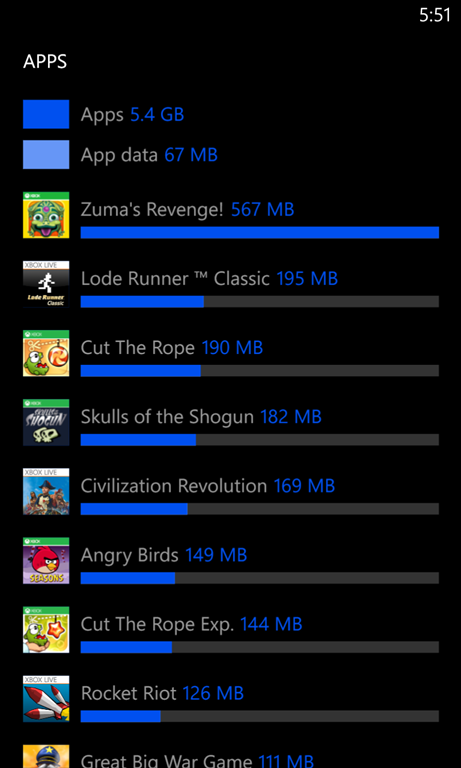
STORAGE & APPS. Outside of that, the fact that it comes with 32GB is great leaving it plenty of room for media & most importantly, apps, which is something that I should address.
I never used to care about the exclusive Nokia apps until I stumbled upon a few unique & memorable apps that only Nokia has. One in particular is a favorite of mine called “Storage Check” which breaks down how your storage is being used. It shows storage consumed by photos, music, documents, email, etc. but it will also list out all your APPS and tell you how much space each is taking up. NO OTHER APP PROVIDES THIS & IT IS EXCLUSIVE TO NOKIA. *mind blown*
PRACTICAL DESIGN. I’ve really come to love the Qi Wireless Charging capability. You can’t really understand the convenience of not having to locate the charger cable… orient the jack correctly… and plug it into your phone to charge your phone until you’ve experienced the bliss of simply dropping your phone on a charging plate forgetting about it.
However, I’m not going to lie: I think the phone is frankly less attractive than other Windows Phones. It’s only available in a white (???) glossy finish and while both the back & the front glass are curved or “pillowed” out, it physically looks like a big ol’ blocky rectangle. It reminds one of a Volvo.
But like a Volvo, there’s a method to this design madness: Speaking from experience, I’ve compared other phones to the 928, and while the sides are flat & the back is slightly curved, this is very practical because it allows you to keep a firm grip on the phone.
If you’ve ever been concerned about maintaining a grip on your phone, the 928 will appeal to you because the surface area of contact between your palm/fingers & the phone’s side/back is really optimized… and while it’s not as elegant as some of our other designs, it really feels secure in your hand because of the glossy finish which delivers an additional level of friction & prevents slipping out of your palm.
[I found this is my Windows Live Writer cache. I guess I never posted it.]
Back in March we produced a web site that provide a searchable online list of all of Microsoft’s patent holdings. This list includes more than 40,000 patents held in the U.S. and internationally. The announcement was also made on Capital Hill in Washington DC as part of another event.
We urge other companies to join us in making available information about which patents they own. By doing so, they will help increase transparency, facilitate licensing, and help ensure that the patent system continues to fulfill its role in promoting and encouraging innovation.
…
Read more about the Patent Tracker announcement here:
If you want to get someone on a Windows Phone 8 device with no carrier commitment whatsoever & you live near a Microsoft Store, here’s how to get a brand new Nokia Lumia 521 Windows Phone for only $105 without signing a carrier contract.
Ask the store to price match Walmart at $129.88 for the Nokia Lumia 521. (Hint: They already know about Walmart’s pricing)
Take the “Bing It On Challenge” at the store. You will enter in 5 search terms of your choosing and a computer screen will show you both the Bing results and the Google results but you won’t know which is which. You will choose which “results set” you like the most for each of the 5 search tersm. We’re betting you’ll like the Bing results better, but regardless of what the results are, in the end, taking this ‘challenge’ will garner you at $25 gift card.
Congratulations. You’ve reduced your cost for the device to $104.88.
Even if you don’t use it as a phone, this unit is like a low cost media player with WiFi/Bluetooth & a speaker. Check out the details:
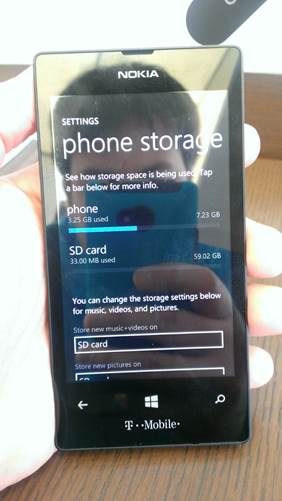
Expandable memory (64GB SDXC microSD support) Note: The specs say 32GB however Dorion Whitlock of the Microsoft Store in Century City confirmed that 64GB SDXC cards indeed work. See photo to the right.
SUMMARY: If you own an HTC 8X Windows Phone & are receiving a "SIM card is missing or invalid" error… or your phone randomly just shuts down, try turning off your phone, pulling out the SIM card tray, and appending a piece of scotch tape to the back of your SIM card. Put it back into your phone and try using your phone for a few days and see if it fixes the issue.
——————————
DETAIL:
Q: Are you seeing "SIM card is missing or invalid" error on your HTC 8X Windows Phone?
I’m seeing this on the phone I got from Verizon but it doesn’t look like it’s specific to any one carrier. It appears that there may be a design issue in this phone. I’ve been struggling with this for a while now and originally thought it was a firmware or software issue but after discussing this with others and researching this on the Internet, it appears that it has to do with the phone’s hardware itself.
PROBLEM: ‘SIM CARD FAILURE’
At seemingly random intervals, usually as frequent as every day or every other day, the phone pops up an error notification that reads, “SIM card is missing or invalid”. At this point, the phone won’t connect over data nor will voice calls work. The only recourse is to completely reboot the phone – either via “Power+VolumeDown” to reboot or “Hold-Power” to shut down.
POSSIBLE CAUSE: DISCONNECTION The hypothesis is that the SIM is getting disconnected briefly. The power button is right above the area where the SIM is inserted. If you ever pull out the SIM, it will cause and error and you’ll either shut down the device or halt all communications. Because the casing is a pliable (however rigid) polycarbonate plastic, over time, when you press on the power button, it bulges the plastic just enough to occasionally separate the SIM from the internal metal contacts that connect it to the radio on the phone. The result is the phone will either randomly turn off its radio (no calls, data, or texts) giving you that “SIM card is missing error”… or the phone will randomly shutdown altogether without letting you know, usually in your pocket.
This seems to be particularly common with individuals that have gel cases or other types of protective cases on their device that require the user to exert a lot of pressure on the power button to click it. This stress looks to be the cause of this issue.
SOLUTION: TAPE ON THE SIM What one thoughtful person did on the Internet is place a thin piece of tape on the back of the SIM. The has the effect of making the connection between the SIM and the contacts in the phone more firm & tight. I did exactly this with a small piece of scotch tape and haven’t had the problem happen since!
We know a lot of you have been waiting for this, and so it is with great excitement that we announce that Exchange Server 2013 RTM Cumulative Update 1 (CU1) has been released to the web and is available for immediate download! This is the first release using the new servicing model for Exchange Server 2013. In addition to this article, the Exchange 2013 RTM CU1 release notes are also available.
Note: Article links that may not have been available at the time of this post’s publishing are now available. Updated Exchange 2013 documentation, including Release Notes, is now available on TechNet.
CU1 is the minimum version of Exchange 2013 required for on-premises coexistence with supported legacy Exchange Server versions. The final build number for CU1 is 15.0.620.29. For more information on coexistence, check out the Planning and Deployment documentation, and this Ignite webcast covering deployment of and coexistence with Exchange Server 2013.
We’re excited to announce that today, Visual Studio 2012 Update 2 (VS2012.2) is now available for download.
For an overview of the five areas of investments in VS2012.2 that we made across agile planning, quality enablement, Windows Store development, line-of-business development, and the general developer experience, please visit Soma’s blog. In particular, you can find an outline of the new functionality and issues we’ve fixed in Visual Studio 2012 Update 2 and comprehensive details on the respective blogs below:
If you encounter a bug or an issue, please report it through the Visual Studio, LightSwitch, and Blend Connect sites. As always, we want to hear your suggestions or feature ideas/improvements so please tell us on UserVoice or vote on other user’s suggestions.
Comments Off on RELEASE: Visual Studio 2012 Update 2
Steven Guggenheimer, Corporate Vice President and Chief Evangelist – Developer Platform & Evangelism.
Windows 8 brings a new opportunity! Create immersive app experiences, reach more people on more devices, and make more money on your terms. With 60M Windows 8 and Windows RT licenses sold in the first three months, this is an opportunity you certainly want to capitalize on!
 Windows Phone 8 was designed to operate completely without the need for a desktop. All firmware updates, software/app installations, and music downloads happen over either cellular or WiFi.


![CropperCapture[14]](https://kurtsh.com/wp-content/uploads/2013/05/croppercapture14.jpg "CropperCapture[14]")





 kurtsh
 Kurt Shintaku's Blog
You must be logged in to post a comment.