We just released a doozy of an eBook called “Introducing Windows Azure for IT Professionals” that covers how to use Windows Azure “Infrastructure as a Service”.  Or in English – how to set up full Virtual Machines in Microsoft’s datacenters through a web browser and run your own instances of Windows Server 2008, 2008 R2, 2012, and 2012 R2… or if you prefer a number of a Linux variants!  Set up your own virtual network, your own Active Directory, open your own ports, and provide your own virtual lab in Microsoft’s “cloud”!

imageWe are happy to announce a new free ebook – Introducing Windows Azure for IT Professionals by Mitch Tulloch with the Windows Azure Team!

Whether you’re new to the Windows Azure platform or are already using it in your business, this book has something that should interest you. Most Windows Azure services are described in some detail, with screenshots used to demonstrate some of the multitude of capabilities of the platform. And for the experienced we have lots of under-the-hood insights and expert tips written by Microsoft insiders who develop, test, and use the Windows Azure platform.

The PDF is available to download today. The Mobi and ePub files will be available through this post soon. I’ll update those links as soon as I have them.
imageICYMI, the Microsoft Management Summit has officially been merged into Microsoft TechEd 2014. And one conference shall rule them all. 

The net net is that the agendas of TechEd & MMS were so closely aligned they basically decided to combine the efforts (and likely the funding) into a single larger event.  Brad Anderson explicitly stated that this was not a “cost cutting” exercise, and given what I know to date, I believe this statement.

Here’s the full explanation:

Please keep in mind the other conferences being run as well, which I will link to later when I get the chance.

Microsoft just posted as America’s #1 most inspiring company according to Forbes.com.

imageMicrosoft, the 38-year-old Redwood, Wash.-based software giant, returned to the No. 1 spot after a two-year hiatus. In 2011 and 2012 Apple landed at the top of the heap—while Microsoft held the No. 3 and No. 5 spots, respectively. But thanks to the company’s philanthropic initiatives, passionate employees and stellar leadership, it reclaimed the title of America’s Most Inspiring Company this year.

“There is clearly an emphasis within Microsoft to give back,” Barber says. “In speaking with their employees, Bill Gates is often quoted saying, ‘we have been given much and therefore much is expected of us.’ What is impressive is that it is not just the Bill and Melinda Gates Foundation worthy of this reputation. The company has donated to over 31,000 nonprofits since 1983 and raised over $1 billion through employee giving. Every Microsoft employee is given the opportunity to have their personal cash contribution matched by the company, dollar for dollar, for up to $12,000. That’s impressive.”

He adds: “Many respondents were aware that Microsoft makes huge profits and they actually applauded because it was so obvious to them that Microsoft uses its profit and influence to help make the world a better place.”

Read more here:

Posted by: kurtsh | October 1, 2013

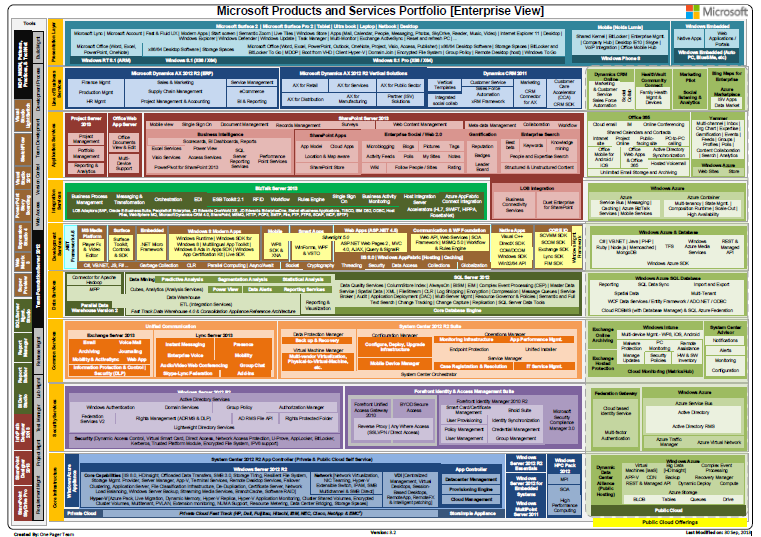
RELEASE: Microsoft Products Portfolio 3.2 (.PDF)

imageThe updated Microsoft Products Portfolio documentation has been updated.

There are two versions – one for all our products and one for ONLY ENTERPRISE products.  The following items have been added to both:

  • Microsoft Surface 2 and Microsoft Surface Pro 2 in Hardware area on the top
  • SFTP to BizTalk LOB Adaptors
  • eDiscovery, and Federated Search to SharePoint 2013 block
  • Office Mobile for Android /  iOS to Office 365
  • De-Duplication, Storage Tiring, Azure Pack to Windows server 2012 R2

The following items have been changed/removed:

  • All-up view:
      • “Xbox 360 & Kinect” to “Xbox One & Kinect”
  • Both views:
      • Windows 8 (X86/X64) to Windows 8.1 (X86/X64)
      • Windows RT (ARM) to Windows RT 8.1 (ARM)
      • Windows 8 Pro (X86 / X64) to Windows 8.1 Pro (X86 / X64)

Download the documents here:

Posted by: kurtsh | October 1, 2013

INFO: Notes from the Surface 2 Launch event

On-Demand: Surface 2 Launch Event
Watch the on-demand presentation of the Monday, Sept. 23, Surface 2 launch event in New York City here:
http://www.microsoft.com/en-us/news/presskits/surface/surfaceevent.aspx

Review the Press materials & the Announcement here:
http://www.microsoft.com/en-us/news/press/2013/sep13/09-23surface2pr.aspx

For those without the time to review everything in the video, here are my notes from the event:

————————

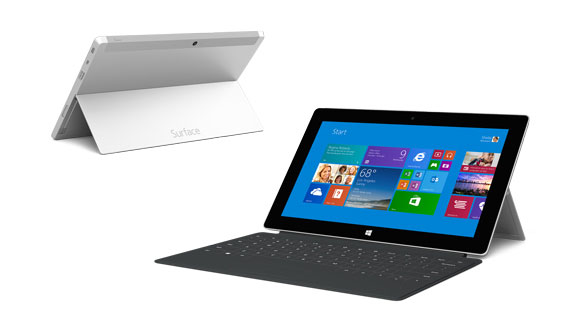
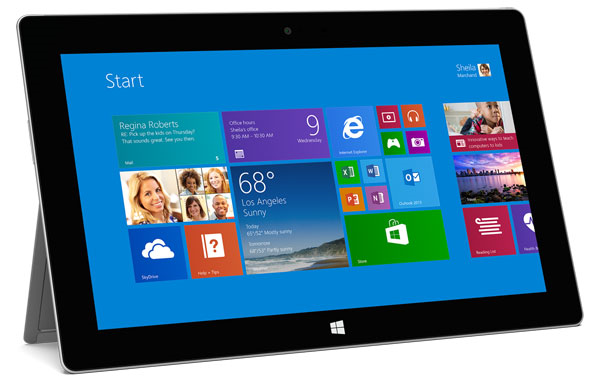
imageSurface Pro 2

  • Best selling device in it’s class
  • Cleartype 1080 HD display
  • 46% more color accuracy to the screen – true colors! Really important for professionals, photos, editing movies
  • Speakers – Boosted, added Dolby to dramatically improve audio
  • FAST – Fastest device ever; faster than 95% of all laptops today
  • Graphics improvement by 50%
  • CPU performance improvement by 20% – lightning fast
  • Kickstand
    • Disappears when you don’t need it
    • Sounds like a high end car door, feels good
    • Now two tilted angles for the kickstand for taller people or people using it in their la
  • Battery
    • Added Haswell
    • Cooler, quieter
    • Focused on more battery 75% improvement in battery life 4-5 to 7-8.7

Surface 2 (ARM)

  • Performance Improvements
    • Double bus speed for wifi
    • Double bus speed for memory
    • Dramatically increased compute
    • Overall 3-4x faster
    • 72 cores on GPU
  • Silver Magnesium casing
    • 3 pieces to 2 pieces of magnesium – thinner walls
    • Lighter & thinner
  • Upgrades
    • Now USB 3.0, not 2.0
    • 1080 resolution, doubled the pixels of the display
    • 50% less reflectivity of any other tablet
    • Two level kickstand
    • 25% battery life added (12 hours)
    • HDMI out
    • USB Wireless
  • Windows 8.1
    • Will run 3 apps on the same screen simultaneously now
    • User switching for families with multiple people logging in with different profiles
    • Lock down for children – personalization
    • 100,000 apps – Mint, Facebook, Flipboard, NFL Fantasy
    • Multitasking gaming & desktop
  • Office
    • Word, PowerPoint, Excel… and now Outlook!
  • Surface 2 camera
    • Back camera – 5MP
    • Front camera – 1/3rd in sensor, lowlight camera
  • Skype for Surface 2 or Surface Pro 2
    • Free international calling for 1 year
    • Free Skype WiFi for 1 year
  • SkyDrive – Everything saved
    • Sync seamlessly
    • 200GB for 2 years
  • $449 Price

Accessories

  • Power Cover
    • New Type Cover with 30Whr battery addon
    • 2.5x battery life from original product 4-5 to 10-12.5 (3-3.75)
    • Feels good, forms like a book, looks beautifu
  • Dock
    • Never need to remove cover
    • Displayport, Power, 2 monitors, 1 USB 3, 2 USB 2
    • Drives 4K monitors
  • DEMO: Red Dragon demo from Assimilate
    • 6K raw video
    • Input & edi
  • Type Cover 2
    • Took a lot of feedback around Productivity
    • Colors! New Purple, Pink, Blue, Black
    • Keyswitch is shorter, thinner, stronger, faster & silent, backlit (Fades on & off) – Almost as thin as Touch Cover
  • Touch Cover 2
    • Uniformly backlit
    • 2.5mm thin
    • Turns off when not being used, auto turns on whe
    • 1092 sensors – Touch cover
    • Faster scanning rate – pick up typing faster. Can’t miss a key
    • Predictive typing
    • Type Cover 2, Touch Cover 2 works with old and new Surface
    • GESTURES available on Touch Cover
    • “Blades” – Design Concepts & Ideas (These are just ideas & not production!)
      • Solar Panel
      • Painting
      • Toy interactive
      • Jewelry
      • Piano
      • Surface Music Kit – Available 10/22
        This last one, “Music Kit”, is real – coming to provide base level DJ capabilities to Surface

Estimated Price

  • Surface Pro
    • 64 GB/4GB of RAM + Surface pen $899
    • 128 GB/4GB of RAM + Surface pen $999
    • 256 GB/8GB of RAM + Surface pen $1,299
    • 512 GB/8GB of RAM + Surface pen $1,799
  • Surface 2
    • 32 GB $449
    • 64 GB $549
  • Accessories
    • Touch Cover 2 $119.99
    • Type Cover 2 $129.99
    • Power Cover $199.99
    • Touch Mouse $69.99
    • Dock Station $199.99
    • Wireless Keyboard Adapter $59.99
    • Car Charger $49.99

Usable storage (for North America)

  • Surface 2
    • 32 GB - 18 GB free
    • 64 GB 47 free
  • Surface Pro 2
    • 64GB 37 free
    • 128GB, 97 free
      (A
      dditional space by moving 4GB recovery image from drive to USB recovery key.)

Pre-Ordering/Availability:

imageAnother free eBook from Microsoft Press.  This one is for System Center Orchestrator!

Welcome to Microsoft System Center: Designing Orchestrator Runbooks. We believe that orchestration and automation are becoming increasingly important in IT organizations of all sizes and across all infrastructure types ranging from on-premises to cloud-based. Orchestration and automation can help reduce the cost of IT while improving consistency and quality of IT service delivery. Like any powerful technology. however, it can be both used and abused.

Our objective with this book is to provide a framework for runbook design and IT process automation to help you get the most out of System Center Orchestrator 2012 and to help you utilize Orchestrator in concert with the rest of the System Center for an enterprise-wide and systematic approach to process automation. We will provide detailed guidance for creating what we call “modular automation” where small, focused pieces of automation are progressively built into larger and more complex solutions. We detail the concept of an automation library, where over time enterprises build a progressively larger library of interoperable runbooks and components. Finally, we will cover advanced scenarios and design patterns for topics like error handling and logging, state management, and parallelism. But before we dive into the details, we’ll begin by setting the stage with a quick overview of System Center 2012 Orchestrator and deployment scenarios.

Download the PDF version of this title (186 pgs, 8.77MB) here and the companion content here (296 KB). You can get the EPUB version here and the MOBI version here.

Read more here:

imageInterested in Surface 2 & Surface Pro 2 in Los Angeles? 

Come see an exclusive briefing on the new releases, directly from Microsoft Corporate Vice President, Panos Panay – the creator of Surface.

Get an insider’s glimpse into the most productive tablet on the planet! You’re invited to a one-of-a-kind sneak peek at the brand new Surface 2 and Surface Pro 2. Panos Panay, the creator of Surface, will demonstrate its cool new features for a select audience at our exclusive launch event. Test drive the brand new devices before anyone else and before it’s even available for purchase. Space is limited, so register today.

imageTIME/DATE:
Oct 2nd
5:30PM-6:30PM

LOCATION:
Microsoft Store Century City
10250 Santa Monica Blvd
Los Angeles, California

REGISTRATION:
https://www.facebook.com/events/339370852875627/
(Click JOIN to register)

Posted by: kurtsh | September 27, 2013

NEWS: Surface 2 Launches… into a New Era

We keep talking about how Microsoft is entering a New Era.  This is usually in the context of our shift to a company focusing on devices & services.  But apparently this applies to Microsoft in more than one way.

Here’s something that I never thought I’d see:

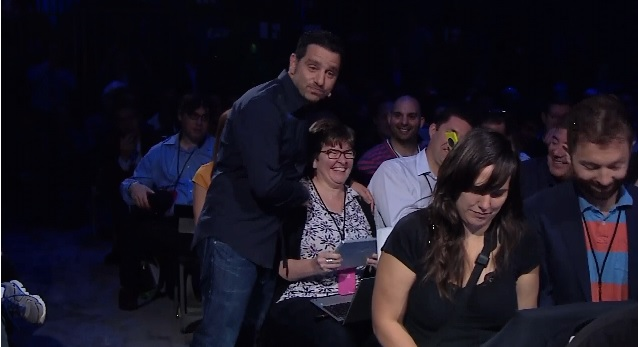
image

That’s Microsoft Corporate VP of Windows Devices, Panos Panay, hugging ZDnet blogger & Microsoft reporter, Mary Jo Foley, who is mentioned immediately before Panos refers to a funny hypothetical situation involving the media.  (And if you look carefully, you can see Windows expert & all-around-curmudgeon Paul Thurrott to the right, facing her and laughing as she holds Panos’ locked down Surface 2 which contains the Surface product roadmap for the next 3 years)

My how times have changed.

But then again, there’s been other things announced recently that I only thought would happen when pigs flew.  In the meantime, check out a rather humorous & historic moment at 44:50 in the Surface 2 On-Demand Launch video below.

Posted by: kurtsh | September 26, 2013

NEWS: The Microsoft/Oracle Partnership (Summary)

imageAs many of you know, Oracle Openworld was held this week in San Francisco. Below, is a link to Brad Anderson’s keynote address which outlines the Microsoft Oracle partnership in more detail and also speaks to the opportunity for Microsoft customers to leverage a singular cloud platform supporting multiple workloads.

What was announced by Microsoft:

  • Microsoft is offering a preview of license-included Windows Server virtual machine images running Oracle Database, Oracle WebLogic Server, and the Java Development Kit. You can download it now here.
  • Oracle is also offering bring-your-own-license Oracle Linux virtual machine images running Oracle Database and Oracle WebLogic Server in Windows Azure

What was announced with Oracle?

  • Fully-supported Oracle software, including Java, Oracle Database, and Oracle WebLogic Server, on both Windows Server Hyper-V and Windows Azure.
  • A Windows Azure preview of license-included Windows Server virtual machine images running Oracle Database, Oracle WebLogic Server, and the Java Development Kit.
  • Bring-your-own-license Oracle Linux virtual machine images running Oracle Database and Oracle WebLogic Server – published to the Windows Azure image gallery by Oracle.

What is being announced with Azul Systems & MS Open Tech?

  • Free and open source technology preview for Azul Systems Zulu: OpenJDK for Windows Azure
  • Offering is based on the Java 7 SE OpenJDK implementation and has passed all Java certification tests in the Java SE 7 version of the OpenJDK Community TCK (Technology Compatibility Kit)
  • Supports Windows Server 2008 R2 and Windows Server 2012 on Azure
  • Simplified deployment of Java applications on Windows Azure through the existing Windows Azure Plugin for Eclipse with Java

Read more here:

RMSError2

PROBLEM:
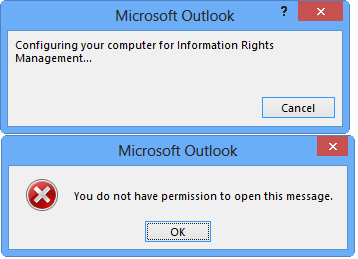
When opening a rights-managed email within Outlook, have you ever seen an error with Windows Rights Management on your desktop that reads:

“You do not have permission to open this message.”

And this occurs even though you know should have permission to access the email.

Or maybe when you attempt to “Connect to server to download rights management templates” from within an email message or an open Word document, you either get NO RESPONSE or you get the following error dialog:

“To use content with restricted permission you must reinstall and repair the Windows Rights Management components.  If the problem continues, contact your administrator.”

RMSError

SOLUTION:
This took a while for me to dig up internally here at Microsoft so I figured this might be useful for others to know.

OUTLOOK 2013:
The following troubleshooting steps (below) resolved my issue for Outlook 2013.  More specifically, the specific resolution was using the following command using an admin elevated command prompt:

rd /q /s "%LOCALAPPDATA%\Microsoft\MSIPC"

After a quick restart of Outlook, I was able to not only open rights managed emails but also create rights managed content throughout Office. Yay!

OUTLOOK 2010:
I’m told that Outlook 2010 is slightly different.  I’ve never tried this since I don’t run Outlook 2010 but for those interested:

1. Go to the path:
c:\users\username\appdata\local\microsoft\DRM

2. Delete all the contents under the folder DRM except for the folder “cc” under it.

3. Restart Outlook


« Newer Posts - Older Posts »

Categories