Posted by: kurtsh | February 28, 2014

NEWS: S/MIME encryption now in Office 365

First, we introduced Office 365 Message Encryption – i.e. the ability send public secured emails to recipients without requiring any add-ins or additional technologies on either the sender or recipient’s computers.  This service is available at no additional cost to Office 365 E3/E4 subscribers.

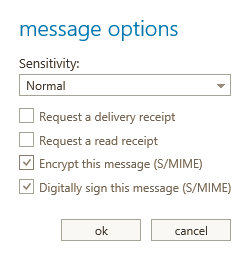
Now, we’re introducing S/MIME as well for Office 365, enabling public key encryption & digital signing of messaging data, and again, at no additional cost to Office 365 E3/E4 subscribers.

imageRecently, we published a blog post that outlines how strongly committed we are to protecting our customers’ information. A key aspect of our strategy is to expand encryption across all our services. Earlier this month, we announced Office 365 Message Encryption, a new service that allows you to send encrypted mail to anyone. As part of our ongoing focus on encryption, we announced yesterday that we’re bringing S/MIME capability to Office 365 and Exchange Server 2013 Service Pack 1. With this release, customers will have S/MIME support across Outlook, Outlook Web App (OWA), and Exchange ActiveSync clients. S/MIME for Outlook and EAS is already available on Exchange Online and S/MIME on OWA is being rolled out and is expected to be completed by early April.

S/MIME (Secure/Multipurpose Internet Mail Extensions) is a standard for public key encryption and digital signing of MIME data, and it is defined in a number of Requests for Comments (RFCs): 3369, 3370, 3850, and 3851. S/MIME allows a user to: (1) encrypt an email and (2) digitally sign an email, and thus provides cryptographic security services such as authentication, message integrity, and non-repudiation of origin (using digital signatures). It also helps enhance privacy and data security (using encryption) for electronic messaging. You can learn more about S/MIME in this technet article.

Read more here:

image

Containing twenty-four design patterns and ten related guidance topics, this guide articulates the benefit of applying patterns by showing how each piece can fit into the big picture of cloud application architectures.

It also discusses the benefits and considerations for each pattern. Most of the patterns have code samples or snippets that show how to implement the patterns using the features of Windows Azure. However the majority of topics described in this guide are equally relevant to all kinds of distributed systems, whether hosted on Windows Azure or on other cloud platforms.

In case you missed it, this was our 2014 Super Bowl commercial entitled, “Empowering”.

Microsoft 2014 Super Bowl Commercial: “Empowering”

This one minute production is a collage of many of the ways that people are empowered & inspired through technology.  For more on any of these stories, click on one of the story videos below:

With Exchange 2013, we released a new data loss prevention (DLP) capability based on deep content analysis that helps you identify, monitor, and protect sensitive information. We’re continually looking to expand our DLP capabilities, and today we’re bringing two new ones to you—Document Fingerprinting and Policy Tips in Outlook Web App (OWA). Both are being rolled out for Office 365 users right now, and they’ll be part of the Exchange Server 2013 SP1 release for our on-premises users (please stay tuned for more information on SP1).

Watch this short video that explains what DLP has to offer today and how the new capabilities can help your organization be more compliant.

Data Loss Prevention with Exchange and Office 365


Read more:

Posted by: kurtsh | February 26, 2014

RELEASE: Exchange Server 2013 Service Pack 1

imageExchange Server 2013 Service Pack 1 (SP1) is now available for download! Please make sure to read the release notes before installing SP1. The final build number for Exchange Server 2013 SP1 is 15.00.0847.032.

SP1 has already been deployed to thousands of production mailboxes in customer environments via the Exchange Server Technology Adoption Program (TAP). In addition to including fixes, SP1 provides enhancements to improve the Exchange 2013 experience. These include enhancements in security and compliance, architecture and administration, and user experiences. These key enhancements are introduced below.

imageJust a reminder that the Microsoft Exchange Conference 2014 is coming up soon!  If you haven’t registered, you ought to do so now!

Microsoft Exchange Conference (MEC) is the premier global event for Microsoft Exchange and Office 365 professionals to enhance their skills and meet with peers, speakers and the people who actually build and maintain the product.

With hundreds of educational breakouts, interactive sessions and evening events to foster productive networking, MEC allows Exchange administrators, IT Pros and Developers to elevate their career potential and enhance their overall knowledge of Microsoft Exchange.

Posted by: kurtsh | February 26, 2014

EVENT: Upcoming Microsoft Conferences for 2014

imageimageimage

For those of you involved with Microsoft technologies, looking to budget & book for the upcoming year’s educational & networking events, this is my list of upcoming conferences, registration URLs, and their locations in order of execution based on my own knowledge:

Posted by: kurtsh | February 26, 2014

NEWS: Live game broadcasting coming to Xbox One, March 11

imageIf you’ve ever wanted to broadcast the live audio & video of the video game you’re playing on your Xbox One, you will have the opportunity to do so on March 11.

Xbox One will be introducing Twitch.TV broadcast capability, allowing anyone with an Xbox One & a Xbox Live Gold subscription to showcase their skills live on the Internet and broadcast their gameplay to viewers such as friends, relatives, or anyone really.

All it takes is to utter, “Xbox, Broadcast.”

How’s that for easy?  This capability is a platform defining function that has long been in the works and looks to be a a great way for people to follow others, create better social gaming, and learn how to play. 

Join in on the fun on your Xbox One!

Posted by: kurtsh | February 26, 2014

RELEASE: Office 2013 Service Pack 1

imageMicrosoft Office 2013 Service Pack 1 (SP1) provides the latest updates for Office 2013. This service pack includes two kinds of fixes:

  • Previously unreleased fixes that are included in this service pack. In addition to general product fixes, these fixes include improvements in stability, performance, and security.
  • All the monthly security updates that were released through January 2014, and all the Cumulative Updates that were released through December 2013.

The following files are available for download from the Microsoft Download Center:
Note If you have a 32-bit version of Office 2013 installed on a 64-bit version of Windows, you should install the Office 2013 SP1 32-bit package.

For more information about the service pack, visit:

For those of you looking to make Windows more resistant to zero-day vulnerabilities for which anti-malware definitions have not been created, the Enhanced Mitigation Experience Toolkit maybe for you.  It is a free set of technologies for helping to protect your clients.

Here’s a view that shows a little bit about the EMET 5.0 Tech Preview:

EMET 5.0 Technical Preview

Today at RSA Conference 2014, Microsoft released a new version of its Enhanced Mitigation Experience Toolkit (EMET), “EMET 5.0 Technical Preview.” EMET is one of our most popular free security tools that helps IT Professionals and Developers manage risk for their organizations.  Typically it is used by IT Professionals and Developers to help protect systems from exploitation via software vulnerabilities.

EMET helps to protect software applications by using the latest security mitigation technologies built into Windows.  This tool can be very effective in cases where a developer might not have turned on Windows security features by default. Running EMET enables a wide variety of software to be made significantly more resistant to exploitation – even against zero day vulnerabilities and vulnerabilities for which an update has not yet been applied. This can give organizations that have deployed EMET more time to test and deploy security updates for applications that they run in their environment.

In this latest version, EMET 5.0 Technical Preview, there are new protections for enterprises that build on the 12 security mitigations included in version 4.1.  For example, in the Technical Preview of EMET 5.0 there is a new Attack Surface Reduction security mitigation.  This feature allows security professionals to better protect third party and custom-built JAVA line of business applications by selectively enabling JAVA, flash, and Windows embedded controls only within their company intranets.  This new Technical Preview also includes further refinements to the existing Export Address Table Access Filtering (EAF) security mitigation that adds more heuristics and filtering functionality, called EAF+, to improve the detection of exploit shell code running in memory. For more information on the latest release, I encourage you to check out our Security Research and Defense blog.

Because of its effectiveness, EMET has been a very popular tool among the customers I talk to, who are responsible for managing application security for their organizations.  If you are responsible for managing risk in your organization then I encourage you to check out the latest version of EMET.  Protect your enterprise. Deploy EMET today. www.microsoft.com/emet.

For more information, visit:

« Newer Posts - Older Posts »

Categories