Overview of the new enterprise video streaming solution for Office 365. See how it works and how to use it. Just published this month to reflect the complete solution.
Introducing Office 365 Video
Overview of the new enterprise video streaming solution for Office 365. See how it works and how to use it. Just published this month to reflect the complete solution.
Comments Off on VIDEO: Introducing Office 365 Video
Posted in Uncategorized
 Some folks mistakenly believe that Skype for Business was “just Lync 2013 renamed”.
Nothing could be further from the truth. Here’s a list of capabilities that only Skype for Business has, that greatly differentiate it from Lync 2013, as written up by our Enterprise Voice Specialist, Christian Burke.
Skype for Business New Feature Matrix
| Enterprise Voice in Office 365 | Companies can now begin to originate dialtone directly into Skype for Business Online. This essentially opens up a new class of worker where the on-prem PBX may not be the most useful/flexible option. |
| Broadcast Meetings | Ability to deliver town hall style meetings to 10,000+ attendees creates an entirely new audience for Skype for Business. |
| Cloud Meeting Recording | Where Lync 2013 meeting recordings were stored on the client, now all meeting recordings are stored server side which improves DLP and also makes sharing and distribution dramatically easier. |
| Improved Desktop/App Sharing | Full HD resolution screen sharing using H.264 at up to 15 FPS utilizing dramatically lower bandwidth instead of leveraging legacy RDP (Lync 2013). This improves the experience to truly compete with WebEx in terms of desktop and application sharing. |
| Call via Work | Universal desktop to PBX integration instead of CTI based Lync 2013 Remote Call Control. Allows Skype for Business to enhance the functionality of any PBX. |
| Improved voice and call controls | Dialpad, transfer, hold, and other critical voice control functions are improved not only with the new interface but also in the server workflow engine. |
| Skype Web App | Instead of utilizing Lync Web App (Lync 2013) for web based conferencing, the new browser-based Skype Web App dramatically improves meeting join experience meaning faster connections with a drastically reduced failure rate. |
| OneNote is default Whiteboard | Collaboration is improved by leveraging OneNote for the whiteboard app instead of the Lync 2013 Whiteboard. |
| Server Side Conversation History | Now all conversation history is stored server-side which means all devices will see identical conversation history. Lync 2013 showed client side meaning that each device saw a different list. This was not optimal for mobility devices. Server side in Skype for Business completely solves this. |
| SILK is default audio codec | All Skype for Business communications are now leveraging the improved audio codec of SILK instead of Real Time Audio (RTA). The user experience is dramatically improved. |
| Connectivity with Skype Consumer | With Skype for Business, communications with Skype Consumer now includes all modalities including IM, Presence, Audio, and Video. |
| Dozens of minor enhancements | From auto meeting rejoin to Windows Fabric stability improvements, the entire ecosystem has been improved to make Skype for Business a true Enterprise-grade Universal Communications platform. |
UPDATE 8/10/16: Since the product is constantly evolving with Microsoft’s new cloud service delivery model, there is now a web page entitled, “What’s new in Skype for Business 2016?” that summarizes improvements made to Skype for Business since we initially released it. At last check, there are published updates for Dec 1, 2015, Feb 9, 2016, & July 1, 2016.
https://support.office.com/en-us/article/What-s-new-in-Skype-for-Business-2016-cece9f93-add1-4d93-9a38-56cc598e5781?ui=en-US&rs=en-US&ad=US
Comments Off on INFO: The Difference between Lync 2013 & Skype for Business
Posted in Uncategorized
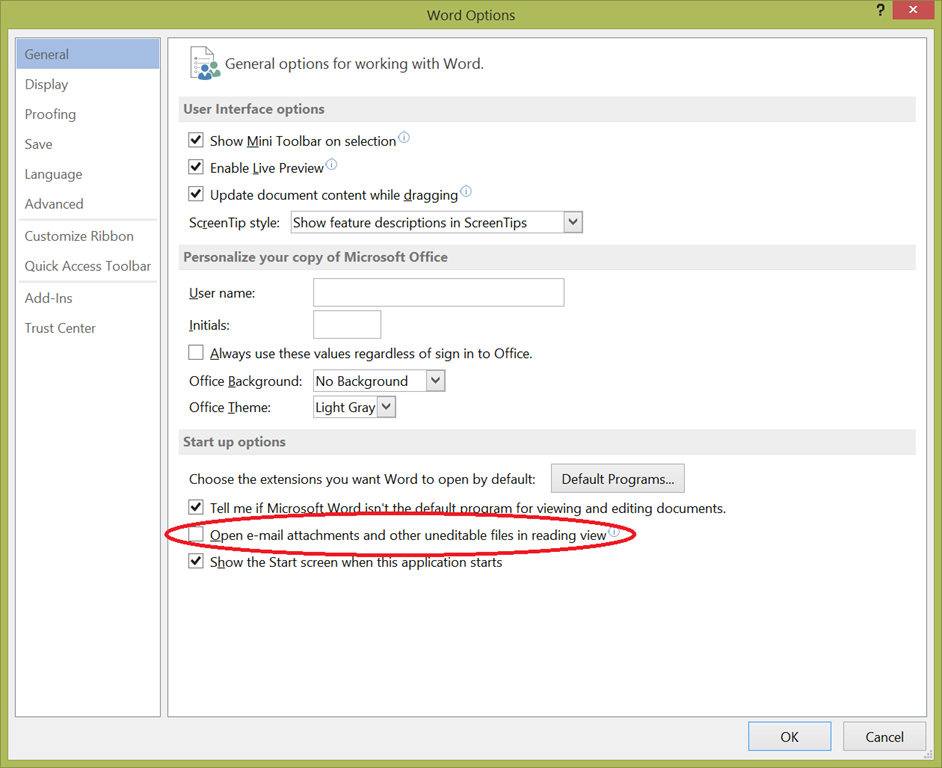 I’m sure this is written somewhere else but I’ve gotten tired of having Read Mode as the default viewer for Word 2013 files.
I NEVER, EVER, EVER use this mode. I always switch to Print Layout as I am almost always editing the document I’m opening, and thus it makes no sense for this view to every be used for me, much less the default. (?!?)
To make Word documents open in the “Print Layout” view instead of “Read Mode” when you first open the document, within Word 2013:
Comments Off on HOWTO: Disable Read Mode as the default view in Word 2013
Posted in Uncategorized
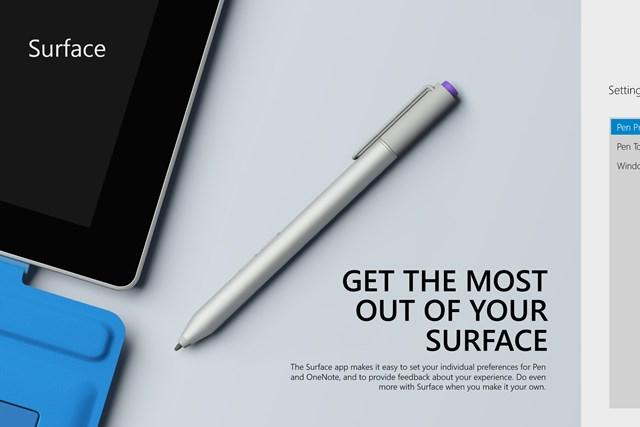 We have received feedback that customers want to include the Surface App (formerly Surface Hub App) to their custom Windows 8.1 image without going to the Windows Store.
Today we are solving this issue, by making the Surface App available over the Microsoft Download Center.
Customers can now download the Surface App, and make the App part of their own custom image – without the need of a Microsoft Account or access to the Windows Store.
Comments Off on RELEASE: Surface App now available for corporate image preinstall
Posted in Uncategorized
We’re all seeing it: more of our basic consumer experiences include technology in one way, shape or form, from mobile apps, loyalty, enhanced point-of-sale and direct customer engagement. These factors and more provide a platform for hospitality brands to differentiate themselves through digital touch points. Hospitality brands are transforming themselves to digital businesses by exploring new ways to serve their customers, including placing technology closer to the customer dining experience.
Join this unique webcast to hear from our Global Director for Hospitality & Travel, Greg Jones, as he discusses ways in which Microsoft is partnering with innovative companies to deliver unique restaurant experiences. Greg will be joined by Ziosk President & CEO, Austen Mulinder, as they discuss transforming the tableside dining experience.
During the webcast you will hear about:
Date: 5/21/2015
Time: 9:00 AM PDT
Duration: 30 minutes
Register:
https://vts.inxpo.com/scripts/server.nxp?LASCmd=AI:4;F:QS!10100&ShowKey=24593
Comments Off on WEBCAST: “Delivering a differentiated guest experience through tableside ordering” – May 21
Posted in Uncategorized
 Last month, Mark Russinovich, Microsoft Technical Fellow & Chief Technology Officer for Microsoft Azure, attended ChefCon 2015 and participated in a panel discussion entitled, “Have Your Bets on Open Paid Off?”
Watch the recording of Mark Russinovich and other industry leaders from Facebook & The Gap discuss the beneficial impact of openness:
Comments Off on VIDEO: Microsoft’s Mark Russinovich at ChefCon 2015 on “Openness”
Posted in Uncategorized
Do you find yourself in the desktop a lot on your Surface Pro? Tired of manually initiating the soft-keyboard to type things in when you’re using the device as a tablet?
Check out Tabtip On-Demand. I think it’s a must have for Surface Pro owners.
Tabtip On-Demand is a great tool for mobile users with Tablet PC which adds the missing keyboard « on-demand » functionality to the user’s desktop. It is also able to scroll through web pages and push application windows into view, thus textboxes are not covered by the keyboard. Tabtip On-Demand also makes the keyboard available by mouse click (optional) on the desktop as well as in the Modern UI (Windows 8 and above).
Many applications still run on the desktop rather than in the Modern UI. If you are one of those users who feel that the lack of keyboard showing up automatically on the desktop is just a pain, this tool is made for you.
If the tablet input panel is not available, Tabtip On-Demand pops up the on-screen keyboard (OSK) instead.
If you use the desktop a lot on your Surface Pro, while you’re walking around with it in tablet mode, check out Tabtip On-demand.
Comments Off on TOOL: Tabtip On-Demand for Surface Pro & other Windows Tablets(3rd Party)
Posted in Uncategorized
We’ve just announced that for folks that CAN’T make BUILD 2015 this year, you’ve have a second chance to hear what is presented by way of a new 25 city tour called the “BUILD tour”, coming this summer:
Bringing the Build experience to cities around the globe, featuring:
- Best of Build announcements and insights
- Deep dive in the Windows 10 developer platform for app and web developers
- Coding sessions and exciting demos across devices
- Partner showcases
- Open Q&A and face-to-face time with Microsoft engineers
- This is a free event
The event runs all day from 9AM-5PM. The general web site for all tour stops is available here:

There are 25 stops along the tour however for Los Angeles, the event will be on June 15 at Universal Studios, Hollywood. Register here:
Comments Off on EVENT: BUILD tour 2015 – Los Angeles tour stop, June 15, Universal Studios, Hollywood
Posted in Uncategorized

New conference coming for web developers interested in Project Spartan, Microsoft’s new browser & engine being released with Windows 10:
On May 5th and 6th, we’ll be hosting the Project Spartan Web Summit at Microsoft’s Silicon Valley campus in Mountain View, CA. This time we’re turning it up to 10 with two days of content packed with deep technical sessions from the Project Spartan team and fantastic guest speakers from the Web development community, including Kimberly Blessing, Kyle Simpson, and Sara Soueidan.
This is a great chance to come meet the engineers building our rendering and JavaScript engines and managing our Web properties and developer tools like Modern.IE, RemoteIE, and IEDevChat. In our technical sessions, you’ll get into the nuts and bolts of the latest interoperable Web technologies; learn how to make your site or Web app shine across browsers and platforms with tools like ECMAScript 6, WebAudio, WebGL, Cordova, SVG elements, and much more. We’ll take you under the hood of Project Spartan and its new rendering engine, show you the latest updates to our roadmap, and host open Q&A panels with the Project Spartan leadership.
You’ll also have the opportunity to test-drive Project Spartan on our latest builds alongside engineers from the platform team, who can guide your testing, answer questions, and take your feedback on any problems you encounter.
…
Read more at:
Comments Off on CONFERENCE: “Project Spartan” Web Summit, May 5th & 6th (Mountain View, CA)
Posted in Uncategorized
A customer of mine commented recently on the lack of color schemes or configuration available in Office 2013, saying that, “It was depressing.”
I hadn’t heard that angle before. It’s true that Office 2013 lacks the ability to change the color of the Office application UI from anything beyond White, Light Grey, and Dark Grey. Most of the time the complaint about this is that the bright white or even the greys were too bright on the user’s eyes – especially for folks that are light sensitive.
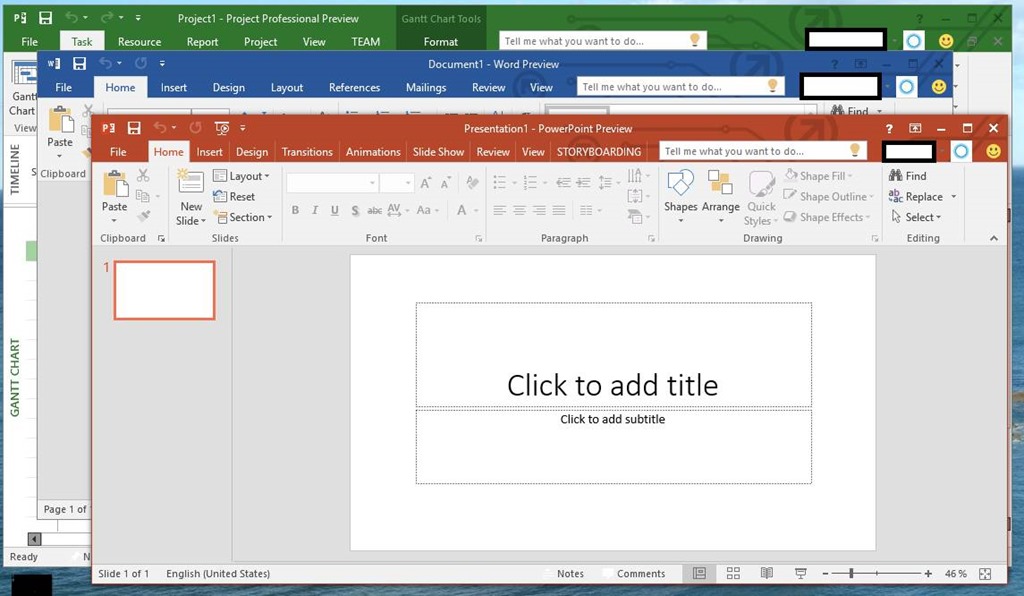 The good news is that Office 2016 appears to at least promise more color variation (see snapshot to the right of Office 2016 for Windows) however to what degree this is configurable, I can’t say.
So for for all you peeps that would like more color schemes & configurability in Office 2016, you may want to upvote up this feedback to the Office team & specifically comment on why you would like to see this change made… before Office 2016 ships later this year:
Comments Off on INFO: Feedback on more color schemes & configurability in Office 2016 UI
Posted in Uncategorized

 kurtsh
 Kurt Shintaku's Blog
You must be logged in to post a comment.