Group Policy tools use Administrative template files to populate policy settings in the user interface. This allows administrators to manage registry-based policy settings.

Also the documentation below are spreadsheets that list the policy settings for computer and user configurations that are included in the Administrative template files delivered with the Windows operating systems specified. You can configure these policy settings when you edit Group Policy Objects.

Posted by: kurtsh | August 7, 2015

RELEASE: Team Foundation Server 2015

imageYesterday, we released the final version of Team Foundation Server 2015.  TFS 2015 is a major step forward, with tons of improvements throughout the development process but with special emphasis on DevOps capabilities.

Here are all of the TFS 2015 related downloads.  Look under Visual Studio 2015 for things like Test Professional, under Team Foundation Server 2015 for TFS, Project Server, etc. and under Tools for Visual Studio 2015 for Release Management, Test Agents, etc.

Read more here:

Posted by: kurtsh | August 7, 2015

INFO: IE11… “The End is Near”

I’ve been asked to send this notification to everyone at my customer responsible for web-based solutions & browser deployment/management/lifecycle and I thought I’d post the content of the email here for your reference in case you didn’t get it.

Anyway, here’s the email:

image

I’d like to make sure you are aware of Microsoft’s web browser direction with Internet Explorer 11 and Microsoft Edge in Windows 10, and reasons why your organization should begin moving to IE11 today. Internet Explorer 11 provides increased performance, improved security, better backward compatibility, and support for the modern web technologies that power today’s websites and services.

Last year Microsoft announced that after January 12, 2016 Internet Explorer 11 will be the only supported version of Internet Explorer on Windows 7, Windows 8.1 and Windows 10. This means that in order to receive IE updates – including security updates and technical support – your organization needs to upgrade to IE11 if you have not done so already. Using Internet Explorer 11 on Windows 7 ensures continued support after January 12, 2016, and easier upgrades to Windows 10.

It’s easier than ever to upgrade to IE11 thanks to Enterprise Mode, Enterprise Site Discovery, and other features.  According to a Forrester Consulting study, the Total Economic Impact of Internet Explorer 11, customers using Enterprise Mode backward compatibility were able to upgrade about twice as fast–and save money by doing so.

Microsoft offers numerous online, self-service support resources for customers and partners who wish to migrate to the latest version of Internet Explorer, many of which can be found at Microsoft’s Internet Explorer TechCenter website.

If you would like hands-on guidance, Microsoft has a number of deployment and compatibility services available to assist with migrations, including Microsoft Services Support, Microsoft Consulting Services and through partners on Microsoft Pinpoint.  I would be glad to assist you further by connecting you to these great resources.

Next Steps Requested of You:

  1. Please confirm you have received this email.
  2. Provide the approximate number of desktops in your organization currently running IE8, IE9, IE10 (if known) that are impacted by this upgrade request.
  3. Watch this video about Microsoft’s browser roadmap.
  4. Share a more detailed technical video with your IT teams who will manage the IE migration.

Last, if there is a person directly responsible for Internet Explorer support that I didn’t reach on this email, please forward to them and ask them to reach out to me for assistance if needed.

Thank you for your time and please let me know if you’d like to continue receiving information like this from me. If not, I can remove you from my distribution list.

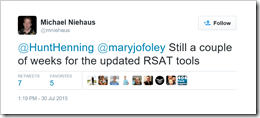
imageAs of July 30th, 2015, the Remote Server Administration Tools for Windows 10 are still a couple weeks away according to Sr Windows PM Michael Niehaus:

Still a couple of weeks for the updated RSAT tools

https://twitter.com/mniehaus/status/626849596703178757

The RSAT tools Tech Preview download is still posted but I don’t believe it works on build 10240 (the “RTW”) as it stopped working as of build 10122.

Remote Server Administration Tools for Windows 10 Technical Preview lets IT administrators manage Windows Server Technical Preview from a remote computer running Windows 10 Insider Preview or Windows 10 Technical Preview. It does not run on the May 2015 release of Windows 10 Insider Preview, build number 10122. An RSAT package will be available shortly after Windows 10 RTM.

https://www.microsoft.com/en-us/download/details.aspx?id=45520

image

I think this will be a brand new cloud addition to Dynamics CRM Online.

I’m excited to announce that Microsoft has acquired Incent Games Inc., the developer and owner of FantasySalesTeam, an innovative sales gamification platform that’s helped hundreds of companies boost sales productivity, drive revenue and improve CRM adoption through collaboration and team based competition. The benefits of this creative and popular feature will soon be available for our customers to help them incentivize their sales teams to new heights and better results.

Read more here:

Posted by: kurtsh | August 4, 2015

RELEASE: Microsoft Identity Manager 2016

imageFor those working on Office 365, this is likely pretty important. 

Microsoft Identity Manager 2016 is the successor to Forefront Identity Manager 2012 R2.  It provides a variety of functions related to identity & access management and is an on-premises implementation.

  • Synchronize identities between directories, databases and applications
  • Self-service password, group and certificate management
  • Increase admin security with policies, privileged access and roles (RBAC)

It’s designed to work out of the box with Microsoft’s cloud including:

  1. Azure Active Directory and enabling synchronization between on-premises AD
  2. Password reset through Azure Multi-factor Authentication
  3. Dynamics grouping based on roles including serial or parallel

For more information, go to the following:

imageThis is a pretty important question, answered on our Microsoft Community Answers forum. 

The net-net is you MUST upgrade via the free upgrade offer before you wipe your PC’s hard drive in order to make it possible to reinstall & activate at no cost in the future.  The free upgrade process registers your computer’s hardware footprint in the cloud so that in the future, if you wipe & reload Windows 10 on your PC, it’ll automatically reactivate on it’s own based on the consistency of your hardware.

Q: Can I clean re-install Windows 10 after upgrading?

A: Once your device upgrades to Windows 10 using the free upgrade offer and activates online automatically, an entitlement is registered to your PC’s hardware for your edition of Windows 10.  (If you go to Settings  >> Update & Security >> Activation says “Windows is activated”.)  Now you will be able to clean install (i.e. boot from media and install Windows 10) the same edition of Windows 10 seamlessly without having to enter a product key.

  1. Make sure your PC is activated by going to the Settings >> Update & Security >> Activation. 
    If the activation has not completed, you can click the Activate Now button to complete the activation process.

  2. Create your installation media for the appropriate edition of Windows 10 by clicking here.  (http://go.microsoft.com/fwlink/p/?LinkId=617364)

  3. Skip entering the product key during Windows 10 Setup. Windows 10 will activate online automatically on such devices. The skip option is only available when booting from media and launching Windows 10 setup

The automatic online activation will occur seamlessly after clean installing Windows 10 if the device had previously upgraded and activated online, with the same edition of Windows 10.

You CANNOT activate Windows 10 using a Windows 7 or Windows 8/8.1 product key. Upgraded Windows 10 PCs do NOT use unique product keys for Activation – all upgraded Windows 10 PCs use the same generic product key that activates ONLY if you launched upgrade while booted in your Windows 7/8 system.

Keep in mind that if the hardware configuration of your Windows 10 device changes significantly (e.g. motherboard change) Windows 10 may require re-activation on the device. This is the same experience as prior versions of Windows (e.g. Windows 7 and Windows 8.1) and you’ll need to contact Support.

(Taken from:
http://answers.microsoft.com/en-us/windows/forum/windows_10-windows_install/can-i-clean-re-install-windows-10-after-upgrading/f59fb5bd-21a5-4010-8a39-7b975611b73b?auth=1)

Grab this tool for future use:

Posted by: kurtsh | August 1, 2015

INFO: Minecraft in Education

“Can we change the way we learn?”

Many teachers have already incorporated Minecraft into their curriculum as the game actually aligns with common core in many areas.

But what can be done to use Minecraft uniformly amongst educators to provide them with a baseline for making Minecraft a fun and valuable part of children’s schooling.

Here’s a new effort around Minecraft in Education:

Minecraft in Education

Check out the new initiative here:

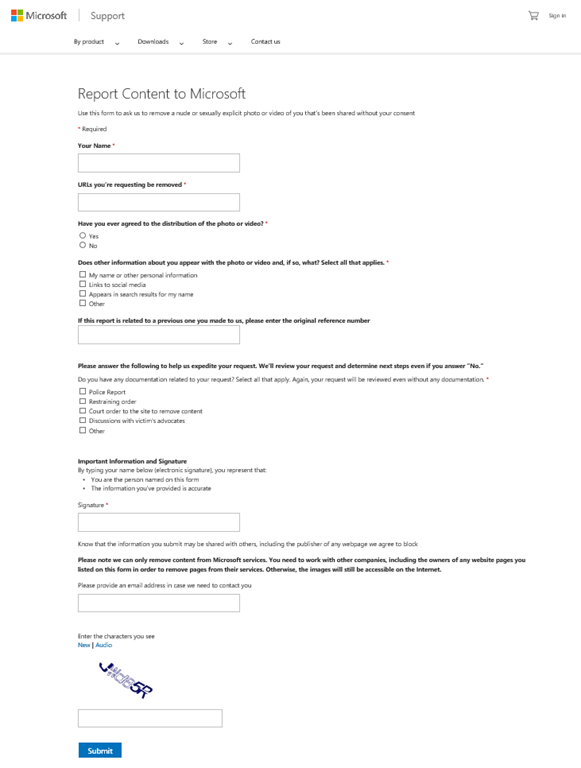
imageJacqueline Beauchere, chief online safety officer, Microsoft, disclosed a new online reporting webpage from Microsoft to enable victims of revenge porn to request the removal of their images from Bing search results, or from images shared on Microsoft OneDrive or Xbox.

Revenge porn – explicit images shared online without a victim’s consent – is a growing online safety problem with significant consequences for its victims.

Read about Microsoft’s effort to help put victims back in control of their images and their privacy here:

imageWe announced 6 primary editions of Windows 10 that will be coming with the release of the product.

Read more here:

——————

Resources:

  • Looking for technical resources?
    Windows 10 helps you reduce the complexity and cost of IT management with new identity and device management choices as well as continued investments in the things you depend on today.
    https://technet.microsoft.com/en-us/windows/cc468658.aspx
  • Looking for Developer resources?
    Getting started on Windows 10 is easier than you think; the tools are free, the code samples are solid, and you can start building and running Universal Apps for Windows 10 today.
    http://dev.windows.com/

« Newer Posts - Older Posts »

Categories