Posted by: kurtsh | September 7, 2015

BETA: Windows Server 2016 Containers Preview

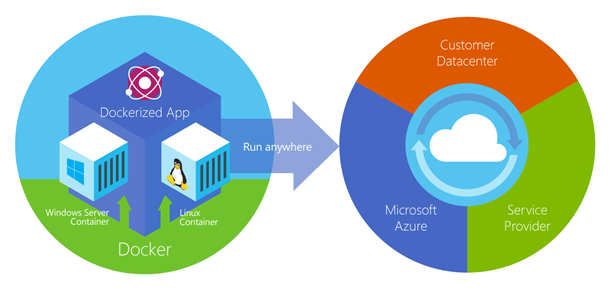
imageI’m a little late posting this but I’ve been out of office for a while.  In case you hadn’t heard already, we’ve launched the beta preview of our Docker Engine-compliant Containers technology. 

Executed in partnership with Docker Inc. itself, this preview release includes:

  • Windows Server Containers
  • Formal Support for Windows in Docker
  • Docker Engine for Windows
  • Visual Studio Tools for Docker

To be clear, this means:

  1. Microsoft is fully supporting Docker Containers for application deployment & management across Windows Servers.  This means we are working with Docker Inc. to ensure Containers on Windows Servers are manageable & can be targeted by Docker Engines wherever they are running within the Enterprise.
  2. Microsoft Support & Development Tools will support Windows applications deployed to Docker Container technology & the Docker Engine running on Windows Server.
  3. The Docker Engine will be implemented on Windows Server, allowing Microsoft customers to manage their Docker Container infrastructure while leveraging their existing Microsoft licensing & support contracts.

(Note: A common misconception is that Containers are platform interoperable – this is not true.  Windows Application Services will not work in Docker Containers running on Linux Servers – and Linux applications running in Docker Containers will not run on Windows Servers.  The Containers & the applications themselves have hooks to the underlying operating system and are not abstracted from the OS.)

Here’s the first part of the announcement:

At DockerCon this year, Mark Russinovich, CTO of Microsoft Azure, demonstrated the first ever application built using code running in both a Windows Server Container and a Linux container connected together. This demo helped demonstrate Microsoft’s vision that in partnership with Docker, we can help bring the Windows and Linux ecosystems together by enabling developers to build container-based distributed applications using the tools and platforms of their choice.

Today we are excited to release the first preview of Windows Server Containers as part of our Windows Server 2016 Technical Preview 3 release. We’re also announcing great updates from our close collaboration with Docker, including enabling support for the Windows platform in the Docker Engine and a preview of the Docker Engine for Windows. Our Visual Studio Tools for Docker, which we previewed earlier this year, have also been updated to support Windows Server Containers, providing you a seamless end-to-end experience straight from Visual Studio to develop and deploy code to both Windows Server and Linux containers. Last but not least, we’ve made it easy to get started with Windows Server Containers in Azure via a dedicated virtual machine image.

Read more at:

imageLooking for more information on implementing Bitlocker Administration & Monitoring?  You’re in luck.

Here’s some of the major pages for MBAM:

  • PRODUCT SITE: Bitlocker Administration & Monitoring
    Microsoft BitLocker Administration and Monitoring (MBAM) provides enterprise management capabilities for BitLocker and BitLocker To Go. MBAM simplifies deployment and key recovery, provides centralized compliance monitoring and reporting, and minimizes the costs associated with provisioning and supporting encrypted drives.
    https://technet.microsoft.com/en-us/windows/hh826072
  • TECHNET DOCS: Microsoft BitLocker Administration and Monitoring 2.5
    Microsoft BitLocker Administration and Monitoring (MBAM) 2.5 provides a simplified administrative interface that you can use to manage BitLocker Drive Encryption. You configure MBAM Group Policy Templates that enable you to set BitLocker Drive Encryption policy options that are appropriate for your enterprise, and then use them to monitor client compliance with those policies. You can also report on the encryption status of an individual computer and on the enterprise as a whole. In addition, you can access recovery key information when users forget their PIN or password or when their BIOS or boot record changes. For a more detailed description of MBAM, see About MBAM 2.5.
    https://technet.microsoft.com/en-us/library/dn645379.aspx
     
  • DATASHEET: Microsoft Desktop Optimization Pack – Microsoft Bitlocker Administration & Monitoring
    Organizations around the world rely on Windows® BitLocker® Drive Encryption and BitLocker To Go to protect data on Windows 7, Windows 8, Windows to Go, and removable storage devices, and to make large-scale BitLocker implementations easier to manage, many are turning to Microsoft® BitLocker Administration and Monitoring (MBAM).
    Microsoft BitLocker Administration and Monitoring 2.0 – from the Microsoft Desktop Optimization Pack (MDOP) for Software Assurance – takes BitLocker to the next level by simplifying deployment and key recovery, centralizing compliance monitoring and reporting, and minimizing the costs associated with supporting encrypted drives within your organization.
    http://download.microsoft.com/download/A/9/1/A91C185B-B8E0-4760-A930-1DA4C87BEAC4/MDOP_MBAM_Datasheet_0313.pdf
     
  • REFERENCE: Microsoft BitLocker Administration and Monitoring Deployment Guide
    This guide helps you choose a deployment method for MBAM and provides step-by-step instructions for each method.
    https://www.microsoft.com/en-us/download/details.aspx?id=38398
     
  • TRAINING: BitLocker Deployment Using MBAM Is a Snap! (1hr 15min)
    Are you frustrated about the hoops you have to jump through to get BitLocker enabled on your devices? Come learn about how new enhancements to MBAM can help you easily enable BitLocker during imaging. MBAM can also increase your success rate while deploying BitLocker to existing machines in your fleet. The session walks you through using MBAM in an MDT task sequence to escrow TPM OwnerAuth even if MBAM doesn’t own the TPM, backup recovery keys immediately even if the device is encrypting, enable BitLocker, and seamlessly handle BitLocker pre-provisioning scenarios.
    https://channel9.msdn.com/events/Ignite/2015/BRK2331
     
  • FORUMS: Bitlocker Admnistration & Monitoring Technet Forums (Q&A)
    https://social.technet.microsoft.com/Forums/en-US/home?forum=mdopmbam
     
  • USERVOICE: MBAM UserVoice Feedback Site
    Welcome to the Microsoft BitLocker Administration and Monitoring customer feedback site! Please submit your ideas or vote for one of the current features suggested below. The engineering team is actively monitoring the site and we want to hear from you!
    https://mbam.uservoice.com/forums/268571-microsoft-bitlocker-administration-and-monitoring
     
  • VIDEO DEMOS: Microsoft Bitlocker Administration & Monitoring
    Learn how to use the Microsoft Desktop Optimization Pack (MDOP)—a dynamic, desktop solution available to Software Assurance customers—to help you reduce application deployment costs, deliver applications as services, and better manage and control your enterprise desktop environments.
    https://technet.microsoft.com/en-us/windows/microsoft-desktop-optimization-pack-technologies.aspx
     
  • WHERE TO DOWNLOAD: Finding & getting the software for Bitlocker Administration & Monitoring (MBAM)
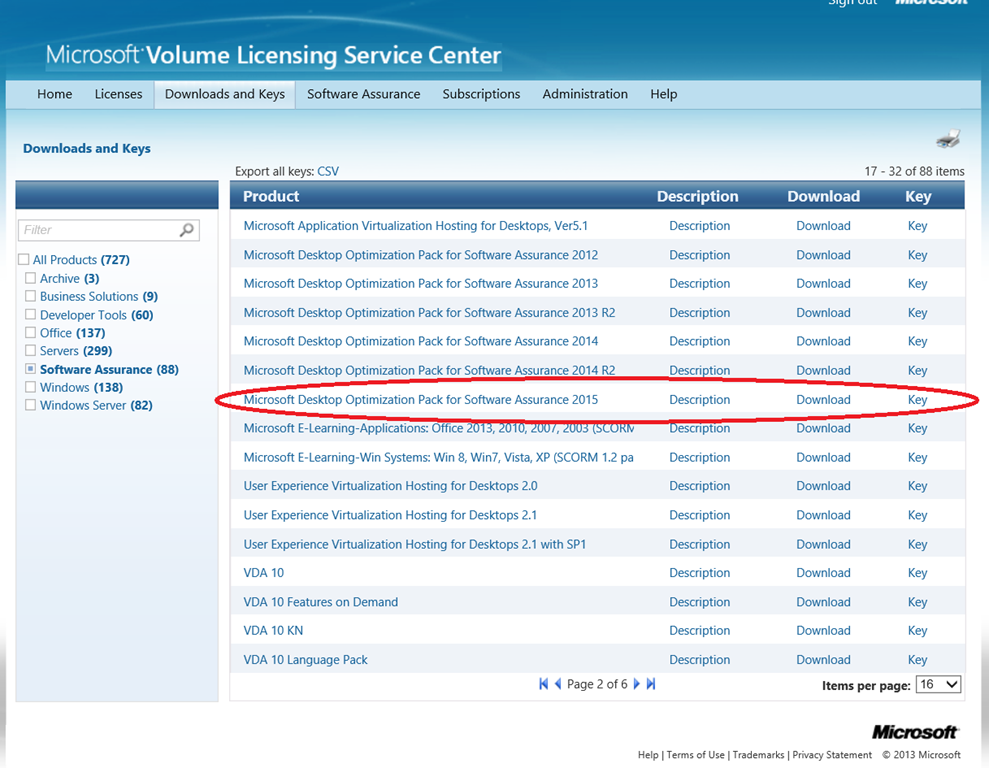
    The software for MBAM 2.5 is available in the downloadable package for Microsoft Desktop Optimization Pack 2015.  It can be found in the Downloads section of the Volume Licensing Service Center under the “Software Assurance” area (since it’s use requires having Software Assurance on all Windows PCs MDOP will be applied to.  Again, this is ONLY available to Volume Licensed customers with Software Assurance on the licenses of Windows MDOP software will be applied to.

image

imageMany folks are looking to get rid of .PST files in their organization – especially with the introduction of Office 365 to their company. 

Some want to get rid of them because they’re a cause of dissatisfaction & help desk calls for their users.  Others are concerned that it’s a legal liability to have old email stored away in an archive that they may be responsible for from a eDiscovery standpoint.

Either way, there are tools available to help you inspect systems throughout your network for these “buried” .PST files:

Alternatively, if PST Capture doesn’t do everything you need it to do, there’s 3rd party tools:

imageAre you a IT support professional that is responsible for troubleshooting Microsoft technologies?  Have you been watching “The Defrag Show” on Channel 9, featuring Larry Larsen & Gov Maharaj.  If not, you might want to check out this weekly 30min video broadcast.

Here’s some of the broadcasts available on-demand from the past few months:

Send your questions to Send your questions to DefragShow@Microsoft.com.  All 117 episodes are available at:

This document specifies some of the most common Microsoft Azure limits. Note that this does not currently cover all Azure services. Over time, these limits will be expanded and updated to cover more of the platform.

NOTE: If you want to raise the limit above the Default Limit, you can open an online customer support request at no charge. The limits cannot be raised above the Maximum Limit value in the tables below. If there is no Maximum Limit column, then the specified resource does not have adjustable limits.

It’s important to know that this is a living document and changes as limits are adjusted.  Please keep this in mind when referencing these numbers.

If you own a Surface, you probably know that there are times when the device can magically wake itself up in your bag or in it’s carrying case.  You end up with an overheated device and your battery drained considerably.

Much of the time, the reason for this is the Surface keyboard, which when moved can wake the device up.  The solution is to disable the keyboard’s ability to wake your Surface.

DISABLING THE KEYBOARD’S ABILITY TO WAKE COMPUTER:
To fix this, follow these steps:

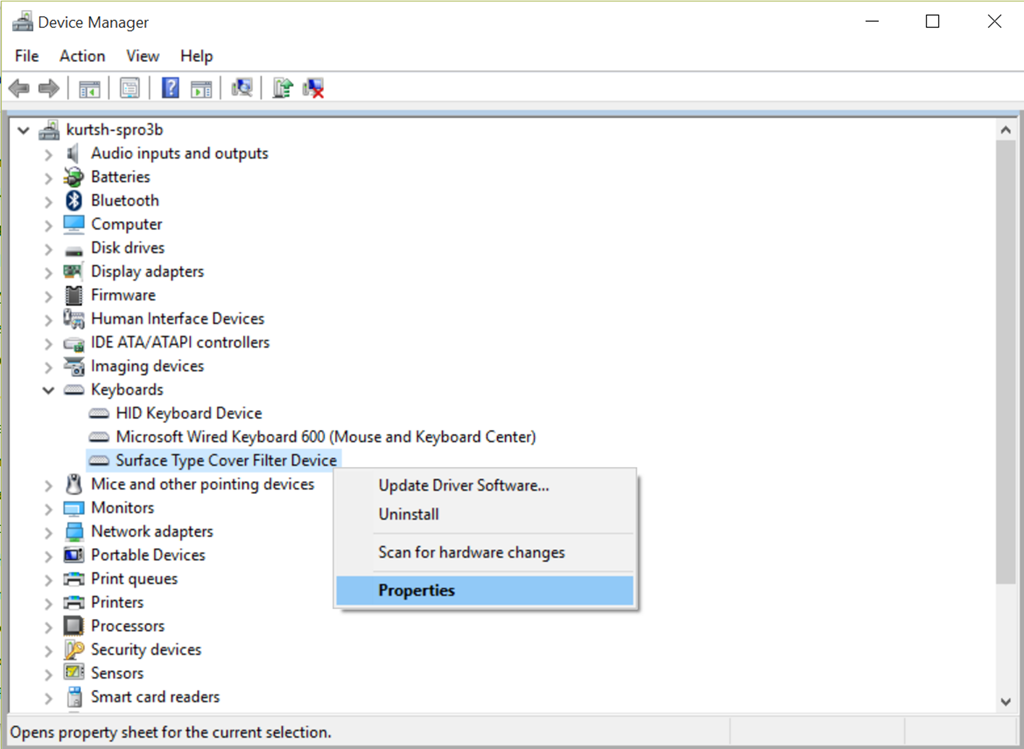
1.  Go to Device manager—> Keyboards –> Surface Typecover Filter Device

2.  Select Properties

image

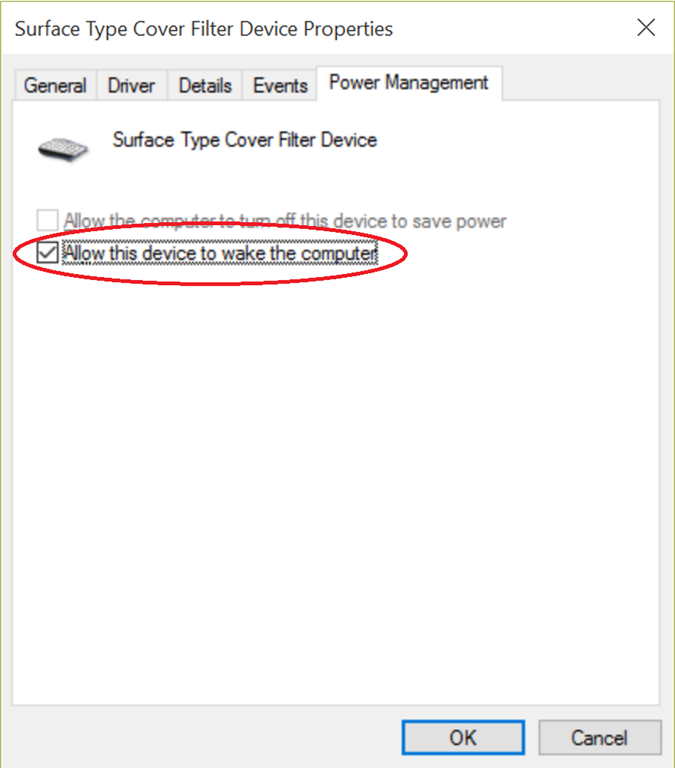
3.  Select the Power Management tab.

4.  Uncheck the box entitled, “Allow this device to wake the computer”.

image

5.  Reboot.

UPDATE 8/26/15:
Found this post on How-To Geek that’s more extensive than mine.  It helps determine the cause of the wake up and highlights the fact that it could be your mouse too.  Check it out. 

image

Anyone else remember the Pacific Design Center launch of Windows 95?  Or the launch at Marriott’s Great America in Santa Clara?

If you do, you’re in for a treat!

TODAY ONLY:
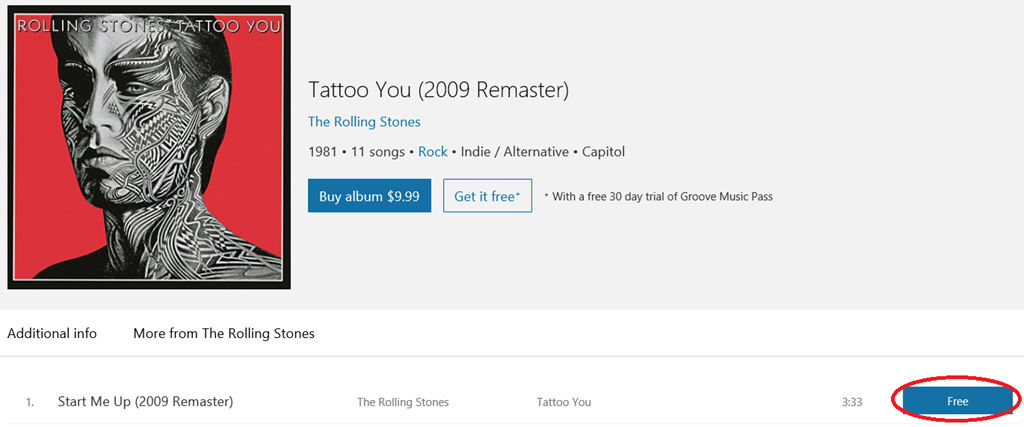
The Rolling Stones “Start Me Up” is available for FREE on Groove Music to celebrate the 20th anniversary of Windows 95.

image

Microsoft is hosting a charity poker tournament at Microsoft in Playa Vista in partnership with The Peace Fund & Adrian Paul. (Duncan MacLeod of “The Highlander”)

The Peace Fund is about changing the lives of children in need around the world. All proceeds from this year’s event will go to fund top organization initiatives, putting your donations to work where support is needed the most.

COME PLAY POKER WITH CELEBS & POKER PROS!
One thing that’s fun about the 2015 Peace Fund Poker Tournament is that The Peace Fund & Adrian Paul have invited several dozen celebrities & professional poker players.  All participants in the tournament will be able to play along side some some fantastic names like Lou Diamond Phillips, the UFC’s Bruce Buffer, & my personal favorite, “Apollo Creed” himself, Carl Weathers. 

WIN A SEAT AT THE WSOP!
The tournament winner will win a seat at the World Series of Poker.

  • imageDATE/TIME:
    September 26th, 2015
    Doors open at 11:00AM; Tournament starts at 1:00PM
     
  • LOCATION:
    Microsoft Playa Del Rey
    13031 W. Jefferson Blvd, Ste 200
    Los Angeles, CA 90094
     
  • REGISTRATION:
    http://www.peacefundpoker.org 

imageWe’ve made available several advisories/documents that Gartner has written about Windows 10 at no cost to you.  Enjoy.

NOTE:  These are part of our new Windows for Business web site here at Microsoft.  Try it out!  There’s lots of good stuff there and we’ve now brought together all Windows web sites into a single view for the Enterprise:

image

Remote Server Administration Tools for Windows 10 lets IT administrators manage Windows Server Technical Preview from a remote computer running the full release version of Windows 10.

Remote Server Administration Tools for Windows 10 includes Server Manager, Microsoft Management Console (MMC) snap-ins, consoles, Windows PowerShell cmdlets and providers, and command-line tools for managing roles and features that run on Windows Server Technical Preview.

Remote Server Administration Tools for Windows 10 can be used to manage roles and features that are running on Windows Server Technical Preview, with the following exceptions:

  • DHCP Tools. Dhcpmgmt.msc is not available in this release of RSAT, but equivalent Windows PowerShell cmdlets are available.
  • IP Address Management (IPAM) Tools. IPAM tools are not available in this release of RSAT.
  • Network Policy Server Tools. The NPS console is not supported on a Windows client-based operating system, and will be removed from future releases of RSAT.
  • Routing and Remote Access Tools. Routing and Remote Access Tools that are GUI-based cannot be used for remote configuration in this release of RSAT, but the equivalent Windows PowerShell cmdlets are available.

Download the tools here:

« Newer Posts - Older Posts »

Categories