Exciting news for folks trying to get off of AD FS! As announced on the Microsoft Entra blog:

“We’re excited to announce that the migration tool for Active Directory Federation Service (AD FS) customers to move their apps to Microsoft Entra ID is now generally available! Customers can begin updating their identity management with more extensive monitoring and security infrastructure by quickly identifying which applications are capable of being migrated and assessing all their AD FS applications for compatibility. “

In November we announced AD FS Application Migration would be moving to public preview, and the response from our partners and customers has been overwhelmingly positive. For some, transitioning to cloud-based security is a daunting task, but the tool has proven to dramatically streamline the process of moving to Microsoft Entra ID.

A simplified workflow, reduced need for manual intervention, and minimized downtime (for applications and end users) have reduced stress for hassle-free migrations. The tool not only checks the compatibility of your applications with Entra ID, but it can also suggest how to resolve any issues. It then monitors the migration progress and reflects the latest changes in your applications. Watch the demo to see the tool in action.

Read more at:

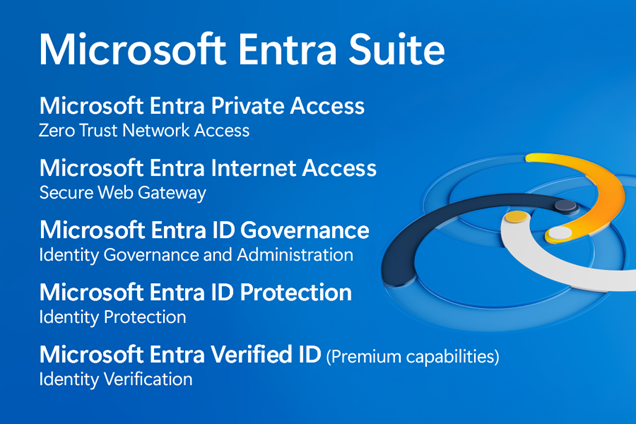
Join us August 14th for a deeper dive into the Microsoft Entra Suite. Get to know the industry’s most comprehensive secure access solution for the workforce. Learn how you can unify identity and network access security–providing you with the ability to verify users, prevent overprivileged permissions, improve detection, and enforce granular access controls for all users and resources.

Microsoft Entra Suite Tech Accelerator – August 14, 2024

Start timeSession title
7:00 a.m. PTSecure access for your workforce with the Microsoft Entra Suite
7:30 a.m. PTAsk Microsoft Anything: Discover the Microsoft Entra Suite
8:00 a.m. PTA closer look at Microsoft Entra Internet Access
8:30 a.m. PTGet to know Microsoft Entra Private Access
9:00 a.m. PTAsk Microsoft Anything: Security Service Edge (SSE)

Why RSVP here and on the session pages?

RSVP to save your spot, receive event reminders, and post your questions—either in advance or during the event.
Note: You must be signed into the Tech Community to RSVP and participate in the live Q&A, but sessions can be viewed without signing in.

Date/Time:
Wednesday, Aug 14, 2024
07:00 AM – 09:30 AM (PDT)

Registration:
(This is mandatory to access & participate in Q&A)

  1. Visit this page.
    (https://techcommunity.microsoft.com/t5/tech-community-live/microsoft-entra-suite-tech-accelerator/ev-p/4189272)
  2. Sign in in the upper right corner.
  3. Find the “RSVP to entire event” button
    (Note: This button will only be displayed if you are signed in.)
  4. Press either the “GOING” or “MAYBE” buttons from the dialog that appears.

  5. Add the event to your calendar via the button near the title.


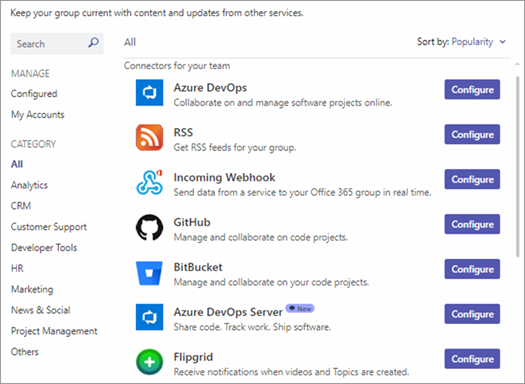
Starting August 15, 2024, Microsoft will retire the Office 365 connectors feature in Teams, and all new Connector creation will be blocked within all clouds. (Clouds include Public, GCC, and GCCH).

Existing Office connectors need to be migrated to Workflows before October 1, 2024, when all connectors will stop functioning

Why?

As taken from the deprecation announcement: “We recommend Power Automate workflows as the solution to relay information into and out of Teams in a … secure way. Power Automate workflows… provide maximum security of your information. These changes are aligned to the Microsoft Secure Future Initiative, and our company-wide priority to safeguard our customers from cyber threats.

FAQ

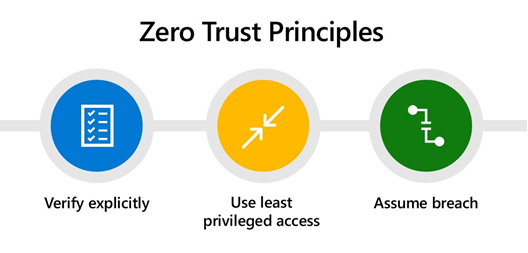
Cybercriminals have embraced emerging technologies like AI as quickly as the rest of the world. In today’s rapidly evolving threat landscape, your Zero Trust strategy has become more essential than ever.  Learn how to bolster your Zero Trust strategy with innovative solutions that’ll help you stay ready for changes to the threat landscape at the Zero Trust in the Age of AI spotlight on July 31.

Join us to learn how to:

  • Simplify your Zero Trust strategy and deployments with new solutions.
  • Unify identity and network access controls to proactively secure access to any application or resource from any location.
  • Extend Zero Trust requirements to all endpoints, apps, and data.

You’ll also hear about the latest end-to-end security innovations and get recommendations for advancing your Zero Trust strategy in a panel discussion with a Forrester analyst and a customer.

Speakers:

  • Vasu Jakkal – Corporate Vice President, Security, Compliance, Identity, and Management, Microsoft
  • Carlos Rivera – Senior Analyst, Forrester
  • Gary McLellan – Head of Engineering Frameworks & Core Mobile Apps, Virgin Money
  • Irina Nechaeva – General Manager, Identity Product Marketing, Microsoft
  • Scott Woodgate – General Manager, Threat Protection, Microsoft
  • Anupma Sharma – Principal Group Product Manager, Microsoft

Date/Time:
Wednesday, July 31, 2024 10:00 AM–11:00 AM Pacific Time 

Registration:
https://info.microsoft.com/ww-landing-zero-trust-in-the-age-of-ai.html?lcid=en-us/&ocid=cmmydx1q9zb

Posted by: kurtsh | June 27, 2024

INFO: NTLM Deprecation in Windows coming H2 CY2024

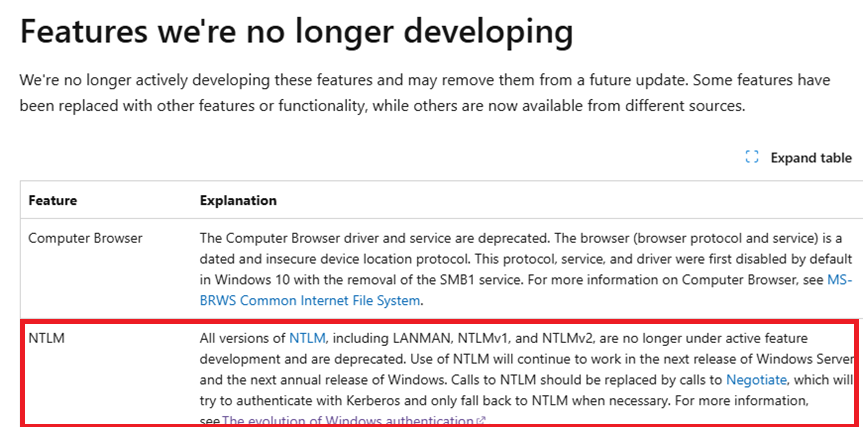
Deprecating NT LAN Manager (NTLM) has been a huge ask from our security community as it will strengthen user authentication, and so we are announcing that deprecation of NTLM is planned in the 2nd half of 2024 in Windows.

Why?

  • No server authentication (read: can’t verify malicious authentication servers)
  • Legacy MD4 encryption used for hashing password (read: weak & guessable)
  • Password submitted not salted (read: offline crackable)
  • Only supports password-based authentication (read: no certs, biometrics, MFA, FIDO, etc.)
  • Bugs (read: vulnerabilities)

Read more at:

Government organizations have numerous requirements around document translation:

  • Intelligence and Security: Translating foreign documents and communications to monitor threats and understand global dynamics.
  • International Cooperation and Alliances: Translating treaties, agreements, and training materials in support of global military alliances.
  • Local Engagement and Stability Operations: Translation in support of humanitarian, disaster relief, and local engagement.
  • Technical and Equipment Manuals: Translation required to ensure correct use and maintenance of diverse technologies and equipment. While international support often includes financial and equipment aid, a significant challenge arises when equipment manuals are not in the recipient’s native language. This impedes the effective and timely use of the equipment, highlighting the critical need for document translation to ensure the success of missions.
  • Government Communications: Translating official communications, public service announcements, and information about public health, safety, and welfare ensures that all members of a diverse population have access to important information.
  • Immigration Services: Translating documents related to immigration, visas, and citizenship services helps streamline the process for both applicants and the authorities.

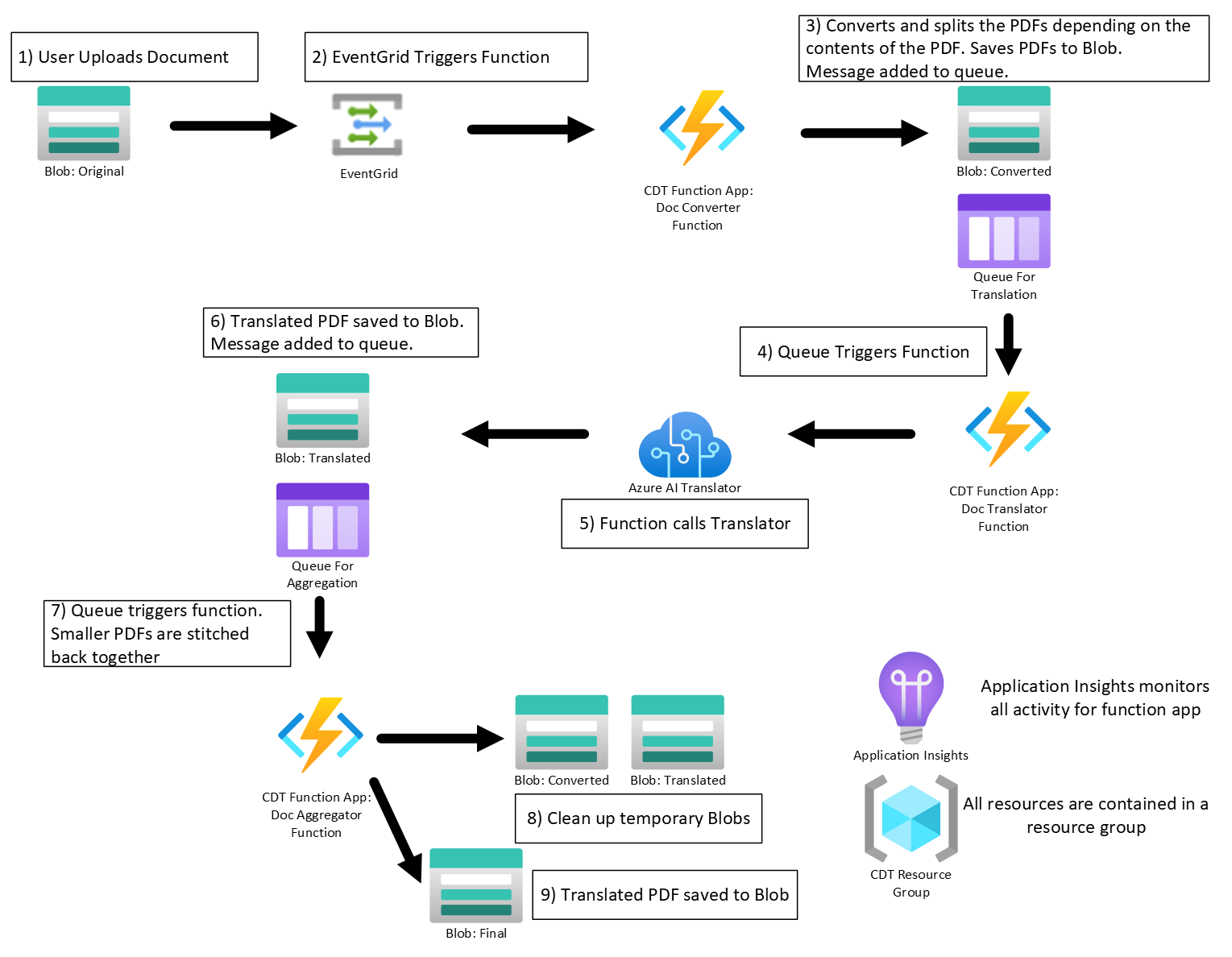
Microsoft’s open source Comprehensive Document Translation Solution offers the perfect balance between the accuracy of digital text-only documents and the completeness of scanned documents. The CDTS solves this problem through a “Hybrid Translation” approach. The Hybrid Translation process splits the digital PDF into two files. One file is a digital document that contains all the pages that are text-only. The other file is a scanned document that contains all the pages that have images, including images embedded with text. The solution then translates both files separately. By translating both, we get the most accurate translation and layout of text-only digital documents and the completeness of scanned documents.

After both versions are translated, the solution then “stitches” back together the complete document, in the correct page order, taking the best and most accurate translation of each page from either the digital or scanned document.

For more information, read the announcement page at:

Posted by: kurtsh | June 21, 2024

TRAINING: Copilot for Microsoft 365 (Pacific Time)

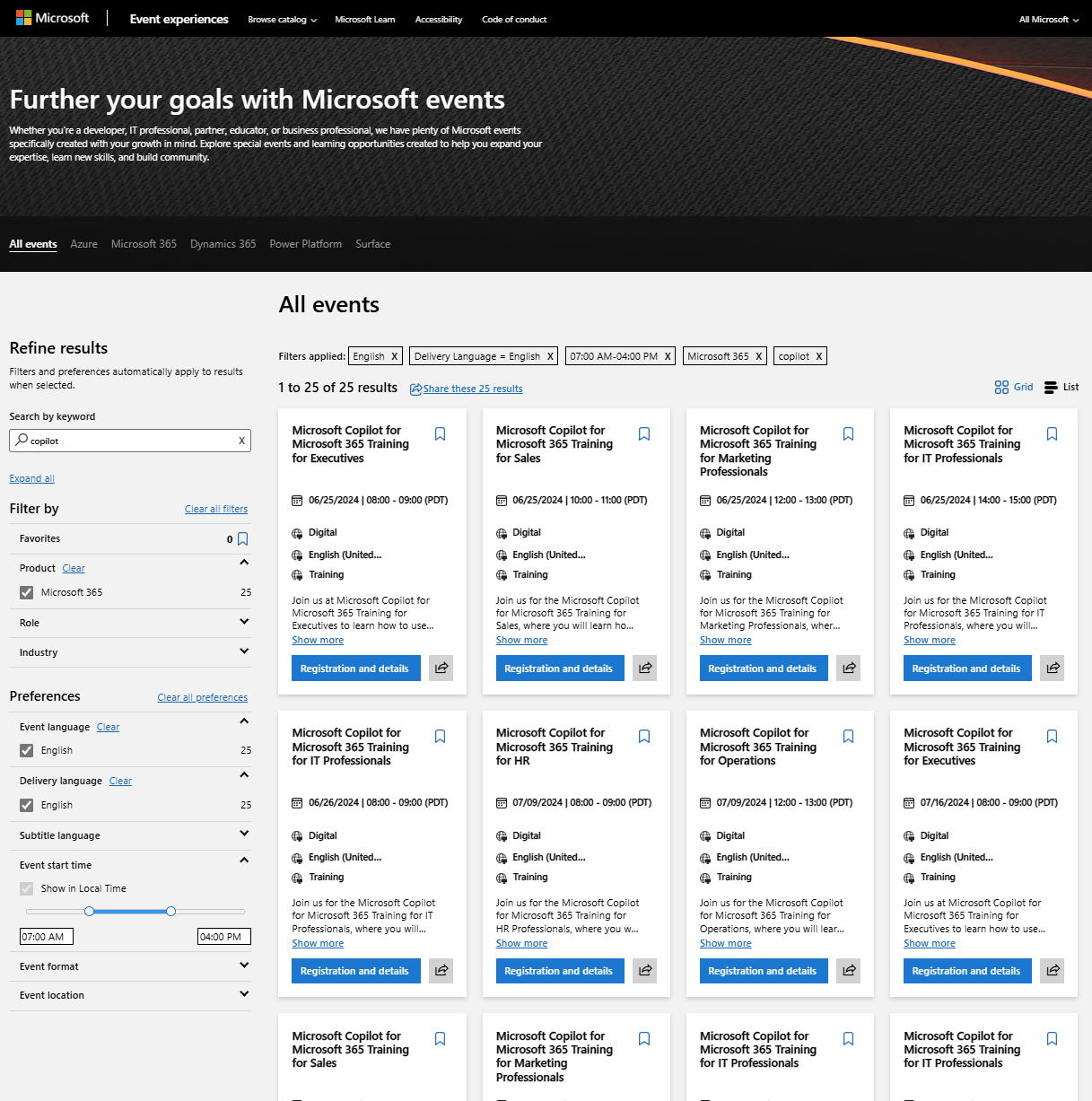
We are running an assortment of free-to-register events for end users & IT Professionals around Copilot for Microsoft 365. Take a look at these scheduled events to register for anything you’re interested in:

Event Experiences – Copilot for Microsoft 365

  • Microsoft Copilot for Microsoft 365 Training for Executives
  • Microsoft Copilot for Microsoft 365 Training for Sales
  • Microsoft Copilot for Microsoft 365 Training for Marketing Professionals
  • Microsoft Copilot for Microsoft 365 Training for IT Professionals
  • Microsoft Copilot for Microsoft 365 Training for HR
  • Microsoft Copilot for Microsoft 365 Training for Operations
  • Microsoft Copilot for Microsoft 365 Training for Finance

Virtual Briefings (Webinars) – Copilot for Microsoft 365

  • Unlocking AI-Powered Productivity: Exploring the Potential of Copilot
  • Ready, Set, Copilot: Preparing Your Tenant for Microsoft 365 Copilot
  • Navigating the Future of Work with Copilot for Microsoft 365
  • Data Security in the Era of Generative AI

Virtual Training Days – Copilot for Microsoft 365

  • Prepare Your Organization for Microsoft Copilot for Microsoft 365
    (IT Decision Makers, Microsoft 365 Administrators, Search Administrators & IT Help Desk roles)

On Demand Instructor-led Training Series – Copilot for Microsoft 365

  • MS-4006 Copilot for Microsoft 365 for Administrators
  • MS-4007 Copilot for Microsoft 365 User Enablement Specialist
  • MS-4005 Craft effective prompts for Copilot for Microsoft 365
  • MS-4004 Empower your workforce with Copilot for Microsoft 365 Use Cases
  • Get Started with Copilot for Microsoft 365

Unified Enterprise Workshops (for Unified Support customers only)

  • Copilot for Microsoft 365 Pilot
  • Copilot for Microsoft 365 Activation
  • Copilot for Microsoft 365 Workshop
  • Copilot for Microsoft 365 Optimization
  • Copilot for Microsoft 365 Champions Workshop
  • Copilot for Microsoft 365 Extensibility Workshop
  • Copilot for Microsoft 365 Champions Pilot
  • Copilot for Microsoft 365 Champions Activation
  • Microsoft 365 Copilot for Adoption Acceleration
  • Microsoft 365 Copilot Adoption Strategy and Design
  • Exploring Copilot Studio Governance
  • WorkshopPLUS – Microsoft 365 Security and Compliance: Microsoft Purview
  • Activate Microsoft 365 Security and Compliance : Sensitivity Labels
  • Activate Microsoft 365 Security and Compliance : Purview Data Classification
Posted by: kurtsh | June 21, 2024

INFO: SharePoint Add-ins retirement in Microsoft 365

The SharePoint Add-In model in SharePoint Online has been retired as of November 27th 2023. Microsoft will be retiring the SharePoint Add-In extensibility model over the following timeline:

  • SharePoint Add-Ins will stop working for new tenants as of November 1st, 2024
  • SharePoint Add-Ins will stop working for existing tenants and will be fully retired as of April 2nd, 2026

This applies to all environments including Government Clouds and Department of Defense. For more details, visit:

Posted by: kurtsh | June 21, 2024

RELEASE: Azure Updates feed

If you’ve ever looked at the list of updates that Azure publishes, as well as the announcements & releases published on the ridiculous number of Azure blogs (Azure SQL, Azure Networking, Azure Apps, Azure Updates, Azure Integration Services, Azure Compute, Azure AI Services, +30 others), you know it can be overwhelming.

I personally don’t have the time to go through every update that’s published because on any given day, we can release 3-4 major features or services.

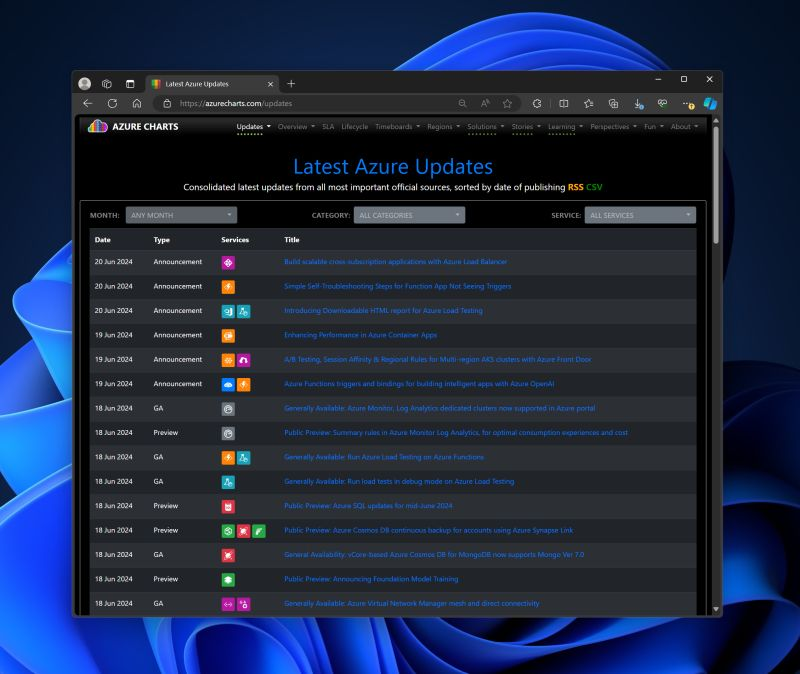
Enter Azure Updates from AzureCharts.

This is a concise list of updates that are sourced from the published Azure update list as well as the many, many dozens of blogs that officially support Azure from Microsoft.

  • Updates are filterable by month, 11 categories and over 70 Azure-specific services.
  • Data is subscribeable using RSS or exportable to CSV.

To view & subscribe to this Azure Updates list from AzureCharts, visit:

This is a great audio interview about the use value of AI in government from KQED, discussing:

✅ Reducing repetition to help with the overwhelming volume of work
✅ Rewriting content to make it easier to understand
✅ Reducing the volume of text in a regulation for comprehension
✅ Translating council meetings to extend community reach
✅ Identifying unsafe intersections that require attention

The interview features conversations with:

  • Jason Elliott, deputy chief of staff to Governor Gavin Newsom
  • Jennifer Pahlka, author, “Recoding America: Why Government Is Failing in the Digital Age and How We Can Do Better”; senior fellow, the Nisaken Center and the Federation of American Scientists
  • Khaled Tawfik, chief information officer, Information Technology Department of the City of San Jose

Listen to the 55min recording here:

« Newer Posts - Older Posts »

Categories