We’ve published a new whitepaper about “Transcription Management in Copilot for Microsoft 365”. It’s designed to uncover the depths of access, governance and privacy controls available to manage transcription in Teams Meetings to leverage it with Copilot. The paper covers:

  • How Copilot for Microsoft 365 integrates with transcription and recording
    capabilities in Microsoft Teams to enhance collaboration and
    productivity
  • Microsoft’s approach to managing transcription and recording
    data through application of controls for access, governance,
    and privacy
  • Specific controls customers can implement to manage
    transcription data
  • The value of transcription with Copilot for Microsoft 365

Download the whitepaper here:

Read more about Copilot Transcription here:
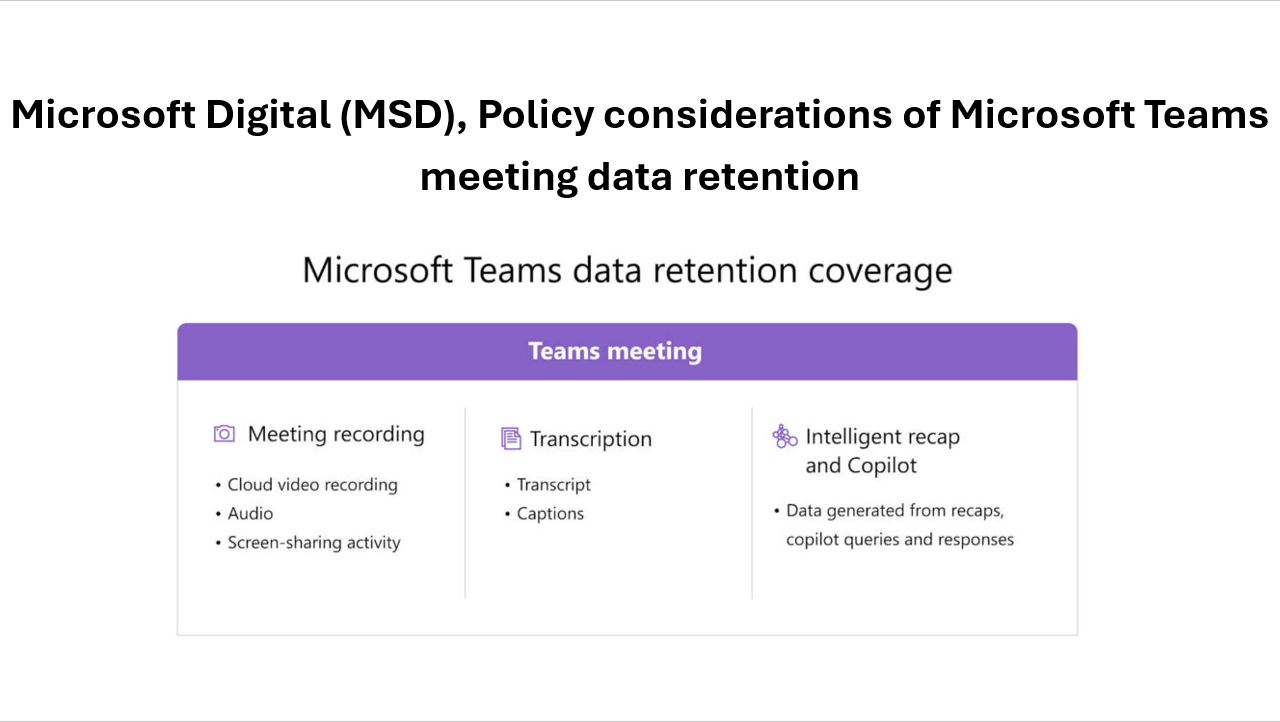
I stumbled upon an article that was written by a 3rd party that was interesting enough that I decided to share it. Written by Mahmoud Hassan of Avanade and backed with information from Microsoft Digital (our IT dept), it goes over real-world concerns about Teams Meeting transcriptions & Copilot for Microsoft 365.

The topics Mahmoud goes over relative to Microsoft’s own deployment & policies include:

  • Microsoft’s own policies around Teams transcription
  • Employee opt-out, alerts around recording
  • Legal guidance sources
  • Control over what can be recorded based on meeting classification
  • Meeting content expiration
  • etc.

Specific areas Mahmoud goes over that are interesting:

  • “Explicit Recording Consent” in Teams Meetings
  • The “Transcription only” Compliance Challenge in Teams Meetings
  • Copilot in Teams Meetings *without* Transcription

Read the full article here:

Microsoft Edge for Business is enhancing its defense against data leaks and vulnerabilities with two new capabilities:

  • Screenshot prevention: Data exfiltration in the browser is a major concern for organizations due to financial, reputational and operational impact. Edge for Business will support screenshot prevention policies set across Microsoft 365, Microsoft Defender for Cloud Apps, Microsoft Intune Mobile Application Management and Microsoft Purview. Screenshot prevention policies will secure against data exfiltration in the browser by blocking the ability to take screenshots on pages labeled as sensitive or protected. Screenshot prevention will be generally available in the coming months.
  • Easily stay up to date: Managed browser instances that are not up to date are at risk for exploitation through vulnerabilities, including zero-day attacks. The Edge management service will enable IT admins to see which devices have Edge instances that are out of date and at risk. It will also provide mitigating controls, such as forcing a browser restart to install updates, enabling automatic browser updates or enabling enhanced security mode for added protections. This capability will be in preview in the coming weeks.

Read more below:

This document provides an overview of how enterprise customers can deploy Microsoft Teams-DLP for protecting sensitive information that is traversing with-in or outside of the organization. Unified DLP has integration with multiple workloads that help to protect customer data with a single policy. Teams-DLP is one of the workloads within the Unified-DLP console. This guide walks through the different aspects of deploying use cases across content/containers and shows the effectiveness of the unified DLP portal as a single place to define all aspects of your DLP strategy.

In summary, this play book will help to

  • Understand the unified console and interface.
  • Develop a strategy for deploying Teams-DLP across the organization.
  • Provide near real time Alerts with notifications.
  • Review various scenarios to test Teams-DLP over chat and channel communication.

This document helps readers plan and protect sensitive information scenarios that normally exist in every organization. This Playbook helps as a user guide to mitigate the risk of exchanging crucial data while communicating over chat or giving access to sites for guest users.

Retrieval-Augmented Generation (RAG) is a commonly used design pattern that provides a human language interface using a “Large Language Model” (i.e. ChatGPT) against a distinct & separate data source (i.e. search index, database table, etc.) to generate a response based on your specific data. The power of Azure OpenAI models in this RAG pattern gives you more control over the data used by the LLM’s response.

Many organizations have large repositories of document images (FAXs, document scans, photos) that can be reborn as rich data sources for RAG patterns and AI models and can enable conversational exchanges that respond based on that unlocked image data.

We’ve provided documentation around how to implement a RAG model that specifically leverages “Azure AI Document Intelligence”, it’s Optical Character Recognition and its unique “Document Layout Model” to understand the document context without training. The pattern can continuously take advantage of your repositories of scanned images & documents to provide more relevant responses.

Read about the pattern here:

We’ve documented “best practices” by which creators of Generative AI solutions using Azure OpenAI Services can improve the response time of end user’s requests, along with GitHub repos for code samples

“New LLM models require massive amounts of compute to run, and unoptimized applications can run quite slowly, leading users to become frustrated. Creating a positive user experience is critical to the adoption of these tools, so minimising the response time of your LLM API calls is a must. The techniques shared in this article demonstrate how applications can be sped up by up to 100x their original speed* through clever prompt engineering and a small amount of code!”

Read the guide here:

Do you need a “one page” guide to investigate suspicious activity in Microsoft 365 and Microsoft Entra?

This guide (and more) contains the artifacts that Microsoft Incident Response hunts for and uses daily. This includes E-mail manipulations, Data collections, Login events etc.

You can also read & download more here:

#microsoft #irt #security #microsof365 #msftadvocate #entra #cybersecurity

We recently published a FREE special 19-module on-demand video training course, “DP-600 Fabric Analytics Engineer”, where instructors were video-recorded for all modules.

This course covers methods and practices for implementing and managing enterprise-scale data analytics solutions using Microsoft Fabric. Students will build on existing analytics experience and will learn how to use Microsoft Fabric components, including lakehouses, data warehouses, notebooks, dataflows, data pipelines, and semantic models, to create and deploy analytics assets. This course is best suited for those who have the PL-300 certification or similar expertise in using Power BI for data transformation, modeling, visualization, and sharing. Also, learners should have prior experience in building and deploying data analytics solutions at the enterprise level.

All video recorded modules are available below:

Additionally, you may find written versions of this course located at: Course DP-600T00-A: Microsoft Fabric Analytics Engineer – Training | Microsoft Learn

Today, we are sharing an update on the Recall (preview) feature for Copilot+ PCs, including more information on the set-up experience, privacy controls and additional details on our approach to security.

To recap our update:
✅ If Recall is not proactively turned on, it’s off by default.
✅ Windows Hello must be enrolled & proof of presence is req’d to view snapshots.
✅ Recall decryption is just-in-time & snapshots are only accessible when the user authenticates.
✅ The search index database is encrypted.

Read the full update here:

Interested in securing your AI solutions?

Join Microsoft’s Mark Russinovich & his Build 2024 session, “Inside AI Security with Mark Russinovich | BRK227” to explore the landscape of AI security, focusing on threat modeling, defense tactics, our red teaming approaches & the path to confidential AI. You will learn about various kinds of attacks in AI systems & our defenses, such as backdoors, poison data, prompt injection attacks, and more.

« Newer Posts - Older Posts »

Categories
