Wanna use Azure Arc but don’t want to directly connect your datacenter servers to external Internet services?

If you use enterprise firewalls or proxies to manage outbound traffic in your datacenter, the “Azure Arc gateway” lets you onboard infrastructure to “Azure Arc” for monitoring & management using only seven (7) endpoints. With “Azure Arc gateway“, you can:

  • Connect to Azure Arc by opening public network access to only seven Fully Qualified Domains (FQDNs).
  • View and audit all traffic an Azure Connected Machine agent sends to Azure via the Arc gateway.

This is a Limited Public Preview, so customer subscriptions must be allowed by Microsoft to use the feature. To participate, complete the Azure Arc gateway Limited Public Preview Sign-up form.

How it works:
Azure Arc gateway consists of two main components:

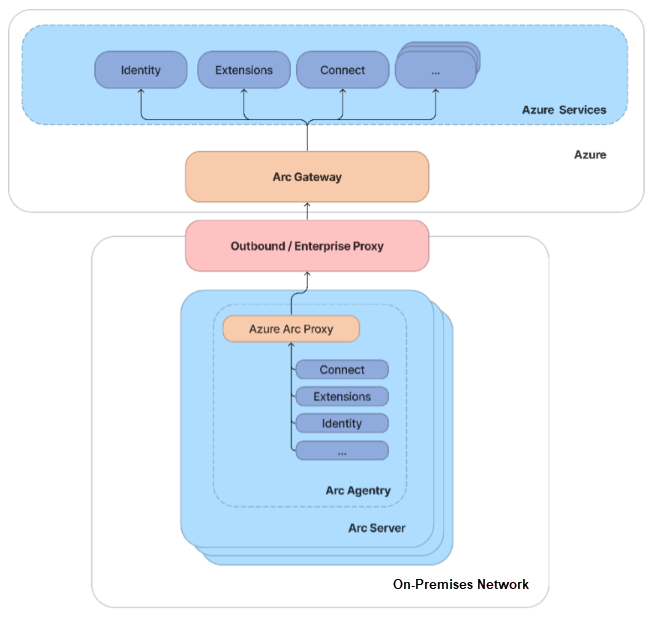
  • The Arc gateway resource: An Azure resource that serves as a common front-end for Azure traffic. This gateway resource is served on a specific domain. Once the Arc gateway resource is created, the domain is returned to you in the success response.
  • The Arc Proxy: A new component added to Arc agentry. This component runs as a service called “Azure Arc Proxy” and acts as a forward proxy used by the Azure Arc agents and extensions. No configuration is required on your part for the gateway router. This router is part of Arc core agentry and runs within the context of an Arc-enabled resource.

When the gateway is in place, traffic flows via the following hops: Arc agentry → Arc Proxy → Enterprise proxy → Arc gateway → Target service.

For more details on deploying the Azure Arc Gateway, visit:

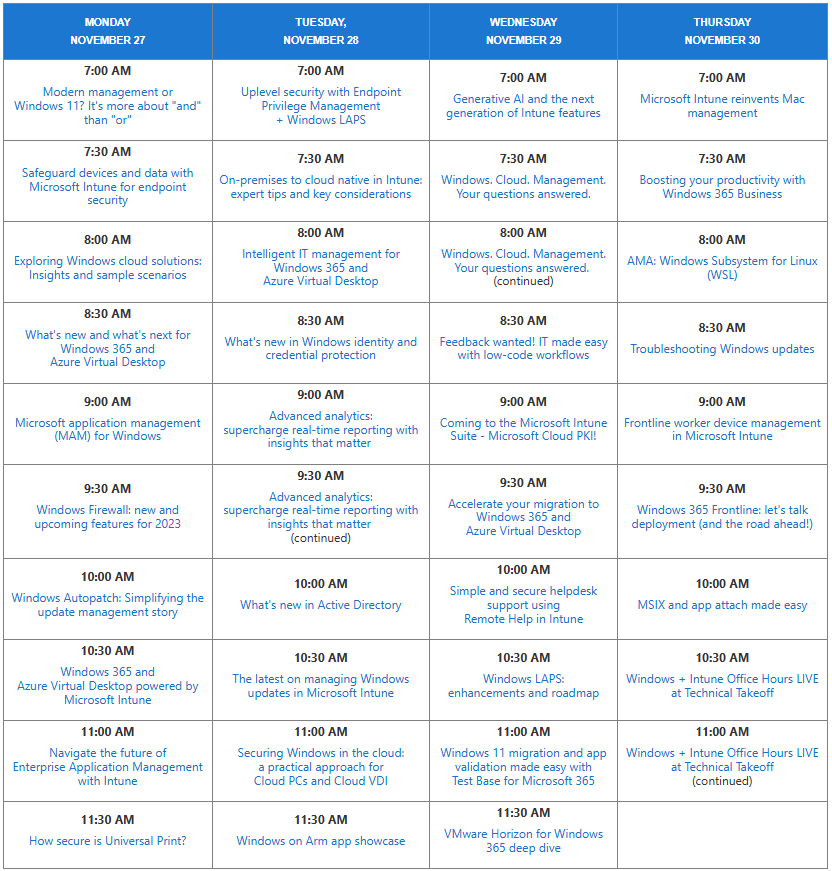
One of the best virtual events we ever did was called the Microsoft Technical Takeoff. It covered so many universally requested & needed topics about desktop infrastructure… Windows, Intune, Azure Virtual Desktop, Window 365, Windows Firewall, Windows Autopatch, Desktop Analytics, PKI… over a 4 day period, it was wonderful.

And I’m discovering that a lot of people had no idea it existed. So fortunately, the whole thing was recorded. Here’s the topics covered with links to the recordings:

For the main page, visit:

Microsoft Sentinel is now eligible for complimentary remote guidance through Microsoft’s FastTrack Architecture & Advisory program.

Microsoft Sentinel is a scalable, cloud-native solution that provides security information and event management (SIEM) and security orchestration, automation, and response (SOAR). 

Microsoft’s FastTrack architects that are assigned to Sentinel customers at no cost, can provide remote guidance for:

  • Providing an overview of the prerequisites for Microsoft Sentinel deployment.
  • Providing conceptual workspace architecture best practices and considerations, including multi-tenancy scenarios.*
  • Assisting in prioritizing data connectors to optimize Microsoft Sentinel configuration, including:
    • Explaining data transformation and collection customization to assist with optimization.*
  • Planning roles and permissions.
  • Conducting cost expectation analysis based on planned configuration.*
  • Enabling the Microsoft Sentinel service.
  • Discussing and configuring data retention.
  • Configuring data connectors, including:
    • Setting up Microsoft data connectors.
    • Demonstrating how to configure third-party data connectors.*
    • Exploring ingestion cost expectations.*
  • Configuring analytics rules, including;
    • Built-in analytics rules.
    • A query starter pack.
    • Additional rules for Zero Trust and insider threats.
    • User entity behavior analytics rules.
    • Apache Log4J enhancements.
  • Providing an overview of the following:
    • Security operations center (SOC) optimization.
    • Workbooks.
    • Watchlists.
    • User and entity behavior analytics (UEBA).
    • Logic app playbooks.
    • Incident response capabilities*, simulations, and tutorials (like practice scenarios, fake malware, and automated investigations).

*Supported with limitations.

For more information, visit:
https://learn.microsoft.com/en-us/microsoft-365/fasttrack/microsoft-defender#microsoft-sentinel

Contact your FastTrack Manager or Microsoft account team for more information.

Join us for a special event with Satya Nadella and Jared Spataro to learn about the next phase of Copilot innovation. The live stream starts at 8 AM Pacific Time on September 16.

Register:
https://www.linkedin.com/events/7236780403867443202/

1000025133

Heads up: Microsoft administrators have 2 months left to enable multifactor authentication for access Microsoft Azure portal, Microsoft Entra admin center, and Microsoft Intune admin center.

Here’s the Microsoft 365 Message Center notification MC862873:

Starting on or after October 15, 2024, to further increase security, Microsoft will require admins to use multi-factor authentication (MFA) when signing into the Microsoft Azure portal, Microsoft Entra admin center, and Microsoft Intune admin center. Note: This requirement will also apply to any services accessed through the Intune admin center, such as Windows 365 Cloud PC. To take advantage of the extra layer of protection MFA offers, we recommend enabling MFA as soon as possible. To learn more, review Planning for mandatory multifactor authentication for Azure and admin portals.

How this will affect your organization:

MFA will need to be enabled for your tenant to ensure admins are able to sign-in to the Azure portal, Microsoft Entra admin center and Intune admin center after this change.

What you need to do to prepare:

  • If you have not already, set up MFA before October 15, 2024, to ensure your admins can access the Azure portal, Microsoft Entra admin center, and Intune admin center.
  • If you are unable to set up MFA before this date, you can apply to postpone the enforcement date.
  • If MFA has not been set up before the enforcement starts, admins will be prompted to register for MFA before they can access the Azure portal, Microsoft Entra admin center, or Intune admin center on their next sign-in.

For more information, refer to: Planning for mandatory multifactor authentication for Azure and admin portals.

Posted by: kurtsh | August 16, 2024

EVENT: .NET Conf 2024 – November 12-14, 2024

imageMicrosoft is thrilled to announce the highly anticipated .NET Conf 2024, a free, 3-day virtual developer event celebrating the release of .NET 9. Co-organized by the .NET community and Microsoft, this annual tradition continues to grow, and we’re more excited than ever to bring you the latest innovations in .NET.

Mark your calendars for November 12th to 14th, 2024, and prepare to be inspired by a wealth of knowledge, creativity, and community engagement.

Posted by: kurtsh | July 19, 2024

TRAINING: Microsoft at PyCon US 2024

Live from PyCon US 2024, the largest Python conference in the world, Microsoft returned to the Expo hall as a Sustaining sponsor with lots of fun presentations, knee deep in the code, and sharing the latest and greatest of what we do in the Python work.

Watch our 6 PyCon 2024 session recordings here!

Learn more about what Microsoft is doing in the Python Community.

Posted by: kurtsh | July 18, 2024

HOWTO: Subscribe to Microsoft newsletters & updates

I consider myself to be the custodian of the Microsoft technologies my customers implement which keeps me busy. I get asked a lot how it is that I “stay plugged” in with Microsoft’s many different technologies.

MICROSOFT PUBLIC NEWSLETTERS
One way is by subscribing to the very newsletters that everyone else has access to publicly. Here’s a list of some of the newsletters that I subscribe to:

BLOGS ON MICROSOFT TECH COMMUNITIES
More selectively, I also subscribe to email notifications for product/technology blogs on the Microsoft Tech Community portal. This is where the product groups publish articles, updates & “newsletters” that they write monthly. If you are the caretaker of a particular Microsoft technology in your organization, you should be subscribing to email notifications for these as well.

To get email subscriptions for blog content for the 100s of Microsoft Tech Communities:

  1. Login to your Microsoft Account.
  2. Visit the blog page of your technology of choice from Blogs – Microsoft Community Hub.
  3. Click on the “Subscribe” button near the top of the screen.

Here’s just SOME examples of highly active official Microsoft blogs to subscribe to:

Microsoft 365 Apps:

Posted by: kurtsh | July 17, 2024

HOWTO: Obtain support for Power Apps

Did you know your Power Apps subscription entitles you to unlimited support incidents for break/fix issues? For people that need expert guidance around usage, architecture or “how to” accomplish an objective a.k.a. “proactive advisory services”, a paid support plan is required.

Here’s a table I created to help explain the levels of support for Power Apps administrators & developers.

Power Apps “Community & ForumsPower Apps “Subscription” SupportPower Apps “Professional Direct” SupportPower Apps support through “Unified Services”
Service descriptionConnect with peers & share ideas in this discussion forum where you can ask community experts for help & research previous conversations about issuesBreak/fix support included with your Power Apps paid license. Unlimited support tickets.

No advisory support. (“how to” or “usage guidance”)
Break/fix support with faster response times, and escalation management for business-critical incidents.

Proactive advisory support services for non-break/fix matters.
Comprehensive support for your entire org covering all Microsoft technologies.

Break/fix support, advisory support, training, onsite assistance, contract guidance & management, 911 cybersecurity incident response availability, & more
Service Level ObjectivesNone1 hour response for critical cases,
6 AM – 6 PM PT, Mon-Fri excluding weekends & holidays
1 hour response time for ALL technical support issues, 24/7 availabilityCritical Sev 1: 15-min for Azure/1-hour for all other products, 1-hour Sev A/2-hour Sev B/4-hour Sev C, 24/7 availability
CostFreeFree$9-$11/mo/user
(Minimum 20 users)
Contact total is variable annually depending on features enabled beyond base services
Support ticket creationQ&A only. No formal support.
Forums
Online only.
Power Platform Admin Center
Online & phone.
Professional Support
800-642-7676 (US)
Online & phone.
Services Hub
800-936-3100 (US)
More informationLinkLinkLink & Online PurchaseLink

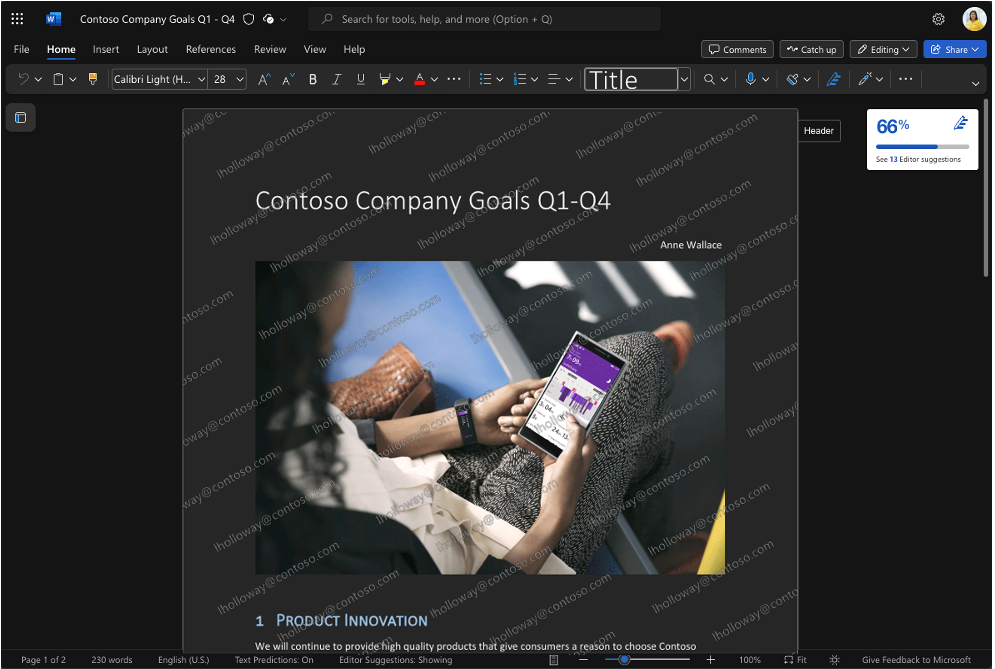
Take a look at the image below: Notice the watermark imprinted on the opened document with the current user’s identity, “jholloway@contoso.com”?

That’s a “dynamic watermark”.

Explore the latest advancement in information protection: Dynamic Watermarking for Word, Excel, and PowerPoint. This innovative feature helps organizations mitigate the risk of data leaks via “analog loopholes” by deterring users from photographing their screens while displaying confidential information. Delve into our recent blog post for detailed insights into this new functionality.

If you work with sensitive or confidential documents, you know how vital it is to prevent any leaks of information from these documents. Sensitivity labels from Microsoft Purview Information Protection offer a highly effective way to limit access to sensitive files and prevent people from taking inappropriate actions with them, such as printing a document, while still allowing for full collaboration.

However, it’s still possible for someone to take a picture of a sensitive file on their screen or of a presentation being shared either online or in-person. (Some forms of screenshotting cannot be blocked with existing technology.) This loophole presents a simple way to bypass the protections that sensitivity labels place on a document. Dynamic watermarking can be a potent weapon in combatting these kinds of leaks.

Read more here:

« Newer Posts - Older Posts »

Categories