Posted by: kurtsh | November 8, 2024

TRAINING: Microsoft On-demand Video Learning Modules

Wish you could learn about a Microsoft technology but can’t dedicate the multiple days 8-5PM required to attend a training course?

Check out the video-on-demand training we have for engineers, architects, developers, and even end users for topics including:

  • Artificial Intelligence (Fundamentals, Copilot, Azure AI, AI Engineering)
  • Copilot (Use cases, Planning, Administration End User)
  • Azure (Fundamentals, Administration, Architecture, Developer, Networking, Windows Server Hybrid, Solutions)
  • Security (Fundamentals, Cybersecurity Architect, Engineer,
  • Data (Fundamentals, Scientist, Engineer, CosmosDB, Developer, DBA, Analytics Engineer, Fabric)
  • Power Platform (Fundamentals, Power BI)
Course TitleCollection LinksNumber of VideosCreated Date
Get Started with Copilot for M365www.aka.ms/VoD-GetstartedWithCopilotForMicrosoft3655May-24
Generative AI Fundamentalswww.aka.ms/VoD-GenerativeAIFundamentals3Dec-23
AI-050: Develop Generative AI Solutions with Azure Open AI Servicewww.aka.ms/VoD-DevelopingGenAISolutions16Feb-24
AI-102: Designing and Implementing a Microsoft Azure AI Solutionwww.aka.ms/VoD-AzureAIEngineer13Mar-24
AI-900: Azure AI Fundamentalswww.aka.ms/VoD-AzureAIFundamentals7Mar-24
AZ-104: Azure Administratorwww.aka.ms/VoD-AzureAdministrator31Dec-23
AZ-120: Planning and Administering Microsoft Azure for SAP Workloadswww.aka.ms/VoD-AzureforSAP14Apr-23
AZ-204: Developing Solutions for Microsoft Azurewww.aka.ms/VoD-AzureDeveloper29May-24
AZ-305: Designing Microsoft Azure Infrastructure Solutionswww.aka.ms/VoD-AzureSolutionsArchitect11May-24
AZ-400: Designing and Implementing Microsoft DevOps Solutionswww.aka.ms/VoD-DevOpsEngineer21Jan-23
AZ-500: Microsoft Azure Security Technologieswww.aka.ms/VoD-AzureSecurityEngineer17Oct-22
AZ-700: Designing and Implementing Microsoft Azure Networking Solutionswww.aka.ms/VoD-AzureNetworkEngineer10May-24
AZ-800: Administering Windows Server Hybrid Core Infrastructurewww.aka.ms/VoD-WindowsServerHybridCore20Apr-23
AZ-801: Configuring Windows Server Hybrid Advanced Serviceswww.aka.ms/VoD-WindowsServerHybridAdvanced15Apr-23
AZ-900: Microsoft Azure Fundamentalswww.aka.ms/VoD-AzureFundamentals6Dec-23
DP-100: Designing and Implementing a Data Science solution on Azurewww.aka.ms/VoD-AzureDataScientist6May-24
DP-203: Data Engineering on Microsoft Azurewww.aka.ms/VoD-AzureDataEngineer12May-24
DP-300: Administering Microsoft Azure SQL Solutionswww.aka.ms/VoD-AzureDBA18Jan-23
DP-420: Designing and Implementing Cloud-Native Applications Using Microsoft Azure Cosmos DBwww.aka.ms/VoD-AzureCosmosDBDeveloper20Dec-22
DP-600: Microsoft Fabric Analytics Engineer https://www.aka.ms/VoD-FabricAnalyticsEngineer19May-24
DP-900: Microsoft Azure Data Fundamentalswww.aka.ms/VoD-AzureDataFundamentals6Dec-23
MB-910: Dynamics 365 Fundamentalswww.aka.ms/VoD-DynamicsCRMFundamentals5Dec-23
MS-4004: Empower your workforce with Copilot for Microsoft 365 Use Caseswww.aka.ms/VoD-CopilotM365UseCases13Apr-24
MS-4005: Craft effective prompts for Microsoft Copilot for Microsoft 365www.aka.ms/VoD-CraftEffectivePromptsForCopilotForM3659May-24
MS-4006: Prepare your organization for Copilot for Microsoft 365www.aka.ms/VoD-PrepareForCopilotForM36512Mar-24
MS-4007: Copilot for Microsoft 365 User Enablement Specialist www.aka.ms/VoD-UserEnablementSpecialist6May-24
MS-900: Microsoft 365 Fundamentalswww.aka.ms/VoD-M365Fundamentals5Dec-23
PL-300: Microsoft Power BI Data Analystwww.aka.ms/VoD-PowerBIDataAnalyst10May-24
PL-900: Microsoft Power Platform Fundamentalswww.aka.ms/VoD-PowerPlatformFundamentals5May-24
SC-100: Microsoft Cybersecurity Architectwww.aka.ms/VoD-CybersecurityArchitect25May-24
SC-300: Implement an identity management solutionwww.aka.ms/VoD-IdentityAccessAdministrator25May-24
SC-900: Microsoft Security, Compliance, and Identity Fundamentalswww.aka.ms/VoD-SCIFundamentals5Dec-23

Posted by: kurtsh | November 1, 2024

INFO: My schedule for Microsoft Ignite 2024

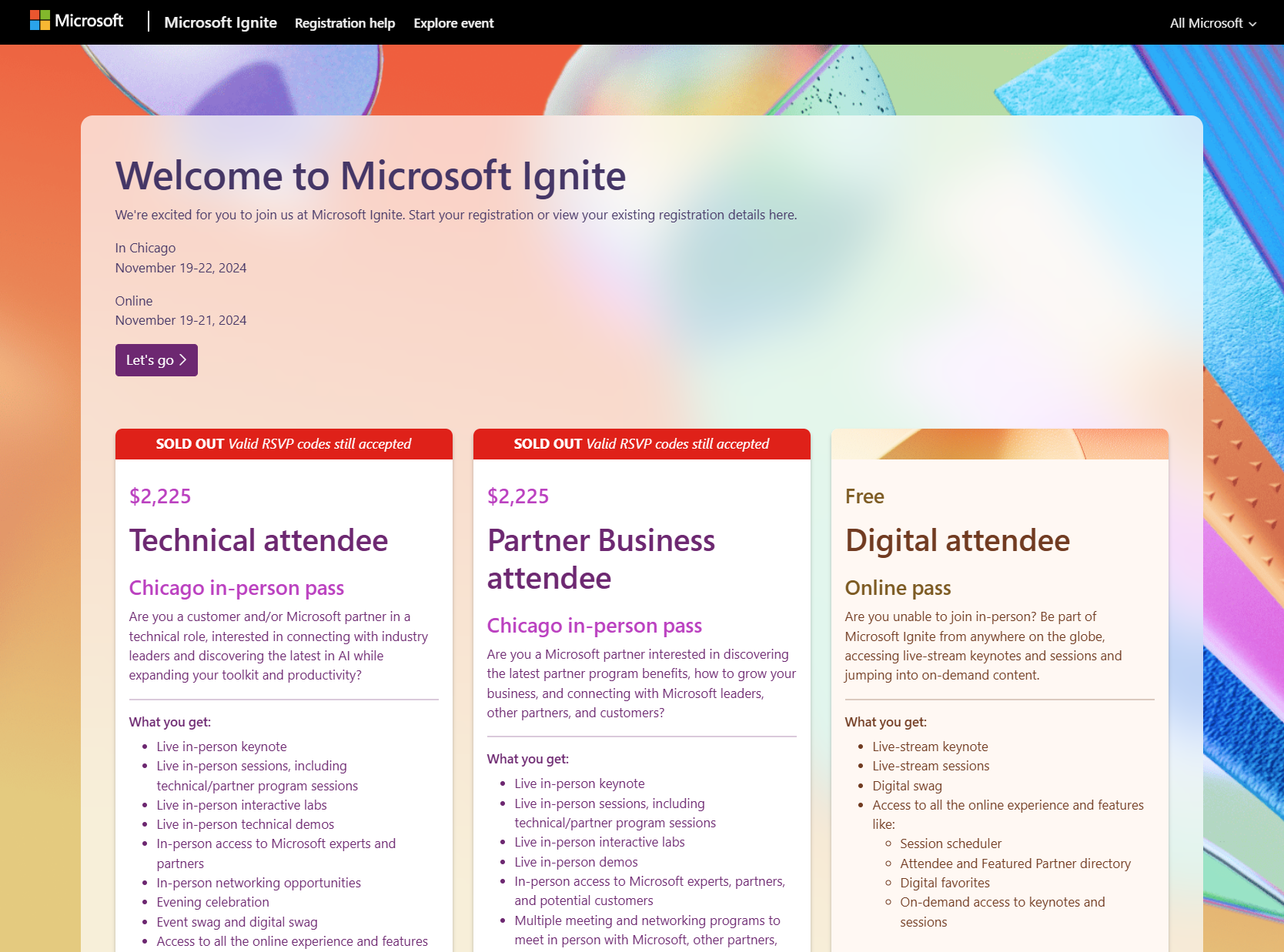
I don’t think I’ve ever done this before but this Microsoft Ignite 2024 promises to be such an important & information packed conference with over 350+ sessions being delivered, I thought some folks might want to see a sample of the sessions that will be available to attend. (I will be remote)

Registration as an Ignite 2024 Digital Attendee (online/remote) is FREE. If you haven’t registered for Microsoft Ignite 2024, I suggest doing so right now.

Why? Because individuals that do not register:

Kurt’s Schedule for Microsoft Ignite 2024:
(Note: Every session listed below in my schedule is also available online/remotely)

Tuesday, November 19th

Wednesday, November 20

Thursday, November 21

Microsoft On-Demand (Pre-recorded)

3rd party On-Demand (Pre-recorded)

Microsoft PC Manager now has the ability to monitor your internet speed directly on your desktop via the toolbar!

PC Manager is a free utility for your PC that offers features such as one-click boost, storage clean-up, file management, and protection of your default settings from unauthorized changes.

Posted by: kurtsh | October 25, 2024

INFO: Microsoft Purview Governance & Compliance

Purview” is Microsoft’s governance & compliance solutions family.  There are some elements of data security in the suite but for the most part, it’s about:

  • Governance – For example, “What kind of data do I have? Do I need to keep this data? Should I delete this data? How should I be protecting this data? What kind of people should have access to this data? What can they do with this data?”
  • Compliance – For example, “Is my organization adhering to the legal & government regulations on how data should be handled? Can I comply with legal & government mandates like audit reports that prove compliance? Can I respond to data discovery requests from pending litigation?”

Comparatively:

  • Defender” is Microsoft’s security solutions family.
  • “Microsoft Sentinel”, because its application & utility spans both security & governance across both on-prem & in-cloud solutions, stands alone as its own offering and isn’t specifically part of either the “Defender” or “Purview” family.

WHAT’S IN PURVIEW
Here’s a synopsis of the solutions that are available through Microsoft Purview. You will find that while some are available “ala carte”, most Purview solutions require licensing either Microsoft 365 E5/G5 or Microsoft 365 E5/G5 Compliance for effectively use.

  1. Purview Audit Premium (E5)
    1. High bandwidth access to Office 365 API (E5)
    2. 1-year Audit Log Retention (E5)
    3. 10-year Audit Log Retention available (E5)
  2. Purview Communications Compliance (E5)
  3. Purview Compliance Manager
    1. 3x Premium Templates (E5)
  4. Purview Data Lifecycle Management
    1. Purview Adaptive Policy Scope (E5)
  5. Purview Data Loss Prevention
    1. Teams Data Loss Prevention (E5)
    2. Endpoint Data Loss Prevention (E5)
    3. Adaptive Protection
  6. Purview eDiscovery Premium (E5)
  7. Purview Information Protection
    1. IRM enabled SharePoint document libraries & lists
    2. Exact Data Match for Sensitive Information Types (E5)
    3. Trainable Classifiers (E5)
    4. Automatic Sensitivity Labelling (E5)
  8. Purview Data Security Investigations
  9. Purview Information Barriers
  10. Purview Advanced Message Encryption (E5)
  11. Purview Insider Risk Management
    1. Purview Insider Risk Management Adaptive Protection
  12. Purview Records Management
  13. Purview Privileged Access Management (E5)
  14. Purview Customer Key (E5)
  15. Purview Customer Lockbox (E5)
  16. Purview Double Key Encryption (E5)
  17. Purview Data Connectors (E5)
  18. Purview Data Security Posture Management (E5/preview)
  19. Purview Data Security Posture Management for AI (E5/classic)

Additionally, for non-Microsoft 365 databases:

  1. Purview Data Map (Billed through Azure)
  2. Purview Unified Catalog (Billed through Azure)

References:

The path to IT modernization involves the integration of technology to optimize processes and elevate experiences for customers and employees alike. Microsoft recognizes that customers have many tech and vendor choices on this journey to help solve their biggest workplace challenges.

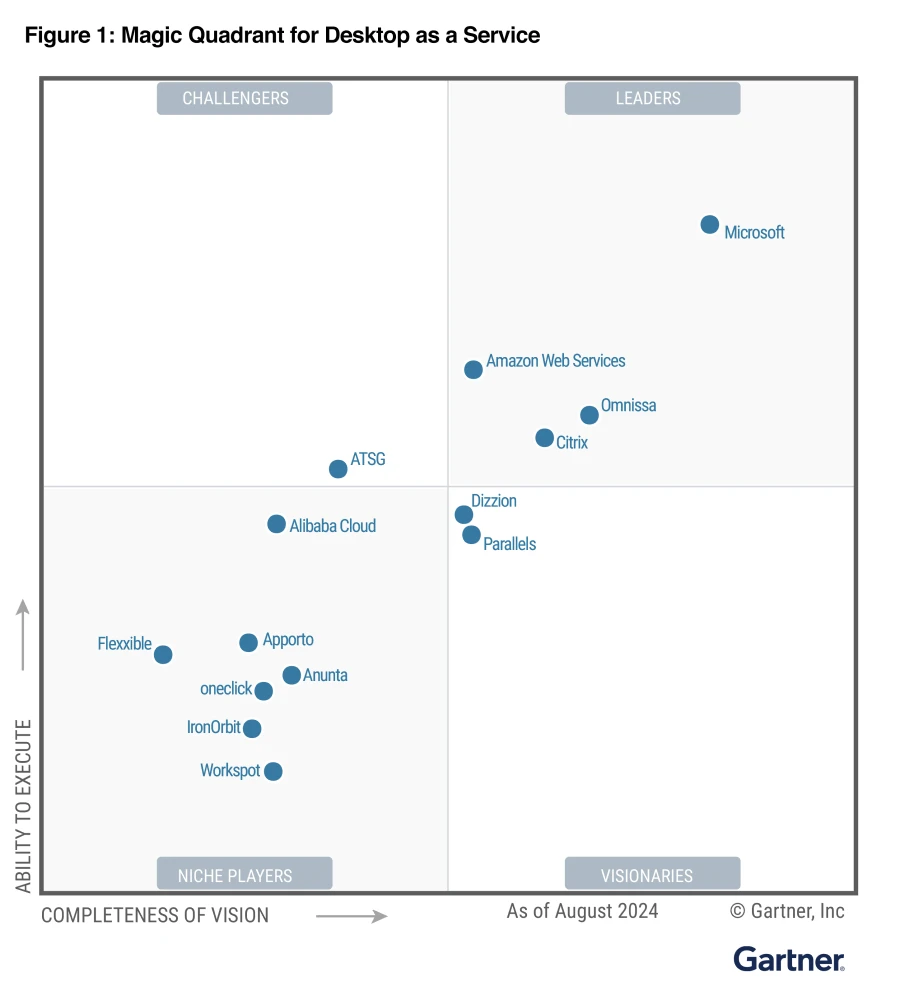
That’s why it is an honor for us to be recognized as a Leader in the Gartner Magic Quadrant™ for Desktop as a Service (DaaS)* for the second consecutive year. Gartner defines DaaS as “the provision of virtual desktops by a public cloud or service provider” and uses the term to encompass a variety of cloud solutions.

Read the full announcement below to learn about Azure Virtual Desktop & Windows 365.

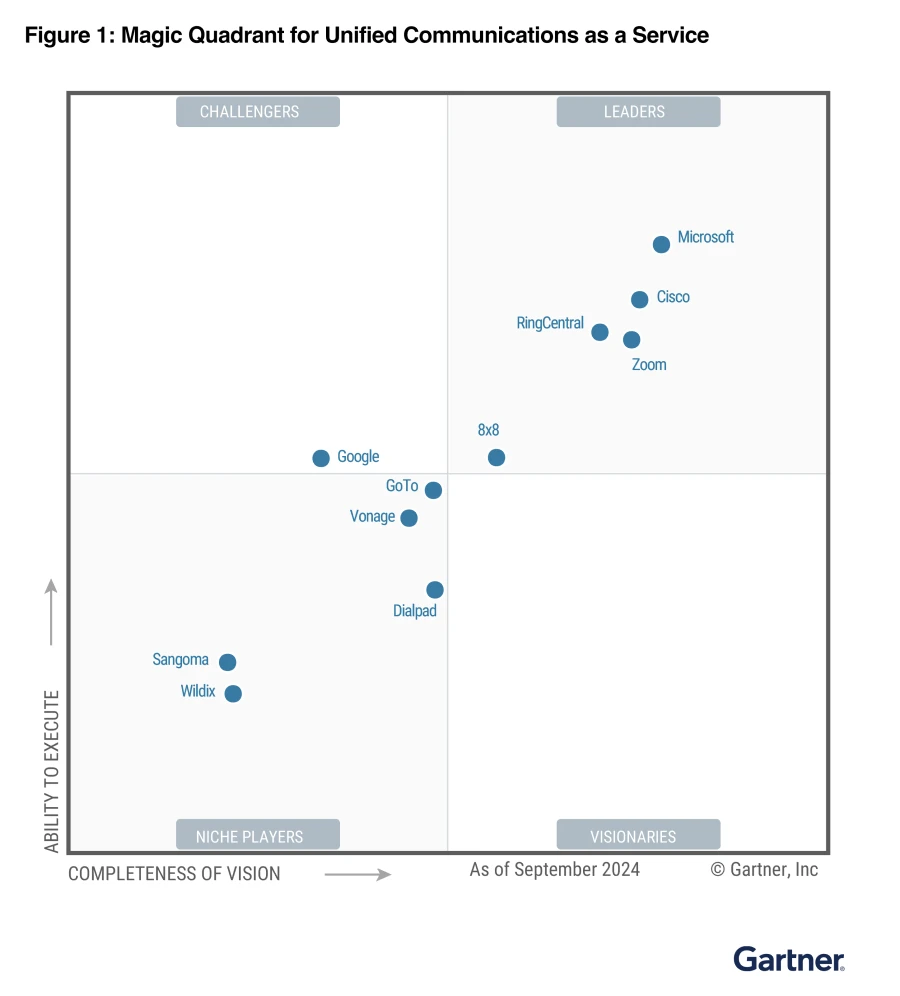
We’re honored to announce that Microsoft has, once again, been recognized as a Leader in the 2024 Gartner® Magic Quadrant™ for Unified Communications as a Service (UCaaS), Worldwide. This is the sixth year we’ve received this recognition and we’re thrilled to be positioned highest in the ability to execute and furthest on completeness of vision axes.

Read more at:

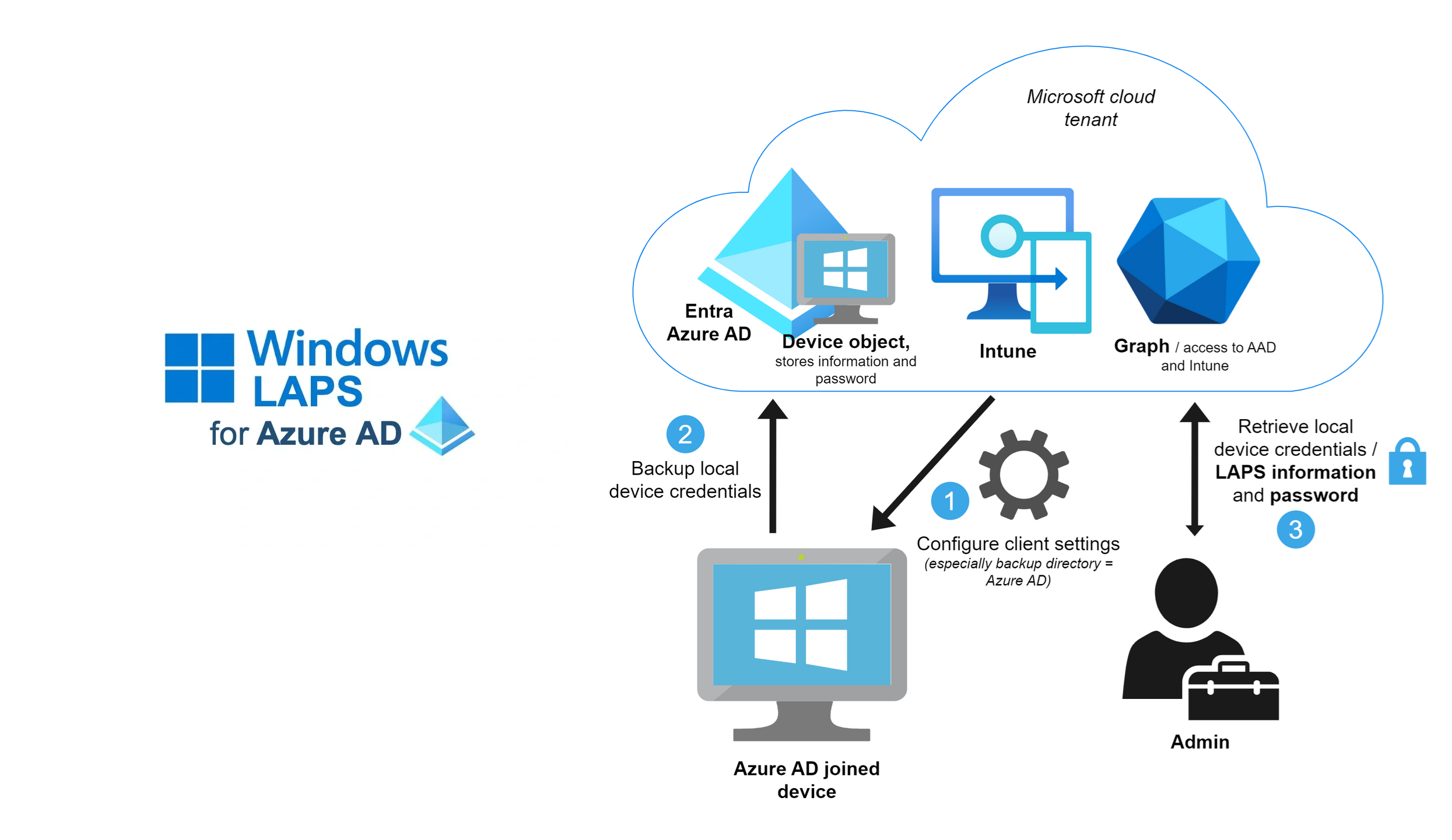
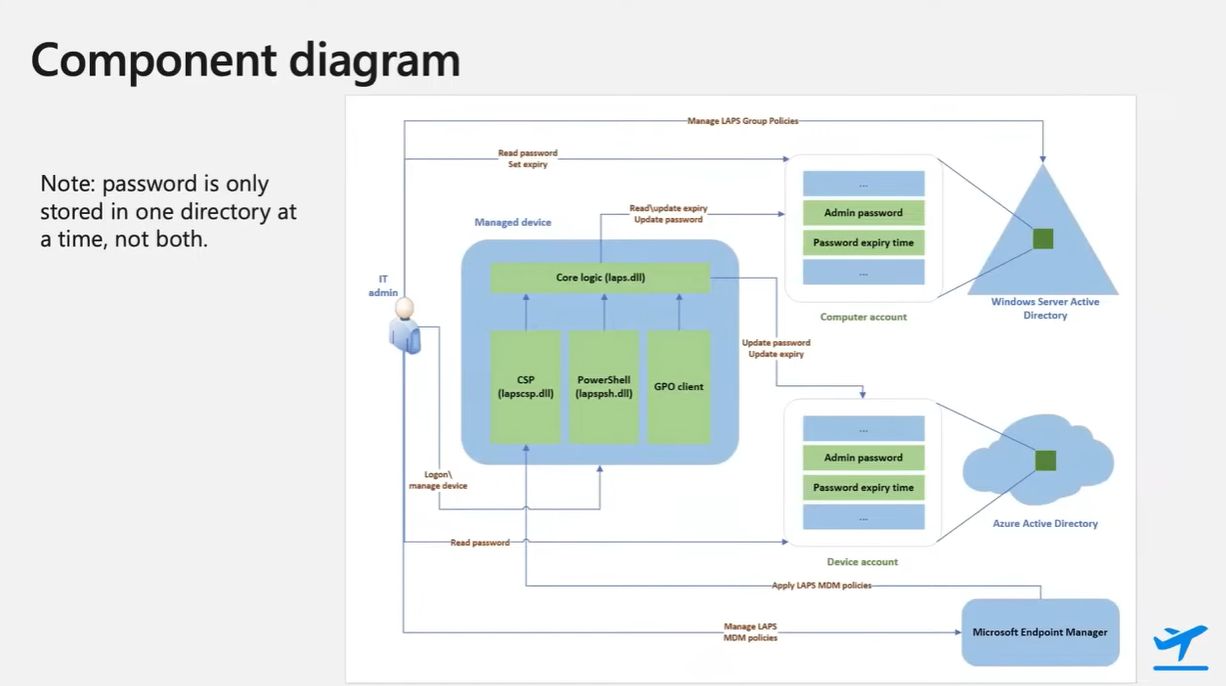
We released the NEW Windows Local Administrator Password Solution (Windows LAPS) close to a year ago and I’m still running into customers that had no idea the solution (or even the previous Legacy LAPS) solution existed. <yikes>

The Windows Local Administrator Password Solution (Windows LAPS) is a solution that changes the Local Admin password on your Windows clients & servers to a randomly generated password on a regular basis & stores the password in Entra ID directory (formerly Azure AD). A privileged role is given the ability to recover Local Admin passwords if required to ‘backdoor’ a workstation or server.

Windows LAPS has the benefit of preventing lateral movement of bad actors from machine to machine in your infrastructure by ensuring every machine has a different local admin password, while also ensuring that every machine’s admin password is changed regularly.

And did I mention Windows LAPS is free to use for any Windows administrator for supported versions of Windows client & server?

Here are some resources to use in deploying Windows LAPS:

As of October 15, 2024, all Microsoft cloud administrators for Microsoft 365, Azure, Intune & Entra ID are required to use Multifactor Authentication to signing into their respective admin portals. Usually this is accomplished by using Entra ID Multifactor Authentication. Enabling users for MFA through the standard Entra ID login is easy & well documented.

I encountered a customer that asked if they could use a 3rd party MFA solution because they weren’t licensed for Entra ID Multifactor Authentication P1 or P2. In this scenario, we have a solution in Preview that, if the 3rd party MFA is configured properly, will pass the multipleauthn claim to Entra ID to satisfy the Admin MFA requirement mandate.

Information about this is available here:

For details on around the multifactor authentication mandate for Microsoft cloud administrators, visit:

Microsoft offers 4 different virtual environments in the cloud that can be accessed & used by developers, depending on need:

  1. Azure Virtual Desktop
    https://azure.microsoft.com/en-us/services/virtual-desktop/
    Microsoft’s Enterprise cloud-hosted VDI offering.  A fully IT-managed Virtual Desktop Infrastructure platform with complete configurability for OS, software & hardware – including the ability to add Nvidia GPUs. Optionally available for integration with 3rd party tools including Citrix XenDesktop, VMware Horizon, and other historically on-prem 3rd party VDI solutions.  Costs are determined based on monthly usage & configuration.  The original Microsoft hosted desktop offering and the one with the greatest maturity & largest ecosystem.
  2. Microsoft Windows 365
    https://www.microsoft.com/en-us/windows-365
    Provides a Windows 10/11 virtual machine and persists the user’s personalized apps, content, and settings—from the Microsoft cloud to any device.  Uniquely available in “t-shirt sizes” providing a flat monthly price for each subscribed VM, ranging from $39-$65/month depending on configuration – with the caveat that there is very little flexibility in hardware configuration beyond what initial VM option is chosen.  With different options available for small & medium businesses vs Enterprise-class customers, Windows 365 provides a turnkey solution for individuals and organizations looking for a balance between predictable costs as well as VM-level flexibility.
  3. Microsoft DevBox – Virtual Machines for Developers
    https://azure.microsoft.com/en-us/blog/announcing-microsoft-dev-box-preview/
    Service that provides hosted Windows hardware & software tailored to development work. Enables quick provisioning of standard tools & platform software for developers in a hosted environment.  Leverages Windows 365 as the backend.  Full hosted Windows VM – full control over the hosted environment including having Administrator privileges to configure the OS & even install applications like SQL Server.  Can be managed using Intune/Endpoint Manager.  Works with any IDE and any source control system that runs on Windows.  Can be managed using Intune, Endpoint Manager or the Azure portal.
  4. GitHub Codespaces
    https://github.com/features/codespaces
    A GitHub Codespace is a development environment that’s hosted in the cloud. Customize your project for GitHub Codespaces by configuring dev container files to your repository (often known as configuration-as-code), which creates a repeatable codespace configuration for all users of your project. GitHub Codespaces run on a various VM-based compute options hosted by GitHub.com, which you can configure from 2 core machines up to 32 core machines. Connect to your codespaces from the browser or locally using an IDE like Visual Studio Code or IntelliJ.
Posted by: kurtsh | September 30, 2024

TRAINING: Azure Arc-enabled Servers

Here’s a list of training & educational resources for individuals interested in Azure Arc.

SELF-PACED TRAINING
There are 3 invaluable FREE self-paced training courses on deploying & managing Azure Arc-enabled Servers:

YOUTUBE VIDEOS
There’s also a number of playlists from the Arc Jumpstart YouTube channel:

JUMPSTART
Microsoft also has “Arc Jumpstart”, which includes step-by-step instructions on getting an Azure Arc environment up and running quickly, fully extensible, automated & open source. The Jumpstart Scenarios are available at: https://azurearcjumpstart.com/azure_arc_jumpstart Specific scenarios available include:

DOCUMENTATION
Docs for Azure Arc-enabled Servers are available at:
https://learn.microsoft.com/en-us/azure/azure-arc/servers/

The docs include Quickstarts, Tutorials, Samples, How-to Guides, Security, References for Azure CLI, PowerShell, .NET, REST, Go, Java, JavaScript, Python, Azure Policy

SUPPORT/COMMUNITY
Azure Arc has a community to ask questions through via Microsoft Q&A, the official platform for technical questions and answers about Microsoft products and services.
https://learn.microsoft.com/en-us/answers/tags/146/azure-arc

« Newer Posts - Older Posts »

Categories