image

Taken from the page:

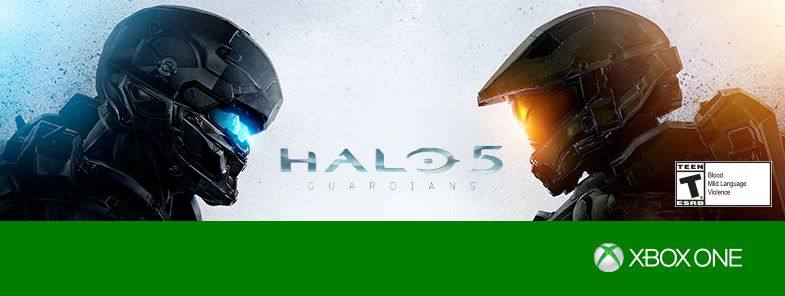
The moment we have all been waiting for is almost here! We invite you to join us at the Halo 5 Launch and Celebration, beginning at 6:00 PM PT on October 26 at the Westfield Century City Microsoft Store.

We’re pulling out all the stops for the biggest game launch party of the year. We will kick off the night with free, early game play of the most dramatic Halo story. We will have live broadcast shout-outs throughout the event along with on-site gamer-relevant talent such as 343 developers, voice talent, and the 405th regiment to answer questions and sign autographs. If you pre-order Halo 5: Guardians or make a purchase of $25 or more, you could receive a limited edition poster only available on launch day. We…’ll even have a giant Master Chief Helmet Installation, augmented reality photo experience, Halo-inspired food and beverages, and live music.

As an extra bonus, we will be having raffles throughout the event including a Halo 5 Xbox One console grand prize and more. Plus, you will have the opportunity to enter our sweepstakes for a chance to win a trip for 2 to Seattle, lunch with Major Nelson, and exclusive behind-the-scenes Xbox experiences.

Monday, October 26
4:00 PM PT – Halo 5 Launch and Celebration lineup begins
6:00 PM PT – Halo 5 Launch and Fan Celebration begins
9:00 PM PT – Halo 5: Guardians game pick-up

See rules and FAQs: msft.it/Halo5laFAQ

Taken from Halo Waypoint:

Meet voice-over actors from the game, including Darren O’Hare (Lasky), Q&A with key 343 Industries developers and surprise celebrity guests. Fans will also have a chance to appear on the Halo 5: Live broadcast throughout the night…

Lineup begins at 4 p.m. on Monday, October 26, with doors opening at 6 p.m. More details on the Microsoft store Facebook page

Register here:
https://www.facebook.com/events/192177014448409/

image

Are you a developer?  Get ready for the next Microsoft Connect event!

It all started here – are you ready for what’s next?

A year ago Connect(); started the journey for a new Microsoft for developers, unveiling the future of an open source .NET on Linux and Mac, and a free Visual Studio for targeting any device and any OS.

Join us this year to hear directly from Scott Guthrie, Brian Harry, and Scott Hanselman on what’s next in this exciting journey. Get deeper insights into our exciting announcements with over 30 on-demand sessions. Interact with the engineering team members behind Microsoft tools and technologies to help you get started.

Developer keynotes & technical sessions will all be available streaming live so register for this exciting event!

Posted by: kurtsh | October 20, 2015

RELEASE: Halo 5: Guardians (Original Game Soundtrack)

imageHalo fans:  Are you ready for a full dose of the feels?

343 Industries has made available the entire 39 track soundtrack from Halo 5: Guardians (written by Kazuma Jinnouchi) available to listen to on SoundCloud, leading off with Track 01:  Halo Canticles.

And we all know what that is.

imageGartner recently released their latest Magic Quadrant for Operational Database Management Systems and Microsoft has come out as the clear & away #1 database across all categories including the cloud – surpassing Oracle, IBM, Amazon and other notable vendors.

Read the entire report, at no cost, here:

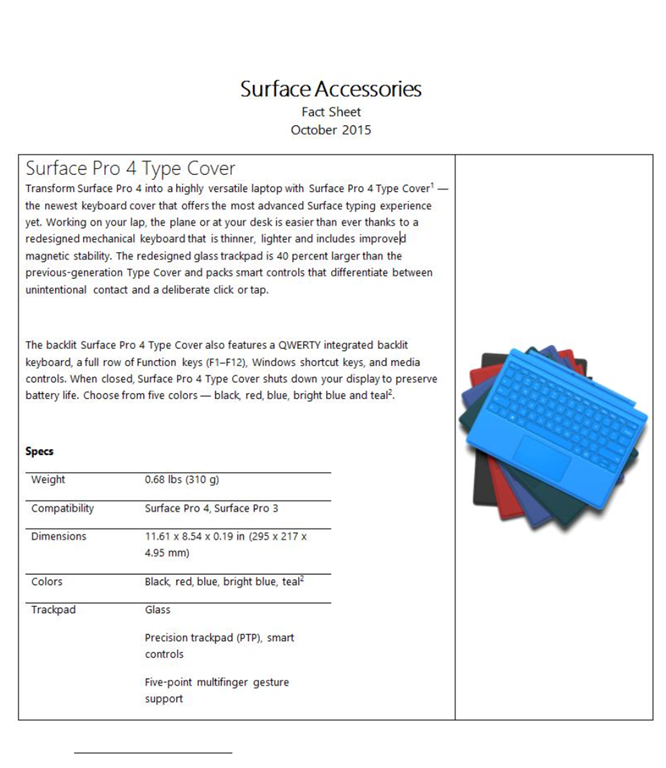
imageIn case you missed them, here’s the Surface Pro 4 factsheet and the Surface Accessories factsheet.

They highlight the new liquid cooling/fanless heat dissipation for quiet operation, the new Surface Pen “eraser” with stiction for the feel of erasing, and the new Surface dock which works with Surface Pro 3, 4, and Book.

imageLooks like in the recent Windows Insider build from yesterday, we are now allowing users to activate Windows 10 using product keys from Windows 7 or 8.x.

Per Gabe Aul’s blog post on the Windows blog:

Device activation improvements: We have received a lot of feedback from Insiders on making it easier to activate Windows 10 on devices that take advantage of the free upgrade offer to genuine Windows by using existing Windows 7, Windows 8 or Windows 8.1 product keys. If you install this build of the Windows 10 Insider Preview on a PC and it doesn’t automatically activate, you can enter the product key from Windows 7, Windows 8 or Windows 8.1 used to activate the prior Windows version on the same device to activate Windows 10 by going to Settings > Update & security > Activation and selecting Change Product Key. If you do a clean install of Windows 10 by booting off the media, you can also enter the product key from prior Windows versions on qualifying devices during setup. Refer to the Insider Hub for more information on these activation improvements including requirements.

Looks like those old copies of Windows 7 are lookin’ really good about now… or at least during the T2 timeframe, ‘eh?

Posted by: kurtsh | October 11, 2015

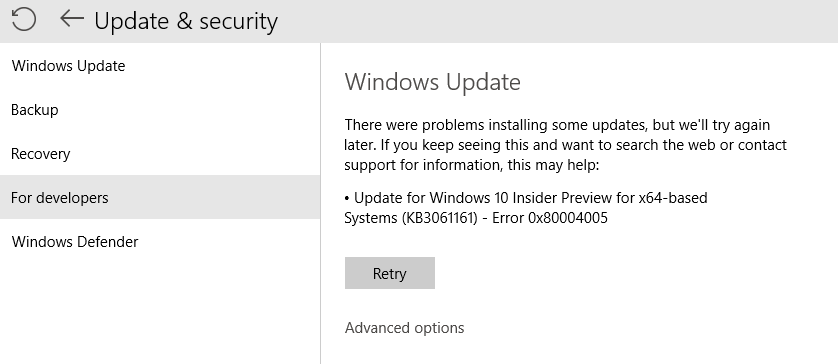
INFO: Fixing Windows Updates by clearing the cache folder

imageSince updating to Windows 10, I’ve encountered an issue twice where the monthly updates failed to install.  Each time, the solution involved erasing/flushing the Windows update file cache and retrying.

Here’s how to do this in case you need to accomplish the same thing:

Flush the Software Distribution Folder.

Run Command Prompt as administrator. In the CMD box that appears on the computer screen, enter the following strings of text, one at a time, and hit Enter.

net stop wuauserv

net stop bits

Now browse to the C:\Windows\SoftwareDistribution folder and delete all the files and folders inside.

If the files are in use, restart your device. After rebooting, run the commands above again. Your Windows Store App needs to be closed by the way, so do not start it.

Now you will be able to delete the files from the mentioned Software Distribution folder. Now in the Command Prompt windows, type the following commands one at a time, and hit Enter:

net start wuauserv

net start bits

Reboot. If you are using Windows Update try using Microsoft Updates or vice versa.

Taken from:

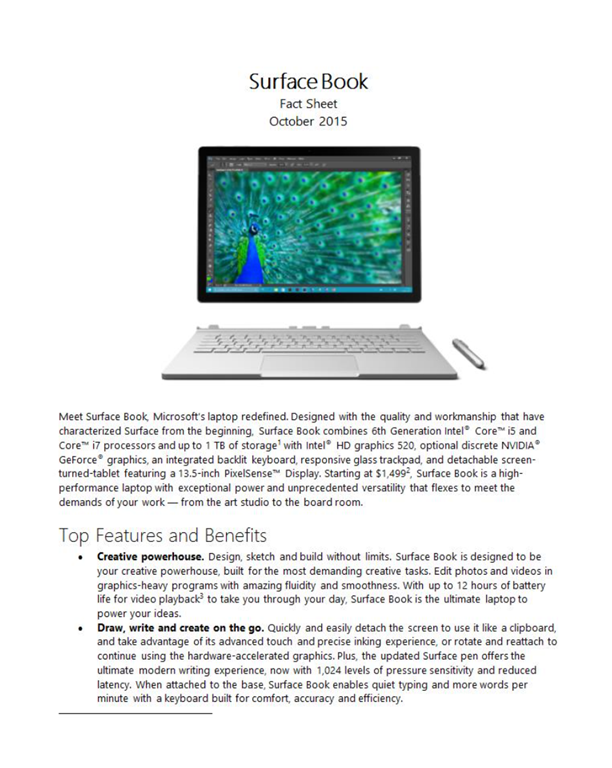
imageLOL, this is just the *BEST*.  Someone did a mashup of Interstellar & our Surface Book advertisement.  And it’s just awesome.

While you’re watching this, download the Surface Book Factsheet here with benefits, technical specifications, and our price sheet:

Matthew McConaughey’s reaction to the Surface Book announcement

Have you ever application that couldn’t find other computers on your network?

Ever needed to turn your home network from a “public” network to a “private” network on Windows 10? 

A private network is one in which devices/computers are discoverable by other devices/computers.  When you’re on a “private” network, discovering other machines for certain software is suddenly possible – otherwise your application or tool may never see other computers on your own home network – simply because it thinks it’s on a public network

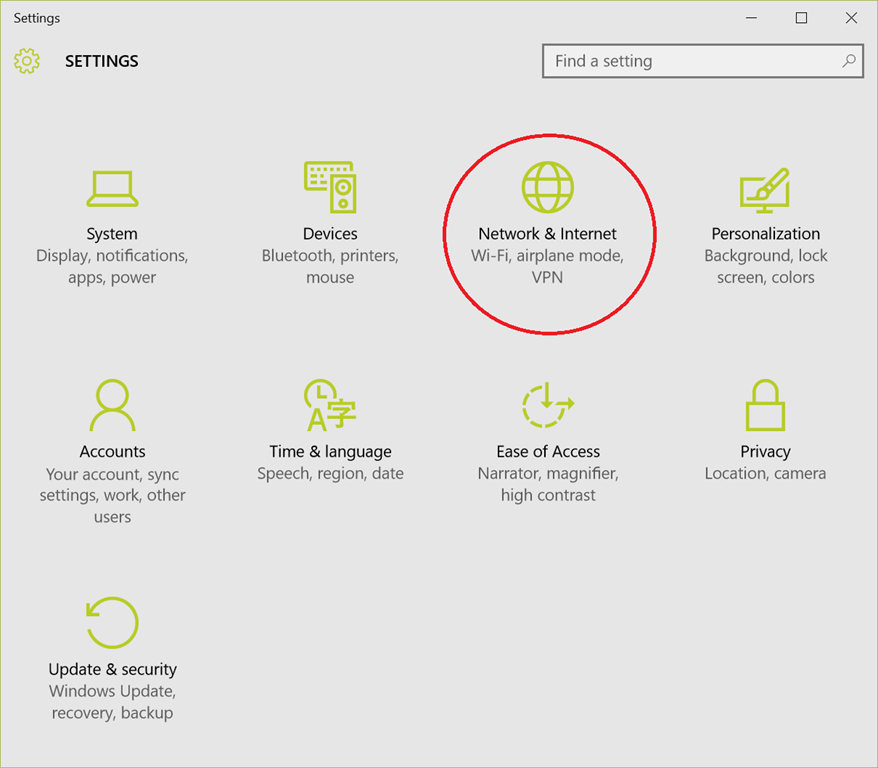
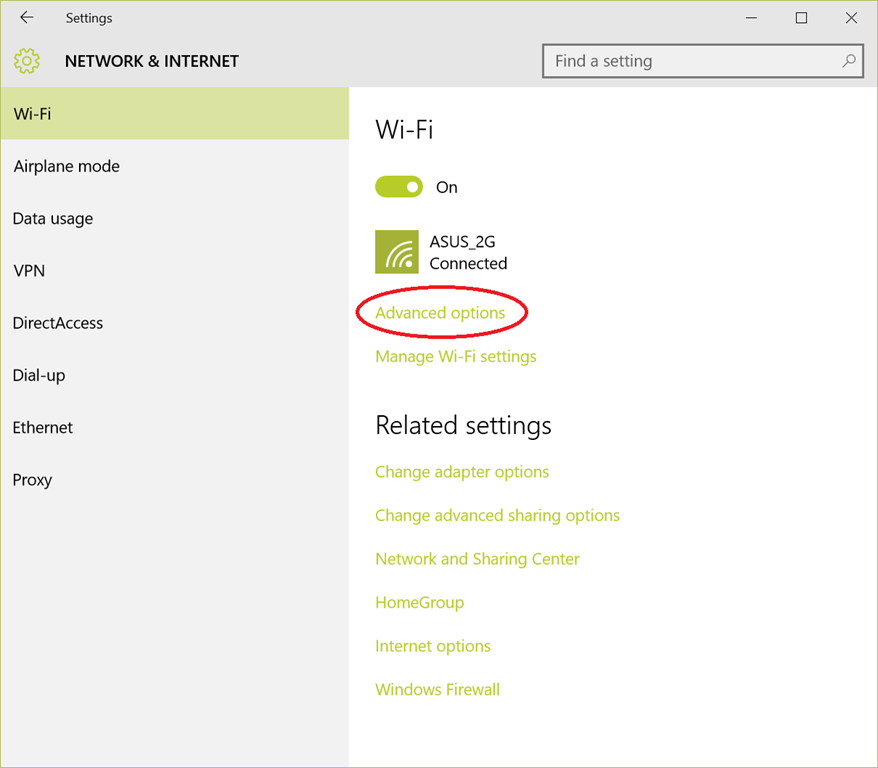
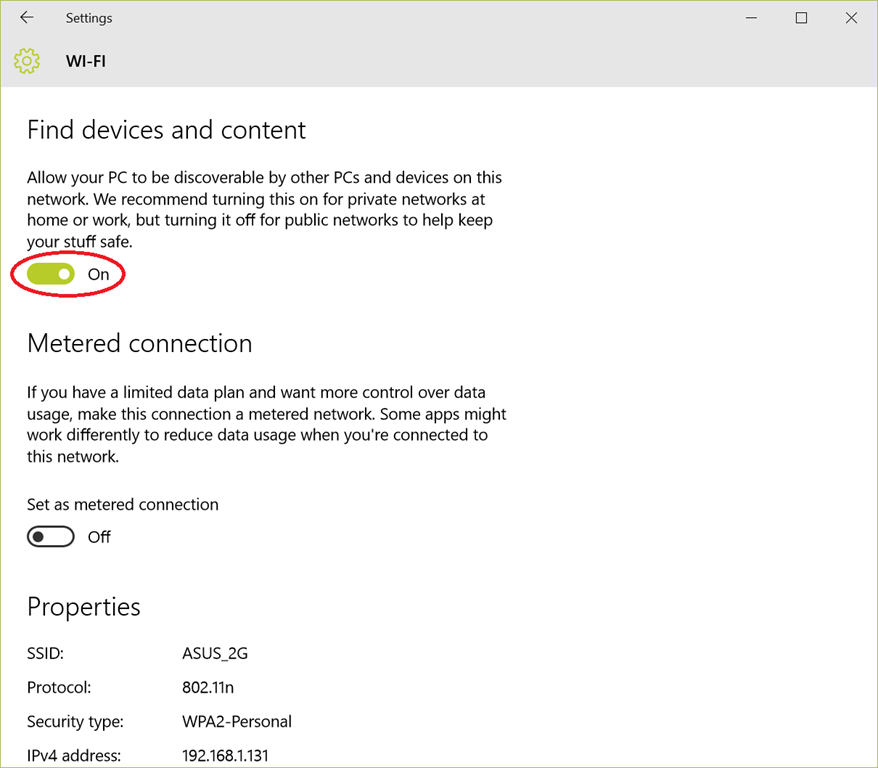
Here’s the steps:

  1. Go to Start – Settings
    image
  2. Click on Advanced Options
    image
  3. Turn ON “Find devices & content” image

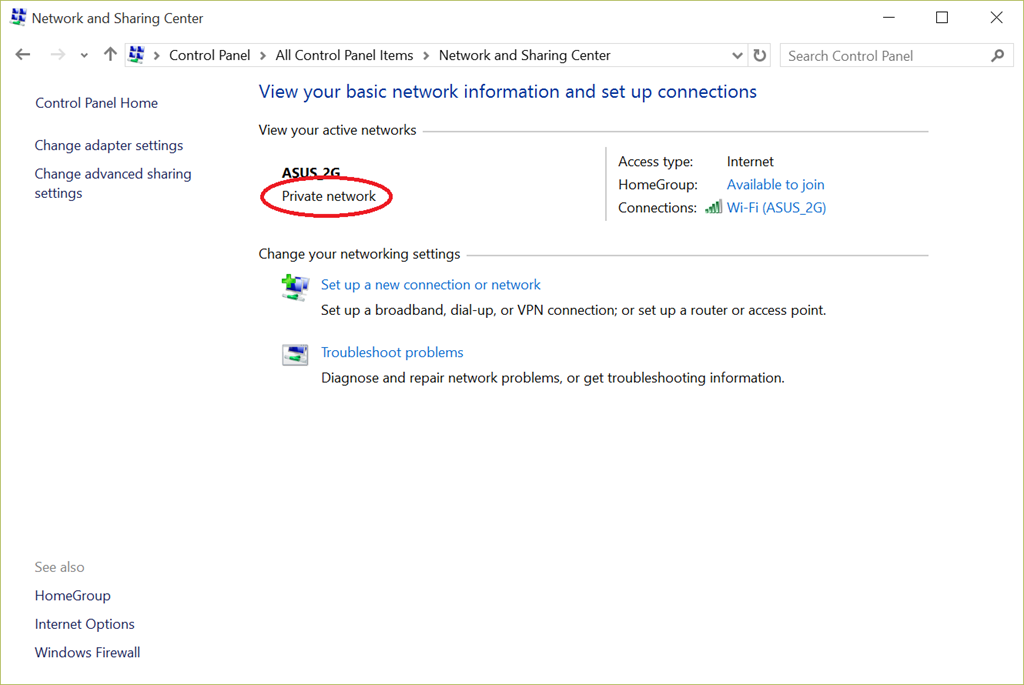
You’re done.  To verify that your machine now considers the local network “Private”, go to Control Panel – Network & Sharing Center and look for the words “Private Network”.

image

Posted by: kurtsh | October 1, 2015

DOWNLOAD: Office Professional Plus 2016 on VLSC

FYI: Office Professional Plus 2016 has posted to Volume Licensing Service Center (VLSC) for customers to download:

clip_image002

clip_image004

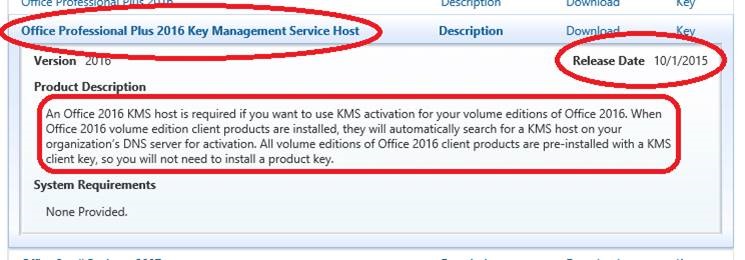
Please also note the availability of THIS SEPARATE DOWNLOAD – the Office ProPlus 2016 Key Management Service Host – that was released today as well.

clip_image006

« Newer Posts - Older Posts »

Categories