Microsoft is hosting a 3-day online conference for IT Professionals called, “TechNet Virtual Conference”.

imageDay 1: “Inspiring IT Pros”
March 1, 2016 | 9:00am – 1:00pm PST

The world of IT is evolving at a more

dramatic pace than any other time in our industry’s history – and change equals opportunity. It’s our choice whether to embrace change or shy away from it, but if we don’t step up, others will!

Day one is designed to get us thinking about change and how to embrace it. We’ve designed a half-day of content, anchored by journalist Mary Jo Foley and our own Senior Evangelist Rick Claus, that will address some of the hottest industry trends.

  • My career as an IT Pro
    We no longer live in a world where you hold one job for life. Navigating the latest technologies and knowing where to focus your energy can be tough. At the same time, CIOs recognize that our industry has a talent crisis. We’ve asked some industry leaders to share their career thoughts and discuss how they approach change and learning.
  • Security
    Rarely a day goes by when we don’t hear about a high-profile hack or government concerns about cybercrime. Microsoft has the privileged position of partnering with government and organizations to respond to these challenges – and empowering every person on the planet to achieve more is what drives our company. This session will highlight our latest security observations and the steps we’re taking to help everyone stay secure online.
  • How does IT lead the business?
    Is your IT group a cost center or a strategic asset? As the role of IT grows and evolves, how do these changes affect the department and team leadership? We’ll explore how IT shows up in business interactions, the evolving role of IT leaders, and what we can learn from other divisions.

Read more at the TechNet Virtual Conference site:

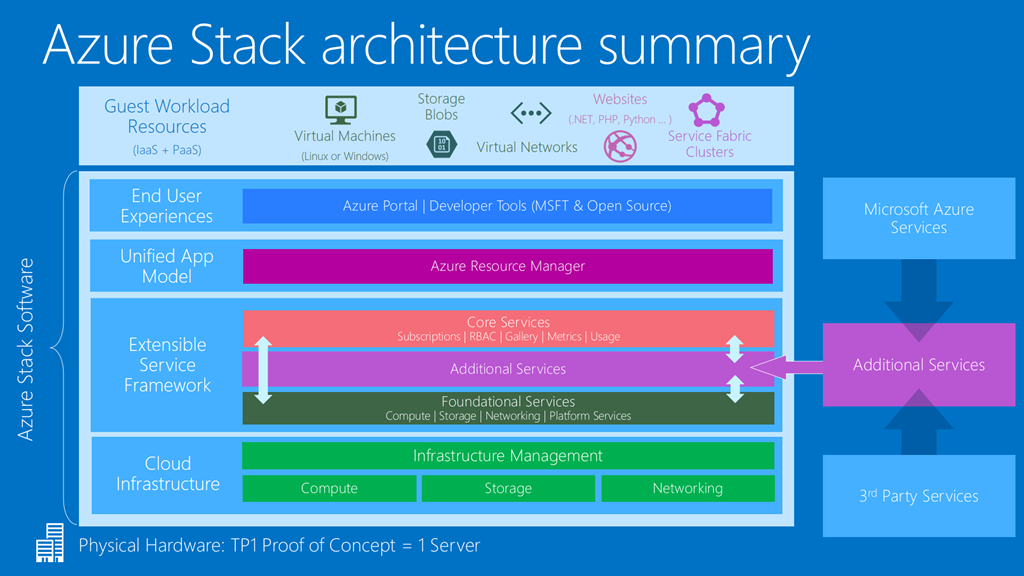
imageJoin this Webcast with Mark Russinovich and Jeffrey Snover & learn how Azure Stack will help you drive app innovation by delivering the power of Azure in your datacenter. Experience the new potential of hybrid cloud computing and get your questions answered by the Azure Stack team.

Read the announcement here:

image

Are you a client/mobile technology IT professional with an interest in enterprise management, deployment & mobility? 

You may wanna start following Microsoft’s Corporate Vice President of Enterprise Client & Mobility, Brad Anderson.

What Brad’s been doing is producing blog posts infrequently, however also releasing audio podcasts that explain the post.  Here’s the last 3 posts/podcast tandems.

Navigating the Windows 10 Servicing Options

Best Practices for Deploying Windows 10

Best Practices for Managing Windows 10 with EMS & ConfigMgr
In this podcast, Brad speaks with Mark Florida (Principal Program Manager of ConfigMgr) about best practices for successfully managing Windows 10 with the Enterprise Mobility Suite (EMS) and ConfigMgr.

Posted by: kurtsh | January 29, 2016

DOWNLOAD: Windows Defender Offline

imageDid you know you can run Windows Defender from a bootable USB stick to hard-to-remove malware?

We have a solution called Windows Defender Offline, which is a version of its antivirus that you can run from a USB drive to help you remove malicious code that is infecting Windows 10.

Windows Defender Offline helps protect your PC by scanning it to remove rootkits and other advanced malware that can’t always be detected by antimalware programs. If this type of malware is detected on your PC, you’ll be prompted in Microsoft Security Essentials or Windows Defender to download and run Windows Defender Offline.

For instructions on how to use Windows Defender Offline, visit:

Hey, all you AD GPO policy jockeys… new tool for you to geek out on!

imagePolicy Analyzer is a utility for analyzing and comparing sets of Group Policy Objects (GPOs). It can highlight when a set of Group Policies has redundant settings or internal inconsistencies, and can highlight the differences between versions or sets of Group Policies. It can also compare GPOs against current local policy settings and against local registry settings. And you can export its findings to a Microsoft Excel spreadsheet.

imagePolicy Analyzer lets you treat a set of GPOs as a single unit.  This makes it easy to determine whether particular settings are duplicated across the GPOs or are set to conflicting values.  It also lets you capture a baseline and then compare it to a snapshot taken at a later time to identify changes anywhere across the set.

Read more on the tool announcement page:

imageThe following communication has been issued with regard to the change in which we support Yammer environments:

I want to let you know that we are centralizing our Office 365 customer success efforts to Microsoft FastTrack. FastTrack is included as part of your Office 365 subscription and has evolved from being an onboarding program to being our customer success service. It is designed to help you realize business value faster with Office 365. FastTrack provides you access to best practices, tools and resources for success and offers assistance with onboarding, migration, and adoption planning.

A key part of FastTrack is having access to Microsoft experts who can help you onboard to Office 365 and help you get the most value out of Office 365. We have been expanding the FastTrack team to include customer success and adoption expertise and are now ready to begin transitioning your customer success engagement from your Customer Success Manager (CSM) to the FastTrack team.

Microsoft is committed to making this transition as smooth as possible and will continue investing in FastTrack to support your success with Office 365. I would appreciate the opportunity to tell you more about this transition, including the assistance, guidance and offers that are available to you as a customer through FastTrack.

In the meantime, you are welcome to visit the FastTrack web site at fasttrack.microsoft.com, and learn more about the service.

image

Microsoft Envision is bringing the most forward thinking minds in business and technology together. Whether you’re a business leader or decision maker, you won’t want to miss the opportunity to hear the latest business trends and discover solutions that can help you, your team and your business achieve more.

Get event details

Hear from business leaders like Microsoft CEO Satya Nadella and a broad slate of third-party visionaries as they share perspectives on the evolving tech and business landscape. Explore the hot topics that are impacting your industry – including IoT, big data and analytics, cybersecurity, productivity, mobility and more. See how other companies like yours are transforming themselves and revolutionizing the way they compete. You’ll come away inspired and empowered to take your business to the next level.

Gain crucial insights: Attend sessions that merge thought leadership with tech expertise. Learn what’s next, what’s trending, and how to capitalize.

Discover new solutions: Explore successful strategies, disruptive technologies, and next-level thinking can help you reinvent your role.

Build connections: Connect with innovators, experts, colleagues and visionaries. Build professional relationships that will last for years.

The people who are shaping the future of business will be in New Orleans in April. We look forward to seeing you there.

DATE:
April 4-6, 2016

LOCATION:
New Orleans, LA

REGISTRATION:
https://www.microsoft.com/en/envision

Join your peers in April. Be part of the conversation today.

Follow us on: Facebook | Twitter | LinkedIn

We’ve all accidentally dismissed reminders in Outlook when they appear.  Many times it’s a result of “hitting the “Dismiss All” button in they Reminder dialog box.

In case you didn’t know, you can reenable the Reminders you accidentally dismissed.

REENABLING REMINDERS
If it’s just one or two reminders that you know about, you can imageopen the originating meeting or appointment for the reminder.  In the ribbon, you will see a Reminder field.  (See snapshot to the right)

If you dismissed the reminder then the Reminder field will say None. Change it to a new interval and then click Save & Close. The Reminder should be reenabled.

FINDING DISMISSED REMINDERS
Sometimes however, you might dismiss a lot of reminders and not know what you just dismissed.  (This can happen when you “Dismiss All” and watch 15 reminders disappear from the Reminder dialog box before you get the chance to read any of them)

Outlook Tips has a solution for this involving searching for modified:[date] in order to find any calendar objects that were recently changed by your dismissal of their reminders.  

image

We have a lot of digital posters for our products that people can download and print.

If you’d like to take a look at what we offer, check out the links below to the poster libraries for their respective products.

We also have an app that makes it easy for Windows 8.1/10 users to view all the posters (and download them) from one single location.

Posted by: kurtsh | January 25, 2016

DOWNLOAD: Skype for Business Hybrid Handbook, Version 1.2

image

New eBook from Josh Blalock, UC Architect from Deloitte.

This FREE e-book is intended to be a reference, or "handbook", for various topics regarding the planning and implementation of various Hybrid Skype for Business environments. From supported topologies, to step-by-step instructions for configuring Cloud PBX with On-Premises PSTN Connectivity, this e-book is intended to provide an authoritative foundation and single point of reference for all things related to deploying a Hybrid Skype for Business environment.

Grab the 84 page, 2.7MB eBook here:

« Newer Posts - Older Posts »

Categories