UPDATE 2/1/16:
Advanced Threat Protection (ATP) is a subscription service that works for both Exchange Online as well as Exchange Server On-Prem or hybrid.  I was recently notified by Chandler Bootchk, our regional Office 365 Technology Specialist, that ATP is actually a very useful service for organizations that are entirely on-prem, as well as those in our cloud at any degree.  Thanks Chan.

ORIGINAL POST:
Back in April 2015, we announced the availability of Advanced Threat Protection for Office 365, a per-user add-on service for Exchange.

Here’s a video that talks about that technology and what it delivers for customers that are seeking a higher level of protection for those that might receive malware or dangerous hyperlinks in their inboxes. (And have the propensity to <ahem> click on them)

It is subscribed to per-user, and doesn’t require that your whole organization be subscribed.  It’s usually intended for executives of individual that are traditionally a high value target for malware writers & hackers.

(For the technical folks, this is similar to Proofpoint – except engineered as an additional service available for Exchange mail organizations.)

Stay Secure with Advanced Threat Protection in Office 365

Microsoft is hosting a 3-day online conference for IT Professionals called, “TechNet Virtual Conference”.
imageDay 3: “Infrastructure, on-premises and in the cloud”
March 3, 2016 | 9:00am – 4:30pm PST

With nearly continuous updates to our cloud infrastructure and major innovations just around the corner, it can be tough to find the time to keep up. Day three will look at some of the Microsoft infrastructure technology you should be trying out for yourself. Regardless of how much you think you know, there are many opportunities to learn from Microsoft experts who are creating the future!

Datacenter Infrastructure Fundamentals
With Windows Server 2016, Microsoft brings to market new innovations across virtualization, storage and networking that will enable you to transform and modernize your datacenter. From unique security capabilities with Shielded Virtual Machines, hyperconverged storage with Storage Spaces Direct, and comprehensive software-defined networking, you’ll get up to speed on the key infrastructure enhancements in this release.

Nano Server
As customers adopt modern applications and next-generation cloud technologies, they need an OS that delivers speed, agility and lower resource consumption. Nano Server is a deeply refactored version of Windows Server with a small footprint and remotely managed installation, optimized for the cloud and a DevOps workflow. It is designed for fewer patch and update events, faster restarts, better resource utilization and tighter security. This session will explore everything you need to know about Nano Server!

Containers
There’s no denying that virtualization has dramatically changed the datacenter. Virtualization, however, is not without its limitations, and it’s not ideal for all use cases. Containerization takes virtualization to the next level. In many ways, containerization is an evolution of virtualization, and some would argue that the lines between the two are blurry and semantic. This session will help you understand Windows Server and Hyper-V Containers, in addition to how we’re integrating the Container ecosystem through partnerships with platforms such as Docker.

Operations Management Suite
The Microsoft Operations Management Suite is the IT management solution for the cloud era; a single solution built to manage your entire enterprise environment regardless of location, operating system, hypervisors, or cloud provider choices. The Operations Management Suite oversees the Windows and Linux workloads across your datacenter, Azure, Amazon Web Services (AWS), OpenStack, and VMware environments, incorporating cloud-scale resources to unlock newer, faster ways to solve and prevent problems. In this session, you’ll learn how the Operations Management Suite delivers a unified IT management solution that enables you gain deep visibility, automate, protect and secure your key workloads – no matter where they are.

Azure Fundamentals
Are you new to Microsoft Azure? If you’re an experienced IT Pro and you want to know more about Microsoft Azure, this session will help get you up to speed on the fundamental elements of the Microsoft Cloud Infrastructure platform that is Microsoft Azure. Topics covered will include Compute, Storage and Networking.

Microsoft Azure Stack
Microsoft Azure Stack brings proven innovation from Microsoft’s hyper-scale public cloud into your datacenter, providing agility and productivity for application owners, flexibility and control for IT, and assurance that corporate assets are protected. Founded on Azure technologies, Microsoft Azure Stack delivers proven, software-defined infrastructure for existing and next-generation applications. With advanced compute, networking, storage and security solutions, you can unlock new levels of flexibility and performance using industry-standard hardware, on top of which you can deliver Azure-based IaaS and PaaS services in your datacenter. These services can be customized to meet the needs of your users, delivering the same self-service experience as Azure to empower your developers through write-once/deploy-anywhere freedom.

Read more at the TechNet Virtual Conference site:

Microsoft is hosting a 3-day online conference for IT Professionals called, “TechNet Virtual Conference.

imageDay 2: “Windows 10 & Mobility”
March 2, 2016 | 9:00am – 4:30pm PST

Day two will explore the latest developments in Windows 10 and provide IT Pros with the skills they need

to plan out scaled deployments. We’ll focus on the key areas described here.

  • IT Pro: Identity and Security
    The modern business world is fraught with IT security challenges: How do you stay cost-effective and protect your business information? How do you enable people to
  • work where they need to? How do you prevent the types of attacks you read about almost daily? This session will teach you how to move users away from easily phished, guessed or shared passwords with Windows Hello and Microsoft Passport, protect credentials from common attack vectors such as pass-the-hash, and protect your company’s information from accidental data leakage.
  • IT Pro: Management for continuous innovation
    The way your business works today has undoubtedly evolved, requiring the flexibility to configure and protect your identities, devices, applications and data. The techniques you already know are valid, but there are more flexible, cost-effective ways to make it happen. This session will explore new configuration management tools such as provisioning packages and mobile device management, uncovering fresh ways to enhance your day-to-day productivity.
  • IT Pro: Productivity
    Learn how to ensure your critical line-of-business apps keep working, whether they’re Win 32 or web-based applications. Discover new ways to manage and control apps with the Windows Store for Business. We’ll also explore key technologies including Enterprise Mode for Internet Explorer, Edge, Office, and Bridges.+
  • Managing Windows 10 with Enterprise Mobility Suite
    Where does Windows 10 fit into your wider mobility management strategy? With more users connecting their own devices to your services, it’s important to have an all-up strategy that ensures your business is both productive and secure. This session will help you understand the role that Enterprise Mobility Suite can play in your enterprise and how it works with Windows 10.

Read more at the TechNet Virtual Conference site:

Microsoft is hosting a 3-day online conference for IT Professionals called, “TechNet Virtual Conference”.

imageDay 1: “Inspiring IT Pros”
March 1, 2016 | 9:00am – 1:00pm PST

The world of IT is evolving at a more

dramatic pace than any other time in our industry’s history – and change equals opportunity. It’s our choice whether to embrace change or shy away from it, but if we don’t step up, others will!

Day one is designed to get us thinking about change and how to embrace it. We’ve designed a half-day of content, anchored by journalist Mary Jo Foley and our own Senior Evangelist Rick Claus, that will address some of the hottest industry trends.

  • My career as an IT Pro
    We no longer live in a world where you hold one job for life. Navigating the latest technologies and knowing where to focus your energy can be tough. At the same time, CIOs recognize that our industry has a talent crisis. We’ve asked some industry leaders to share their career thoughts and discuss how they approach change and learning.
  • Security
    Rarely a day goes by when we don’t hear about a high-profile hack or government concerns about cybercrime. Microsoft has the privileged position of partnering with government and organizations to respond to these challenges – and empowering every person on the planet to achieve more is what drives our company. This session will highlight our latest security observations and the steps we’re taking to help everyone stay secure online.
  • How does IT lead the business?
    Is your IT group a cost center or a strategic asset? As the role of IT grows and evolves, how do these changes affect the department and team leadership? We’ll explore how IT shows up in business interactions, the evolving role of IT leaders, and what we can learn from other divisions.

Read more at the TechNet Virtual Conference site:

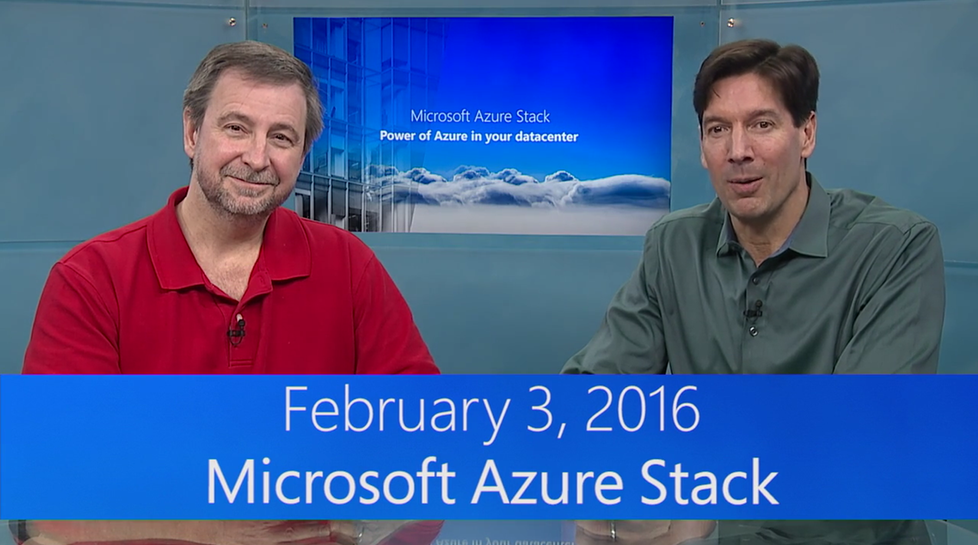
imageJoin this Webcast with Mark Russinovich and Jeffrey Snover & learn how Azure Stack will help you drive app innovation by delivering the power of Azure in your datacenter. Experience the new potential of hybrid cloud computing and get your questions answered by the Azure Stack team.

Read the announcement here:

image

Are you a client/mobile technology IT professional with an interest in enterprise management, deployment & mobility? 

You may wanna start following Microsoft’s Corporate Vice President of Enterprise Client & Mobility, Brad Anderson.

What Brad’s been doing is producing blog posts infrequently, however also releasing audio podcasts that explain the post.  Here’s the last 3 posts/podcast tandems.

Navigating the Windows 10 Servicing Options

Best Practices for Deploying Windows 10

Best Practices for Managing Windows 10 with EMS & ConfigMgr
In this podcast, Brad speaks with Mark Florida (Principal Program Manager of ConfigMgr) about best practices for successfully managing Windows 10 with the Enterprise Mobility Suite (EMS) and ConfigMgr.

Posted by: kurtsh | January 29, 2016

DOWNLOAD: Windows Defender Offline

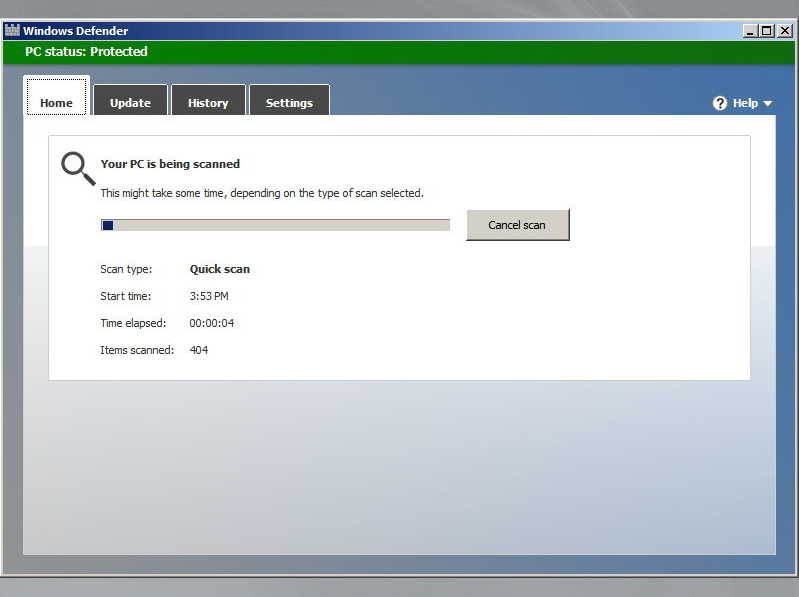
imageDid you know you can run Windows Defender from a bootable USB stick to hard-to-remove malware?

We have a solution called Windows Defender Offline, which is a version of its antivirus that you can run from a USB drive to help you remove malicious code that is infecting Windows 10.

Windows Defender Offline helps protect your PC by scanning it to remove rootkits and other advanced malware that can’t always be detected by antimalware programs. If this type of malware is detected on your PC, you’ll be prompted in Microsoft Security Essentials or Windows Defender to download and run Windows Defender Offline.

For instructions on how to use Windows Defender Offline, visit:

Hey, all you AD GPO policy jockeys… new tool for you to geek out on!

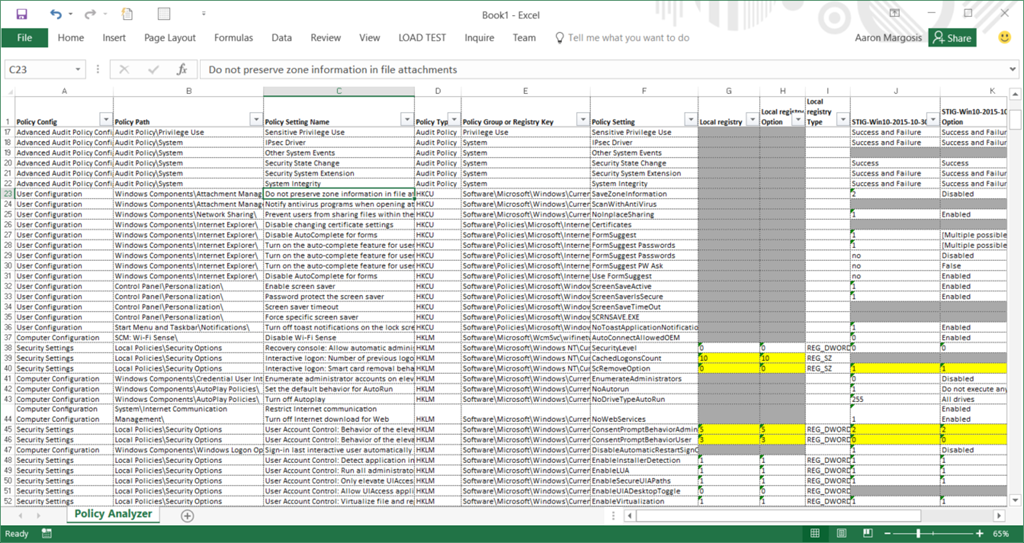
imagePolicy Analyzer is a utility for analyzing and comparing sets of Group Policy Objects (GPOs). It can highlight when a set of Group Policies has redundant settings or internal inconsistencies, and can highlight the differences between versions or sets of Group Policies. It can also compare GPOs against current local policy settings and against local registry settings. And you can export its findings to a Microsoft Excel spreadsheet.

imagePolicy Analyzer lets you treat a set of GPOs as a single unit.  This makes it easy to determine whether particular settings are duplicated across the GPOs or are set to conflicting values.  It also lets you capture a baseline and then compare it to a snapshot taken at a later time to identify changes anywhere across the set.

Read more on the tool announcement page:

imageThe following communication has been issued with regard to the change in which we support Yammer environments:

I want to let you know that we are centralizing our Office 365 customer success efforts to Microsoft FastTrack. FastTrack is included as part of your Office 365 subscription and has evolved from being an onboarding program to being our customer success service. It is designed to help you realize business value faster with Office 365. FastTrack provides you access to best practices, tools and resources for success and offers assistance with onboarding, migration, and adoption planning.

A key part of FastTrack is having access to Microsoft experts who can help you onboard to Office 365 and help you get the most value out of Office 365. We have been expanding the FastTrack team to include customer success and adoption expertise and are now ready to begin transitioning your customer success engagement from your Customer Success Manager (CSM) to the FastTrack team.

Microsoft is committed to making this transition as smooth as possible and will continue investing in FastTrack to support your success with Office 365. I would appreciate the opportunity to tell you more about this transition, including the assistance, guidance and offers that are available to you as a customer through FastTrack.

In the meantime, you are welcome to visit the FastTrack web site at fasttrack.microsoft.com, and learn more about the service.

image

Microsoft Envision is bringing the most forward thinking minds in business and technology together. Whether you’re a business leader or decision maker, you won’t want to miss the opportunity to hear the latest business trends and discover solutions that can help you, your team and your business achieve more.

Get event details

Hear from business leaders like Microsoft CEO Satya Nadella and a broad slate of third-party visionaries as they share perspectives on the evolving tech and business landscape. Explore the hot topics that are impacting your industry – including IoT, big data and analytics, cybersecurity, productivity, mobility and more. See how other companies like yours are transforming themselves and revolutionizing the way they compete. You’ll come away inspired and empowered to take your business to the next level.

Gain crucial insights: Attend sessions that merge thought leadership with tech expertise. Learn what’s next, what’s trending, and how to capitalize.

Discover new solutions: Explore successful strategies, disruptive technologies, and next-level thinking can help you reinvent your role.

Build connections: Connect with innovators, experts, colleagues and visionaries. Build professional relationships that will last for years.

The people who are shaping the future of business will be in New Orleans in April. We look forward to seeing you there.

DATE:
April 4-6, 2016

LOCATION:
New Orleans, LA

REGISTRATION:
https://www.microsoft.com/en/envision

Join your peers in April. Be part of the conversation today.

Follow us on: Facebook | Twitter | LinkedIn

« Newer Posts - Older Posts »

Categories