Microsoft Azure has over 75 services available within it and “Azure Compute” is just one of those.
This a diagram that lays out Azure Compute & related services that are involved with the execution, management, and automation of Virtual Machines in the Azure cloud.
In case you hadn’t heard, the licensing for Windows Server & System Center are moving from a per-processor license to a per-core license.
The details of the licensing change are documented in the following downloadable datasheets and FAQs below, but the big point to know is:
For Windows Server:
Customers with processor licenses with Software Assurance (SA) can upgrade to Windows Server 2016 at no additional cost. At end of the SA term, processor licenses will be exchanged for core licenses and customers can renew their SA on core licenses.
Windows Server Datacenter and Standard Edition 2proc licenses with SA will be exchanged for a minimum of 8 two-core pack licenses (16 core licenses) or the actual number of physical cores in use.
For System Center:
Customers with processor licenses with Software Assurance (SA) can upgrade to System Center 2016 at no additional cost. At end of the SA term, processor licenses will be exchanged for core licenses and customers can renew their SA on core licenses.
System Center 2-proc licenses with SA will be exchanged for a minimum of 8 two-core pack licenses (16 core licenses) or the actual number of physical cores in use on the server under management.
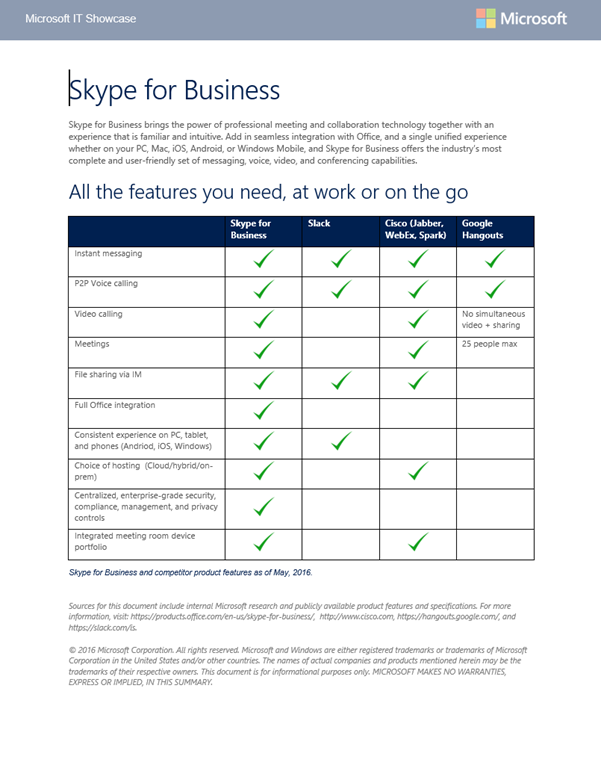
Skype for Business brings the power of professional meeting and collaboration technology together with an experience that is familiar and intuitive. Add in seamless integration with Office, and a single unified experience whether on your PC, Mac, iOS, Android, or Windows Mobile, and Skype for Business offers the industry’s most complete and user-friendly set of messaging, voice, video, and conferencing capabilities.
This is a downloadable document that provides a high-level comparison between Skype for Business & Slack, Cisco (Jabber, WebEx, Spark) & Google Hangouts as of May 2016.
At DockerCon 2016 on Tuesday, new capabilities to run and manage containers in the cloud were demonstrated by Mark Russinovich, Microsoft Azure CTO.
Among them: Docker Datacenter is now available in the Azure Marketplace, bringing container management and deployment services to enterprises with a production-ready platform supported by Docker and hosted locally behind the firewall. Russinovich also showed Docker Datacenter managing a hybrid, container-based application spread across Azure and, for the first time, Azure Stack on-premises.
“Microsoft has been rapidly releasing container innovation to the Windows and Linux ecosystems – partnering with industry leaders like Docker and Mesosphere to deliver container solutions that help companies build and deploy applications at cloud speed and scale, whatever their choice of platform or tools,” Russinovich writes in a blog post.
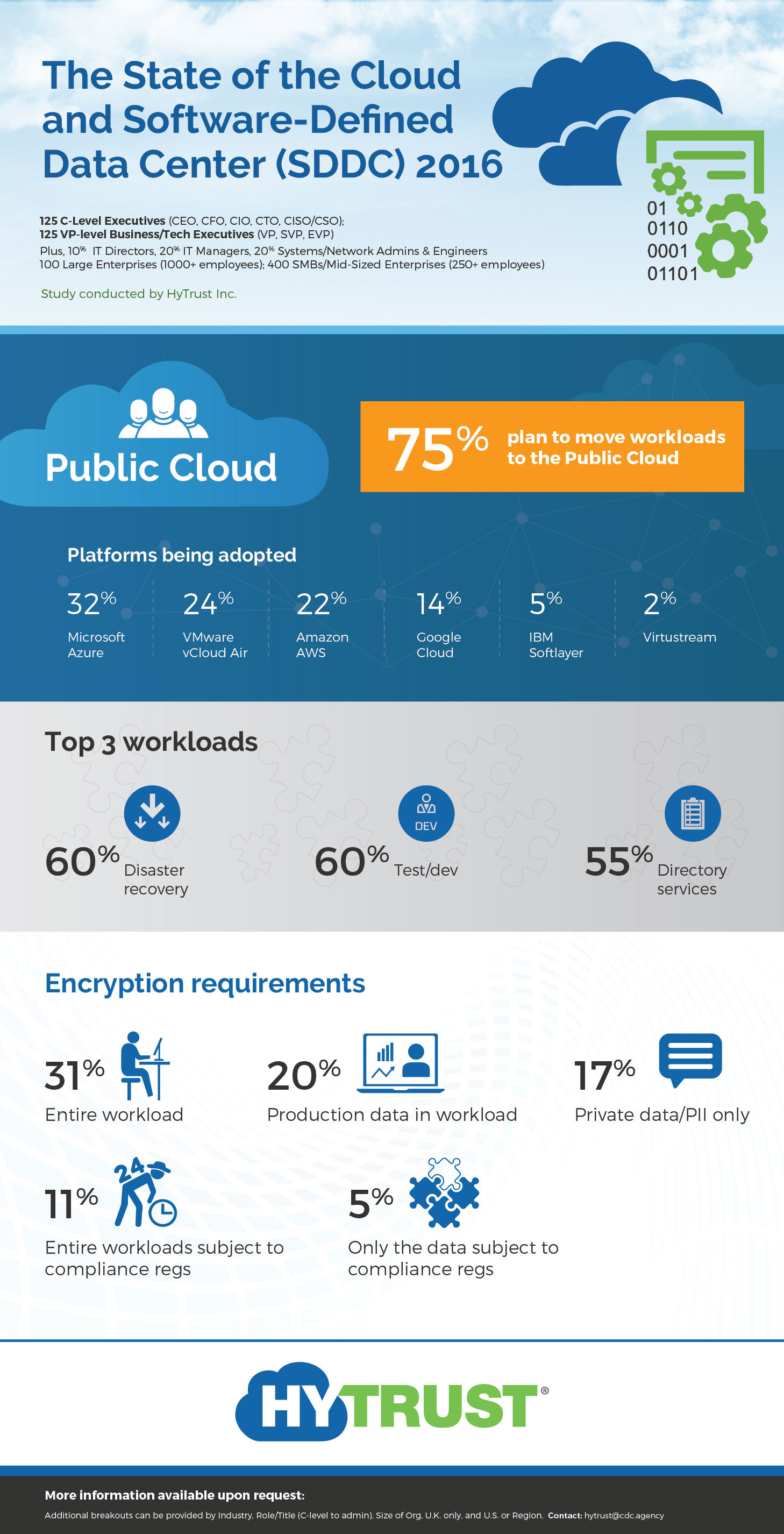
A lot has been said about the importance of the cloud in evolving business practices for agility & new markets. But who’s the #1 Public Cloud platform being adopted (or planned to be adopted) by Enterprises today?
According to HyTrust’s recent study, that’d be Microsoft.
According to the “HyTrust 2016 State of the Cloud and Software Defined Data Center Study” looking at real-world implementations, Microsoft is the #1 Public Cloud chosen amongst 125 C-level execs, 125 VP-level execs, and an additional 250 Directors, Managers, and IT professionals for a mix of Large Enterprise & SMB/mid-sized Enterprises.
Visit the study site for high-res digitals of the graphic & the downloadable whitepaper of the study at:
HYTRUST: Industry Experience: The 2016 State of the Cloud and Software Defined Data Center (SDDC) in Real-World Environments http://www.hytrust.com/cloud-sddc-study/
Comments Off on NEWS: Microsoft leads as #1 Public Cloud platform for Enterprises, according to HyTrust
We’re pleased to announce a new free ebook: Microsoft Platform and Tools for Mobile App Development (ISBN 9781509304134), by Cesar de la Torre and Simon Calvert.
Understanding and creating a mobile app development strategy is an important process for today’s development decision-makers who aim to open up new business opportunities or to empower employees to be more productive with new capabilities.
Microsoft defines an end-to-end (E2E) platform for the agile creation of mobile apps that can target any platform (iOS, Android, or Windows), provides easy consumption of services in the cloud or on-premises, spans the requirements for consumer or employee scenarios, offers development teams DevOps tools to improve quality and to achieve faster time to market, and allows for integration with existing enterprise systems.
This book outlines the E2E platform from Microsoft that forms the critical capabilities for organizations selecting technologies and tools for a Mobile Application Development Platform (MADP) and Rapid Mobile Application Development (RMAD). It also describes the core decision factors that organizations should consider, and it outlines the technical capabilities available within Microsoft solutions and products.
Connected cloud and mobile technologies present immense business opportunity, but there is potential for increased risk as organizations increase their exposure to cybersecurity threats. The digital world requires new approaches to protect against, detect, and respond to security threats.
Join speakers Julia White, General Manager in the Cloud + Enterprise, and Ann Johnson, Vice President of the Enterprise Cybersecurity Group, for our webinar: Top 5 security threats facing your business—and how to respond. You’ll discover our unique approach to security and how to benefit from the insight into the threat landscape that Microsoft derives from trillions of signals from billions of sources.
During this webinar you’ll learn about:
Protecting against identity compromise and identify breaches before they cause damage
Ensuring device security while enabling mobile work for your users
The unique perspective Microsoft brings to cybersecurity
Today we are announcing “Microsoft Azure Information Protection”, preview.
Azure Information Protection is a new service that makes it simpler to classify and protect information, even as it travels outside of your organization. It combines Secure Islands’ classification and labeling technology with Azure Rights Management. It enables customers to enable a protection process including these steps:
Classify
Label
Protect
Monitor
Respond
An Introduction to Microsoft Azure Information Protection
In the above demo, you’ll see the new options that let you define how your users can classify their documents and emails during the normal course of their work. Find out how you can define the labels, protections, and visual markings appropriate for your organization. And finally, track where sensitive documents are traveling and how to stop them in their tracks.
A public preview of Azure Information Protection will be available next month.
For more information, visit the announcement post at:
Are you a global company? Are you looking to understand which cloud services are available in the language of the country that your business or your business segment resides in?
Each service has different country and language availability, as outlined below:
Office 365, Exchange Online Protection, and Power BI
Skype for Business PSTN Conferencing
Skype for Business PSTN Calling
Microsoft Azure
Microsoft Intune
Microsoft Dynamics CRM Online
Microsoft Social Engagement
Microsoft Dynamics Marketing
Parature, from Microsoft
System Center Advisor
System Center Endpoint Protection
System Center Global Service Monitor
Live Meeting
(All Microsoft Online Services are unavailable in Cuba, Iran, Democratic People’s Republic of Korea, Sudan, and Syria.)
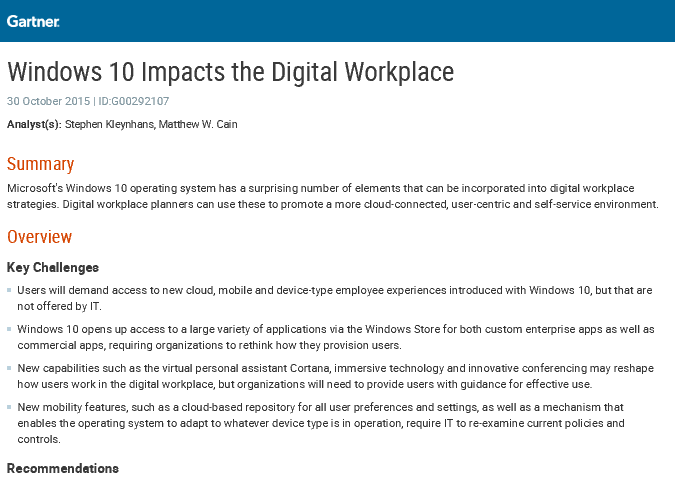
Gartner has released a research document around how Windows 10 addresses the needs of end users around cloud, mobile and device-type experiences.
Summary:
“Microsoft’s Windows 10 operating system has a surprising number of elements that can be incorporated into digital workplace strategies. Digital workplace planners can use these to promote a more cloud-connected, user-centric and self-service environment.”
– Analyst: Stephen Kleynhans
To view the entire research document for free, visit:






 kurtsh
 Kurt Shintaku's Blog
You must be logged in to post a comment.