Posted by: kurtsh | October 18, 2016

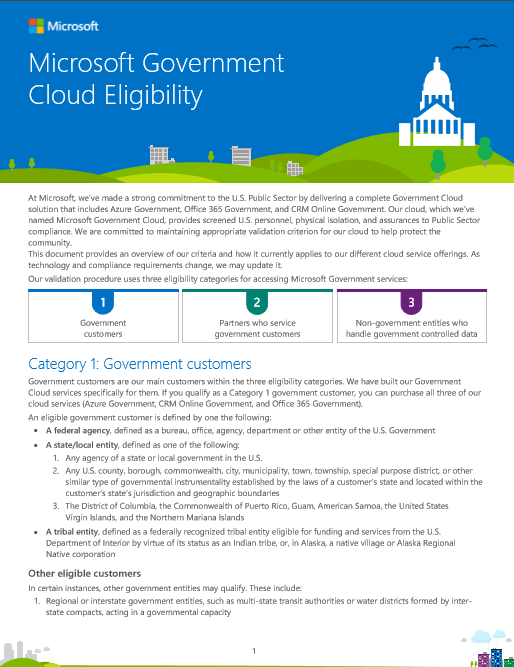
INFO: Microsoft Government Cloud Eligibility

imageAt Microsoft, we’ve made a strong commitment to the U.S. Public Sector by delivering a complete Government Cloud solution that includes Azure Government, Office 365 Government, and CRM Online Government.

Our cloud, which we’ve named Microsoft Government Cloud, provides screened U.S. personnel, physical isolation, and assurances to Public Sector compliance. We are committed to maintaining appropriate validation criterion for our cloud to help protect the community.

This document provides an overview of our criteria and how it currently applies to our different cloud service offerings. As technology and compliance requirements change, we may update it.

Posted by: kurtsh | October 17, 2016

DOWNLOAD: “Contoso in the Microsoft Cloud poster”

The Azure team has released a poster that shows how the Contoso Corporation, a fictional but representative global organization, is embracing a cloud-inclusive IT infrastructure that includes all of Microsoft’s cloud offerings:

  • Microsoft Azure
  • Office 365
  • Dynamics 365
  • Microsoft Intune

image


  • An overview of the fictional Contoso Corporation, its three-tier design for its offices, and key elements of Contoso’s implementation of the Microsoft cloud.
  • A review of Contoso’s on-premises IT infrastructure and how its business needs map to Microsoft’s cloud offerings, including opportunities for Azure PaaS and IaaS.
  • Contoso’s private WAN infrastructure, its app design for its offices, its use of Azure ExpressRoute Premium, and its step-by-step path to cloud networking readiness.
  • Contoso’s on-premises Windows Server Active Directory (AD) forest, how it geographically distributes authentication traffic, and how it uses Azure IaaS to provide authentication infrastructure redundancy for the 15,000 workers in its Paris headquarters.
  • Contoso’s structure for Microsoft cloud offering subscriptions, licenses, its common Azure AD tenant, and user accounts synched with Azure AD from its on-premises Windows Server AD forest.
  • Contoso’s security requirements in the cloud, its data sensitivity classification and mapping of cloud features to each level, and its step-by-step path to cloud security readiness.

See the entire poster online here.

Download the poster here:

Read the announcement for the poster here:

image

Just released: Free MSPress eBook, “Introducing Microsoft SQL Server 2016”

Microsoft SQL Server 2016  delivers breakthrough in-memory performance, unparalleled security, end-to-end mobile BI and advanced analytics. We want you to see for yourself why Microsoft is recognized as an industry leader across the data platform, with Gartner Magic Quadrant leadership in Operational DBMS (ahead of Oracle, IBM, and SAP), BI, and Analytics and Data Warehousing.

Download this free nine-chapter ebook today to learn from expert authors Stacia Varga, Denny Cherry, and Joseph D’Antoni, who describe the features and enhancements that make this release of SQL Server 2016 the best ever:

  • Mission-Critical Performance: Chapters cover faster queries, better security, higher availability, and the improved database engine.
  • Deeper Insights Across Data: Chapters cover the broader data access, increased analytics, and better reporting in SQL Server 2016.
  • Hyperscale Cloud: Chapters cover the improvements in Azure SQL Database and how to expand your options with SQL Data Warehouse.

Download the new free ebook to get hands-on guidance for SQL Server 2016.

imageWith the September 2016 update to Office 365 ProPlus, we’ve released a new set of features – as we have every month.

If you’re wondering “what’s new” in each of the products in the Office 365 ProPlus suite, check out the following sites:

There’s more available on the support site for Office 365:

Posted by: kurtsh | October 12, 2016

NEWS: Windows Announcements from Microsoft Ignite 2016

Windows EnterpriseIn case you missed it, here’s the major Windows announcements made at Ignite 2016.

Be sure to watch the Ignite keynotes, overviews, deep dives, and more at: https://myignite.microsoft.com/videos

Posted by: kurtsh | October 12, 2016

TOOL: Windows 10 Enterprise Value Calculator

Windows Enterprise_thumb[1]We produced an online tool with a partner called Alinean, called the “Windows 10 Enterprise Value Calculator” (aka Benefits Estimator) to enable people to see how Windows 10 can provide savings to their businesses.

WHAT IS THE CALCULATOR?
The Windows 10 Enterprise Value Calculator will help organizations assess the return on investment (ROI) and total cost of ownership (TCO) of implementing Windows 10 Enterprise.

image

BEST PRACTICES IN USING THE CALCULATOR
When going through the calculator and entering plans, remember that predictions are inherently uncertain, therefore we recommend that you create at least 3 different calculations with different scenarios: An Expected Case, a Low Case, and a High Case.  Use the calculator 3 separate times and produce a report for each scenario.

Business cases should be conservative.  When you enter the assumptions, profiling data and statements in the calculator, overstate costs and understate benefits

Soft cost like productivity gains should be included as a scenario in the business case.

When you evaluate the ROI and TCO from the report, compare the calculated ROI to your organizations hurdle rate, for example your internal rate of return (IRR).

TRY IT
To start using the calculator, register at the following site and begin.

More information on Windows 10 Enterprise can be found at:

<taken from a live event focused on the Citrix & Microsoft partnership>

Bill Burley from Citrix and Brad Anderson from Microsoft explain how the Citrix partnership with Microsoft will dramatically simplify VDI deployments while maintaining a great user experience.

What the New Citrix-Microsoft Partnership Means for VDI and Why It Matters


When Citrix and Microsoft renewed their longstanding partnership, what does that mean for customers? This panel discussion from the Citrix-Microsoft live event on August 23 answers that question.

How Has The Citrix-Microsoft Partnership Changed?

imageMicrosoft Client Access License (CAL) Suite Bridges are used when you are transitioning from a CAL Suite (onpremises) to a comparable Product and Online Service combination.

This is an overview of the Client Access Licenses Suite Bridges and it contains details for Intune & Microsoft Enterprise Mobility Suite.

imageMicrosoft has quickly become the market leader in cloud-centric Machine Learning due to its comprehensive, easy-to-access toolset & designer, it’s highly scalable, extensible & accessible cloud-based engine, and its key ability to share Machine Learning models between data scientists & modelers.

If you are interested in learning about this great service within Azure there’s a lot of training & references available at no cost:

imageedX TRAINING COURSES ON MACHINE LEARNING
Additionally, edX has hosted a series of free training courses online in Azure Machine Learning that you can take advantage of:

imageMICROSOFT DATA SCIENCE SUMMIT 2016 RECORDINGS
Microsoft’s recent Data Science Summit (2016) also recorded all their sessions for folks to learn from, and they are available for viewing here:

imageAZURE MACHINE LEARNING STUDIO OVERVIEW & CHEAT SHEET
It is also possible to get a high-level view of the capabilities of Machine Learning Studio by downloading the Azure ML Studio capabilities diagram along with the Azure Machine Learning Algorithm Cheat Sheet and get help figuring out how to choose a machine learning algorithm for your solution.

imageREFERENCE: “Microsoft Azure Essentials: Azure Machine Learning” & “Data Science in the Cloud with Microsoft Azure Machine Learning and R”
We have available for download, the free ebook, Microsoft Azure Essentials: Azure Machine Learning (ISBN 9780735698178), by Jeff Barnes as well as a free eBook from O’Reilly on Azure Machine Learning entitled, “Data Science in the Cloud with Microsoft Azure Machine Learning and R”.

image[a.k.a. What’s the difference between Outlook for iOS/Android & OWA for iOS/Android]

I’ve gotten this question a lot recently so I’m just gonna post my answer here.

“The new Outlook app replaces OWA for iPhone/iPad/Android. We are leaving the OWA for iPhone/iPad/Android apps in market for the time being because there are some advanced Office 365 and Exchange Server features which are not yet available in Outlook. Customers who require these advanced features can continue to use OWA for iPhone/iPad/Android until those features are available in Outlook.”

So to be clear: 
We are phasing out the OWA app for iPhone/iPad/Android.

  • Microsoft is not making any further investments in the OWA app tool.
  • There is no “next version” to my knowledge coming of the OWA app as it is not part of the long term roadmap for mobile clients.
  • Customers should plan to support the new Outlook app in their strategic IT roadmap, not OWA app.
  • The scenarios in which the OWA app still makes sense are when functionality is required from the list of features that OWA app still has that Outlook app does not.  This should be treated as a stop gap solution while these features are added to Outlook app. (I do not have a timeline for availability however all of these as I understand it, are under development)

WHAT ARE THE FEATURES THAT ARE MISSING IN OUTLOOK APP?
This is what I’ve gleaned so far, however I may be missing some differences, so don’t consider this definitive:

  • Support for Information Rights Management (IRM) protected email
  • Support for Apps for Outlook
  • Attach hard file from cloud storage
    (i.e. Converting a cloud document to a hard attachment to send in a new mail from OneDrive/OneDrive for Business.)
  • Certain specific Exchange Activesync Policies (Most policies do exist):
          • EAS Policy – Pin lock (app level)
          • EAS Policy – Wipe after N incorrect password attempts
          • EAS Policy – Maximum inactivity time lock
  • Empty Spam/Junk folder
  • Hard delete from Deleted Item

« Newer Posts - Older Posts »

Categories