image

Starting June 1st, Xamarin University’s team of mobile experts – including special guest and author Charles Petzold – will host five new demo-packed webinars, designed to show you how to use Visual Studio Tools for Xamarin to deliver fully native mobile apps for iOS, Android, Windows, and more.

Join a new topic every Thursday. Topics range from learning how to get the most out of Visual Studio 2017’s latest features to building cloud-connected games to adding intelligence with Azure Machine Learning. You will get the training, samples, and advice you need to ship amazing apps using Visual Studio and C#. Every session is totally free, open to everyone, and Xamarin University experts will be on hand to answer all your questions live.

Sign up for the series now. Register even if you’re unable to attend a session, you’ll receive the recordings following each air date.

  • June 1st 9 am PDT: Introduction to Xamarin.Forms for Visual Studio 2017 – Learn how to take your .NET skills mobile with Visual Studio 2017 and Xamarin.Forms. Jesse Dietrichson, a Xamarin University instructor, will show you how to use the latest Visual Studio features to maximize code re-usage and design, develop, and test fully native apps for Android, iOS, and Windows, faster than ever.
  • June 8th 9 am PDT: Building games for iOS, macOS, and tvOS with Visual Studio and Azure – Create multiplayer games for the latest Apple devices, from iPhone to tvOS, with René Ruppert, Xamarin University instructor. He’ll teach SpriteKit basics, integration with cloud back-end services, and show you best practices for sharing C# game logic, UI, and infrastructure code cross-platform.
  • June 15th 9 am PDT: SkiaSharp Graphics for Xamarin.Forms – Get serious about graphics with special guest and popular author, Charles Petzold. You’ll learn how to use SkiaSharp, powered by Google’s Skia graphics library, to extend your Xamarin.Forms apps with compelling 2D graphics.
  • June 22nd 9 am PDT: Customizing Xamarin.Forms UI – Embed native Android and iOS controls into your Xamarin.Forms apps. Join Rob Gibbens, Xamarin University training manager, to see how to integrate native controls and adjust visual properties unique to each platform – while still sharing the majority of your code. You’ll get the step-by-step guidance you need to take full advantage of the latest OS-specific UI patterns and designs.
  • June 29th 9 am PDT: Introduction to Azure Machine Learning –  Start integrating intelligence and predictive analytics into your apps. Jason DeBoever, Xamarin University instructor, will introduce Machine Learning fundamentals, get you started with Azure Machine Learning Studio, and demo how to easily build your first “smart” mobile app.

If you’re interested, register here:

imageMicrosoft is offering a new training event to help you sharpen your data management experience in a single day.

Dashboard in a Day invites you to gain practical hands-on experience from trained Power BI partners to learn how to transform your data and create more value in your organization. You’ll build data dashboards and learn to connect with your data like never before.

Microsoft is pleased to offer a 1-day workshop covering the capabilities of Power BI to our enterprise accounts. The goal of this informational session is to help you understand how Power BI can help provide insights on an organization’s data and operational processes. At the end of the day, attendees will have a better understanding of the features of Power BI in order to evaluate its ability to meet organizational requirements around data visualization and analysis.

In this session, we will cover Power BI features that help organizations:

  • Unlock insights from a variety of data by mashing up multiple datasets
  • Gain real-time insights of customers and products in new ways
  • Rapidly create insightful and visually appealing dashboards

image

If you’re interested in participating, please register below:

imageIf you’re interested in hearing Steve Ballmer’s thoughts on his life at Microsoft as CEO & after, as owner of the Clippers, etc., check out this 39min podcast published last week on Freakonomics Radio:

Our latest Freakonomics Radio episode is called “Hoopers! Hoopers! Hoopers!” (You can subscribe to the podcast at Apple Podcasts or elsewhere, get the RSS feed or listen via the media player above.)

imageAs CEO of Microsoft, Steve Ballmer was famous for over-the-top enthusiasm. Now he’s brought that same passion to the N.B.A. — and to a pet project called USAFacts, which performs a sort of fiscal colonoscopy on the American government.

Steve answers questions about:

  • his creation of the $10M http://usafacts.org
  • the decisions behind Microsoft’s mobile phone strategy & his thoughts today on Apple’s iPhone
  • his purchase of the Clippers basketball team
  • and more.

So if you’re interested in listening, check out the podcast online (or read the transcript) here:

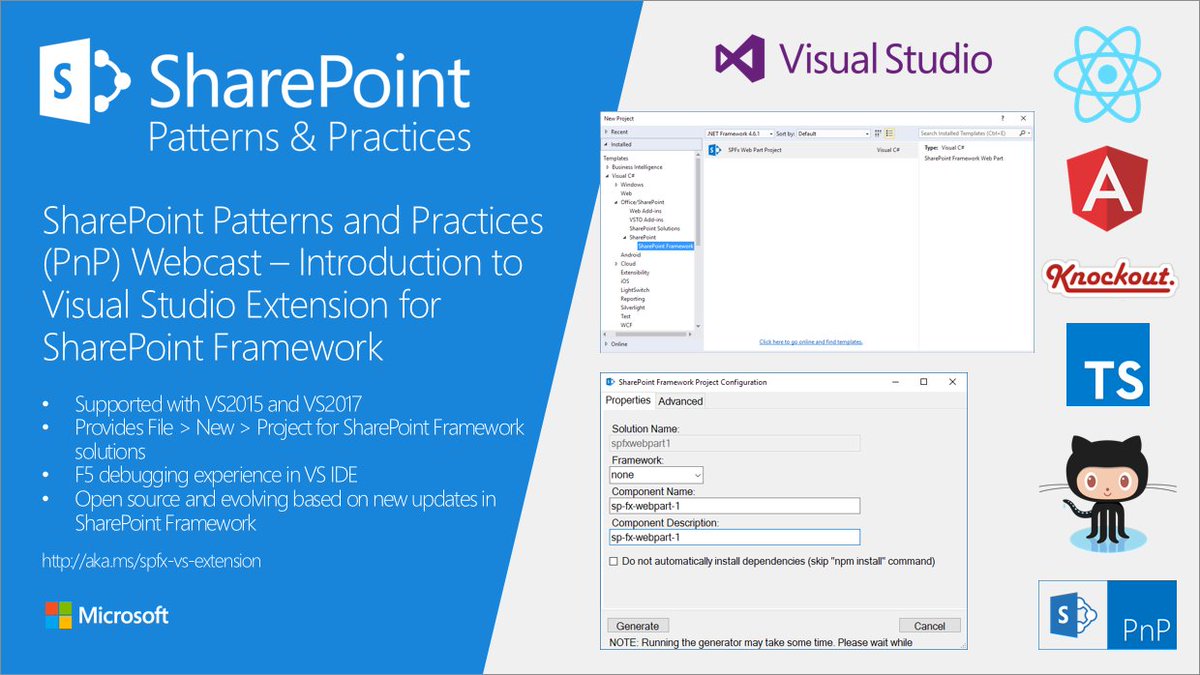
Interested in extending Visual Studio for SharePoint development?

In this PnP Webcast, we concentrate on introducing new community driven Visual Studio extension for SharePoint Framework solutions. The Visual Studio Extension for SharePoint Framework wraps the command-line UI of the Microsoft Yeoman Generator (yo @microsoft/sharepoint) into a familiar Windows Forms experience, executes the generator project scaffolding behind the scenes and creates a Visual Studio project that includes all the necessary files for a complete web part project. Also included is a web part item template for adding new web parts to an existing Framework project. Developers can launch the Workbench local sandbox environment to test their web parts by pressing F5 or by binding to the Gulp Serve event in the Task Runner Explorer.

For developers who wish to dive deeper and learn more about the new web development toolchain used by the SharePoint Framework, the Advanced mode provides full access to the Yeoman generator command parameters and an optional cmd.exe window to view the generator tasks in real time. Visual Studio extension for SharePoint Framework projects is a community driven open source initiative under the SharePoint PnP "umbrella". This work is done together with SharePoint engineering to ensure that extension is kept up to date with all the upcoming changes within the SharePoint Framework. 

Read the agenda, watch the video & download the presentation here:

Posted by: kurtsh | May 24, 2017

BETA: Office 365 Adoption Pack (Preview)

Looking for a better way to understand how Office 365 is being adopted in your organization relative to licenses purchased & how to target training & education where needed.

Office 365 Admin Updates

Here’s an excerpt from the announcement blog:

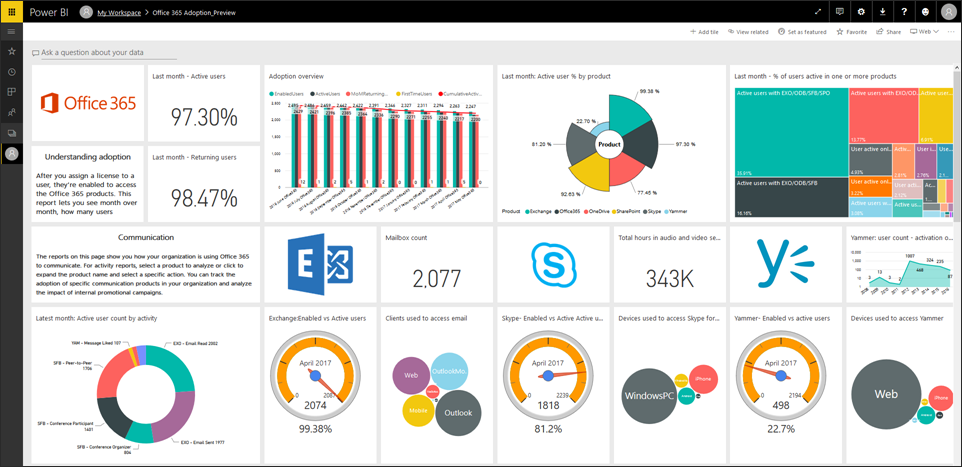
Today, we’re pleased to announce the public preview of the Office 365 adoption content pack in Power BI, which enables customers to get more out of Office 365.

imageThe content pack combines the intelligence of the usage reports with the interactive analysis capabilities of Power BI, providing rich usage and adoption insights. With these insights, admins can drive more targeted user training and communication that helps them transform how their organizations communicate and collaborate, enabling a truly modern workplace

Read the rest of the announcement here:

PER THE EVENT PAGE:
Visit the Windows Blog for updates about our Microsoft Event beginning at 4:00AM PT/7:00AM ET on May 23. Then check back at the event page for updates and more information.

SUPERSITE POST:
Richard Hay wrote an interesting post about the event tomorrow… in case you’re interested in what he thinks will be on display in China.

PREVIOUS POST:
https://kurtsh.com/2017/05/09/event-microsoft-event-shanghai-may-23rd/

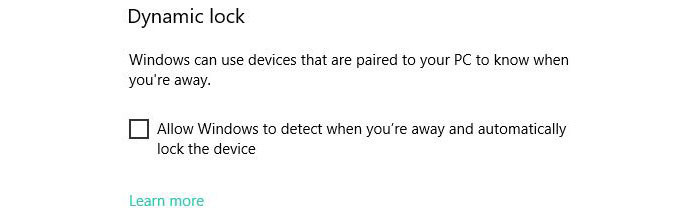
imageWindows 10 Creators Update has a new feature on it called “Dynamic Lock” that enables a user to walk away from their PC with their phone, and at a certain distance, the PC will automatically lock the screen.  This is done by pairing your phone & your PC, and measuring the signal strength between the two.

HOW DO YOU SHORTEN THE DISTANCE BEFORE LOCKING?
The Dynamic Lock feature however has no configuration.  It’s either on or off, and there’s no way to adjust the distance upon which the computer locks itself… and the reason for that appears to be because every computer’s Bluetooth strength is different.

There’s an article however written by Rafael Rivera from Thurrott.com that shows how to adjust this in the Registry, if you’re so bold.  Simply put:

  • Create a registry key named HKEY_LOCAL_MACHINE\SOFTWARE\Microsoft\Windows NT\CurrentVersion\NaAuth
  • Within that key create a DWORD value named BluetoothRssiMaxDelta
  • Set the value to an appropriate integer.  Rafael used 5 but your mileage may vary.

The issue however is that the registry tweak values are not the same for everyone.  Depending on the power of your PC’s Bluetooth transceiver, you may have completely different values from the next person.  He explains how he derived this value for himself and how you can do the same.

Read the article below.

(Note: Dynamic Lock will reduce both your PC’s & phone’s battery life.  I’ve read that this is as much as 25%-33% so be forewarned.)

imageI was just made aware of this amazing open source Service Client for Forefront Identity Manager or Microsoft Identity Manager, called the “Lithnet FIM Service Client”.

If you want to extend the capabilities of FIM/MIM using abstracted APIs, eliminating the need to recompile the libraries every time you upgrade the servers, this is the library you want to get.

At Microsoft for example, we have a site called “IDWebElements” that accepts inputs from the URL submitted plus the user’s identity that enables people to join groups or remove themselves from groups in just a single click of a link.  This library can help you help accomplish the same thing with much less code.

Taken from the doc article:

The Lithnet FIM Service Client Jump is a .NET Library that makes it easy for anyone to program against the FIM web service using any .NET language. It supports create, update, delete, and search operations against the FIM service.

The library has a similar purpose to the FIM 2010 Client Jump , but abstracts away the particulars of the SOAP web service implementation into a robust object model. The development of the FIM 2010 client was abandoned some time ago and unfortunately, the client suffers from a number of bugs and performance issues. This library is not intended to be a drop-in replacement for that library. It is a complete re-write with a new API and more approachable way of working with the objects in the FIM service.

The Lithnet Resource Management Client is designed to be easy to use and help you get started quickly.

  1. First, create a new project in Visual Studio
  2. Ensure Microsoft.ResourceManagement.dll is registered in the GAC (you can find this on your FIM service server)
  3. Install the nuget package Jump from the Package Manager Console in Visual Studio
  4. Update the app.config or web.config file to point to your FIM service server

If you are using either Forefront Identity Manager 2010 or Microsoft Identity Manager, and want to orchestrate it or extend it’s self-service functionality, you need to check this library out.

Posted by: kurtsh | May 19, 2017

EVENT: Yammer AMA – May 23rd, 9:00AM-10:00AM

imageWe are very excited to announce an upcoming opportunity to ‘Ask Microsoft Anything’ (AMA) about Yammer!

The AMA will take place on Tuesday, May 23, 2017 from 9:00 a.m. to 10:00 a.m. PT in the Yammer AMA space.

An AMA is a live online event similar to a "YamJam" on Yammer or an "Ask Me Anything" on Reddit. The Windows as a service AMA will give you the opportunity to connect with members of the Windows product and engineering teams, who will be on hand to answer your questions and listen to feedback.

Don’t forgot to add the event to your calendar. We hope to see you there!

Posted by: kurtsh | May 19, 2017

TOOLS: Adoption Resources for Microsoft Teams

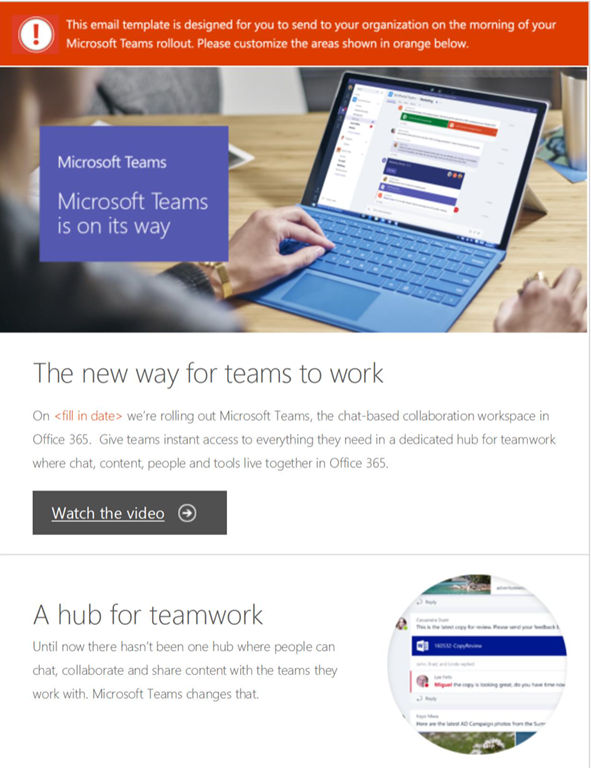
imageMicrosoft has adoption materials for Microsoft Teams available on the FastTrack website:

(Select the icon to the far right “provide a chat-based workspace” and you’ll find the content that’s been released)

Communication

Training

« Newer Posts - Older Posts »

Categories